Linux Adds CH341 GPIO

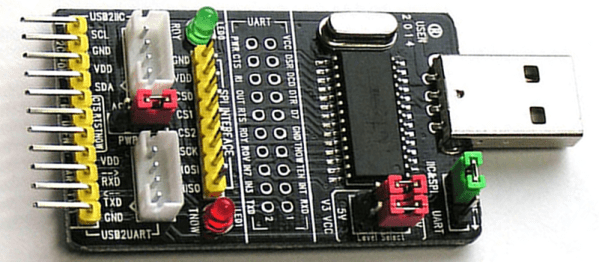
There was a time when USB to serial hardware meant one company: FTDI. But today there are quite a few to choose from and one of the most common ones is the WCH CH341. There’s been support for these chips in Linux for a while, but only for use as a communication port. The device actually has RS232, I2C, SPI, and 8 general purpose I/O (GPIO) pins. [ZooBaB] took an out-of-tree driver that exposes the GPIO, and got it working with some frightening-looking CH341 boards.

He had to make a slight mod to the driver to get six GPIOs in /sys/class/gpio. Once there though, it is easy to manipulate the pins using a shell script or anything that can write to the virtual files corresponding to the GPIO pins.

Continue reading “Linux Adds CH341 GPIO”

You All Know Reginald Fessenden. Who?

Quick, name someone influential in the history of radio. Who do did you think of? Marconi? Tesla? Armstrong? Hertz? Perhaps Sarnoff? We bet only a handful would have said Reginald Fessenden. That’s a shame because he was the first to do something that most of us do every day.

Few know this Canadian inventor’s name even though he developed quite a few innovations. Unlike Colpitts and Hartley we don’t have anything named after him. However, Fessenden was the first man to make a two-way transatlantic radio contact (Marconi’s was one way) and he was a pioneer in using voice over the radio.

He did even more than that. He patented transmitting with a continuous wave instead of a spark, which made modern radio practical. This was unpopular at the time because most thought the spark was necessary to generate enough energy. In 1906, John Fleming (who gave us tubes that are sometimes still called Fleming valves) wrote that “a simple sine-curve would not be likely to produce the required effect.” That was in 1906, five years after Fessenden’s patent.

Continue reading “You All Know Reginald Fessenden. Who?”

Hack Excel For 3D Rendering

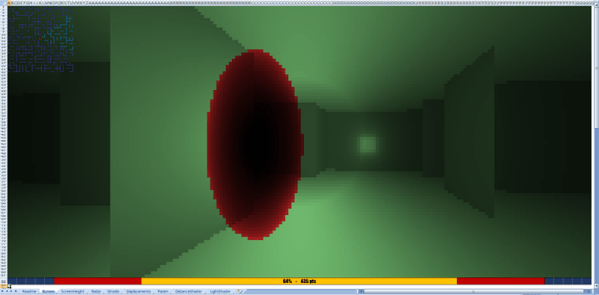
[C Bel] teaches Excel and he has a problem. Most of us — especially us Hackaday types — immediately write a VBA (Visual Basic for Applications) macro to do tough things in Excel. Not only is this difficult for non-technical users, but it also isn’t as efficient, according to [C Bel]. To demonstrate that VBA macros are not always needed, he wrote a 3D game engine using nothing but Excel formulae. He did have to resort to VBA to get user input and in a very few cases to improve the performance of large algorithms. You can see his result in the video below or download it and try it yourself.

The game is somewhat Doom-like. Somewhat. As you might expect it isn’t blindingly fast, and the enemy is a big red blob, but as the old Russian proverb goes, “The marvel is not that the bear dances well, but that the bear dances at all.” (And thanks to [Sean Boyce] for recalling that quote.)

Continue reading “Hack Excel For 3D Rendering”

AI Listens To Radio

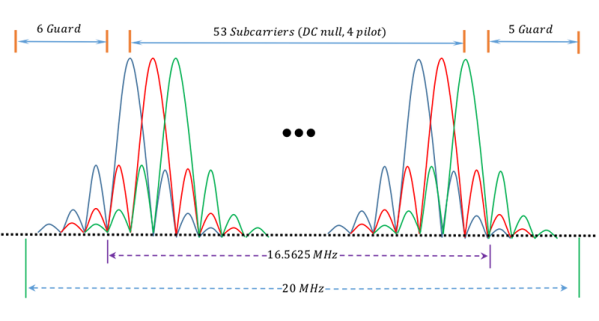
We’ve seen plenty of examples of neural networks listening to speech, reading characters, or identifying images. KickView had a different idea. They wanted to learn to recognize radio signals (site down but archived). Not just any radio signals, but Orthogonal Frequency Division Multiplexing (OFDM) waveforms.

OFDM is a modulation method used by WiFi, cable systems, and many other systems. In particular, they look at an 802.11g signal with a bandwidth of 20 MHz. The question is, given a receiver for 802.11g, how can you reliably detect that an 802.11ac signal — up to 160 MHz — is using your channel? To demonstrate the technique, they decided to detect 20 MHz signals using a 5 MHz bandwidth.

Continue reading “AI Listens To Radio”

Catching The (PCIe) Bus

If you are trying to learn about FPGAs, there is only so far you can go with the usual blinking lights and VGA outputs. Eventually, you want to do something more. Although not terribly cheap, you can get FPGA boards in a PCIe form-factor and use them directly with PC software. Is it easy? Well, it isn’t flashing an LED, but there are tools to help. [Angelos Kyriakos] did a Master’s thesis on the very subject and used a project known as RIFFA to help with the task.

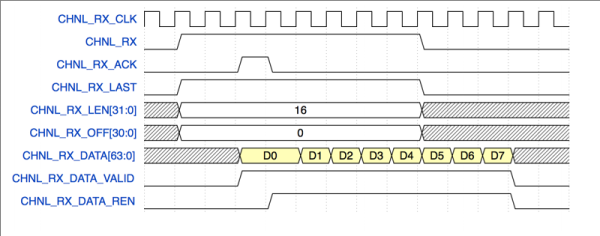
RIFFA (Reusable Integration Framework for FPGA Accelerators) is a simple framework for communicating data from a host CPU to an FPGA via a PCI Express bus. The framework requires a PCIe enabled workstation and an FPGA on a board with a PCIe connector. RIFFA supports Windows and Linux, Altera and Xilinx, with bindings for C/C++, Python, MATLAB, and Java. With proper design, RIFFA can transfer quite a bit of data in a short period of time between your computer and your FPGA.

Continue reading “Catching The (PCIe) Bus”

Underwater Logging For Science

Logging data with an Arduino is old-hat for most Hackaday readers. However, [Patricia Beddows] and [Edward Mallon] had some pretty daunting requirements. Their sensors were going underground and underwater as part of an effort to study conditions underwater and in caves. They needed to be accessible, yet rugged. They didn’t want to use batteries that would be difficult to take on airplanes, but also wanted more than a year of run time. You can buy all that, of course, if you are willing to pay the price.

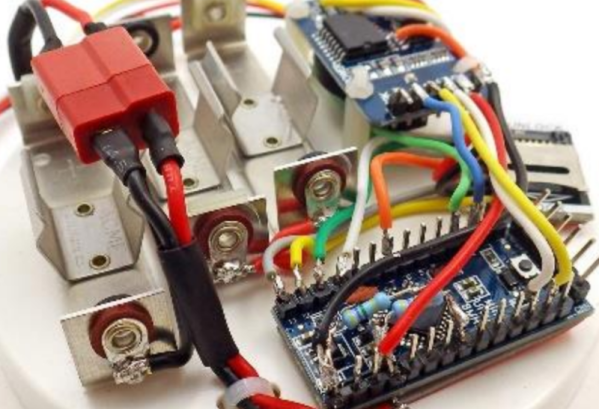
Instead, they used off-the-shelf Arduino boards connected together inside PVC housings. Three alkaline AA batteries are compact and give them more than a year of run time. They wrote a journal paper to help other scientists use the same techniques for the Sensors journal published by the Multidisciplinary Digital Publishing Institute.

Continue reading “Underwater Logging For Science”

Learn About Waveforms Interactively

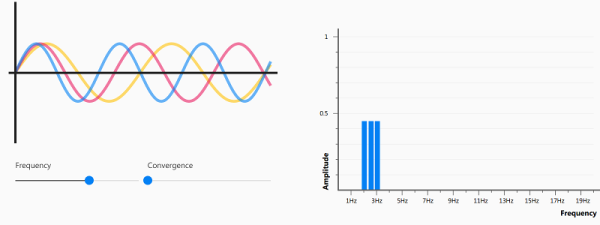
We’ll be honest: If you are a regular Hackaday reader, you probably won’t learn much new information about waveforms from this website. However, the presentation is a great example of using React on a webpage and — who knows — you might just pick up something interesting. At the very least, it’ll be a great resource the next time you try to help someone starting out.

The animated waveform is cool enough. It is also interesting that it changes based on where you are in the text. The really interesting part though is that you can press the M key to unmute your audio and hear what the wave sounds like. You can also use adjustments to control the frequency and amplitude of the wave.

Continue reading “Learn About Waveforms Interactively”