Quantum Weirdness In Your Browser

I’ll be brutally honest. When I set out to write this post, I was going to talk about IBM’s Q Experience — the website where you can run real code on some older IBM quantum computing hardware. I am going to get to that — I promise — but that’s going to have to wait for another time. It turns out that quantum computing is mindbending and — to make matters worse — there are a lot of oversimplifications floating around that make it even harder to understand than it ought to be. Because the IBM system matches up with real hardware, it is has a lot more limitations than a simulator — think of programming a microcontroller with on debugging versus using a software emulator. You can zoom into any level of detail with the emulator but with the bare micro you can toggle a line, use a scope, and hope things don’t go too far wrong.

So before we get to the real quantum hardware, I am going to show you a simulator written by [Craig Gidney]. He wrote it and promptly got a job with Google, who took over the project. Sort of. Even if you don’t like working in a browser, [Craig’s] simulator is easy enough, you don’t need an account, and a bookmark will save your work.

It isn’t the only available simulator, but as [Craig] immodestly (but correctly) points out, his simulator is much better than IBM’s. Starting with the simulator avoids tripping on the hardware limitations. For example, IBM’s devices are not fully connected, like a CPU where only some registers can get to other registers. In addition, real devices have to deal with noise and the quantum states not lasting very long. If your algorithm is too slow, your program will collapse and invalidate your results. These aren’t issues on a simulator. You can find a list of other simulators, but I’m focusing on Quirk.

What Quantum Computing Is

As I mentioned, there is a lot of misinformation about quantum computing (QC) floating around. I think part of it revolves around the word computing. If you are old enough to remember analog computers, QC is much more like that. You build “circuits” to create results. There’s also a lot of difficult math — mostly linear algebra — that I’m going to try to avoid as much as possible. However, if you can dig into the math, it is worth your time to do so. However, just like you can design a resonant circuit without solving differential equations about inductors, I think you can do QC without some of the bigger math by just using results. We’ll see how well that holds up in practice.


Continue reading “Quantum Weirdness In Your Browser”

Firing Up 750 Raspberry Pis

Creating Raspberry Pi clusters is a popular hacker activity. Bitscope has been commercializing these clusters for a bit now and last year they created a cluster of 750 Pis for Los Alamos National Labs. You might wonder what an institution know for supercomputers wants with a cluster of Raspberry Pis. Turns out it is tough to justify taking a real high-speed cluster down just to test software. Now developers can run small test programs with a large number of CPU cores without requiring time on the big iron.

On the face of it, this doesn’t sound too hard, but hooking up 750 of anything is going to have its challenges. You have to provide power and carry away heat. They all have to communicate, and you aren’t going to want to house the thing in a few hundred square feet which makes heat and power even more difficult.

Continue reading “Firing Up 750 Raspberry Pis”

DIY Graphene Putty Makes Super Sensitive Sensor

It is sort of an electronics rule 34 that if something occurs, someone needs to sense it. [Bblorgggg], for reasons that aren’t immediately obvious, needs to sense ants moving over trees. No kidding. How are you going to do that? His answer was to use graphene.

Actually, his super sensitive sensors mix graphene in Silly Putty, an unlikely combination that he tried after reading (on Hackaday, no less) about similar experiments at Trinity College resulting in Gputty. The Gputty was highly sensitive to pressure, and so it appears is his DIY version called Goophene. At Trinity they claimed to be able to record the footsteps of a spider, so detecting ant stomping didn’t seem too far-fetched. You can see a video of the result, below.

Continue reading “DIY Graphene Putty Makes Super Sensitive Sensor”

Tiny Programming Language In 25 Lines Of Code

There are certain kinds of programs that fascinate certain kinds of software hackers. Maybe you are into number crunching, chess programs, operating systems, or artificial intelligence. However, on any significant machine, most of the time those activities will require some sort of language. Sure, we all have some processor we can write hex code for in our head, but you really want at least an assembler if not something sturdier. Writing languages can be addictive, but jumping right into a big system like gcc and trying to make changes is daunting for anyone. If you want a gentle introduction, check out [mgechev’s] language that resides in 25 lines of Javascript.

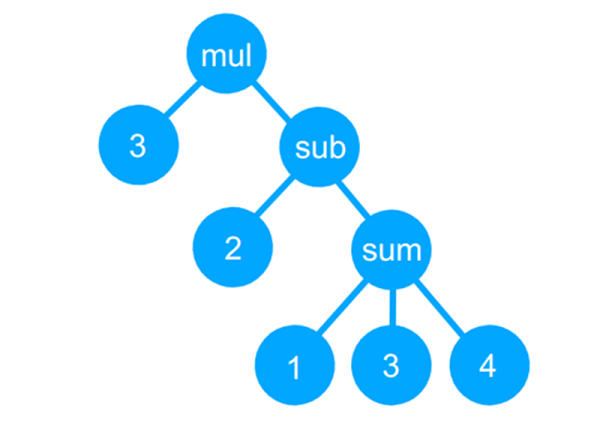
The GitHub page bills it as a tiny compiler, although that is a bit misleading and even the README says it is a transpiler. Actually, the code reads a simple language, uses recursive descent parsing to build a tree, and then uses a “compiler” to convert the tree to JavaScript (which can then be executed, of course). It can also just interpret the tree and produce a numerical answer.

Continue reading “Tiny Programming Language In 25 Lines Of Code”

Reverse Engineering The TEC-06 Battery Tester

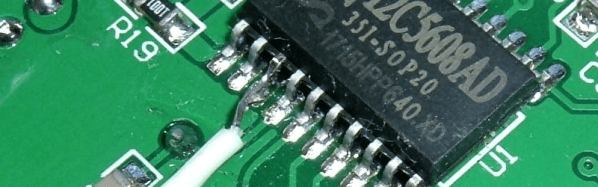
[Syonyk] read that you could solder a few wires to a TEC-06 battery capacity tester, connect it to a TTL serial adapter, and it would interface with some Windows software via a serial port. You can buy it already enabled for serial, but since he had the non-connected version, he was interested in trying it. Not only did it work, but he took the time to reverse engineer the protocol and made a detailed write up about his findings and how he attacked the problem.

Around here, we never need an excuse to reverse engineer anything. But [Synonyk] mentions that he didn’t like using Windows-only software from China. If he wants it on Linux, or if Windows compatibility breaks with a new version, or if the software has spyware in it, he wants to be able to continue using the device. Of course, he also admits — and we get it — that he just enjoys doing it, too.

Continue reading “Reverse Engineering The TEC-06 Battery Tester”

How Low Can An ESP8266 Go?

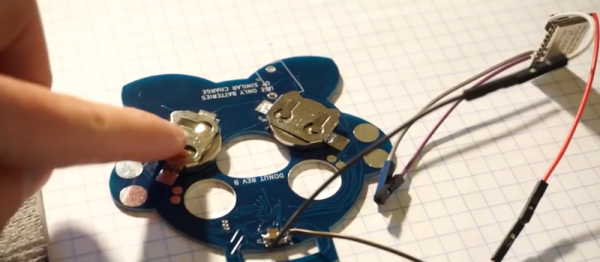
We’ve been tuned into coin cell designs lately given the coin cell challenge, so we were interested in [CNLohr]’s latest video about pushing the ESP8266 into the lowest-possible battery drain with coin cells. The result is a series of hacks, based on a reverse-engineered library and depends on a modified router, but that gets the power consumption down by more than a factor of ten!

Although the ESP8266 has a deep sleep mode that draws only 20 microamps or so, that isn’t as rosy as it seems. If you could go to sleep for a while, wake up for just a moment, send your data, and then go back to sleep, that might be one thing. But when you use conventional techniques, the device wakes up and has to do about ten seconds of work (at high power) to connect to a nearby access point. Then it can do what you want and go back to sleep. That ten-second hit is a killer on small batteries.

Since that’s all you can do with the standard libraries, the next step was to find [pvvx] who has reverse engineered a great deal of the libraries and provides a library with no WiFi capability. That’s a two-edged sword. The pro is you get a 30 ms startup from a deep sleep. The downside is — well — you don’t have WiFi.

Continue reading “How Low Can An ESP8266 Go?”

We Couldn’t Afford An Oculus, So We Built One

Like a lot of 16-year-olds, [Maxime Coutté] wanted an Oculus Rift. Unlike a lot of 16-year-olds, [Maxime] and friends [Gabriel] and [Jonas] built one themselves for about a hundred bucks and posted it on GitHub. We’ll admit that at 16 we weren’t throwing around words like quaternions and antiderivatives, so we were duly impressed.

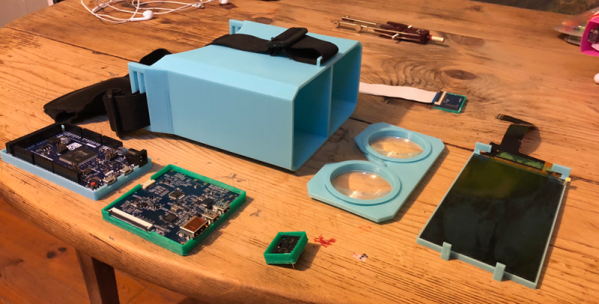
Before you assume this is just a box to put a phone in like a Google Cardboard, take a look at the bill of materials: an Arduino Due, a 2K LCD screen, a Fresnel lens, and an accelerometer/gyro. The team notes that the screen is what will push the price unpredictably, but they got by for about a hundred euro. At the current exchange rate, if you add up all the parts, they went a little over $100, but they were still under $150 assuming you have a 3D printer to print the mechanical parts.

Continue reading “We Couldn’t Afford An Oculus, So We Built One”