Biped Bob Walks And Dances

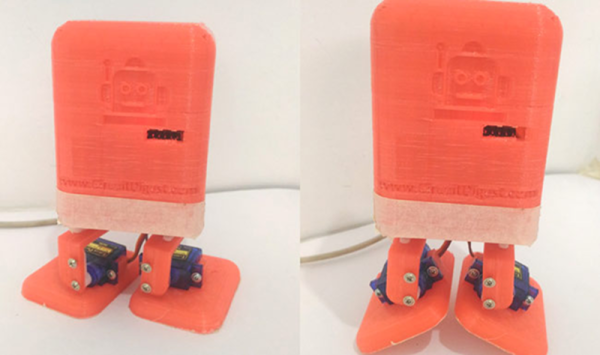
If you have a few servo motors, an Arduino, and a Bluetooth module, you could make Biped Bob as a weekend project. [B. Aswinth Raj] used a 3D printer, but he also points out that you could have the parts printed by a service or just cut them out of cardboard. They aren’t that complex.

Each of Bob’s legs has two servo motors: one for the hip and one for the ankle. Of course, the real work is in the software, and the post breaks it down piece-by-piece. In addition to the Arduino code, there’s an Android app written using Processing. You can build it yourself, or download the APK. The robot connects to the phone via BlueTooth and provides a simple user interface to do a few different walking gaits and dances. You can see a few videos of Biped Bob in action, below.

This wouldn’t be a bad starter project for a young person or anyone getting started with robotics, especially if you have a 3D printer. However, it is fairly limited since there are no sensors. Then again, that could be version two, if you were feeling adventurous.

We have mixed feelings about the BlueTooth control. BlueTooth modules are cheap and readily available, but so are ESP8266s. It probably would not be very difficult to put Bob on WiFi and let him serve his own control page to any web browser.

If Bob meets Jimmy, he may find himself envious. However, Jimmy would be a little more challenging to build. We’ve actually seen quite a few walking ‘bots over the years. Continue reading “Biped Bob Walks And Dances”

Single Part Boost Converter Challenge (Completed)

[Josh] posed an interesting challenge. Create a boost converter that can light a blue LED using a nearly dead battery and one part. Well, we were skeptical until we saw he wasn’t counting an ATtiny processor as a part. You can see a video of the challenge, below.

The challenge has already been solved, so if you view the link, you might want to avoid the comments until you’ve had time to think about your own solution. We’ll confess, the first one we thought of was probably not workable for reasons [Josh] explains. The final answer neatly fits the criteria of a hack.

Continue reading “Single Part Boost Converter Challenge (Completed)”

Oh No! It’s The Claw Again!

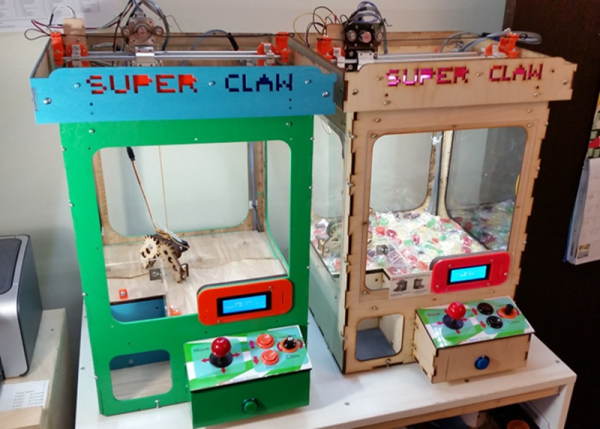
[Ryan Bates] apparently really likes building claw machines. We noticed his latest build with a new PCB, but then we scrolled down and found other incarnations of the machine going back to 2015.

The laser-cut claw is interesting looking and the brains are an Arduino. You can see the action in the video below and there are plenty of older videos on the project page.

Continue reading “Oh No! It’s The Claw Again!”

NEETS: Electronics Education Courtesy Of The US Navy

Just about everything the US Government publishes is available to the public. Granted, browsing the GPO bookstore yields a lot of highly specialized documents like a book on how to perform pediatric surgery in hostile environments. However, there are some gems if you know where to look. If you ever wanted to have a comprehensive electronics course, the US Navy’s NEETS (Navy Electricity and Electronics Training Series) is freely available and has 24 modules that cover everything from electron flow through conductors, to tubes, to transistors and integrated circuits.

There are many places you can download these in one form or another. Some of them are in HTML format. Others are in PDF, which might be easier to put on a mobile device. The Internet Archive has them, although sorting by title isn’t quite in numerical order.

Some of the content is a bit dated — the computer section talks about magnetic core and bubble memory, for example, even though the latest revision we know of was in 1998. Of course, there are also references to bits of Navy gear that probably doesn’t mean much to most of us. However, things like the shift register (from module 13) you can see above haven’t changed in a few decades, so you can still learn a lot. The phase splitter in the top banner is even more timeless (you can find it in module 8).

Continue reading “NEETS: Electronics Education Courtesy Of The US Navy”

Portable Jacob’s Ladder For When…You Know… You Need A Portable Jacob’s Ladder

When do you need a portable Jacob’s Ladder? We don’t know, but apparently [mitxela] doesn’t want to leave home (or the laboratory) without one. So he built a portable unit that works for a few minutes on a battery. In the video (see below), he says he wouldn’t presume to claim it was the smallest Jacob’s Ladder ever, but he thought it might be a contender.

The battery is a LiPo cell and although it might last up to four minutes, [mitxela] points out that the transistors probably wouldn’t survive that much on time, despite the heat sinks he put in place. The whole device is 45mm square and 17mm thick. Of course, the wires add some height (about 150mm total).

We were hoping to see more of the insides, but we presume this uses one of the cheap high voltage modules you can procure from the usual Far East sources–or, at least–it could. The rest is just laser cutting and workmanship.

If you haven’t encountered them before (outside of old monster movies), a Jacob’s Ladder lets high voltage ionize the air down at the bottom of the narrow gap. The ionized air is hot and rises, and the current flows through it, despite the electrodes getting further apart. Of course, that means you shouldn’t put on in your zero-gee space station.

You might think a portable Jacob’s ladders is unique. Turns out, it isn’t. If you want something easy (and perhaps not as portable), you can’t get much easier than this one.

Continue reading “Portable Jacob’s Ladder For When…You Know… You Need A Portable Jacob’s Ladder”

Raspberry Pi Malware Mines BitCoin

According to Russian security site [Dr.Web], there’s a new malware called Linux.MulDrop.14 striking Raspberry Pi computers. In a separate posting, the site examines two different Pi-based trojans including Linux.MulDrop.14. That trojan uses your Pi to mine BitCoins some form of cryptocurrency. The other trojan sets up a proxy server.

According to the site:

Linux Trojan that is a bash script containing a mining program, which is compressed with gzip and encrypted with base64. Once launched, the script shuts down several processes and installs libraries required for its operation. It also installs zmap and sshpass.

It changes the password of the user “pi” to “\$6\$U1Nu9qCp\$FhPuo8s5PsQlH6lwUdTwFcAUPNzmr0pWCdNJj.p6l4Mzi8S867YLmc7BspmEH95POvxPQ3PzP029yT1L3yi6K1”.

In addition, the malware searches for network machines with open port 22 and tries to log in using the default Raspberry Pi credentials to spread itself.

Embedded systems are a particularly inviting target for hackers. Sometimes it is for the value of the physical system they monitor or control. In others, it is just the compute power which can be used for denial of service attacks on others, spam, or — in the case — BitCoin mining. We wonder how large does your Raspberry Pi botnet needs to be to compete in the mining realm?

We hope you haven’t kept the default passwords on your Pi. In fact, we hope you’ve taken our previous advice and set up two factor authentication. You can do other things too, like change the ssh port, run fail2ban, or implement port knocking. Of course, if you use Samba to share Windows files and printers, you ought to read about that vulnerability, as well.