8-Bit Breadboard Computer Is Up To 8 Hours

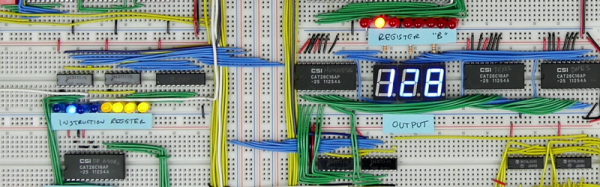
[Ben Eater] posted some videos of an 8-bit computer with no CPU chip that he built completely on a breadboard a few years ago. After being asked for schematics, he finally admitted that he didn’t have any. So, instead, he decided to rebuild it and keep a video log of each step in the process. You can see his kickoff video, below, but you can also find 30 more recent videos covering topics from the ALU design and troubleshooting to the decimal LED display. He even uses an Arduino to program a EEPROM that he uses to replace a lot of logic.

You probably want to wait until you have some free time as there are around eight hours of videos so far. The videos start off with a simple 555 timer and work up from there. Each piece gets a test separate from the whole, so with luck you won’t have an impossible job trying to troubleshoot the whole thing at the end.

Continue reading “8-Bit Breadboard Computer Is Up To 8 Hours”
FreeRTOS Gets Class

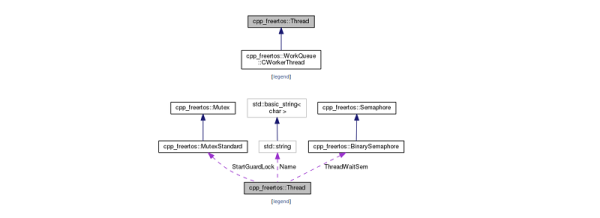
[Michael Becker] has been using FreeRTOS for about seven years. He decided to start adding some features and has a very interesting C++ class wrapper for the OS available.

Real Time Operating Systems (RTOS) add functionality for single-thread microcontrollers to run multiple programs at the same time without threatening the firmware developer’s sanity. This project adds C++ to the rest of the FreeRTOS benefits. We know that people have strong feelings one way or the other about using C++ in embedded systems. However, as the 24 demo projects illustrate, it is possible.

One nice thing about the library is that it is carefully documented. A large number of examples don’t hurt either. The library is clean with just under 30 classes. It seems to have resisted the trend of having classes for everything. You know the kind of library we mean. To create an Integer object, just build a configuration object to pass to the class factory generator which…. This library doesn’t entertain any of that. It has simple abstractions around threads and timers, queues, and mutexes.

Continue reading “FreeRTOS Gets Class”

Popping The Top Of A Ceramic IC

If you’ve ever wanted to open up an IC to see what’s inside it, you have a few options. The ceramic packages with a metal lid will succumb to a hobby knife. That’s easy. The common epoxy packages are harder, and usually require a mix of mechanical milling and the use of an acid (like fuming nitric, for example). [Robert Baruch] wanted to open a fully ceramic package so he used the “cooler” part of a MAP gas torch. If you like seeing things get hot in an open flame, you might enjoy the video below.

Spoiler alert: [Robert] found out the hard way that dropping the hot part isn’t a great idea. Also, we are not sure what the heat does if you want to do more than just inspect the die. It would be interesting to measure a junction on the die during the process to see how much heat actually goes to the device.

Continue reading “Popping The Top Of A Ceramic IC”

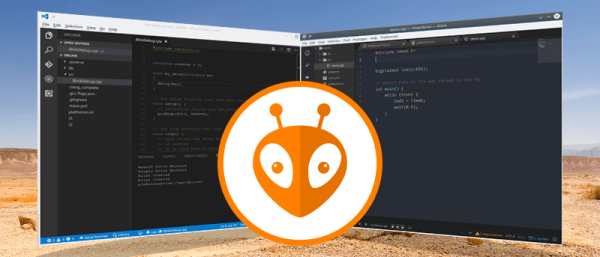
PlatformIO And Visual Studio Take Over The World

In a recent post, I talked about using the “Blue Pill” STM32 module with the Arduino IDE. I’m not a big fan of the Arduino IDE, but I will admit it is simple to use which makes it good for simple things.

I’m not a big fan of integrated development environments (IDE), in general. I’ve used plenty of them, especially when they are tightly tied to the tool I’m trying to use at the time. But when I’m not doing anything special, I tend to just write my code in emacs. Thinking about it, I suppose I really don’t mind an IDE if it has tools that actually help me. But if it is just a text editor and launches a few commands, I can do that from emacs or another editor of my choice. The chances that your favorite IDE is going to have as much editing capability and customization as emacs are close to zero. Even if you don’t like emacs, why learn another editor if there isn’t a clear benefit in doing so?

There are ways, of course, to use other tools with the Arduino and other frameworks and I decided to start looking at them. After all, how hard can it be to build Arduino code? If you want to jump straight to the punch line, you can check out the video, below.

Continue reading “PlatformIO And Visual Studio Take Over The World”

That Sucks! Death Of A Tesla Coil

[Electroboom] always has some entertaining videos. He recently tried to run his Tesla coil in a vacuum. The video shows some interesting results, along with his usual bleeped out expletives as he drills into his hand and suffers other indignities in the name of electronics.

Unfortunately, a bit of extra bolt caused the coil to arc internally, eventually leading to the impressive device shuffling off its mortal… um, well, let’s just say its untimely demise. Along the way, though, you get to see some interesting techniques for building a silicone seal for the vacuum chamber, and some neat Tesla coil tricks with a closed off syringe.

Continue reading “That Sucks! Death Of A Tesla Coil”

Hackaday.io User Reviews Six STM32 IDEs

One of the issues with getting started with any Arm-based project is picking a toolset. Some of us here just use the command line with our favorite editor, but we know that doesn’t suit many people–they want a modern IDE. But which one to choose? User [Wassim] faced this problem, evaluated six different options for STM32 and was kind enough to document his findings over on Hackaday.io.

Many of the tools are Windows-only and at least two of them are not totally free, but it is still a good list with some great observations. Of course, the choice of an IDE is a highly personal thing, but just having a good list is a great start.

Continue reading “Hackaday.io User Reviews Six STM32 IDEs”

Chess AI, Old School

People have been interested in chess-playing computers before there were any chess-playing computers. In a 1950 paper, [Claude Shannon] defined two major chess-playing strategies. Apparently, practical chess programs still use the techniques he outlined. If you’ve ever wondered how to make a computer play chess [FreeCodeCamp] has an interesting post that walks you through building a chess engine step-by-step.

The code is in JavaScript, but the approach struck us as old school. However, it is interesting to watch the evolution of code as you go from random moves, to slightly smarter strategy, to deeper searching. Because it is in JavaScript, you can follow along in your browser and find out when the program gets smart enough to beat you. The final version is even on GitHub.

Continue reading “Chess AI, Old School”