Eurorack Synth Module Runs On ESP32

The ESP32 is well known for both its wireless communication abilities, as well as the serious amount of processing power it possesses for a microcontroller platform. [Robert Manzke] has leveraged the hardware to produce a Eurorack audio synthesis platform with some serious capabilities.

Starting out as a benchmarking project, [Robert] combined the ESP32 with an WM8731 CODEC chip to handle audio, and an MCP3208 analog-to-digital converter. This gives the platform stereo audio, and the ability to handle eight control-voltage inputs.

The resulting hardware came together into what [Robert] calls the CTAG Strämpler. It’s a sampling-based synthesizer, with a wide feature set for some serious sonic fun. On top of all the usual bells and whistles, it features the ability to connect to the freesound.org database over the Internet, thanks to the ESP’s WiFi connection. This means that new samples can be pulled directly into the synth through its LCD screen interface.

With the amount of power and peripherals packed into the ESP32, it was only a matter of time before we saw it used in some truly impressive audio projects. It’s got the grunt to do some pretty impressive gaming, too. Video after the break.

Continue reading “Eurorack Synth Module Runs On ESP32” →

A Stylish Pair Of FPGA Earrings

Sometimes, rather than going the commercialistic route, it can be nice to make a gift for that personal touch. [Mahesh Venkitachalam] had been down this very road before, often stumbling over that common hurdle of getting in too deep and missing the deadline of the occasion entirely. Not eager to repeat the mistake, help was enlisted early, and the iCE bling earrings were born.

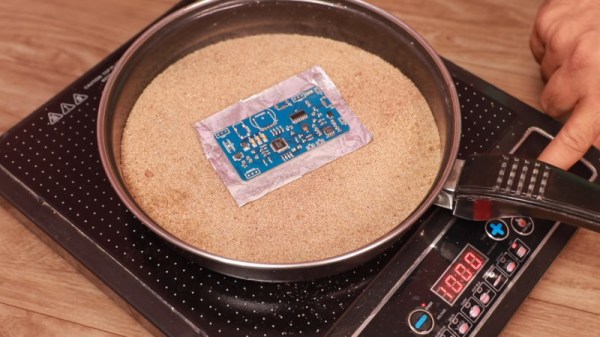
The earrings were a gift for [Mahesh]’s wife, and were made in collaboration with friends who helped out with the design. The earrings use a Lattice iCE40UP5k FPGA to control an 8×8 grid of SMD LEDs. This is all achieved without the use of shift registers, with the LEDs all being driven directly from GPIO pins. This led to several challenges, such as routing all the connections and delivering enough current to the LEDs. The final PCB is a 4-layer design, which made it much easier to get all the lines routed effectively. A buffer is used to avoid damaging the FPGA by running too many LEDs at once.

It’s a tidy build, which makes smart choices about component placement and PCB design to produce an attractive end result. LEDs naturally lend themselves to jewelry applications, and we’ve seen some great designs over the years. Video after the break.

Continue reading “A Stylish Pair Of FPGA Earrings” →

Pitting 8-Bit Chess Games Against Modern Foes

UltraChess is a vintage chess game for the 8-bit MSX platform, running on the Z80. [flok] wondered just how capable the game really was, and set forth to test it against a variety of other chess engines.

Having been designed in the 1980s, UltraChess is far from up-to-date as far as the chess software world is concerned. By using the OpenMSX emulator to run the game, [flok] was able to implement scripts to read and write the gamestate in UltraChess, and make it compatible with the Universal Chess Interface. This would allow UltraChess to be played off against a variety of other chess engines to determine its approximate ELO rating.

The scripts worked well, and are available on Github for those who wish to tinker further. Unfortunately, [flok] has thus far been unable to determine a rating for UltraChess, as it has lost every single game it has played against other chess engines. This is unsurprising given the limited processing power available, but we’d love to see a tweaked and hotrodded Z80 chess program take on the same challenge. If you’ve done such a thing, let us know, or alternatively  you might like to try playing like Harry Potter.

Easy DIY Gecko Tape

Geckos are amazing creatures, with the ability to walk on and stick to all manner of surfaces. If you’ve ever woken up to see lizards on your ceiling, you’re already familiar with their capabilities. The mechanisms behind this have been an area of much research in recent times, and [The Thought Emporium] decided to try and recreate the effect himself (Youtube video, embedded below).

The way geckos stick to surfaces is through the use of nano-scale hairs on their feet. These hairs dramatically increase the surface area of contact between the gecko and the surface in question. This allows the usually-small intermolecular forces to stack up and keep the gecko adhered.

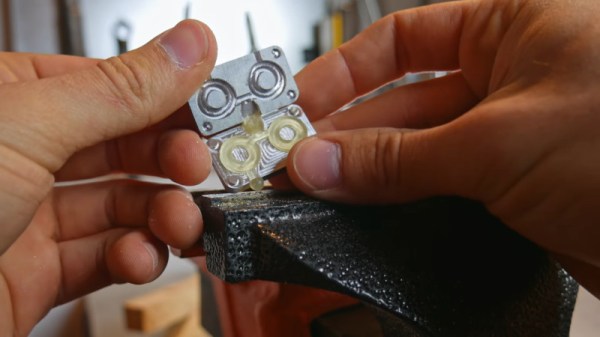
Several teams have managed to create synthetic substances that recreate this ability; indeed we’ve featured some here before. In this case, experimentation started with an attempt to generate the requisite nanostructures by casting RTV silicone on a microporous filter. This was unsuccessful, with the hairs on the surface of the material created being too sparse and at random angles. The next stage involved attempting to use a tattoo gun, needles, and finally sharpened tungsten wires to pattern wax, which could then have silicone cast onto it to pick up the geometry. This too was unsuccessful, as it wasn’t possible to generate tiny enough features to generate the effect.

The final experiment involved casting silicone upon a 1000 line per millimeter diffraction grating. This generated tiny ridges on the surface of the silicone, and greatly improved its sticking ability. While the ridges generated aren’t as capable as gecko feet or professionally-produced films, they do have an impressive weight holding ability. A small section of the silicone was able to hold over 20 pounds for an extended period in testing.

It’s a great example of how to do seemingly complicated science with materials that can be easily acquired for the home workshop. We’d love to see just how strong a gecko tape could be produced with more work done on this method. Video after the break.

Continue reading “Easy DIY Gecko Tape” →

Improving A Cheap Frequency Counter With GPS

Frequency counters are useful tools for anyone that finds themselves regularly working with time-variant signals. There are a huge range available, from cheap eBay specials to expensive lab-grade hardware. [itakeyourphoto] had a counter on the lower end of the cost spectrum, and decided to make some improvements with the help of GPS (Youtube link, embedded below).

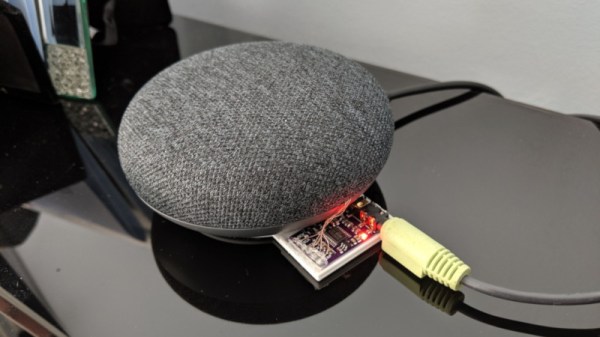
The fundamental weakness of a cheap frequency counter is usually the internal reference against which all other signals are measured. The more accurate this is, the more accurate the counter will be. [itakeyourphoto] determined that a great way to generate a reasonably good reference frequency was by using a uBlox GPS module. Once locked on to satellites, it can use a numerically controlled oscillator to output any frequency up to 15MHz with good accuracy.

The cheap frequency counter in question used a 13 MHz internal reference, so the uBlox module was programmed to match this. [itakeyourphoto] reports that it compares favorably to his higher-end GPS-disciplined oscillators, displaying very little drift or other aberrations.

We see plenty of clocks using GPS for its accurate time, but we’ve seen projects that attempt to go even further than that, too. Video after the break.

[Thanks to jafinch78 for the tip!]

Continue reading “Improving A Cheap Frequency Counter With GPS” →

A Different Way To Privately Chat Over Telegram

If you’ve had the need to send secure, private messages in recent times, you might have considered using Telegram. However, using such a service means that, if discovered, it’s well known what manner of encryption you’re using, and there’s a third party involved to boot. [Labunsky] walks a different path, and built a covert channel within Telegram itself.

[Labunsky] likens their process to the process used in the film Seventeen Moments of Spring, in which a flower placed in an apartment windows indicates a spy has failed their mission. In this case, instead of a flower in a window, one user blocks another to signal them. By switching the blocked status on and off, messages can be sent, albeit in a slow and convoluted way.

It’s more of a proof of concept than a practical way to message people over Telegram. With that said, it does work, and it might just keep the security services monitoring your chats confused for a few extra weeks. Or, it would, if we hadn’t written an article about it. Perhaps consider using zero-width characters instead.

Windows Utility Helps ID Serial Ports

The humble serial interface has been around for a very long time, and will stay with us in one form or other for the foreseeable future. It was easy enough to keep track of back in the days when a computer only had one, or perhaps two COM ports. However, in this day and age of USB-programmable microcontrollers, it’s likely you’ve got COMs coming out the wazoo. Thankfully, [Amr Bekhit] has put together a utility to help solve this problem.

[Amr’s] utility is called Serial Port Monitor, and it does what it says on the tin. When new serial ports are enumerated in Device Manager, a system tray notification pops up noting the number of the newly attached COM port. Additionally, it maintains a list of ports sorted in order of the newest first, and also features a right-click menu that allows the launching of various terminal programs.

It’s a useful tool to keep in your back pocket that can prove particularly so when programming many devboards at once, or any other time when you find yourself dealing with a mess of serial devices.

Incidentally, if you find yourself having continual headaches with USB-to-Serial adapters on Windows, this might just be your problem. Happy hacking.

Footnote: In light of this article, the author would like to formally apologise to [Cosmos2000] for permanently disabling COM1 on his main programming rig. Sorry, friend.