Telco Curio Hacked Into Simple Counter

The tikkenteller was a device used to measure the duration of telephone use. 70 Volts were sent down the telephone line at 50Hz to run an electromechanical counter, and the devices were often used in communal areas where several users shared a single phone. [Charles Babbadge] decided to repurpose the stout 1950s hardware into a simple counter.

The build uses an ATtiny13 to generate pulses for the original hardware, when receiving inputs from the tikkenteller’s buttons. A solid state relay is triggered by the microcontroller, which connects the original solenoid to mains power to jog the counter. An HLK-PM01 5V power supply is used to run the micro, allowing the entire project to run off a single mains supply.

It’s a big, heavy, beautiful hunk of metal, built in a style that we simply don’t see anymore. It’s in no way the cheapest or most efficient counter you could build, but it’s got a charm you can’t find on more modern hardware. You could use such a device to track your Youtube subs, that is… if the API hadn’t broken that for everyone. Video after the break.
Continue reading “Telco Curio Hacked Into Simple Counter”

Breathing New Life Into Old School ThinkPad Keyboards

The ThinkPad is generally considered the unofficial laptop of hackerdom, so it’s no surprise that we see plenty of projects focused on repairing and modifying these reliable workhorses. But while we usually see folks working on relatively modern incarnations of this iconic line of computers, this project by [Frank Adams] and [Brian Chan] shows that the hacker’s love affair with the ThinkPad stretches back farther than many might realize.

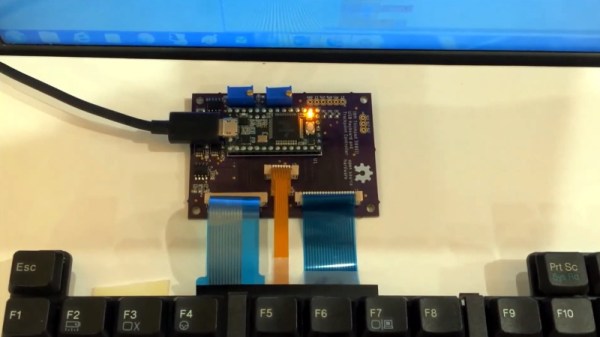
As explained on the project’s Hackaday.io page, the duo have produced an open hardware board that will allow you to take the keyboard and trackpoint from a late ’90s ThinkPad 380ED and use it as a standard USB input device on a modern computer. According to [Frank], the keyboards on these machines are notable for having full-size keys rather than the “chicklet” boards that are so common today.

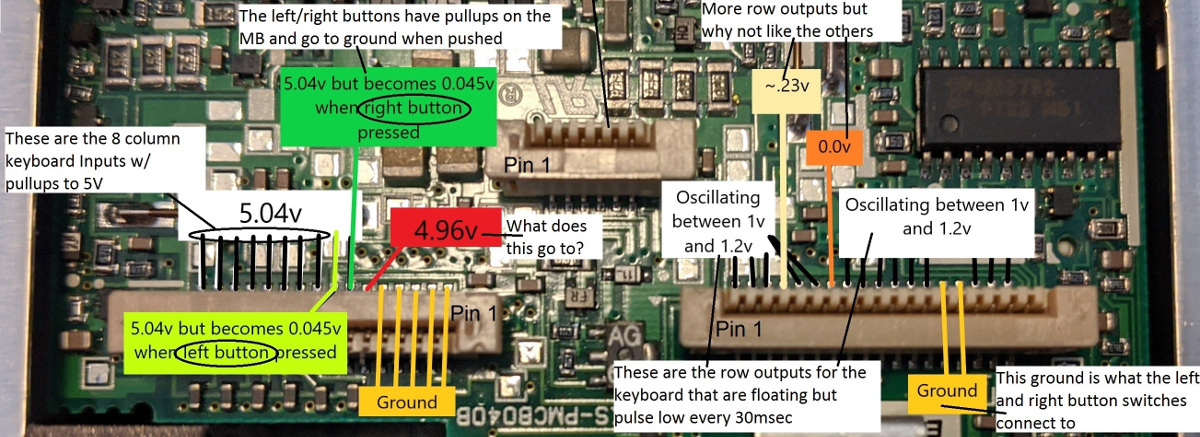
Now you may be wondering why this is significant. After all, we’ve seen plenty of projects that hook up an old keyboard to a USB-equipped microcontroller to get them speaking the lingua franca. Well, the trick here is that the trackpoint on these older ThinkPads actually required additional circuitry on the motherboard to function. The keyboard features three separate FPC connections for the matrix, the trackpoint buttons, and the analog strain gauges in the trackpoint itself.

After a considerable amount of reverse engineering, [Frank] and [Brian] have developed a board that uses the Teensy 3.2 to turn this plethora of pins into something useful. In the video after the break, you can see the new composite USB device working perfectly on a modern Windows computer.

It will probably come as little surprise to find that [Frank] is no stranger to hacking ThinkPad keyboards. In 2018 we covered a similar adapter he built for the far more modern T61, which was an absolute cakewalk by comparison.

Continue reading “Breathing New Life Into Old School ThinkPad Keyboards”

Simple Sprite Routines Ease Handheld Gaming DIY

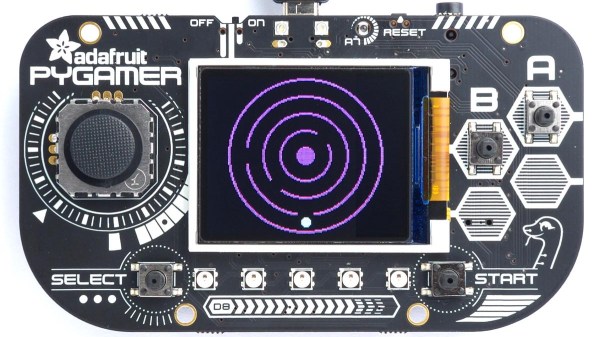
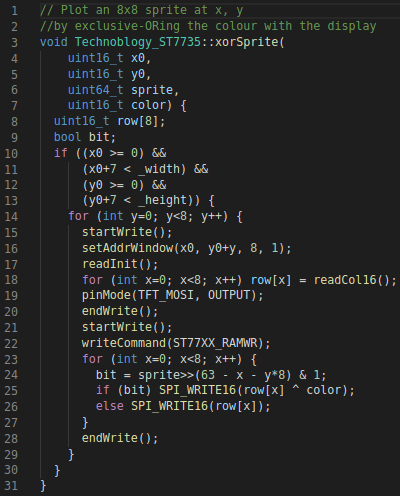
Making your own handheld games is made much easier with [David Johnson-Davies’] simple sprite routines for the Adafruit PyBadge and PyGamer boards. Sprites can be thought of as small, fixed-size graphical objects that are drawn, erased, moved, and checked for collision with other screen elements.

xorSprite() plots an 8×8 sprite, moveSprite() moves a given sprite by one pixel without any flicker, and hitSprite() checks a sprite for collision with any screen elements in a given color. That is all it takes to implement a simple game, and [David] makes them easy to use, even providing a demo program in the form of the rolling ball maze shown here.

These routines work out-of-the-box with the PyBadge and PyGamer, but should be easy to adapt to any TFT display based on the ST7735 controller. The PyGamer is the board shown here, but you can see the PyBadge as it was used to create an MQTT-enabled conference badge.

If you really want to take a trip down the rabbit hole of sprite-based gaming graphics, you simply can’t miss hearing about the system [Sprite_TM] built into the FPGA Game Boy badge.

Teardown: Nabaztag

In 2020 there is nothing novel or exciting about an online device. Even the most capable models are designed to be unobrusive pucks and smart speakers; their function lies in what they do rather than in how they look. In 2005, an Internet connected device was a rare curiosity, a daring symbol of a new age: the “Internet of Things”!

Our fridges were going to suggest recipes based upon their contents, and very few people had yet thought of the implications of an always-on connected appliance harvesting your data on behalf of a global corporation. Into this arena stepped the Nabaztag (from the Armenian for “rabbit”), an information appliance in the form of a stylised French plastic rabbit that could deliver voice alerts, and indicate status alerts by flashing lights and moving its ears.

Continue reading “Teardown: Nabaztag”

Nintendo Switch Gets A Stylish Dock In A Broken NES

The Switch is Nintendo’s latest home console, which has forever blurred the line between handhelds and consoles you plug in to your TV. It does both! Typically, hooking up to a screen is done through the dock, but that wasn’t quite cool enough for [sturm]. He took a NES and turned it into a tidy Switch dock instead!

The build starts with an original NES shell, which is gutted of its original hardware. The PCB from the original dock is installed, and a slot cut in the top of the NES to allow the Switch to be inserted. Naturally, there’s a spring flap reminiscent of the Super NES to keep the dock looking clean when not in use. When it is installed, a series of cables and bezels break out the USB ports to the original controller ports on the NES.

It’s a tidy build that brings a touch of nostalgia to the modern console. We’re sure an official version would sell like hotcakes, too. There’s plenty of similarly inspired builds for the Switch, with the Gamecube Joycons a particular highlight!

Continue reading “Nintendo Switch Gets A Stylish Dock In A Broken NES”

Aluminium Pucks Fuel Hydrogen Trucks

In the race toward a future free from fossil fuels, hydrogen is rapidly gaining ground. On paper, hydrogen sounds fantastic — it’s clean-burning with zero emissions, the refuel time is much faster than electric, and hydrogen-fueled vehicles can go longer distances between refuels than their outlet-dependent brethren.

The reality is that hydrogen vehicles usually need fuel cells to convert hydrogen and oxygen into electricity. They also need pressurized tanks to store the gases and pumps for refueling, all of which adds weight, takes up space, and increases the explosive potential of the system.

Kurt Koehler has a better idea: make the hydrogen on demand, in the vehicle, using a solid catalyst and a simple chemical reaction. Koehler is the founder of Indiana-based startup AlGalCo — Aluminium Gallium Company. After fourteen years of R&D and five iterations of his system, the idea is really starting to float. Beginning this summer, these pucks are going to power a few trucks in a town just outside of Indianapolis.

Continue reading “Aluminium Pucks Fuel Hydrogen Trucks”

Tic Tac Arduintoe Moves The Game To 4×4

We know you’re out there spending a lot more time with your loved ones, and appreciate that you may be running out of ways to keep everyone entertained. [Mukesh] dropped us a tip because he has the antidote to boredom — a new twist on that old chestnut, Tic Tac Toe.

Instead of the usual 3×3 configuration, [Mukesh] made the grid 4×4 so the game would be more engaging. Game play is otherwise the same — this Tic Tac Toe still results in a lot of draws, but they take longer and you can’t see them coming a mile away. What’s even more engaging is that you get to push clicky buttons that light up, and don’t have to draw a grid before every game.

Under the hood is an Arduino Uno that controls 16 push buttons and their corresponding RGB LEDs. Whoever goes first is blue, and player two gets pink. If you win, your color floods the board for a brief victory animation. If the game is a tie, the board turns red. We really like the printed two-piece buttons that house the LEDs and actuate the push buttons while keeping the two separate. Toe your way past the break to check out the build video.

Intrigued by the 4×4 version, but need a build that takes more time? Try building your TTT in TTL.

Continue reading “Tic Tac Arduintoe Moves The Game To 4×4”