A Vintage AC Bridge Teardown

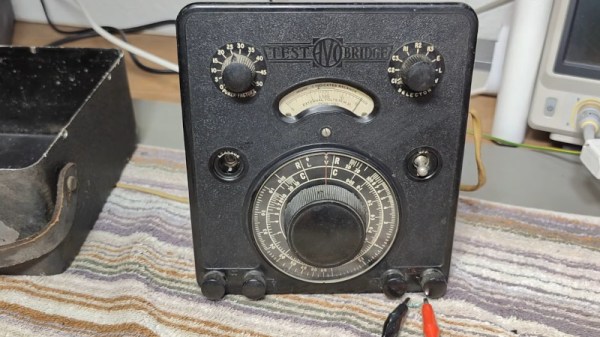
If you ever encounter a British engineer of a certain age, the chances are that even if they use a modern DMM they’ll have a big boxy multimeter in their possession. This is the famous Avo 8, in its day the analogue multimeter to have. Of course it wasn’t the only AVO product, and [Thomas Scherrer OZ2CPU] is here with another black box sporting an AVO logo. This one’s an AC bridge, one of a series of models manufactured from the 1930s through to the late 1940s, and he treats us to a teardown and restoration of it.

Most readers will probably be familiar with the operation of a DC Wheatstone Bridge in which two resistances can be compared, and an AC bridge is the same idea but using an AC source. A component under test is attached to one set of terminals while one with a known value is put on the other, and the device can then be adjusted for a minimum reading on its meter to achieve a state of balance. The amount by which it is adjusted can then be used as a measure of the difference between the two parts, and thus the value of an unknown part can be deduced.

In the case of this AVO the AC is the 50Hz (remembering that this is a British instrument) mains frequency, and the reading from the bridge is taken via a single tube amplifier to a rectifier circuit and the meter. Inside it’s a treasure trove of vintage parts with an electrolytic capacitor that looks as though it might not be original, with a selenium rectifier and a copper oxide signal diode in particular catching our eye. This last part is responsible for some reading anomalies, but after cleaning and lubricating all the switches and bringing up the voltage gently, he’s rewarded with a working bridge. You can see the whole story in the video below the break.

Test equipment from this era is huge, so perhaps not all of you have the space for something like this. Some of us have been known to own other AVO products though.


Continue reading “A Vintage AC Bridge Teardown”

The Book That Could Have Killed Me

It is funny how sometimes things you think are bad turn out to be good in retrospect. Like many of us, when I was a kid, I was fascinated by science of all kinds. As I got older, I focused a bit more, but that would come later. Living in a small town, there weren’t many recent science and technology books, so you tended to read through the same ones over and over. One day, my library got a copy of the relatively recent book “The Amateur Scientist,” which was a collection of [C. L. Stong’s] Scientific American columns of the same name. [Stong] was an electrical engineer with wide interests, and those columns were amazing. The book only had a snapshot of projects, but they were awesome. The magazine, of course, had even more projects, most of which were outside my budget and even more of them outside my skill set at the time.

If you clicked on the links, you probably went down a very deep rabbit hole, so… welcome back. The book was published in 1960, but the projects were mostly from the 1950s. The 57 projects ranged from building a telescope — the original topic of the column before [Stong] took it over — to using a bathtub to study aerodynamics of model airplanes.

X-Rays

[Harry’s] first radiograph. Not bad!
However, there were two projects that fascinated me and — lucky for me — I never got even close to completing. One was for building an X-ray machine. An amateur named [Harry Simmons] had described his setup complaining that in 23 years he’d never met anyone else who had X-rays as a hobby. Oddly, in those days, it wasn’t a problem that the magazine published his home address.

You needed a few items. An Oudin coil, sort of like a Tesla coil in an autotransformer configuration, generated the necessary high voltage. In fact, it was the Ouidn coil that started the whole thing. [Harry] was using it to power a UV light to test minerals for flourescence. Out of idle curiosity, he replaced the UV bulb with an 01 radio tube. These old tubes had a magnesium coating — a getter — that absorbs stray gas left inside the tube.

Continue reading “The Book That Could Have Killed Me”

The Best DIY PCB Method?

Now before you start asking yourself “best for what purpose?”, just have a look at the quality of the DIY PCB in the image above. [ForOurGood] is getting higher resolution on the silkscreen than we’ve seen in production boards. Heck, he’s got silkscreen and soldermask at all on a DIY board, so it’s definitely better than what we’re producing at home.

The cost here is mostly time and complexity. This video demonstrating the method is almost three hours long, so you’re absolutely going to want to skip around, and we’ve got some relevant timestamps for you. The main tools required are a cheap 3018-style CNC mill with both a drill and a diode laser head, and a number of UV curing resins, a heat plate, and some etchant.

[ForOurGood] first cleans and covers the entire board with soldermask. A clever recurring theme here is the use of silkscreens and a squeegee to spread the layer uniformly. After that, a laser removes the mask and he etches the board. He then applies another layer of UV soldermask and a UV-curing silkscreen ink. This is baked, selectively exposed with the laser head again, and then he cleans the unexposed bits off.

In the last steps, the laser clears out the copper of the second soldermask layer, and the holes are drilled. An alignment jig makes sure that the drill holes go in exactly the right place when swapping between laser and drill toolheads – it’s been all laser up to now. He does a final swap back to the laser to etch additional informational layers on the back of the board, and creates a solder stencil to boot.

This is hands-down the most complete DIY PCB manufacturing process we’ve seen, and the results speak for themselves. We would cut about half of the corners here ourselves. Heck, if you do single-sided SMT boards, you could probably get away with just the first soldermask, laser clearing, and etching step, which would remove most of the heavy registration requirements and about 2/3 of the time. But if it really needs to look more professional than the professionals, this video demonstrates how you can get there in your own home, on a surprisingly reasonable budget.

This puts even our best toner transfer attempts to shame. We’re ordering UV cure soldermask right now.

Continue reading “The Best DIY PCB Method?”

Taking A Look Underneath The Battleship New Jersey

By the time you read this the Iowa-class battleship USS New Jersey (BB-62) should be making its way along the Delaware River, heading back to its permanent mooring on the Camden waterfront after undergoing a twelve week maintenance and repair period at the nearby Philadelphia Navy Yard.

The 888 foot (270 meter) long ship won’t be running under its own power, but even under tow, it’s not often that you get to see one of the world’s last remaining battleships on the move. The New Jersey’s return home will be a day of celebration, with onlookers lining the banks of the Delaware, news helicopters in the air, and dignitaries and veterans waiting eagerly to greet her as she slides up to the pier.

But when I got the opportunity to tour the New Jersey a couple weeks ago and get a first-hand look at the incredible preservation work being done on this historic ship, it was a very different scene. There was plenty of activity within the cavernous Dry Dock #3 at the Navy Yard, the very same slip where the ship’s construction was completed back in 1942, but little fanfare. Staff from North Atlantic Ship Repair, the company that now operates the facility, were laboring feverishly over the weekend to get the ship ready.

While by no means an exhaustive account of the work that was done on the ship during its time in Dry Dock #3, this article will highlight some of the more interesting projects that were undertaken while it was out of the water. After seeing the thought and effort put into every aspect of the ship’s preservation by curator Ryan Szimanski and his team, there’s no doubt that not only is the USS New Jersey in exceptionally capable hands, but that it will continue to proudly serve as a museum and memorial for decades to come.

Continue reading “Taking A Look Underneath The Battleship New Jersey

Harmonic Table Keyboard Brings Old Idea Back To Life

If you missed the introduction of the Axis-49 and Axis-64 keyboards by C-Thru Music, you’re definitely not alone. At the time it was a new musical instrument that was based on the harmonic table, but it launched during the Great Recession and due to its nontraditional nature and poor timing, the company went out of business. But the harmonic table layout has a number advantages for musicians over other keyboard layouts, so [Ben] has brought his own version of the unique instrument to life in his latest project.

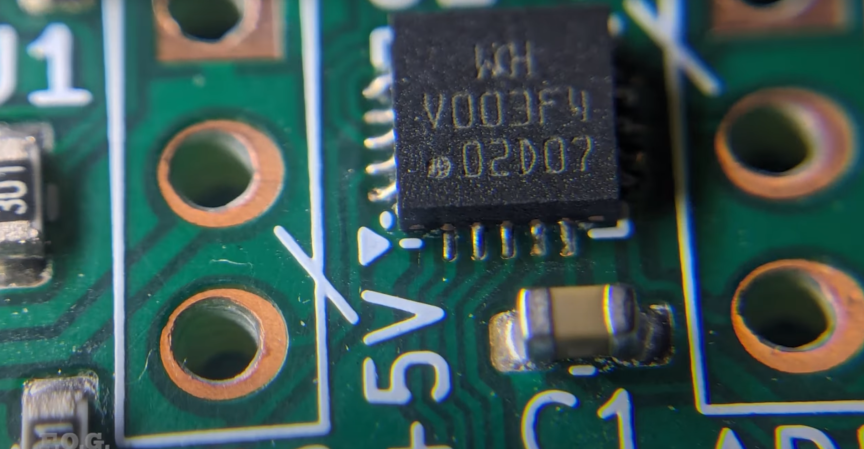
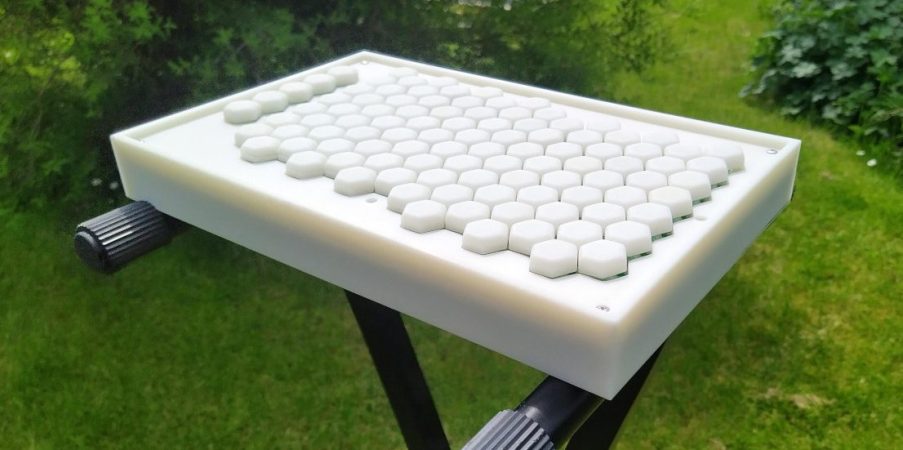
Called the Midihex, the keyboard has a number of improvements over the version from C-Thru Music, most obviously its much larger 98 playable keys and five function keys. The keys themselves are similar to Cherry MX keys but which use Hall-effect sensors. This style of key allows the device to send continuous key position information to the host computer, and since this is a MIDI instrument, this capability allows it to support a MIDI protocol called MIDI Polyphonic Expression (MPE) which allows each note to be more finely controlled by the musician than a standard MIDI instrument. The PCB is powered by a Teensy 4.1 at the core.

For any musicians that haven’t tried out a harmonic table before, an instrument like this might be worth trying out. The layout provides easier chord and scale patterns, and for beginner musicians it can have a much shallower learning curve than other types of instruments. If you can’t find an original Axis-49 or Axis-64 anywhere to try out, though, we actually posted a teardown of one way back in 2009 when the company was still producing instruments.

Continue reading “Harmonic Table Keyboard Brings Old Idea Back To Life”

This Week In Security: Unicode Strikes Again, Trust No One (Redditor), And More

There’s a popular Sysadmin meme that system problems are “always DNS”. In the realm of security, it seems like “it’s always Unicode“. And it’s not hard to see why. Unicode is the attempt to represent all of Earth’s languages with a single character set, and that means there’s a lot of very similar characters. The two broad issues are that human users can’t always see the difference between similar characters, and that libraries and applications sometimes automatically convert exotic Unicode characters into more traditional text.

This week we see the resurrection of an ancient vulnerability in PHP-CGI, that allows injecting command line switches when a web server launches an instance of PHP-CGI. The solution was to block some characters in specific places in query strings, like a query string starting with a dash.

The bypass is due to a Windows feature, “Best-Fit”, an automatic down-convert from certain Unicode characters. This feature works on a per-locale basis, which means that not every system language behaves the same. The exact bypass that has been found is the conversion of a soft hyphen, which doesn’t get blocked by PHP, into a regular hyphen, which can trigger the command injection. This quirk only happens when the Windows locale is set to Chinese or Japanese. Combined with the relative rarity of running PHP-CGI, and PHP on Windows, this is a pretty narrow problem. The XAMPP install does use this arrangement, so those installs are vulnerable, again if the locale is set to one of these specific languages. The other thing to keep in mind is that the Unicode character set is huge, and it’s very likely that there are other special characters in other locales that behave similarly.

Downloader Beware

The ComfyUI project is a flowchart interface for doing AI image generation workflows. It’s an easy way to build complicated generation pipelines, and the community has stepped up to build custom plugins and nodes for generation. The thing is, it’s not always the best idea to download and run code from strangers on the Internet, as a group of ComfyUI users found out the hard way this week. The ComfyUI_LLMVISION node from u/AppleBotzz was malicious.

The node references a malicious Python package that grabs browser data and sends it all to a Discord or Pastebin. It appears that some additional malware gets installed, for continuing access to infected systems. It’s a rough way to learn. Continue reading “This Week In Security: Unicode Strikes Again, Trust No One (Redditor), And More”

This Week In Security: Recall, Modem Mysteries, And Flipping Pages

Microsoft is racing to get into the AI game as part of Windows 11 on ARM, calling it Copilot+. It’s an odd decision, but clearly aimed at competing with the Apple M series of MacBooks. Our focus of interest today is Recall, a Copilot+ feature that not only has some security problems, but also triggers a sort of visceral response from regular people: My computer is spying on me? Eww.

Yes, it really sort of is. Recall is a scheme to take screen shots of the computer display every few seconds, run them through character recognition, and store the screenshots and results in a database on the local machine hard drive. There are ways this could be useful. Can’t remember what website had that recipe you saw? Want to revisit a now-deleted tweet? Is your Google-fu failing you to find a news story you read last week? Recall saw it, and Recall remembers. But what else did Recall see? Every video you watched, ever website you visited, and probably some passwords and usernames you typed in.

Continue reading “This Week In Security: Recall, Modem Mysteries, And Flipping Pages”