Stupid Friggin’ Robots


Some robots aspire to greatness, revolutionizing our humanoid behaviour in ways we struggle to understand. They have traveled in space, photographing the stars like celestial paparazzi or snatching Martians up like interplanetary bed intruders. Some robots are happy to perform their everyday functions with dignity and grace, scrubbing our floors and thanking us for recycling.

It may seem that every robot has a calling that–whether grandiose or humble–makes it a valuable part of our society. Unfortunately, this is not the case. Some robots use our hard-earned energy resources to no good use, lazing around without a useful function, drinking flux and tonic all night while watching reruns of Lost in Space. They are stupid robots.

Many humans look upon such pitiful automatons as nothing more than flotsam in the whitewater rapids of human achievement, but the more empathetic among us are ready to celebrate the unique uselessness of stupid robots in grand style. Enter Bacarobo (translated), the premier event showcasing the quirkiest and most amusingly useless robots of our time.

This year the contest was held at the end of October, and the entrants were hilarious to say the least. The dancing olé-bot drew much applause, while the shivering toque robots wooed the crowd in a desperate attempt to escape their frigid prison. It will be fun to see whether any stupidly adorable robot designs will come out of our own Santa-bot competition, considering the source material. If you’ve ever built a stupid or useless robot (accidentally or not) please share your story in the comments. Sometimes the most endearing things about our technology are the parts that don’t work the way they’re supposed to.

Under-desk RGB Keyboard Lighting

[Jay Collett] was having trouble seeing his keyboard when the room was dim. But throwing a light under the desk just didn’t seem cool enough. Instead he built an RGB light board that is controlled by his desktop. The board is based around an ATmega328 with the Arduino booloader. He etched a single-sided PCB to connect it to a group of five RGB LEDs, with a programming header for an FTDI cable. The board communicates with a PC via serial connection, with a C# control application that [Jay] coded to control the color. We’ve embedded a couple of videos after the break but check his page for a package of code and hi-res pictures.

If you want something cool that’s a little bit less work to build check out the EL-wire keyboard from this links post.

Continue reading “Under-desk RGB Keyboard Lighting” →

DIY Vaporizer

Here’s a DIY vaporizer build. It uses a 30 watt Radio Shack soldering iron as a heat source that is regulated with a common dimmer switch. This is done by removing the soldering tip and replacing it with threaded rod attached to a brass pipe fitting assembly. This is housed inside of a Mason jar with a copper pipe for air intake and another for output. Not surprisingly the creator tipped us off anonymously, saying that this a “smoking accessory”. A bit of searching and we came across this Wikipedia article about a Volcano Vaporizer which sheds light on what one is used for.

We don’t condone using illicit substances. But even more so, we’re skeptical about breathing through this thing because of the warning that [Anon] included about noxious vapors put off by the epoxy putty when it heats up. Still, it’s an interesting build so we though we’d share.

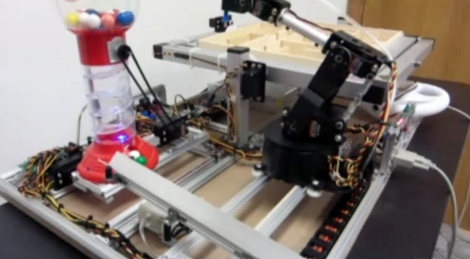
Gum Ball Maze Updated… Now With Robots!

In what is surely becoming an ever-growing Rube Goldberg machine, [Dan] updated his gum ball dispenser to include a robot arm. We looked in on this human lab-rat experiment that rewards successful maze navigation with bubble-gum just about a year ago. As you can seen in the video after the break he’s added several new features to delight users. The original had a maze actuated by an accelerometer and that remains the same. But when the device fires up, the wooden ball is moved to the start of the maze by a Lynxmotion robotic arm. That arm is mounted on rails so it can also move to deliver the gum ball after a successful run. There’s also an anti-jamming feature that shakes the gum ball dispenser to ensure you don’t come up empty.

Whether playing chess or being controlled by a mouse the Lynxmotion has been quite popular lately. [Dan’s] solution uses a vacuum pump to grab onto the spheres (both wooden and gum), similar to the method used with the CNC pick and place from a while back.

Continue reading “Gum Ball Maze Updated… Now With Robots!” →

Dungeon Crawler Game For IM-ME (and Linux)

[Joby Taffey] takes the prize for the first completed homebrew game for the IM-ME. Over the last few weeks we’ve seen [Travis Goodspeed] working with sprite graphics, and [Emmanuel Roussel] developing game music for the pink pager. But [Joby] didn’t really use either of those.

[Travis’] sprites were using a framebuffer that fills up a lot of valuable RAM. [Joby] decided to draw the room screens (all of them have been stitched together for the image above) as a one-time background image to keep the memory free. From there, the screen is updated in 8×8 blocks based on cursor movement. He also decided not to add music as he feels the high-pitched piezo is not capable making sound without driving everyone crazy.

Source code is available and for those of you who don’t own this pretty handheld, the game can also be compiled in Linux.

Moving A Resistor For EvalBot Power When Programming

[Riley Porter] posted a picture of his EvalBot USB power hack. In the photo above we’ve put a box around D6 and D7. The development board ships with a 0 Ohm resistor in the D7 location, patching in power from the USB-B connector labeled USB DEVICE. He found that by moving that resistor to D6 he can power the board from the USB-B connector labeled ICDI.

That connector is the In-Circuit Debug Interface. TI sent us an EvalBot bundle so we pulled it out and tried it ourselves. If you plug in the ICDI it doesn’t power the board, and no USB devices register. Shorting the D6 pads changes this and the following USB device registers:

Bus 002 Device 062: ID 0403:bcd9 Future Technology Devices International, Ltd Stellaris Evaluation Board

So it looks like you need to have two USB connections or be using batteries in order to program the board via USB. The uC/OS-III hardcover book that ships with the EvalBot bundle includes board schematics. We took a look and were surprised to see that they show diodes installed on both pads. Rev A of the online schematics have been corrected, showing an omitted diode on D6 and the 0 Ohm resistor on D7. Images of both schematics are included after the break.

It would have been nice to see a selector switch installed here to give you a little more flexibility when prototyping.

Continue reading “Moving A Resistor For EvalBot Power When Programming” →

Open Source Kinect Contest Has Been Won

Adafruit Technologies has announced the winner of the Open Source Kinect contest. [Hector], who we mentioned yesterday has won, providing both RGB and depth access to the device.  Some of you were asking at that time, why the contest was not over yet. Well, Adafruit had to verify. The image you see above are of another user[qdot], verifying the drivers on his machine.

What is interesting is how Adafruit has chosen to close this contest. Not only are they giving [Hector] his prize money, they are also donating an additional $2,000 to the EFF who fight for our right to legally hack and reverse engineer our own equipment.

[Hector] is being generous as well, using his prize money to help pay for gadgets to hack with some teams he is involved with, mainly the iPhone Dev Team and the Wii hacker team “Twiizers”