Barcode Scanner In Processing

barcode_sc

Reader [Nikolaus] decided that instead of using an existing image based bar code decoder, he would write his own. Using the Processing language he created a scanner that parsed the black and white pattern when a bar code was centered on the image. His code then parsed that data and compared it with the initializing character to provide a reference. Currently his scanner supports three character sets of the Code 128 encoding, and provided his complete code so that others could add as they see fit. He admits that the code is a bit messy due to the lengthy character tables, but very straight forward.

Cheap Yaris Cabin Filter

Cheap-Yaris-Cabin-Air-Filter (8)

[Jake] never ceases to amaze with his inventions, from his Powered respirator to his Steampunk LCD and more. Today he proves that not every hack has to be an amazing one requiring hundreds of hours, tons of soldering, and an Arduino. Instead, he was tired of being charged $50 for a $5 cabin air filter. With a quick squeeze he had access to the filter bay. It was only a matter of finding a similar filter at a home improvement store and then using a scrap wood jig, he could cut and glue his own filter. It’s stuff like this that tends to make us think, what else are we getting ripped off on?

Introduction To FTDI Bitbang Mode

It was an interface that launched a thousand hacks. Near trivial to program, enough I/O lines for useful work, and sufficiently fast for a multitude of applications: homebrew logic analyzers, chip programmers, LCD interfaces and LED light shows, to name a few.

Today the parallel printer port is on the brink of extinction (and good riddance, some would say). Largely rendered obsolete by USB, few (if any) new peripherals even include a parallel connector, and today’s shrinking computers — nettops, netbooks, media center PCs — wouldn’t have space for it anyway. That’s great for tidy desks, but not so good if you enjoyed the dirt-cheap hacks that the legacy parallel port made possible.

Fear not, for there’s a viable USB alternative that can resurrect many of these classic hacks! And if you’ve done much work with Arduino, there’s a good chance it’s already lurking in your parts drawer.

Continue reading “Introduction To FTDI Bitbang Mode”

Six Monitors, One Video Card

6 displays 1 videocard

With most of us utilizing at least two monitors these days in our day to day operations, six monitors, while an awesome thought, might seem a little too excessive. After all, do we really have space for multiple video cards?

AMD has a new setup in their testing lab that is running six Dell 30inch displays at 7680×3200 through a video card holding six DisplayPort connectors.

Maximum PC has the scoop on the setup, and they say that this single GPU will be coming out on AMD’s DirectX 11 capable chips. Details are slim with the amount of video RAM, speeds and cost not known at present.

Think of the possibilities! Trade shows are one thing, but how about a video wall at home for gaming and movies? How would you use the six monitors shown above? Be sure to leave your ideas in the comments.

Virtual Pool, Real-world Interface

[youtube=http://www.youtube.com/watch?v=2Wc_DXGe2fQ]

Sunday we saw robots playing pool and an augmented reality pool game. Today we’ll complete the pool trifecta: virtual pool using a real cue stick and ball in another vintage video from Hack a Day’s secret underground vault. The video is noteworthy for a couple of reasons:

First is the year it was made: 1990. There’s been much buzz lately over real-world gaming interfaces like the Nintendo Wii motion controller or Microsoft’s Project Natal. Here we’re seeing a much simpler but very effective physical interface nearly twenty years prior.

Second: the middle section of the video reveals the trick behind it all, and it turns out to be surprisingly simple. No complex sensors or computer vision algorithms; the ball’s speed and direction are calculated by an 8-bit processor and a clever arrangement of four infrared emitter/detector pairs.

The visuals may be dated, but the interface itself is ingenious and impressive even today, and the approach is easily within reach of the casual garage tinkerer. What could you make of this? Is it just a matter of time before we see a reader’s Mini-Golf Hero III game here?

Toilet And Figlet

toilet_and_figlet

We thought [Kristofer’s] Tech Tip about using figlet with scripts was kind of fun. It’s a throwback to the days of logging onto a BBS and being greeted by a vertically scrolling ASCII art image that had been meticulously hand crafted (although a lot of the coolest stuff was actually ANSI art). No hand crafting here, just feed (or pipe) your text to figlet and it outputs the message in ASCII style letters.

When we went to try install this in Ubuntu, the toilet package was suggested. This one’s worth checking out too. It works in much the same way as figlet but uses extended characters and has a lot more color and font settings:

hackaday_toilet

Give these packages a try and make character art cool again!

Defocusing LED Clock

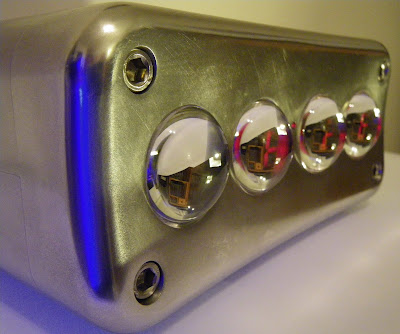
[Dennis] has created a well-documented and very beautiful clock in his latest project. This clock stands out from the other clock projects we have covered with its unique display. The seven segment LED displays mounted on a sled that moves them back and forth behind an array of fiber optic lenses, effectively taking the display out of focus at certain points. Currently, a Dorkboard controls the sled, moving it at random intervals. The case is machined and polished aluminium, the top buttons are ball bearings.