Digital Video From The Amiga’s DB23 Socket

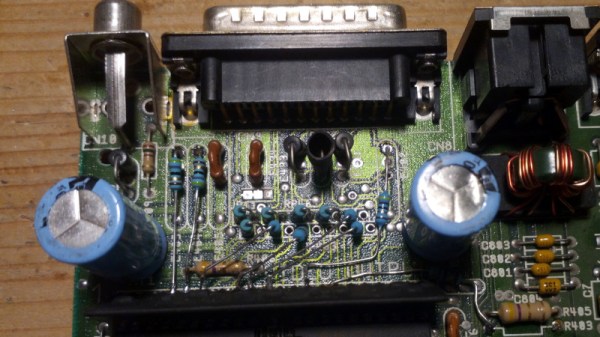
Back in the days of 16-bit home computers, the one to have if your interests extended to graphics was the Commodore Amiga. It had high resolutions for the time in an impressive number of colours, and thanks to its unique video circuitry, it could produce genlocked broadcast-quality video. Here in 2023 though, it’s all a little analogue. What’s needed is digital video, and in that, [c0pperdragon] has our backs with the latest in a line of Amiga video hacks. This one takes the 12-bit parallel digital colour that would normally go to the Amiga’s DAC, and brings it out into the world through rarely-used pins on the 23-pin video connector.

This follows on from a previous [c0pperdragon] project in which a Raspberry Pi Zero was used to transform the digital video into HDMI. This isn’t a hack for the faint-hearted though, as it involves extensive modification of your treasured Amiga board.

It is of course perfectly possible to generate HDMI from an Amiga by using an external converter box from the analogue video output, of the type which can be bought for a few dollars from online vendors. What this type of hack gives over the cheap approach is low latency, something highly prized by gamers. We’re not sure we’re ready to start hacking apart our Amigas, but we can see the appeal for some enthusiasts.
BBS Builder Is A Framework For Running Your Own PETSCII Paradise

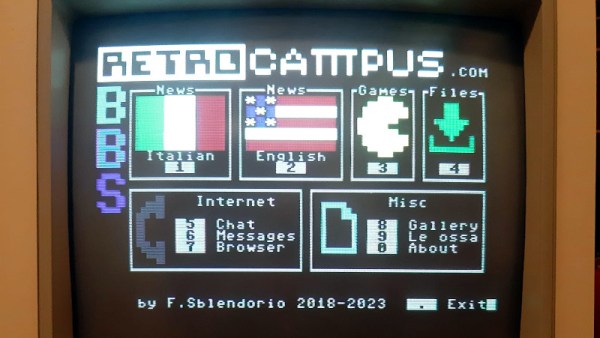
The 80s and 90s were the glory days of the BBS. The plain old telephone system was responsible for bringing us connection to other digital beings, along with plenty of spuriously-obtained software and inappropriate ASCII art. [Francesco Sblendorio] has created BBS Builder to harken back to this great era, allowing people to build their own BBSs as they see fit!

BBS Builder consists of basic classes for construction a BBS that operates in PETSCII mode. If that’s unfamiliar to you, it’s the character encoding created by Commodore, also known as CBM ASCII. BBSs created through this software can be accessed by a variety of appropriately 80s machines. The Github page outlines how to create a basic BBS using the code that can be customized to your own liking.

[Francesco] notes the system is compatible with Commodore 64s running RR-NET compatible network cards, WiFi modem cards, and 1541Ultimate hardware using UltimateTerm. Various other methods are supported too, as well as PCs and Macs running Syncterm.

Running a BBS was like running your own website back in the day. With that said, they also had a distinct community flair that is somehow missing from today’s web. Be sure to sound off with your favorite BBS in the comments!

The MouSTer Adapter Now Has Amiga Scroll Support

The MouSTer is a device that enables modern USB HID mice to be used on various retro computers. The project has been through its ups and downs over years, but [drygol] is here to say one thing: rumors of the MouSTers demise have been greatly exaggerated. Now, the project is back and better than ever!

The team has been hard at work on quashing bugs and bringing new features to bear. The headline is that the MouSTer project will now offer mouse wheel support for Amiga users. This is quite the coup, as mouse wheels were incredibly obscure until the late 90s. Now, users of Commodore’s finest machines will be able to scroll with abandon with modern HID mice.

While the progress is grand, much is still left to be done. Despite the name, the MouSTer was never intended to solely serve Atari users. Future goals involve adding support for ADB mice for retro Macs, DB9 mouse support for even-older Apple machines, and DB9 mouse support for older PCs. The team is eager for there to be one MouSTer to rule them all, so to speak, and hopes to make the ultimate retro computer mouse adapter to serve as many purposes as possible.

We first looked at the MouSTer back in 2020, and it’s great to see how far it’s come.

Continue reading “The MouSTer Adapter Now Has Amiga Scroll Support”

ArcaOS: OS/2 Updated For The Modern World

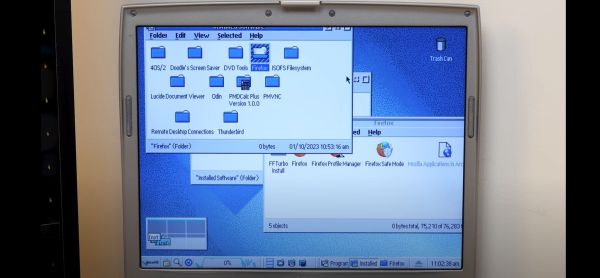
For a certain subset of our readers, mentioning IBM’s OS/2 is likely to bring forth a pang of nostalgia, while for others it’s more likely to bring to mind meme images of rebooting ATM displays. Although OS/2 didn’t become the desktop giant that IBM had intended it to become, reports of its demise are very much premature. As [Michael MJD] covers in a recent video, ArcaOS is essentially the latest version of OS/2, under official license from IBM.

The initial release of ArcaOS was in 2017, and the most recent release was version 5.0.7 in December of 2021. What this gets you is an evolution of OS/2 Warp 4.52 that updates the operating system for modern day hardware, although [Michael]’s experiences with using USB and installing WordPerfect 5.2 end up being rather mixed. With IBM not intending to open source the OS any time soon, ArcaOS appears to be mostly aimed at companies and individuals who wish to keep running their old (OS/2) software on newer hardware, per the FAQ.

This is also reflected in the license cost should you wish to obtain a copy of ArcaOS, with a personal edition license costing $129. What this does get one over OS/2 Warp is SMP support, improved USB, audio and video support, along with an actual package manager (ANPM, based on RPM & Yum).

Would you splurge on an updated OS/2 OS like this, or is tinkering with a fully open source OS like Haiku (BeOS reborn) more your thing?

Continue reading “ArcaOS: OS/2 Updated For The Modern World”

Sol-20 Integrated Computer Teardown

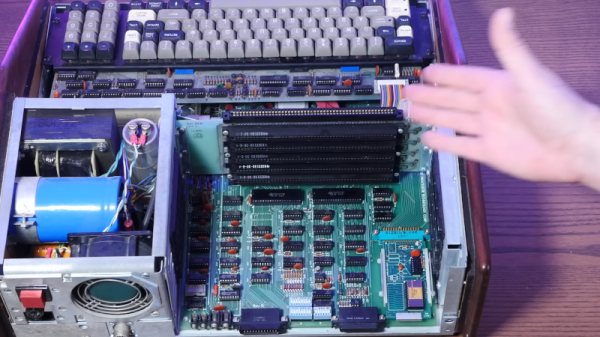
[Action Retro] came into an antique Sol-20 computer and argues that it was the first totally integrated computer aimed at consumers that didn’t require you to buy or build some kind of terminal. These are fairly rare, so we appreciated the peek inside that you can see in the video below.

Sure, the Sol-20 wasn’t the very first computer out there in the market. It was, however, one of the first ones that didn’t need anything more exotic than a monitor to have a functional system (and the monitor was included). There were alternatives such as a Xerox Alto or a Wang 2200, but those had price tags that didn’t land them in your home. Even Apple, which would become famous for a turnkey system, was only producing the Apple I at that time. As the video points out, it was complete as long as you could build your own power supply and knew how to interface a keyboard — keeping in mind that keyboards were all wildly different in those days.

Continue reading “Sol-20 Integrated Computer Teardown”

Too Cool For 8-bit Retro? Try 1-bit Gaming

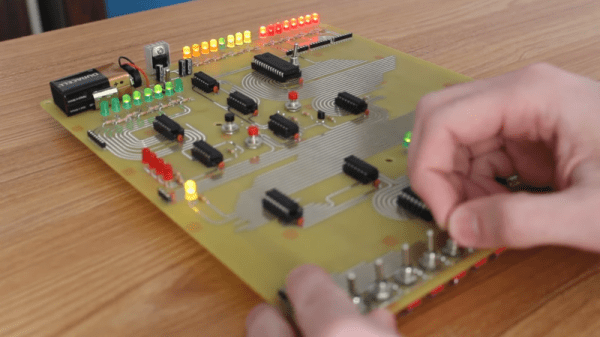
While the world has been racing for higher and higher bit counts for CPUs, there are always those that buck the trend. Consider the venerable Motorola MC14500B, a 1-bit CPU, no kidding. [Usagi Electric] built up a computer based on one of these chips using a breadboard but has since pulled it apart to use the breadboard for other things. So this time, he’s made a permanent version on a PCB and created a simple game to show it off. You can see the result in the video below.

Well, the chip had one bit in the datapath. It did not have any memory, but it did have a way to feed it 4-bit instructions, and, as you might guess, there were 16 possibilities for instructions. The chip was meant to replace industrial controllers where even a PLC might be overkill, and apparently, it did see some use in the real world.

Continue reading “Too Cool For 8-bit Retro? Try 1-bit Gaming”

RCA’s Clear Plastic TV Wowed Crowds In 1939

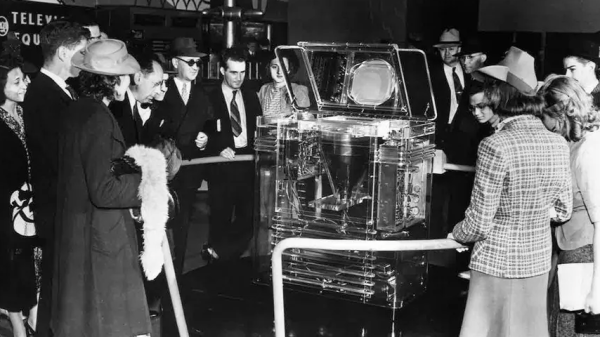
In the United States in 1939, television sets still had a long way to go before they pretty much sold themselves. Efforts to do just that are what led to RCA’s Lucite Phantom Telereceiver, which aimed to show people a new way to receive broadcast media.

Created for the 1939 World’s Fair, the TRK-12 Lucite Phantom Telereceiver introduced people to the concept of television. Production models were housed in contemporary wood cabinets, but the clear acrylic (itself also a relatively new thing) units allowed curious potential customers to gaze within, and see what was inside these devices.

One interesting feature is the vertically-mounted cathode ray tube, which reflects off a mirror in the top cover of the cabinet for viewing. This meant that much of the bulk of the TRK-12 could be vertical instead of horizontal. Important, because the TRK-12 was just over a meter tall and weighed 91 kilograms (or just over 200 lbs.)

Clearly a luxury item, the TRK-12 sold for $600 which was an eye-watering sum for the time. But it was a glimpse of the future, and as usual, the future is made available a few ticks early to those who can afford the cost.

Want to see one in person? You might be in luck, because an original resides at the MZTV Museum of Television in Toronto, Canada.