Dungeons And Dragons Board Game From The 1980s Holds A TMS1100

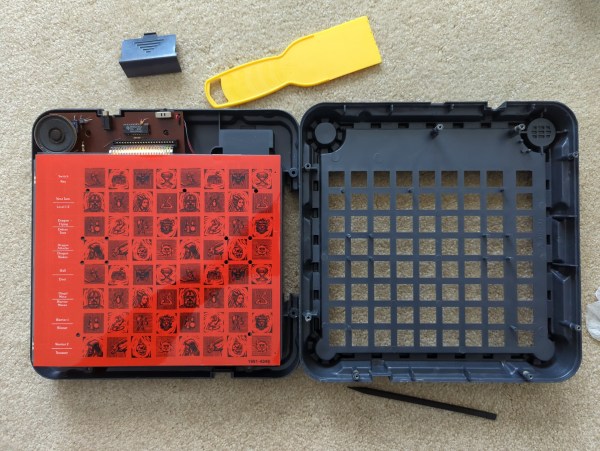
Today is a little tour back to the early 1980s when Mattel released the DUNGEONS & DRAGONS Computer Labyrinth Game. [Cameron Kaiser] was dealing with a few boxes of old stuff when he came across the game. Luckily for us, he decided to do a complete teardown and a comprehensive review more than 40 years after it came out.

The game itself is pretty simple. You and a friend are characters on the board, navigating an eight-by-eight maze. As you move through the labyrinth, a microcontroller emits twelve audio cues telling you what you’ve run into (walls, doors, treasure, and so on). The eight buttons on the side allow you to hear the different tones to know what they mean, as we imagine even the most well-written manual might struggle to describe that. In addition, the pieces are diecast metal, which allows the game to detect where the pieces have been placed. Continue reading “Dungeons And Dragons Board Game From The 1980s Holds A TMS1100”

Connecting A Keyboard To A Vintage PC-XT, The Hard Way

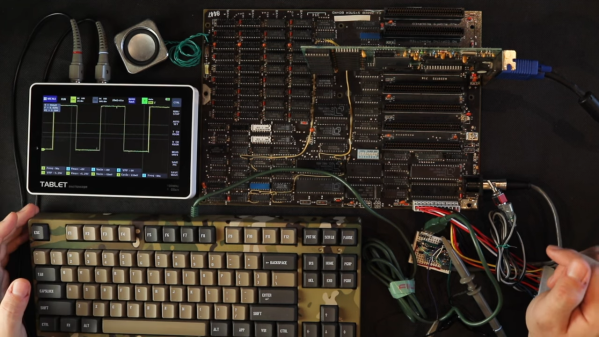
We’re not sure if there’s any single characteristic that qualifies someone as a hacker. After all, we’re a pretty eclectic bunch, with skills that range all over the map, and what one person feels is trivial, others would look upon as black magic. But there’s one thing we’re sure of: if you find yourself reading the original POST code for the PC-XT motherboard just to get a keyboard working, you’re pretty much our kind of people.

That was the position [Anders Nielsen] found himself in as work progresses on his “PC-XT from Scratch” project, which seeks to build a working mid-80s vintage IBM Model 5160 using as many period-correct parts as possible. The first installment of the series featured the delicate process of bringing the motherboard up, lest the magic smoke was released. After seeing some life out of the old board, [Anders] needed a little IO, specifically video and keyboard. The video side of the equation was relatively trivial, with an early-90s VGA card from eBay — not exactly period correct, but good enough to get something to display. Continue reading “Connecting A Keyboard To A Vintage PC-XT, The Hard Way”

Reliving A Bitmapped Past With A Veritable Hoard Of Bitmap Fonts

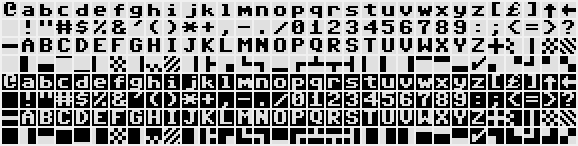
The fonts seen with old computer systems such as those from Apple and Commodore, as well as Microsoft Windows 3.1 and older, form an integral part of our interaction with these systems. These days such bitmap fonts are a rarity, with scalable vector-based fonts having taken their place on modern-day systems. This unfortunately also means that these fonts are at major risk of being lost to the sands of time. This is where [Rob Hagemans] seeks to maintain an archive of such bitmap fonts, ranging from Acorn to MSX to Windows.

Many of these fonts are extracted from character ROMs, with a preview of some of these fonts available via the Monobit viewer. The fonts themselves are made available in YAFF format, which is a text-based format that can be converted back to a binary format using the Monobit tool. If you ever wanted to use one of these old bitmap fonts in a project, this would seem to offer a treasure trove of options. The hoard of bitmap fonts might be the perfect fit for your next graphic LCD project.

(Via [SuperIlu] on Mastodon)

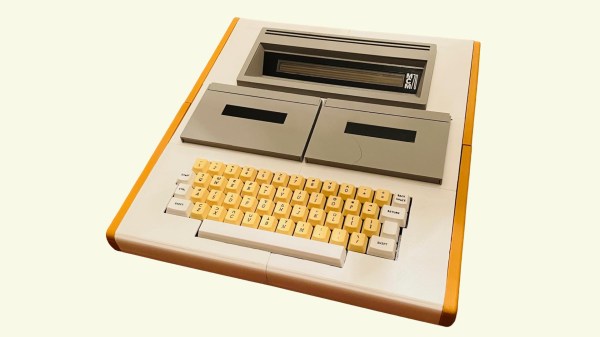
A visually accurate replica of the MCM/70 computer, an all in one system with a keyboard, dual cassette drives and a small one line display

MCM/70 Replica Embodies Proud Canadian Heritage

When a vintage computer is all but unobtanium, software emulation is often all that remains. Unless you are [Michael Gardi], who saw an opportunity to reproduce Canada’s home-grown MCM/70 microcomputer using a combination of software emulation and modern hardware.

Short of building a brand new MCM/70 from the original schematics, this faithful facsimile of the MCM/70 does everything it can to pay homage to the original machine. The foundations of this project can be attributed to the York University Computer Museum (YUCoM) MCM/70E emulator, highly regarded for its “historical accuracy”. The MCM/70 used dual cassette tapes for storage and a funky 32-character dot matrix plasma display, which is all reproduced in software (other versions dropped one of the cassette drives for a modem, bleeding edge innovation for 1974 microcomputing).

From here, [Michael] set off to assemble the various physical components of the original computer. The chassis itself was built from scratch using a mixture of 3D printing and traditional woodwork. The high-voltage plasma display was recreated using four HCMS-2972 dot matrix modules, which minor compromises. The original computer used display memory as extra storage when executing instructions, which created a sporadic blinkenlights effect on the original display. This new display unfortunately won’t reproduce this ‘thinking’ pattern, but it’s a small sacrifice.

Similarly, the original keyboard was going to be challenging to replicate with 100% accuracy, so a brand-new recreation of an Ohio Scientific computer keyboard was used instead. The layouts are extremely similar, and anyone except your most committed Canadian retro computing enthusiasts probably wouldn’t notice the difference. Being a modern recreation of a vintage keyboard, this was relatively easy to source. A set of custom-made keycaps with APL legends really helped sell the replica.

And while working dual cassette drives would have brought this project home, it’s commendable that [Michael] has created ‘working’ cassette drives using 3D printed cassettes and some magnetic magic using hall effect sensors to identify the loaded cassette. The emulator incorporates three virtual cassette tapes which made this solution possible.

If this all sounds familiar, it might be because this project was based on a superb Hackaday writeup of the MCM/70. A truly innovative computer for its time, the story behind Micro Computer Machines (not to be confused with the toy cars) is a fascinating tale, and the write-up is worth a read if you haven’t seen it already.

Continue reading “MCM/70 Replica Embodies Proud Canadian Heritage”

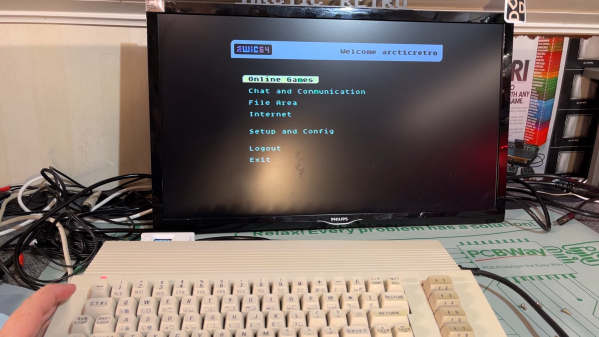
A Commodore 64 accessing an online service

The WiC64 Brings Classic Commodores Online, Google Maps Included

A computing platform is never really dead unless people stop developing new software for it. By that measure, the Commodore 64 is alive and well: new games, demos, and utilities are still being released on a regular basis. Getting those new programs onto an old computer was always a bit of a hassle though, requiring either an SD card adapter for the Commodore or a direct cable connection from an internet-connected PC. Luckily, there’s now a simpler way to get your latest software updates thanks to a WiFi adapter called WiC64.  This adapter plugs into the expansion port of a classic Commodore and lets you download programs directly into memory. [Tommy Ovesen] over at [Arctic Retro] bought one and explored its many features.

The basic design of the WiC64 is straightforward: an ESP32 mounted on an adapter board that connects its data bus to that of the Commodore 64, 128 or VIC-20. A simple program, which you still need to transfer the old way, lets you configure the device and connect to a WiFi network. Once that’s done, an interactive BBS-style program is launched that allows you to access a range of online services. The WiC64 developers provide these, but since the system is fully open-source there’s nothing stopping you from running your own servers as well.

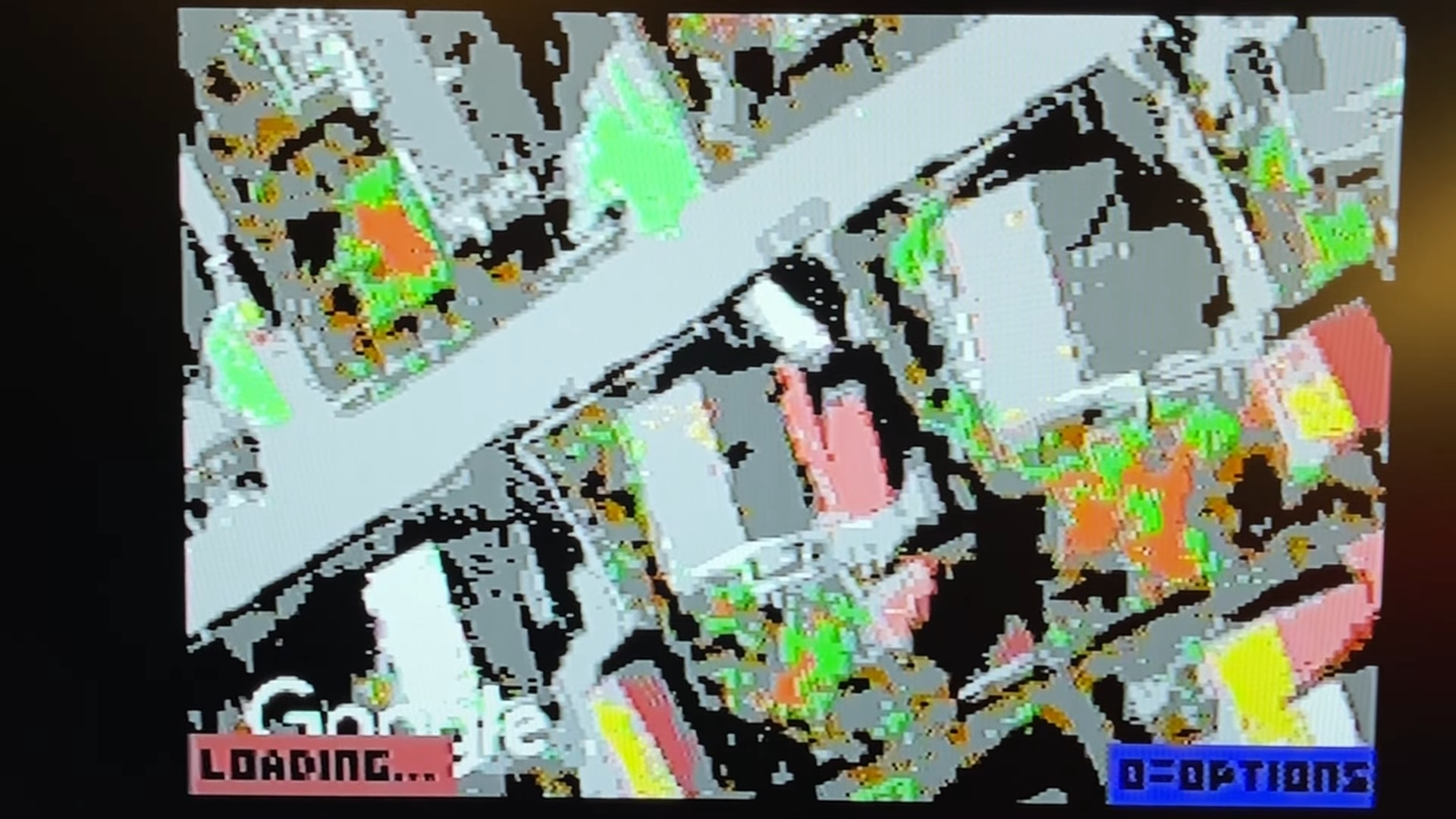
A street on Google Maps, rendered on a Commodore 64 Services currently available include an RSS reader, several multiplayer online games, and even a radio station that plays non-stop SID tunes. There’s also a direct link to CSDB, an online database of Commodore 64 programs and demos which you can now simply download and run directly on your C64 – in effect, a modern app store for a classic computer.

One feature that really seems to defy the C64’s hardware limitations is a fully functional version of Google Maps. Even with the Commodore’s limited resolution and color depth, it does a pretty decent job of showing maps, satellite photos, and even Street View images.

Using the WiC64 requires no hardware modifications to the Commodore 64, but a custom ROM is available that enables a few convenient features such as LOADing programs directly from a web address. There have been several attempts at getting classic Commodores online, but none so far that managed to get complex apps like Google Maps running. We have seen YouTube videos being played on a Commodore PET though.

Continue reading “The WiC64 Brings Classic Commodores Online, Google Maps Included”

A New Analog And CRT Neck Board For The MacIntosh SE

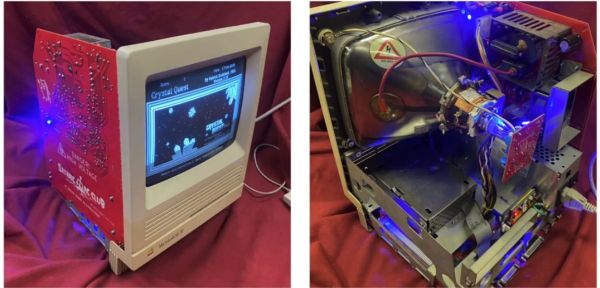
Keeping a 35-year old system like the MacIntosh SE and its successor, the SE/30, up and running requires the occasional replacement parts. As an all-in-one system, the analog board that provides the power for not only the system but also the 9″ (23 cm) built-in CRT is a common failure location, whether it is due to damaged traces, broken parts or worse. For this purpose [Kay Koba] designed a replacement analog board, providing it with a BOM of replacement components. This also includes the neck board, which is the part that the CRT itself connects to.

As [Kay] notes in the project log, the design was inspired after building [Kai Robinson]’s Classic Reloaded logic board, which we covered previously. After a few revisions, [Kay] has now begun selling the PCBs for $42. The product page also links to BOMs for both the analog board and the neck board, with most of the parts simple through-hole parts. If the board’s fancy styling and LEDs compared to the original board isn’t your cup of tea, it does look like there exists interest in a more subdued version as well.

FPS Game Engine Built In Ancient Macintosh HyperCard Software

Wolfenstein 3D and Doom are great examples of early FPS games. Back in that era, as Amiga was slowly losing its gaming supremacy to the PC, Apple wasn’t even on the playing field. However, [Chris Tully] has used the 90s HyperCard platform to create an FPS of his own, and it’s charming in what it achieves.

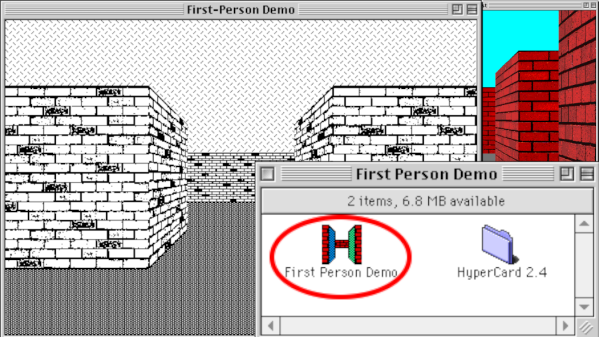
If you’re not familiar with it, HyperCard was a strange combination of database, programming language, and graphical interface system all rolled into one. It made developing GUI apps for the Macintosh platform simpler, with some limitations. It was certainly never intended for making pseudo-3D video games, but that just makes [Chris’s] achievement all the more impressive.

At this stage, [Chris’s] game doesn’t feature any NPCs, weapons, or items yet. It’s thus more of a First Person Walker than First Person Shooter. It features four small rooms with perpendicular, vertical walls, rendered either greyscale or 8-bit color. Now that he’s got the basic engine running, [Chris] is looking to recreate a bit of a Doom RPG experience, rather than copying Doom itself. He hopes to add everything from monsters to weapons, lava, and working HUD elements. If you want to dive in to the code, you can – HyperCard “stacks”, as they’re known, are made up of readily editable scripts.

[Chris] built the project to celebrate the aesthetic and limitations of the original Mac platform. While it could technically run on original hardware, it would run incredibly slowly. It currently takes several seconds to update the viewport on an emulated Mac Plus with 4MB of RAM. Thankfully, emulation on a modern PC can be sped up a lot to help the framerate.

We love seeing HyperCard pushed far beyond its original limits. We’ve seen it before, too, such as when it was used on a forgotten 90s Apple phone prototype. If you’ve been hacking away on retro software yourself, we’d love to see your projects on the tipsline!