C#, The Language For All Platforms – Now Including Windows 3.11 And DOS

The Microsoft .NET framework has been with us in one form or another since the millennium, and though it has remained largely the preserve of the Microsoft universe, it has found its way since then through a variety of implementations to other platforms including MacOS and GNU/Linux. In Microsoft terms though its history goes back only as far as Windows 98, earlier MS operating systems remain off-limits.

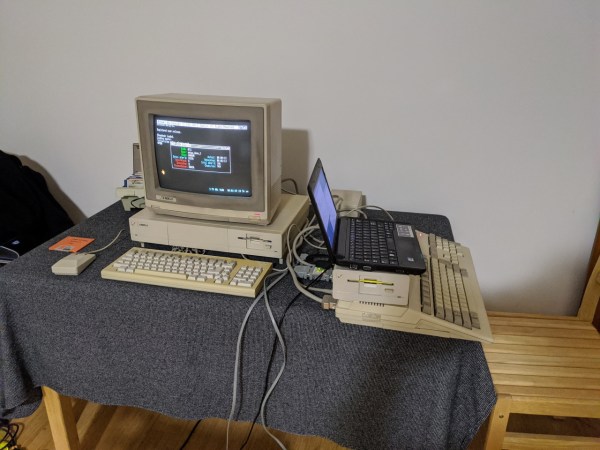
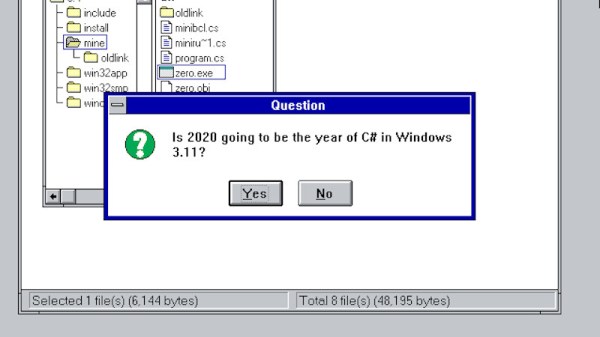
Just a glimmer of .NET in DOS and Windows 3.11 comes courtesy of [Michal Strehovský], who has successfully compiled .net C# code for both Windows 3.11 and DOS. An in-depth explanation comes courtesy of [Scott Hanselman], and it involves some tricks spanning the decades since the early 1990s. The .NET Core compiler’s object files can be fed into the linker that shipped with an ancient version of Microsoft’s C++ compiler, which when used with Microsoft’s Win32s compatibility layer that brought some of Windos NT’s APIs to the 16-bit OS, allows C# from 2020 to run as though it were 1992 again. Meanwhile the DOS version uses .NET Core’s ability to produce self-contained executables along with some very significant tricks to pare down the size of the finished program from many megabytes to an eventual DOS-suitable 27k. Remember the apocryphal Bill Gates quote, that “640k should be enough for anyone“, that refers to the maximum memory available to DOS without extra memory-extending tricks.

Neither piece of software is especially useful, and we can’t see a rush of C# coders to these new platforms. But we applaud him for his ingenuity, and getting old hardware to do new tricks is right up our alley. It’s certainly dredged up a few memories from back in the day for us. Meanwhile we’ve featured .NET in a few projects over the years, most recently on an FPGA.
Generate 3D Printable QR Codes With This Web Tool

Since most people are carrying a camera-equipped computer in their pockets these days, QR codes can be a great way to easily share short snippets of information. You can put one on your business card so people can quickly access your contact information, or on your living room wall with your network’s SSID and encryption key. The design of QR codes also make them well suited to 3D printing, and thanks to a new web-based tool, you can generate your own custom STL in seconds.

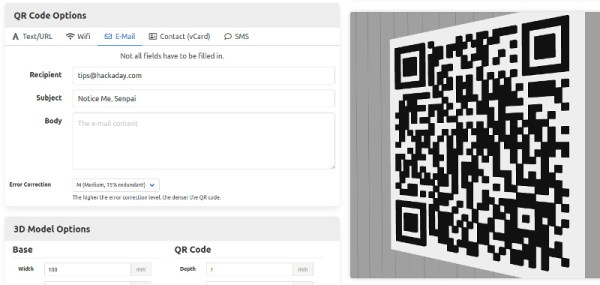
Created by [Felix Stein], the website provides an easy to use interface for the many options possible with QR codes. Obviously you have full control over the actual content of the code, be it a simple URL or a something more specific like a pre-formatted SMS message. But you can also tweak physical parameters like size and thickness.

Once you’re happy with the 3D preview, you can have the website generate an STL for either single or multi-extrusion printers. For those of us who are puttering along with single extruder machines, you’ll need to swap the filament color at the appropriate layer manually. With so many variables involved, you’ll also need figure out which layer the swap should happen on your own.

Incidentally, this is an excellent example of where STL leaves something to be desired. When using a format like 3MF, color and material information could be baked right into the model. Once opened in a sufficiently modern slicer, all the tricky bits would automatically sorted out. Or at least, that’s what Prusa Research is hoping for.

Building A Better BitTorrent Client In Go

When it comes to peer-to-peer file sharing protocols, BitTorrent is probably one of the best known. It requires a client implementing the program and a tracker to list files available to transfer and to find peer users to transfer those files. Developed in 2001, BitTorrent has since acquired more than a quarter billion users according to some estimates.

While most users choose to use existing clients, [Jesse Li] wanted to build one from scratch in Go, a programming language commonly used for its built-in concurrency features and simplicity compared to C.

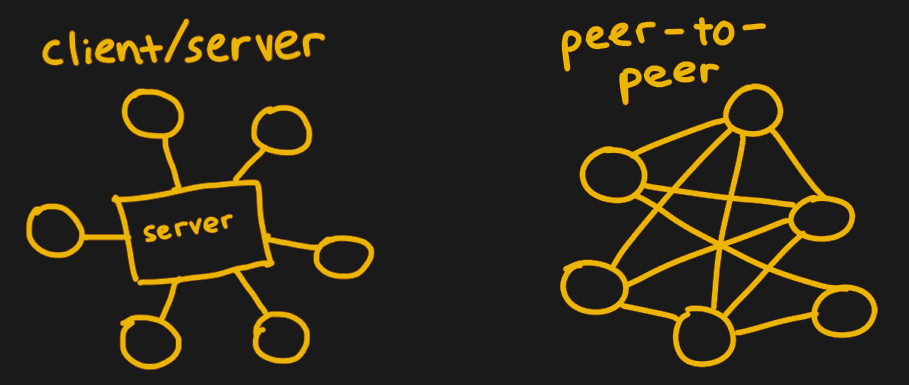
Client-server versus peer-to-peer architecture

The first step for a client is finding peers to download files from. Trackers, web servers running over HTTP, serve as centralized locations for introducing peers to one another. Due to the centralization, the servers are at risk of being discovered and shut down if they facilitate illegal content exchange. Thus, making peer discovery a distributed process is a necessity for preventing trackers from following in the footsteps of the now-defunct TorrentSpy, Popcorn Time, and KickassTorrents.

The client starts off by reading a .torrent file, which describes the contents of the desired file and how to connect to a tracker. The information in the file includes the URL of the tracker, the creation time, and SHA-1 hashes of each piece, or a chunk of the file. One file can be made up of thousands of pieces – the client will need to download the pieces from peers, check the hashes against the torrent file, and finally assemble the pieces together to finally retrieve the file. For the implementation, [Jesse] chose to keep the structures in the Go program reasonably flat, separating application structs from serialization structs. Pieces are also separated into slices of hashes to more easily access individual hashes.

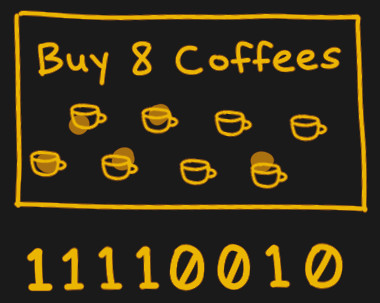
The bitfield explained as a coffee shop loyalty card.

Next, a GET request to an `announce` URL in the torrent file announces the presence of the client to peers and retrieves a response from the tracker with the list of peers. To start downloading pieces, the client starts a TCP connection with a peer, completes a two-way BitTorrent handshake, and exchanges messages to download pieces.

One interesting data structure exchanged in the messages is a bitfield, which acts as a byte array that checks which pieces a peer has. Bits are flipped when their respective piece’s status changes, acting somewhat like a loyalty card with stamps.

While talking to one peer may be straightforward, managing the concurrency of talking to multiple peers at once requires solving a classically Hard problem. [Jesse] implements this in Go by using channels as thread-safe queues, setting up two channels to assign work and collect downloaded pieces. Requests are later pipelined to increase throughput since network round-trips are expensive and sending blocks individually inefficient.

The full implementation is available on GitHub, and is easy enough to use as an alternative client or as a walkthrough if you’d prefer to build your own.

These Bit Twiddling Tricks Will Make Your Coworkers Hate You

In the embedded world, twiddling a few bits is expected behavior. Firmware is far enough down the stack that the author may care about the number of bits and bytes used, or needs to work with registers directly to make the machine dance. Usually these operations are confined to the typical shifting and masking but sometimes a problem calls for more exotic solutions. If you need to descend down these dark depths you invariably come across the classic Bit Twiddling Hacks collected by [Sean Eron Anderson]. Here be dragons.

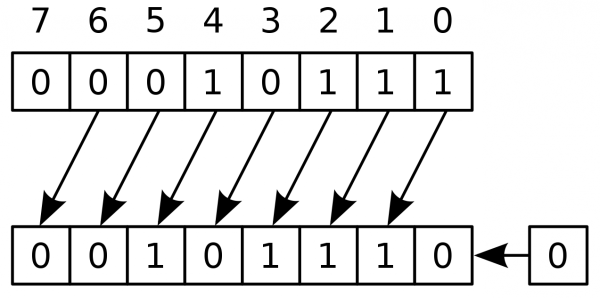
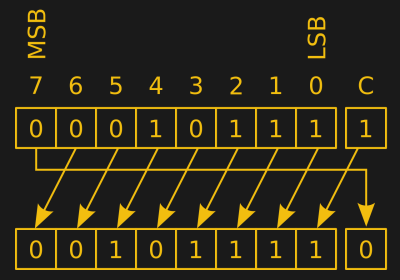
Discussions of bit math are great opportunities to revisit Wikipedia’s superb illustrations

Bit Twiddling Hacks is exactly as described; a page full of snippets and suggestions for how to perform all manner of bit math in convenient or efficient ways. To our surprise upon reading the disclaimer at the top of the page, [Sean] observes that so many people have used the contents of the page that it’s effectively all been thoroughly tested. Considering how esoteric some of the snippets are we’d love to know how the darkest corners found use.

The page contains a variety of nifty tricks. Interview content like counting set bits makes an early appearance.  There’s more esoteric content like this trick for interleaving the bits in two u16’s into a single u32, or rounding up to the next power of two by casting floats. This author has only been forced to turn to Bit Twiddling Hacks on one occasion: to sign extend the output from an unfortunately designed sensor with unusual length registers.

Next time you need to perform an operation with bitmatch, check out Bit Twiddling Hacks. Have you ever needed it in production? How did you use it? We’d love to hear about it in the comments.

Run Java On An Amiga

In the modern world, we take certain tools for granted. High-level programming languages such as C or Python haven’t been around that long in the grand scheme of things, and Java has only existed since the ’90s. Getting these tools working on machines that predate them is more of a challenge than anything, and [Michael Kohn] was more than willing to tackle this one. He recently got Java running on a Commodore Amiga.

The Amgia predates Java itself by almost a decade, so this process wasn’t exactly straightforward. The platform has a number of coprocessors that were novel for their time but aren’t as commonplace now, taking care of such tasks such as graphics, sound, and memory handling. Any psoftware running on the Amiga needs to be in a specially formatted program as well, so that needed to be taken care of, even loading Java on the computer in the first place took some special work using a null modem cable rather than the floppy disk an Amiga would have used back in the day.

Loading Java on an antique Amiga is certainly a badge of honor, but [Michael] isn’t a stranger to Java and the Motorola 68000s found in Amigas. There’s a 68000 in the Sega Genesis as well, and we’ve seen how [Michael] was able to run Java on that too.

Continue reading “Run Java On An Amiga”

3DBuzz Closes With A Final Gift

If you wanted to learn about creating modern computer games, 3DBuzz had some of the best tutorials around. In fact, some of the tutorials about C#, C++, Android, and math would be useful for anyone, while the ones about game art and modeling in Maya are probably mostly for game developers. While these were once available only by subscription, the company — now defunct — has left them available for download via this BitTorrent file.

We don’t know enough about things like Blender and Maya to evaluate the material, but it is well regarded and the ones we do know something about seem very high quality. There are, for example, many videos about C++ and C# that are very professional and cover quite a few topics.

Continue reading “3DBuzz Closes With A Final Gift”

Building A Low-Tech Website For Energy Efficiency

In an age of flashy jQuery scripts and bulky JavaScript front-end frameworks, loading a “lite” website is like a breath of fresh air. When most of us think of lightweight sites, though, our mind goes to old-style pure HTML and CSS sites or the intentionally barebones websites of developers and academics. Low-tech Magazine, an intentionally low-tech and solar-powered website, manages to incorporate both modern web aesthetics and low-tech efficiency in one go.

Rather than hosting the site on data centers – even those running on renewable power sources – they have a self-hosted site that is run on solar power, causing the site to occasionally go off-line. Their model contrasts with the cloud computing model, which allows more energy efficiency at the user-side while increasing energy expense at data centers. Each page on the blog declares the page size, with an average page weight of 0.77 MB, less than half of the average page size of the top 500,000 most popular blogs in June 2018.

Some of the major choices that have limited the size of the website include building a static site as opposed to a dynamic site, “dithering” images, sparing a logo, staying with default typefaces, and eliminating all third-party tracking, advertising services, and cookies. Their GitHub repository details the front-end decisions  including using unicode characters for the site’s logo rather than embedding an SVG. While the latter may be scalable and lightweight in format it requires distribution to the end-user, which can involve a zipped package with eps, ai, png, and jpeg files in order to ensure the user is able to load the image.

As for the image dithering, the technique allows the website to maintain its characteristic appearance while still minimizing image quality and size. Luckily for Low-tech Magazine, the theme of the magazine allows for black and white images, suitable for dithering. Image sprites are also helpful for minimizing server requests by combining multiple small images into one. Storage-wise, the combined image will take up less memory and only load once.

There are also a few extraneous features that emphasize the website’s infrastructure. The background color indicates the capacity of the solar-charged battery for the website’s server, while other stats about the server’s location (time, sky conditions, forecast) also help with making the website availability in the near future more visible. Who knows, with the greater conscience on environmental impact, this may be a new trend in web design.