Before the first atomic bomb was detonated, there were some fears that a fission bomb could “ignite the atmosphere.” Yes, if you’ve just watched Oppenheimer, read about the Manhattan Project, or looked into atomic weapons at all, you’ll be familiar with the concept. Physicists determined the risk was “near zero,” proceeded ahead with the Trinity test, and the world lived to see another day.
You might be wondering what this all means. How could the very air around us be set aflame, and how did physicists figure out it wasn’t a problem? Let’s explore the common misunderstandings around this concept, and the physical reactions at play.
Harry Daghlian and Louis Slotin were two of many people who worked on the Manhattan Project. They might not be household names, but we believe they are the poster children for safety procedures. And not in a good way.
Slotin assembled the core of the “Gadget” — the plutonium test device at the Trinity test in 1945. He was no stranger to working in a lab with nuclear materials. It stands to reason that if you are making something as dangerous as a nuclear bomb, it is probably hazardous work. But you probably get used to it, like some of us get used to working around high voltage or deadly chemicals.
Making nuclear material is hard and even more so back then. But the Project had made a third plutonium core — one was detonated at Trinity, the other over Nagasaki, and the final core was meant to go into a proposed second bomb that was not produced.
The cores were two hemispheres of plutonium and gallium. The gallium allowed the material to be hot-pressed into spherical shapes. Unlike the first two cores, however, the third one — one that would later earn the nickname “the demon core” — had a ring around the flat surfaces to contain nuclear flux during implosion. The spheres are not terribly dangerous unless they become supercritical, which would lead to a prompt critical event. Then, they would release large amounts of neutrons. The bombs, for example, would force the two halves together violently. You could also add more nuclear material or reflect neutrons back into the material.
Historians may note that World War II was the last great “movie war.” In those days, you could do many things that are impossible today, yet make for great movie drama. You can’t sneak a fleet of ships across the oceans anymore. Nor could you dig tunnels right under your captor’s nose. Another defining factor is that it doesn’t seem we seek out superweapons anymore.
A Churchill Bullshorn plough for clearning minefields — one of Hobart’s “Funnies”
Sure, we develop better planes, tanks, submarines, and guns. But we aren’t working on anything — that we know of — as revolutionary as a rocket, an atomic bomb, or even radar was back in the 1940s. The Germans worked on Wunderwaffe, including guided missiles, jets, suborbital rocket bombers, and a solar-powered space mirror to burn terrestrial targets. Everyone was working on a nuclear bomb, of course. The British had Hobart’s Funnies as well as less successful entries like the Panjandrum — a ten-foot rocket-driven wheel of explosives.
Death Ray
Perhaps the holy grail of all the super weapons — both realized and dreamed of was the “death ray.” Of course, Tesla claimed to have one that didn’t use rays, but particles, but no one ever successfully built one and there was debate if it would work. Tesla didn’t like the term death ray, partly because it wasn’t a ray at all, but also because it required a huge power plant and, therefore, wasn’t mobile. He envisioned it as a peacekeeping defensive weapon, rendering attacks so futile that no one would dare attempt them.
Among the daily churn of ‘Web 3.0’, blockchains and cryptocurrency messaging, there is generally very little that feels genuinely interesting or unique enough to pay attention to. The same was true for OpenAI CEO Sam Altman’s Ethereum blockchain-based Worldcoin when it was launched in 2021 while promising many of the same things as Bitcoin and others have for years. However, with the recent introduction of the World ID protocol by Tools for Humanity (TfH) – the company founded for Worldcoin by Mr. Altman – suddenly the interest of the general public was piqued.
Defined by TfH as a ‘privacy-first decentralized identity protocol’ World ID is supposed to be the end-all, be-all of authentication protocols. Part of it is an ominous-looking orb contraption that performs iris scans to enroll new participants. Not only do participants get ‘free’ Worldcoins if they sign up for a World ID enrollment this way, TfH also promises that this authentication protocol can uniquely identify any person without requiring them to submit any personal data, only requiring a scan of your irises.
Essentially, this would make World ID a unique ID for every person alive today and in the future, providing much more security while preventing identity theft. This naturally raises many questions about the feasibility of using iris recognition, as well as the potential for abuse and the impact of ocular surgery and diseases. Basically, can you reduce proof of personhood to an individual’s eyes, and should you?
The last time that a human set foot on the Moon, it was December 1972 — when the crew of the Apollo 17 mission spent a few days on the surface before returning to Earth. Since then only unmanned probes have either touched down on the lunar surface or entered orbit to take snapshots and perform measurements.
But after years of false starts, there are finally new plans on the table which would see humans return to the Moon. Not just to visit, but with the goal of establishing a permanent presence on the lunar surface. What exactly has changed that the world went from space fever in the 1960s to tepid interest in anything beyond LEO for the past fifty years, to the renewed interest today?
Part of the reason at least appears to be an increasing interest in mineable resources on the Moon, along with the potential of manufacturing in a low gravity environment, and as a jumping-off point for missions to planets beyond Earth, such as Mars and Venus. Even with 1960s technology, the Moon is after all only a few days away from launch to landing, and we know that the lunar surface is rich in silicon dioxide, aluminium oxide as well as other metals and significant amounts of helium-3, enabling in-situ resource utilization.
Current and upcoming Moon missions focus on exploring the lunar south pole in particular, with frozen water presumed to exist in deep craters at both poles. All of which raises the question of we may truly see lunar-based colonies and factories pop up on the Moon this time, or are we merely seeing a repeat of last century?
Once a month or so, I have the privilege of sitting down with Editor-in-Chief Elliot Williams to record the Hackaday Podcast. It’s a lot of fun spending a couple of hours geeking out together, and we invariably go off on ridiculous tangents with no chance of making the final cut, except perhaps as fodder for the intro and outro. It’s a lot of work, especially for Elliot, who has to edit the raw recordings, but it’s also a lot of fun.
Of course, we do the whole thing virtually, and we have a little ritual that we do at the start: the clapping. We take turns clapping our hands into our microphones three times, with the person on the other end of the line doing a clap of his own synchronized with the final clap. That gives Elliot an idea of how much lag there is on the line, which allows him to synchronize the two recordings. With him being in Germany and me in Idaho, the lag is pretty noticeable, at least a second or two.
Every time we perform this ritual, I can’t help but wonder about all the gear that makes it possible, including the fiber optic cables running beneath the Atlantic Ocean. Undersea communications cable stitch the world together, carrying more than 99% of transcontinental internet traffic. They’re full of fascinating engineering, but for my money, the inline optical repeaters that boost the signals along the way are the most interesting bits, even though — or perhaps especially because — they’re hidden away at the bottom of the sea.
In the long ago times, when phones still flipped and modems sang proudly the songs of their people, I sent away for a set of Slackware CDs and embarked on a most remarkable journey. Back then, running Linux (especially on the desktop) was not a task to be taken lightly. The kernel itself was still in considerable flux — instead of changing some obscure subsystem or adding support for a niche gadget you don’t even own, new releases were unlocking critical capabilities and whole categories of peripherals. I still remember deciding if I wanted to play it safe and stick with my current kernel, or take a chance on compiling the latest version to check out this new “USB Mass Storage” thing everyone on the forums was talking about…
But modern desktop Linux has reached an incredible level of majority, and is now a viable choice for a great number of computer users. In fact, if you add Android and Chrome OS into the mix, there are millions and millions of people who are using Linux on daily basis and don’t even realize it. These days, the only way to experience that sense of adventure and wonderment that once came pre-loaded with a Linux box is to go out and seek it.
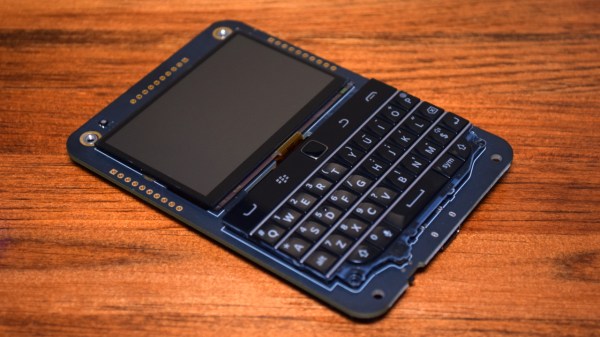
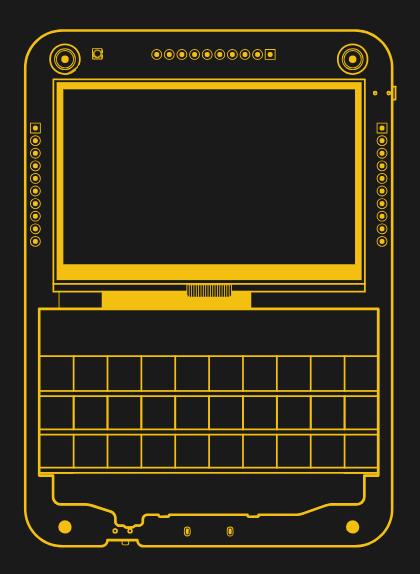
Which is precisely how it feels using using the Beepy from SQFMI. The handheld device, which was formerly known as the Beepberry before its creators received an all-too-predicable formal complaint, is unabashedly designed for Linux nerds. Over the last couple of weeks playing with this first-run hardware, I’ve been compiling kernel drivers, writing custom scripts, and trying (though not always successfully) to get new software installed on it. If you’re into hacking around on Linux, it’s an absolute blast.
There’s a good chance that you already know if the Beepy is for you or not, but if you’re still on the fence, hopefully this in-depth look at the hardware and current state of the overall project can help you decide before SQFMI officially starts taking new orders for the $79 gadget.