Hackaday Podcast 196: Flexing Hard PCBs, Dangers Of White Filament, And The Jetsons’ Kitchen Computer

This week, Editor-in-Chief Elliot Williams and Managing Editor Tom Nardi start the Hackaday Podcast by talking about another podcast that’s talking about…Hackaday. Or more accurately, the recent Hackaday Supercon. After confirming the public’s adoration, conversation moves on to designing flexible PCBs with code, adding a rotary dial to your mechanical keyboard, and a simulator that lets you visualize an extinction-level event. We’ll wrap things up by playing the world’s smallest violin for mildly inconvenienced closed source software developers, and wonder how the world might have been different if the lady of the house had learned to read binary back in 1969.

Check out the links below if you want to follow along, and as always, tell us what you think about this episode in the comments!

Download the podcast and play it on your Palm Pilot!

Continue reading “Hackaday Podcast 196: Flexing Hard PCBs, Dangers Of White Filament, And The Jetsons’ Kitchen Computer”

Build A Better Mousetrap… But It Better Be Better!

As creative problem solvers, we like to “think outside the box,” and we should strive for that. But what happens if your strange idea isn’t kept in check by cooler heads? There is a real danger — especially if you work alone — to falling so in love with your idea, that you lose sight of what it really means to be better.

Case in point. The self-parking car. Well, not the modern variant, which seems to work pretty well. But did you know that the self-parking car was invented in the 1930s and used an extra fifth wheel? Hard to imagine? See the video below. History tells us that the idea didn’t catch on.

Continue reading “Build A Better Mousetrap… But It Better Be Better!”

Singapore Branches Out Into Internet Of Trees

Five years ago, a 38-year-old woman was enjoying an outdoor concert with her family with one of her twin infants in her arms. In the week prior, it had been windy and rainy, but today, the weather was nice, and the concert was crowded. Without warning, a 270-year-old tembusu tree fell on the woman, pinning and ultimately killing her after the other concertgoers couldn’t remove it in time. This tragedy happened in spite of twice-yearly inspections where the tree showed no visual signs of trouble.

It’s exactly this type of incident that Singaporean officials hope to avoid by building an Internet of Trees. The equatorial island nation is home to roughly 5.5 million people, and around 7 million trees — about 6 million of which are tracked by Singapore’s National Parks Board, so that they can be managed remotely with an app. (The Board only tracks trees once they’ve reached a certain size, so we’ll assume that the other million are too young to join the fun just yet.)

While tree-triggered deaths are fairly few and far between, there are plenty of other ‘tree incidents’ that can occur, such as a branch falling, or a tree trunk snapping or uprooting. Depending on the size of the branch, this can be a dangerous nuisance as it could block roads, obscure signage, or destroy property. Thanks to the efforts of the National Parks Board, these incidents have dropped from around 3,000 per year at the turn of the millennium to under 500 per year today.

Continue reading “Singapore Branches Out Into Internet Of Trees”

Love AI, But Don’t Love It Too Much

The up-and-coming Wonder of the World in software and  information circles , and particularly in those circles who talk about them, is AI. Give a magic machine a lot of stuff, ask it a question, and it will give you a meaningful and useful answer. It will create art, write books, compose music, and generally Change The World As We Know It. All this is genuinely impressive stuff, as anyone who has played with DALL-E will tell you. But it’s important to think about what the technology can and can’t do that’s new so as to not become caught up in the hype, and in doing that I’m immediately drawn to a previous career of mine. Continue reading “Love AI, But Don’t Love It Too Much”

Review: Inkplate 2 Shrinks Down, Adds Color

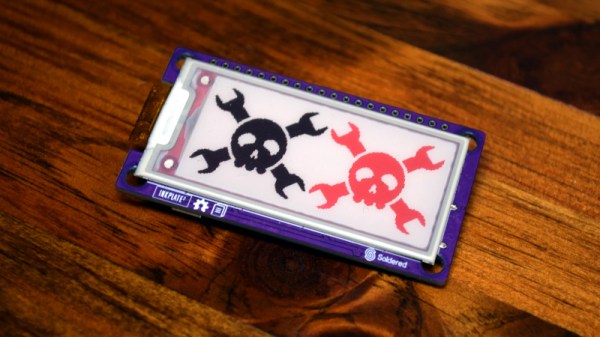
Regular Hackaday readers may recall the Inkplate family of devices: open source all-in-one development boards that combine the power and versatility of the ESP32 with electronic paper displays salvaged from commercial e-readers. By taking the sharp, high-speed, displays intended for readers such as Amazon’s Kindle and bundling it together with all the hardware and software you need to make it work, the Inkplate provided a turn-key platform for anyone looking to get serious with e-paper.

Given the fact that their screens were pulled from recycled readers, it’s no surprise the previous Inkplate entries came in familiar 6 and 10 inch variants. There was even an upgraded 6 inch model that benefited from newer reader technology by adopting a touch-sensitive backlit panel, which we took a close look at last year. Their large displays make them excellent for wall mounted applications, such as a household notification center or constantly-changing art display. Plus, as you might expect, the Inkplate is an ideal choice for anyone looking to roll their own custom e-reader.

But of course, not every application needs so much screen real estate. In fact, for some tasks, such a large display could be considered a liability. Seeing a void in their existing product lineup, the folks at Soldered Electronics (previously e-radionica) have recently unveiled the diminutive Inkplate 2. This new miniature Inkplate uses the same software library as its larger predecessors, but thanks to its 2.13 inch three-color display, lends itself to a wider array of potential projects. Plus it’s considerably cheaper than the larger Inkplate models, at just $35 USD.

Considering the crowd sourced funding campaign for the Inkplate 2 blew past its goal in just 72 hours, it seems clear there’s plenty of interest in this new smaller model. But if you’re still not sure if it’s the e-paper solution you’ve been waiting for, maybe we can help — the folks at Soldered sent along a pre-production version of the Inkplate 2 for us to play around with, so let’s take it for a test drive and see what all the fuss is about.

Continue reading “Review: Inkplate 2 Shrinks Down, Adds Color”

All About USB-C: Introduction For Hackers

We’ve now had at least five years of USB-C ports in our devices. It’s a standard that many manufacturers and hackers can get behind. Initially, there was plenty of confusion about what we’d actually encounter out there, and manufacturer-induced aberrations have put some people off. However, USB-C is here to stay, and I’d like to show you how USB-C actually gets used out there, what you can expect out of it as a power user, and what you can get out of it as a hobbyist.

Modern devices have a set of common needs – they need a power input, or a power output, sometimes both, typically a USB2 connection, and often some higher-speed connectivity like a display output/input or USB 3. USB-C is an interface that aims to be able to take care of all of those. Everything aforementioned is optional, which is a blessing and a curse, but you can quickly learn to distinguish what to expect out of a device based on how it looks; if ever in doubt, I’d like to show you how to check.

Continue reading “All About USB-C: Introduction For Hackers”

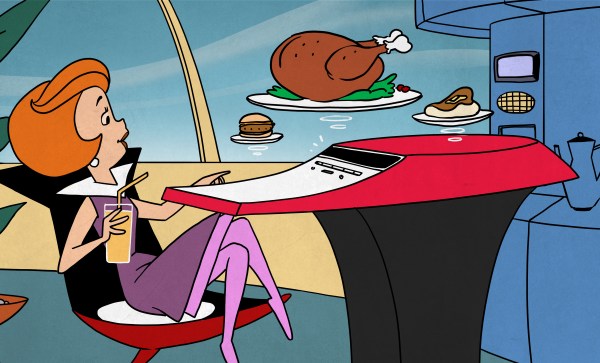
Gift Idea From 1969: A Kitchen Computer

The end of the year is often a time for people to exchange presents and — of course — the rich want to buy each other the best presents. The Neiman Marcus company was famous for having a catalog of gift ideas. Many were what you’d consider normal gifts, but there were usually extreme ones, like a tank trunk filled with 100,000 gallons of cologne. One year, the strange gift was an authentic Chinese junk complete with sails and teak decks. They apparently sold three at $11,500 (in 1962 money, no less). Over the top? In 1969, they featured a kitchen computer.

Wait a minute! In 1969, computers were the purview of big companies, universities, and NASA, right? Well, not really. By that time, some industrial minicomputers were not millions of dollars but were still many thousands of dollars. The price in the catalog for the kitchen computer was $10,600. That’s about $86,000 in today’s money. The actual machine was a Honeywell 316, based on one of the computers that helped run the early Internet.

Continue reading “Gift Idea From 1969: A Kitchen Computer”