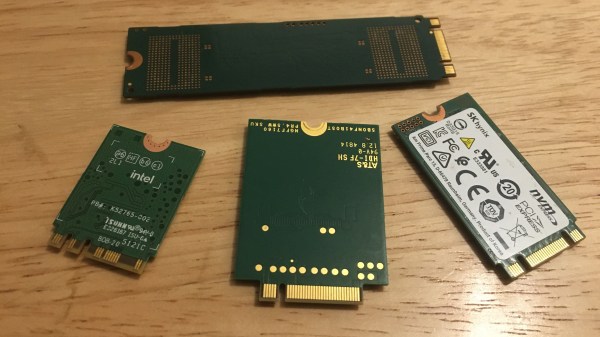
Four M.2 cards of different sizes on a desk surface

M.2 For Hackers – Cards

Last time, I’ve explained everything you could want to know if you wanted to put an M.2 socket onto your board. Today, let’s build M.2 cards! There’s a myriad of M.2 sockets out there that are just asking for a special card to be inserted into it, and perhaps, it’s going to be your creation that fits.

Why Build Cards?

Laptops and other x86 mainboards often come with M.2 slots. Do you have a free B-key slot? You can put a RP2040 and bunch of sensors on a B-key PCB as an experimental platform carried safely inside your laptop. Would you like to do some more advanced FPGA experiments? Here’s a miniscule FPGA board that fits inside your laptop and lets you play with PCIe on this same laptop – the entire setup having a super low footprint. Are you looking for an extra PCIe link because you’re reusing your laptop as a home server? Again, your WiFi slot will provide you with that. Want to get some PCIe out of a SteamDeck? Building a M-key 2230 card seems to be your only hope! Continue reading “M.2 For Hackers – Cards” →

Dosimetry: Measuring Radiation

Thanks to stints as an X-ray technician in my early 20s followed by work in various biology labs into my early 40s, I’ve been classified as an “occupationally exposed worker” with regard to ionizing radiation for a lot of my life. And while the jobs I’ve done under that umbrella have been vastly different, they’ve all had some common ground. One is the required annual radiation safety training classes. Since the physics never changed and the regulations rarely did, these sessions would inevitably bore everyone to tears, which was a pity because it always felt like something I should be paying very close attention to, like the safety briefings flight attendants give but everyone ignores.

The other thing in common was the need to keep track of how much radiation my colleagues and I were exposed to. Aside from the obvious health and safety implications for us personally, there were legal and regulatory considerations for the various institutions involved, which explained the ritual of finding your name on a printout and signing off on the dose measured by your dosimeter for the month.

Dosimetry has come a long way since I was actively considered occupationally exposed, and even further from the times when very little was known about the effects of radiation on living tissue. What the early pioneers of radiochemistry learned about the dangers of exposure was hard-won indeed, but gave us the insights needed to develop dosimetric methods and tools that make working with radiation far safer than it ever was.

Continue reading “Dosimetry: Measuring Radiation” →

Hackaday Links Column Banner

Hackaday Links: November 6, 2022

Remember the chip shortage? We sure do, mainly because as far as we can tell, it’s still going on, at least judging by the fact that you can’t get a Raspberry Pi for love or money. But that must just be noise, because according to a report in the Straits Times, the chip shortage is not only over, it’s reversed course enough that there’s now a glut of semiconductors out there. The article claims that the root cause of this is slowing demand for products like smartphones, an industry that’s seeing wave after wave of orders to semiconductor manufacturers like TSMC canceled. Chips for PCs are apparently in abundance now too, as the spasm of panic buying machine for remote working during the pandemic winds down. Automakers are still feeling the pinch, though, so much so that Toyota is now shipping only one smart key with new cars, instead of the usual two. So there seems to be some way to go before balance is restored to the market, but whatever — just call us when Amazon no longer has to offer financing on an 8 GB Pi.

Continue reading “Hackaday Links: November 6, 2022” →

This Week In Security: OpenSSL Fizzle, Java XML, And Nothing As It Seems

The security world held our collective breaths early this week for the big OpenSSL vulnerability announcement. Turns out it’s two separate issues, both related to punycode handling, and they’ve been downgraded to high severity instead of critical. Punycode, by the way, is the system for using non-ASCII Unicode characters in domain names. The first vulnerability, CVE-2022-3602, is a buffer overflow that writes four arbitrary bytes to the stack. Notably, the vulnerable code is only run after a certificate’s chain is verified. A malicious certificate would need to be either properly signed by a Certificate Authority, or manually trusted without a valid signature.

A couple sources have worked out the details of this vulnerability. It’s an off-by-one error in a loop, where the buffer length is checked earlier in the loop than the length variable is incremented. Because of the logic slip, the loop can potentially run one too many times. That loop processes the Unicode characters, encoded at the end of the punycode string, and injects them in the proper place, sliding the rest of the string over a byte in memory as a result. If the total output length is 513 characters, that’s a single character overflow. A Unicode character takes up four bytes, so there’s your four-byte overflow. Continue reading “This Week In Security: OpenSSL Fizzle, Java XML, And Nothing As It Seems” →

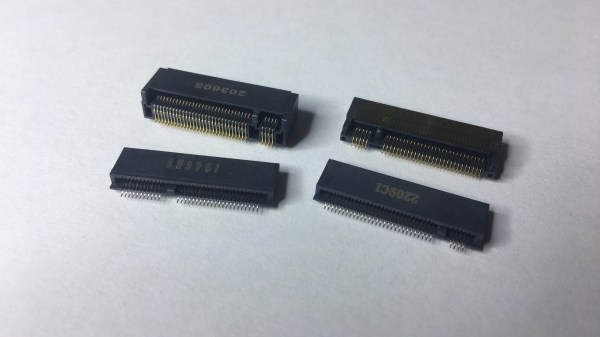
M.2 For Hackers – Connectors

In the first M.2 article, I’ve described real-world types and usecases of M.2 devices, so that you don’t get confused when dealing with various cards and ports available out there. I’ve also designed quite a few M.2 cards and card-accepting adapters myself. And today, I’d like to tell you everything you need to know in order to build M.2 tech on your own.

There’s two sides to building with M.2 – adding M.2 sockets onto your PCBs, and building the PCBs that are M.2 cards. I’ll cover both of these, starting with the former, and knowing how to deal with M.2 sockets might be the only thing you ever need. Apart from what I’ll be describing, there’s some decent guides you can learn bits and pieces from, like the Sparkfun MicroMod design guide, most of which is MicroMod-specific but includes quite a few M.2 tips and tricks too.

First, Let’s Talk About The Y-Key

What could you do with a M.2 socket on your PCB? For a start, many tasty hobbyist-friendly SoMs and CPUs now have a PCIe interface accessible, and if you’re building a development board or a simple breakout, an M.2 socket will let you connect an NVMe SSD for all your high-speed low-power storage needs – many Raspberry Pi Compute Module mainboards have M.2 M-key sockets specifically for that, and there’s NVMe support in the RPi firmware to boot. Plus, you can always plug a full-sized PCIe adapter or an extender into such a socket and connect a PCIe network card or other much-needed device – even perhaps, an external GPU! However, as much as PCIe-equipped SoMs are tasty, they’re far from the only reason to use M.2 sockets.

Continue reading “M.2 For Hackers – Connectors” →

MoCA Networking Is A Niche Solution For Coax Lovers

When it comes to networking these days, the vast majority of our devices are connected wirelessly. Beyond that, we’re all familiar with the Cat 5 and Cat 6 cables that form the high-capacity Ethernet networks in our homes, schools, and offices.

It’s only if you go back to the very dawn of Ethernet that coaxial cables are relevant… right? Wrong! MoCA networking is all about coaxial cables, designed to hook up devices over cable TV infrastructure!

Continue reading “MoCA Networking Is A Niche Solution For Coax Lovers” →

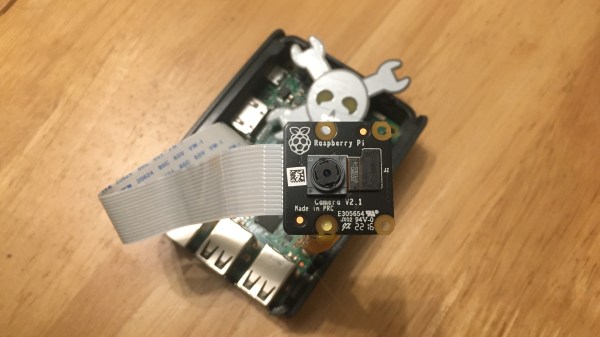
A Raspberry Pi 3 with a black Raspberry Pi Camera PCB on top of it, looking at the camera taking this picture. There's a Jolly Wrencher in the background.

Make Your Pi Moonlight As A Security Camera

A decade ago, I was learning Linux through building projects for my own needs. One of the projects was a DIY CCTV system based on a Linux box – specifically, a user-friendly all-in-one package for someone willing to pay for it. I stumbled upon Zoneminder, and those in the know, already can tell what happened – I’ll put it this way, I spent days trying to make it work, and my Linux skills at the time were not nearly enough. Cool software like Motion was available back then, but I wasn’t up to the task of rolling an entire system around it. That said, it wouldn’t be impossible, now, would it?

Five years later, I joined a hackerspace, and eventually found out that its CCTV cameras, while being quite visually prominent, stopped functioning a long time ago. At that point, I was in a position to do something about it, and I built an entire CCTV network around a software package called MotionEye. There’s a lot of value in having working CCTV cameras at a hackerspace – not only does a functioning system solve the “who made the mess that nobody admits to” problem, over the years it also helped us with things like locating safety interlock keys to a lasercutter that were removed during a reorganization, with their temporary location promptly forgotten.

Being able to use MotionEye to quickly create security cameras became quite handy very soon – when I needed it, I could make a simple camera to monitor my bicycle, verify that my neighbours didn’t forget to feed my pets as promised while I was away, and in a certain situation, I could even ensure mine and others’ physical safety with its help. How do you build a useful always-recording camera network in your house, hackerspace or other property? Here’s a simple and powerful software package I’d like to show you today, and it’s called MotionEye.

Continue reading “Make Your Pi Moonlight As A Security Camera” →