But Does It Run TOOM?

id Software’s iconic 1993 first-person shooter game Doom was the game to play on your 486 (or fast 386) and was for many their first introduction to immersive 3D environments in gaming. Its eventual release as open-source gave it a new life, and now it’s a rite of passage for newly-reverse-engineered devices: Will it run Doom?

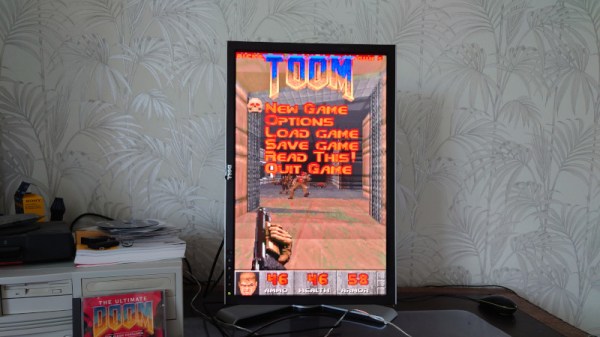
One type of platform that never ran Doom though was the classic arcade cabinet with its portrait-aligned screen. This is something [Matt Phillips] has addressed with Toom, a PC Doom port that — finally — runs on a portrait screen.

To enter the world of a UAC space marine in glorious portrait mode, simply take an installation of Doom 1.9 for DOS, and copy the Toom files from the GitHub repository over the top of it. The minimum spec is a 486 so period hardware will be fine, all you’ll need is a monitor that can be tipped on its side.

Doom consumed far too many hours for gamers of a certain age, and while it may look quaint to modern eyes it can’t be overstated what a giant step it was compared to what had gone before. If any of you install Toom and give it a go, prepare to see its monsters when you close your eyes.

We’ve shown you Doom on all sorts of devices over the years, perhaps the most intriguing is a no-software version in FPGA hardware.

Internet Chess On A Real Chessboard

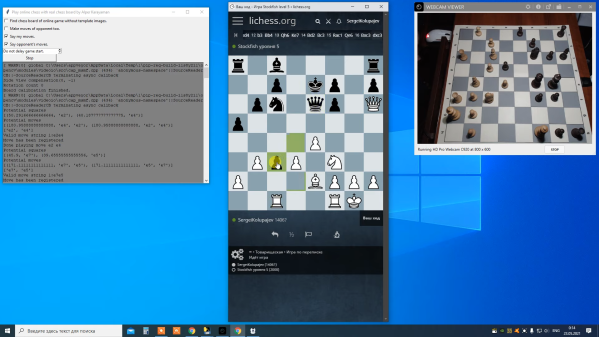
The Internet teaches us that we can accept stand-ins for the real world. We have an avatar that looks like us. We have virtual mailboxes to read messages out of make-believe envelopes. If you want to play chess, you can play with anyone in the world, but on a virtual board. Or, you can use [karayaman’s] software to play virtual games on real boards.

The Python program uses a webcam. You point it at an empty board and calibrate. After that, the program will track your moves on the real board in the online world. You can see a video of a test game below.

Continue reading “Internet Chess On A Real Chessboard”

Modifying A SNES Rom To Be Widescreen

Turning a game like Super Mario World for SNES into a widescreen game is not a small task, but [Vitor Vilela] accomplished just that. [Vitor] has a long list of incredible patches such as optimizing code for better frame rates and adding code to take advantage of the SA-1 accelerator chip, so out of anyone he has the know-how to pull a widescreen mod off. This patch represents a true labor of love as many levels were designed with a specific screen width in mind. [Vitor] went through each of these single-screen width levels and expanded them by writing the extra assembly needed.

On a technical level, this hack was achieved by using the panning feature built into the game. The left and right shoulder buttons allowed a player to pan the camera to the left and right. The viewport is considered to be two times the screen resolution and so items will be rendered within the widescreen resolution. By taking away the panning feature and render a larger section of the viewport to the screen, you get a widescreen view. However, to save cycles, enemies and items don’t start moving until they get close to the screen edge. So how do you make a game widescreen without ruining the timing of every enemy that spawns? Suddenly the hours of muscle memory that fans have drilled in over the years is a disadvantage rather than a strength. The answer is a significant time investment and an eye for detail.

All the code is available on GitHub. A video of a playthrough of the mod is after the break.

Continue reading “Modifying A SNES Rom To Be Widescreen”

A Smart Light Bulb Running Doom Is A Pretty Bright Idea

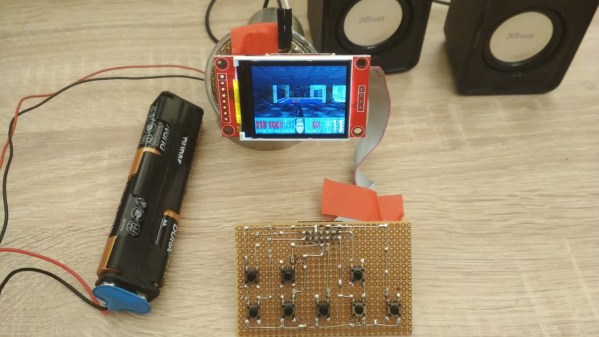
A light bulb might seem like an unlikely platform for gaming, but we’re living in the future now, so anything is possible. And with enough know-how, it turns out that an RGB light bulb can indeed be modified to run Doom.

[Ed note: The project pages and video got pulled right when this went to press. Nicola received a takedown notice.  We’ll let you know more when we do. The main link has been updated to the Wayback Machine.]

That’s not to say that the Ikea TRÅDFRI light bulb is the only thing [Nicola Wrachien] needed to accomplish the hack. But the bulb, specifically this addressable GU10 RGB LEB bulb, donated the most critical component, a Silicon Labs MGM210L wireless microcontroller, with enough processing power to run vanilla Doom. Added to the microcontroller was a TFT display, a controller made from a handful of buttons and a shift register, and a few odds and ends to stitch it all together. Some more memory was needed, though, so [Nicola] used an 8 MB QSPI flash memory and a couple of neat tricks to reduce latency and improve bandwidth. There are a lot of neat tricks with this one, but the coolest thing might just be that the whole footprint of the build isn’t that much bigger than the original bulb. Check out the surprisingly smooth gameplay in the video below.

This is a nice addition to the seemingly neverending “Will it Doom?” series. We’ve seen the classic game ported to everything from a GPS to a kitchen “bump bar” computer and even to an oscilloscope.

Continue reading “A Smart Light Bulb Running Doom Is A Pretty Bright Idea”

An Emulator That Only Plays One Game

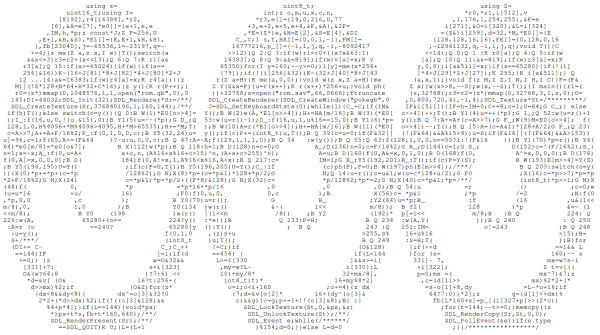
[Ben Smith] had previously implemented a GameBoy Color emulator but decided to make a new emulator that to play just one game called pokegb. The game is, of course, the popular blue edition of Pokemon. While this emulator could play other GameBoy games, the way it was implemented was to support only the opcodes and features that Pokemon Blue used. What’s perhaps even more amazing is that this full emulator is just 582 lines of C++ (using SDL for graphics and input). There is also an obfuscated version that comes in at just 68 lines and in the shape of three Pokeballs. All the code for pokegb can be found on GitHub.

[Ben] goes through a detailed listing of each opcode of the processor, memory, the graphics unit (PPU), and how it interacts with a modern operating system. We love the idea of implementing each opcode one by one and gradually seeing the emulator make it farther and farther through the ROM. The only feature that’s noticeably absent is sound, which would require a significant amount of code to emulate properly.

If you’re interested in a deep dive into the audio chips inside a Gameboy Color, [Ken Shirriff] has already done the research for you.

Portable, Digital Scoreboard Goes Anywhere

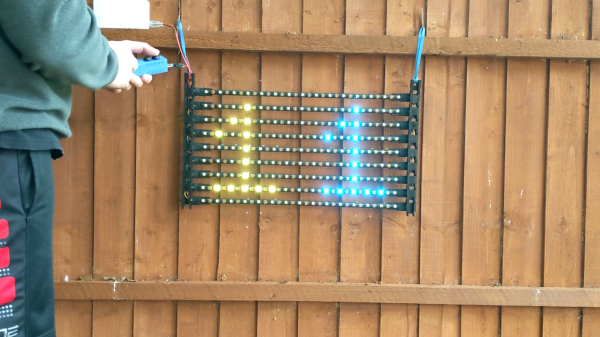
It’s that time of year in both hemispheres — time to get outside and play before it gets unbearably hot (or cold). No matter what your game, don’t keep score in your head or with piles of rocks — make yourself a portable, fold-able scoreboard like [LordGuilly] did and be on the bleeding edge of display technology. It’s really more roll-able than fold-able, which is awesome because you get to unfurl it like a boss.

All you need is a place to hang it up and you’re good to go. This thing runs on a beefy 10,000 mAH USB power bank, and [LordGuilly] says that it’s easy to read even on really sunny days. As you may have guessed, those are WS2812 strips and they are set into rectangular PVC bars. The bars are set equidistant from each other in a frame made from modified version of cable tracks — plastic chain links for cable management.

Good looks aside, we especially like that there are two controller options here. If you want to assign a dedicated scorekeeper, there’s a handled version that uses an STM32 blue pill and is wired to the display. But if you’re short on people, use the ESP8266 version and update the score with the accompanying app. Check out the demo after the break so you can see it in action.

We’ve seen a few scoreboards over the years, including this beauty that’s meant for indoor games.

Continue reading “Portable, Digital Scoreboard Goes Anywhere”

Dreamcast Homebrew Gets Boost From SD Card Cache

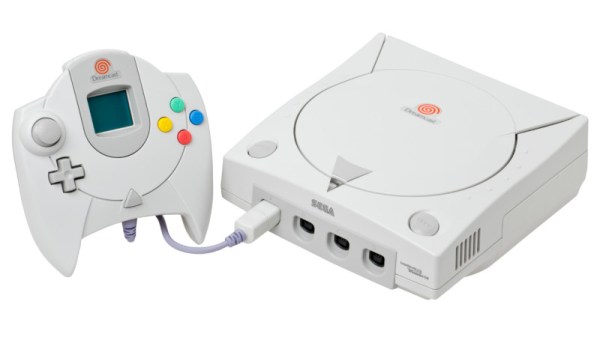
While it might have been a commercial failure compared to contemporary consoles, the Sega Dreamcast still enjoys an active homebrew scene more than twenty years after its release. Partly it’s due to the fact that you can burn playable Dreamcast discs on standard CD-Rs, but fans of the system will also point out that the machine was clearly ahead of its time in many respects, affording it a bit of extra goodwill in the community.

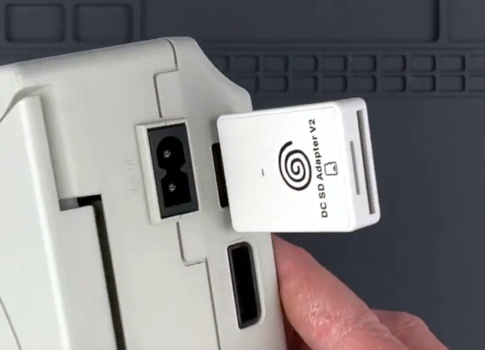
That same community happens to be buzzing right now with news that well-known Dreamcast hacker [Ian Micheal] has figured out how to cache data to an SD card via the console’s serial port. At roughly 600 KB/s the interface is too slow to use it as swap space for expanding the system’s paltry 16 MB of memory, but it’s more than fast enough to load game assets which otherwise would have had to be loaded into RAM.

A third-party Dreamcast SD adapter.

In the video below, [Ian] shows off his new technique with a port of DOOM running at 640×480. He’s already seeing an improvement to framerates, and thinks further optimizations should allow for a solid 30 FPS, but that’s not really the most exciting part. With the ability to load an essentially unlimited amount of data from the SD card while the game is running, this opens the possibility of running mods which wouldn’t have been possible otherwise. It should also allow for niceties like saving screenshots or game progress to the SD card for easy retrieval.

[Ian] says he’ll be bringing the same technique to his Dreamcast ports of Quake and Hexen in the near future, and plans on posting some code to GitHub that demonstrates reading and writing to FAT32 cards so other developers can get in on the fun. The downside is that you obviously need to have an SD card adapter plugged into your console to make use of this technique, which not everyone will have. Luckily they’re fairly cheap right now, but we wouldn’t be surprised if the prices start climbing. If you don’t have one already, now’s probably the time to get one.

To be clear, this technique is completely separate from replacing the Dreamcast’s optical drive with an SD card, which itself is a very popular modification that’s helped keep Sega’s last home console kicking far longer than anyone could have imagined.

Continue reading “Dreamcast Homebrew Gets Boost From SD Card Cache”