Friday Hack Chat: Breaking Security With Samy Kamkar

[Samy Kamkar] is a hardware hacker extraordinaire. This week, he’s joining us on Hackaday.io for this week’s Hack Chat.

Every week, we find someone interesting that makes or breaks the electronic paraphernalia all around us. We sit them down, and get them to spill the beans on how this stuff works, and how we can get our tools and toys to work for everyone. This is the Hack Chat, and it’s happening this Friday, April 7, at noon PDT (20:0 UTC).

Over the years, [Samy] has demonstrated some incredible skills and brought us some incredible hacks. He defeated chip and pin security on a debit card with a coil of wire, exploited locked computers with a USB gadget, and has more skills than the entire DEF CON CFP review board combined. If you want to know about security, [Samy] is the guy you want to talk to.

Here’s How To Take Part:

join-hack-chatOur Hack Chats are live community events on the Hackaday.io Hack Chat group messaging.

Log into Hackaday.io, visit that page, and look for the ‘Join this Project’ Button. Once you’re part of the project, the button will change to ‘Team Messaging’, which takes you directly to the Hack Chat.

You don’t have to wait until Friday; join whenever you want and you can see what the community is talking about.

Upcoming Hack Chats

We’ve got a lot on the table when it comes to our Hack Chats. On April 14th we’ll be talking custom silicon with SiFive and on April 21st, we’re going to be talking magnets with Nanomagnetics. Making magnets, collecting magnets, playing with magnets, it’ll all be over on the Hack Chat.

Introducing The MENSCH Microcomputer

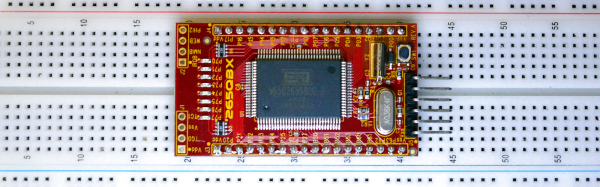
A few weeks ago, I was browsing Tindie on one of my daily trawls for something interesting to write about. I came across something I hadn’t seen before. The Mensch Microcomputer is a product from Western Design Center (WDC) that puts a microcontroller based on the 65xx core on a small breakout board.

I’ve played around with some of WDC’s tools and toys before, back when the sent me a few dev boards to review. They’re cool, and I have considered building a little breakout board for this weird cross between a microcontroller and a system on a chip. Life gets in the way, and that project sat on the shelf. The Mensch, however, was cheap and well into impulse purchase territory. After buying one, one of the VPs at WDC asked if I’d be interested in doing another review on their latest bit of hardware. Sure. I got this.

Continue reading “Introducing The MENSCH Microcomputer”

The Shocking Truth About Transformerless Power Supplies

Transformerless power supplies are showing up a lot here on Hackaday, especially in inexpensive products where the cost of a transformer would add significantly to the BOM. But transformerless power supplies are a double-edged sword. That title? Not clickbait. Poking around in a transformerless-powered device can turn your oscilloscope into a smoking pile or get you electrocuted if you don’t understand them and take proper safety precautions.

But this isn’t a scare piece. Transformerless designs are great in their proper place, and you’re probably going to encounter one someday because they’re in everything from LED lightbulbs to IoT WiFi switches. We’re going to look at how they work, and how to design and work on them safely, because you never know when you might want to hack on one.

Here’s the punchline: transformerless power supplies are safely useable only in situations where the entire device can be enclosed and nobody can accidentally come in contact with any part of it. That means no physical electrical connections in or out — RF and IR are fair game. And when you work with one, you have to know that any part of the circuit can be at mains voltage. Now read on to see why!

Continue reading “The Shocking Truth About Transformerless Power Supplies”

LEGO Liquid Handler And Big Biology

A career as a lab biologist can take many forms, but the general public seems to see it as a lone, lab-coated researcher sitting at a bench, setting up a series of in vitro experiments by hand in small tubes or streaking out a little yeast on an agar plate. That’s not inaccurate at all – all of us lab rats have done time with a manual pipettor while trying to keep track of which tube in the ice bucket gets which solution. It’s tedious stuff.

But because biology experiments generally scale well, and because more data often leads to better conclusions, life science processes can quickly grow beyond what can be handled manually. I’ve seen this time and again in my 25 years in science, from my crude grad school attempts to miniaturize my assays and automate data collection to the multi-million dollar robotic systems I built in my career in the pharmaceutical industry. Biology can get pretty big in a hurry. Continue reading “LEGO Liquid Handler And Big Biology”

Hackaday Links: April 2, 2017

Toorcamp registration is open. It’s June 20-24th on Orcas Island, Washington.

Hey, you. The guy still using Mentor Graphics. Yeah, you. Siemens has acquired Mentor Graphics.

CNC knitting machines are incredibly complicated but exceptionally cool. Until now, most CNC knitting machines are actually conversions of commercial machines. Beginning with [Travis Goodspeed] and  [Fabienne Serriere] hack of a knitting machine, [Becky Stern]’s efforts, and the Knitic project, these knitting machines are really just brain transplants of old Brother knitting machines. A few of the folks from the OpenKnit project have been working to change this, and now they’re ready for production. Kniterate is a project on Kickstarter that’s a modern knitting machine, and basically a 2D woolen printer. This is an expensive machine at about $4500, but if you’ve ever seen the inside of one of these knitting machines, you’ll know building one of these things from scratch is challenging.

There was a time when a Macintosh computer could play games. Yes, I know this sounds bizarre, but you could play SimCity 2000, Diablo, and LucasArts adventure games on a machine coming out of Cupertino. [Novaspirit] wanted to relive his childhood, so he set up a Mac OS 7 emulator on a Raspberry Pi. He’s using Minivmac, beginning with an install of OS 7.1, upgrading that to 7.5.3, then upgrading that to 7.5.5. It should be noted the utility of the upgrade to 7.5.5 is questionable — the only real changes from 7.5.3  to 7.5.5 are improved virtual memory support (just change some emulator settings to get around that) and networking support (which is difficult on an emulator). If you’re going to upgrade to 7.5.5, just upgrade to 8.1 instead.

It’s getting warmer in the northern hemisphere, and you know what that means: people building swamp coolers. And you know what that means: people arguing about the thermodynamics of swamp coolers. We love these builds, so if you have a swamp cooler send it on in to the tip line.

The Prusa edition of Slic3r is out. The improvements? It’s not a single core app anymore (!), so slicing is faster. It’s got that neat variable layer slicing. Check out all the features.

It takes at least a week to delete your Facebook account. In the meantime, you can lawyer up and hit the gym. Additionally, we’re not really sure Facebook actually deletes your profile when you disable your account. Robots to the rescue. [anerdev] built a robot to delete all his content from Facebook. It’s a pair of servos with touchpad-sensitive pens. Add an Arduino, and you have a Facebook deleting machine.

Ask Hackaday: Which Balaclava Is Best For Hacking?

At Hackaday, we’re tapped into Hacker Culture. This goes far beyond a choice of operating system (Arch Linux, or more correctly, ‘Arch GNU/Linux’, or as I’ve recently taken to calling it, ‘Arch GNU plus Linux’).  This culture infects every fiber of our soul, from music (DEF CON’s station on Soma FM), our choice in outerwear (black hoodies, duh), and our choice in laptops (covered in stickers). We all wear uniforms, although a gaggle of computer science and electronics nerds all wearing black t-shirts won’t tell you that. We all conform, whether we’re aware of it or not.

Despite a standardized uniform for this subculture, one small detail of this Hacker Uniform has remained unresolved for decades. Are one-hole or three-hole balaclavas best for hacking? Which balaclava is best for stealing bank accounts and hacking into NASA computers? What offers the best protection from precipitating ones and zeros in a real-life Matrix screensaver?

Continue reading “Ask Hackaday: Which Balaclava Is Best For Hacking?”

The $2 32-Bit Arduino (with Debugging)

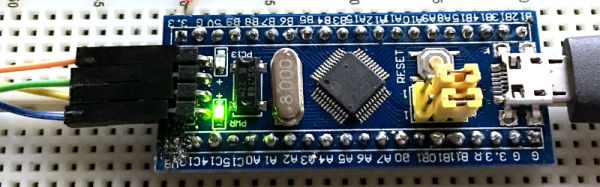
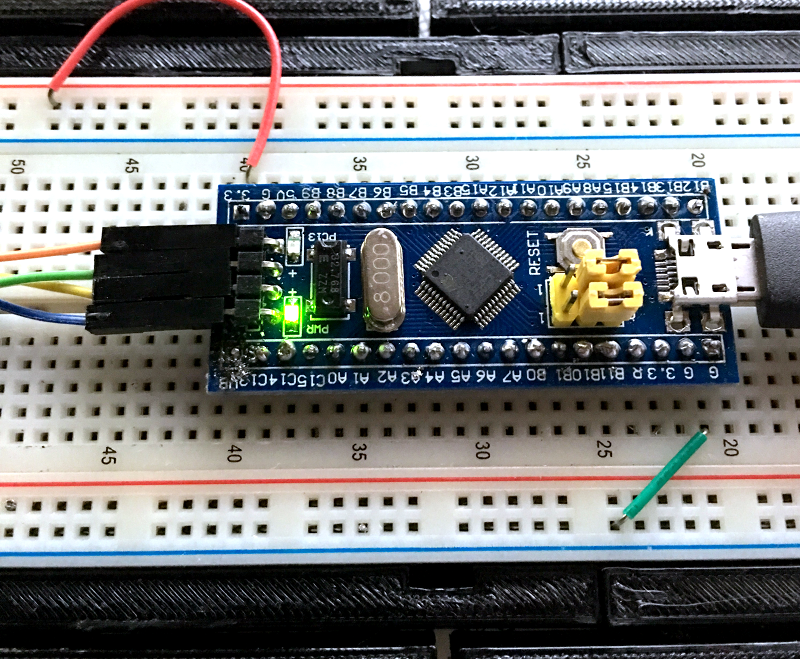
I have a bit of a love/hate relationship with the Arduino. But if I had two serious gripes about the original offering it was the 8-bit CPU and the lack of proper debugging support. Now there’s plenty of 32-bit support in the Arduino IDE, so that takes care of the first big issue. Taking care of having a real debugger, though, is a bit trickier. I recently set out to use one of the cheap “blue pill” STM32 ARM boards. These are available for just a few bucks from the usual Chinese sources. I picked mine up for about $6 because I wanted it in a week instead of a month. That’s still pretty inexpensive. The chip has a lot of great debugging features. Can we unlock them? You can, if you have the right approach.

The Part

For a few bucks, you can’t complain about the hardware. The STM32F103C8T6 onboard is a Cortex-M3 processor that runs at 72 MHz. There’s 64K of flash and 20K of RAM. There’s a minimicro-USB that can act as a programming port (but not at first). There’s also many 5 V-tolerant pins, even though this a 3.3 V part.

You can find a lot more information on this wiki. The board is a clone–more or less–of a Maple Mini. In fact, that’s one way you can use these. You can use the serial or ST-Link port to program the Maple bootloader (all open source) and use it like a Maple. That is, you can program it via the USB cable.

From my point of view, though, I don’t want to try to debugging over the serial port and if I have the ST-Link port already set up, I don’t care about a bootloader. You can get hardware that acts as a USB to ST-Link device inexpensively, but I happen to have an STM32VLDISCOVER board hanging around. Most of the STM32 demo boards have an ST-Link programmer onboard that is made to use without the original target hardware. On some of the older boards, you had to cut traces, but most of the new ones just have two jumpers you remove when you want to use the programmer to drive another device.

The “blue pill” designation is just a common nickname referring to the Matrix, not the pharmaceuticals you see on TV ads. The board has four pins at one edge to accommodate the ST-Link interface. The pin ordering didn’t match up with the four pins on the STM32VLDISCOVER, so you can’t just use a straight four-pin cable. You also need to bring power over to the board since it will have to power the programmer, too. I took the power from the STM32VLDISCOVER board (which is getting its power from USB) and jumpered it to my breadboard since that was handy.

Continue reading “The $2 32-Bit Arduino (with Debugging)”