Hackaday Links Column Banner

Hackaday Links: October 16, 2016

You need only look at the weekly user account leak from a popular web service or platform to know there’s a problem with security. Reusing passwords is the dumbest thing you can do right now, and the Mooltipass Mini is the answer to that problem. The Mooltipass originally began as a Developed on Hackaday series, and we log frequent sightings of the Multipass (maxi?) at security cons. The Mini is smaller, has exactly the same capability, and is completely unrepairable. It’s very cool, and if your email password is the same as your banking account passwords, you kind of need this yesterday.

Last weekend was the Open Hardware Summit in Portland. All the talks were worth watching, but editing the talks down into something sensible takes time. In lieu of this, OSHPark has gone through the livestream and timestamped everything

Continue reading “Hackaday Links: October 16, 2016” →

Program Your Brain, Hack Your Way To Productivity

Most people wish they were more productive. Some buckle down and leverage some rare facet of their personality to force the work out. Some of them talk with friends. Some go on vision quests. There are lots of methods for lots of types of people. Most hackers, I’ve noticed, look for a datasheet. An engineer’s reference. We want to solve the problem like we solve technical problems.

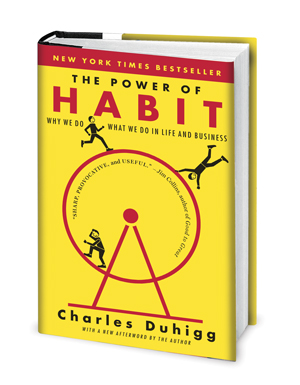
It's got the cover equivalent of click-bait, but the centimeter thick bibliography listing research sources at the back won me over.
It’s got the cover equivalent of click-bait, but the centimeter thick bibliography listing research sources at the back won me over.

There were three books that gave me the first hints at how to look objectively at my brain and start to hack on it a little. These were The Power of Habit by Charles Duhigg, Flow By Mihaly Csikszentmihalyi, and Getting Things Done By David Allen.

I sort of wandered into these books in a haphazard path. The first I encountered was The Power of Habit which I found to be a bit of a revelation. It presented the idea of habits as functions in the great computer program that makes up a person. The brain sees that you’re doing a task over and over again and just learns to do it. It keeps optimizing and optimizing this program over time. All a person needs to do is trigger the habit loop and then it will run.

For example: Typing. At first you either take a course or, if your parents left you alone with a computer for hours on end, hunt-and-peck your way to a decent typing speed. It involves a lot of looking down at the keyboard. Eventually you notice that you don’t actually need to look at the keyboard at all. Depending on your stage you may still be “t-h-i-n-k-i-n-g”, mentally placing each letter as you type. However, eventually your brain begins to abstract this away until it has stored, somewhere, a combination of hand movements for every single word or key combination you typically use. It’s only when you have to spell a new word that you fall back on older programs.

Continue reading “Program Your Brain, Hack Your Way To Productivity” →

Get Hands-On: Workshop Tickets Now Available

Get together with awesome hackers and build something cool. That’s the exact description for the workshops of the Hackaday SuperConference. Previously we announced all of the talks and some of the workshop presenters, but starting right now you can reserve your space in these inspiring hands-on sessions.

You must have a SuperCon ticket in order to purchase a workshop ticket. We anticipate SuperCon to be sold out before the end of this week so buy your ticket now! This is the ultimate hardware conference, held in Pasadena California on November 5th and 6th.

Workshops start at $5. This is a “skin in the game” rate to help encourage everyone who registers to show up. Space is limited and will surely sell out (last year the waiting list for some of the workshops was far bigger than the actual workshop). Any tickets above the $5 price are to cover the material expense for that workshop.

Delve into ultrasonics, try your hand at rapid prototyping connected devices, head out on the town with your robot, or get building with PCBs, FPGAs, conductive ink, and servo motors. These workshops span a range of very interesting skill sets and will send you away inspired to explore that next big hack.

Continue reading “Get Hands-On: Workshop Tickets Now Available” →

Ask Hackaday: DIY Handwriting Recognition

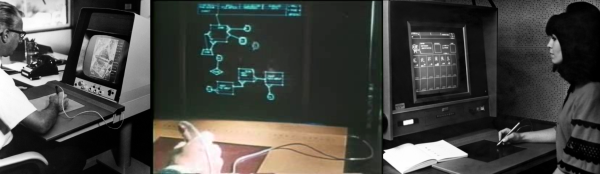
Computer handwriting recognition is very cool by itself, and it’s something that we’d like to incorporate into a project. So we went digging for hacker solutions, and along the way came up with an interesting bit of history and some great algorithms. We feel like we’ve got a good start on that front, but we’re stuck on the hardware tablet sensor itself. So in this Ask Hackaday, we’re going to make the case for why you could be using a tablet-like device for capturing user input or doing handwriting recognition, and then we’re going to ask if you know of any good DIY tablet designs to make it work.

Continue reading “Ask Hackaday: DIY Handwriting Recognition” →

NextThingCo Introduces C.H.I.P. Pro, GR8 System On Module

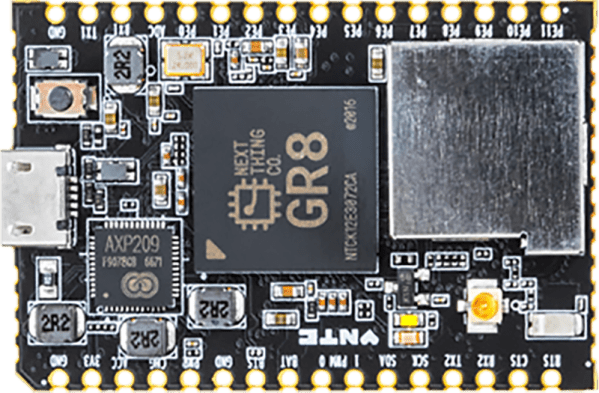
NextThingCo, makers of the very popular C.H.I.P. single board Linux computer, have released the latest iteration of their hardware. It’s the C.H.I.P. Pro, an SBC designed to be the embedded brains of your next great project, product, or Internet of Things thing.

The C.H.I.P. Pro features an Allwinner R8 ARMv7 Cortex-A8 running at 1 GHz, a MALI-400 GPU, and either 256 MB or 512 MB of NAND Flash. The Pro also features 802.11 b/g/n WiFi, Bluetooth 4.2, and is fully certified by the FCC. This board will be available in December at supposedly any quantity for $16.

The design of the C.H.I.P. Pro is a mix between a module designed to be installed in a product and a single board computer designed for a breadboard. It features castellated edges like hundreds of other modules, but the design means that assembly won’t be as simple as throwing down some paste and reflowing everything. The C.H.I.P. Pro features parts on two sides, making reflow questionable and either 0.1″ headers or a cutout on a PCB necessary. As a single board computer, this thing is small, powerful, and a worthy competitor to the Raspberry Pi Zero. A C.H.I.P. Pro development kit, consisting of two C.H.I.P. Pro units, a ‘debug’ board, and headers for breadboarding, is available for $49, with an estimated ship date in December.

A $16 Linux module with WiFi, Bluetooth, and no NDA is neat, but perhaps a more interesting announcement is that NextThingCo will also be selling the module that powers the C.H.I.P. Pro.

The GR8 module includes an Allwinner R8 ARMv7 Cortex-A8 running at 1 GHz, a MALI-400 GPU, and 256 MB of DDR3 SDRAM. Peripherals include TWI, two UARTS, SPI (SD cards support is hacked onto this), two PWM outputs, a single 6-bit ADC, I2S audio, S/PDIF, one USB 2.0 Host and one USB 2.0 OTG, and a parallel camera interface. This isn’t really a chip meant for video out, but it does support TV out and a parallel LCD interface. A limited datasheet for the GR8 is available on the NextThingCo GitHub.

Putting an entire Linux system on a single BGA module must draw comparisons to the recent release of the Octavo Systems OSD355X family, best known to the Hackaday audiences as the Beaglebone on a chip. Mechanically, the Octavo chip will be a bit easier to solder. Even though it has almost twice as many balls as the GR8, 400 on the Octavo and 252 on the GR8, the Octavo has a much wider pitch between the balls, making escape routing much easier.

Comparing peripherals between the OSD355X and GR8, it’s a bit of a wash, with the OSD coming out slightly ahead with Ethernet, more RAM and fancy TI PRUs. Concerning pricing, the GR8 wins hands down at $6 per chip in any quantity. That’s significantly less than the OSD355X.

The original C.H.I.P. has been exceptionally well received by the community NextThingCo is marketing to, despite the community’s distaste for Allwinner CPUs, cringeworthy PR, and questions concerning the true price of the C.H.I.P.. The C.H.I.P. Pro will surely see more than a few uses, but the GR8 is the real story here. A jellybean part that contains an entire Linux system has been the fevered dream of a madman for years now. The GR8 makes putting the power of open software into any project much easier, and we can’t wait to see the applications it allows.


Creating A PCB In Everything: Friends Don’t Let Friends Use Fritzing

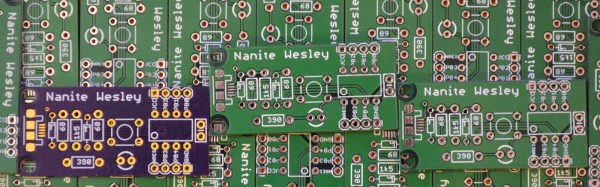
This week, we’re continuing our Creating A PCB In Everything series, where we go through the steps to create a simple, barebones PCB in different EDA suites. We’re done with Eagle, and now it’s time to move onto Fritzing.

fritzing-logoFritzing came out of the Interaction Design Lab at the University of Applied Sciences of Potsdam in 2007 as a project initiated by Professor Reto Wettach, André Knörig and Zach Eveland. It is frequently compared to Processing, Wiring, or Arduino in that it provides an easy way for artists, creatives, or ‘makers’ to dip their toes into the waters of PCB design.


I feel it is necessary to contextualize Fritzing in the space of ‘maker movement’, DIY electronics, and the last decade of Hackaday. Simply by virtue of being an editor for Hackaday, I have seen thousands of homebrew PCBs, and tens of thousands of amateur and hobbyist electronics projects. Despite what the Fritzing’s Wikipedia talk page claims, Fritzing is an important piece of software. The story of the ‘maker movement’ – however ill-defined that phrase is – cannot be told without mentioning Fritzing. It was the inspiration for CircuitLab, and the Fritzing influence can easily be seen in Autodesk’s 123D Circuits.

Just because a piece of software is important doesn’t mean it’s good. I am, perhaps, the world’s leading expert at assessing poorly designed and just plain shitty PCBs. You may scoff at this, but think about it: simply due to my vocation, I look at a lot of PCBs made by amateurs. EE professors, TAs, or Chris Gammell might beat me on volume, but they’re only looking at boards made by students using one tool. I see amateur boards built in every tool, and without exception, the worst are always designed in Fritzing. It should be unacceptable that I can even tell they’re designed in Fritzing.

Fritzing has its place, and that place is building graphical representations for breadboard circuits. Fritzing has no other equal in this respect, and for this purpose, it’s an excellent tool. You can also make a PCB in Fritzing, and here things aren’t as great. I want to do Fritzing for this Creating A PCB In Everything series only to demonstrate how bad PCB design can be.

For the next few thousand words, I am going to combine a tutorial for Fritzing with a review of Fritzing. Fritzing is an important piece of software, if only for being a great way to create graphics of breadboard circuits. As a PCB design tool, it’s lacking; creating parts from scratch is far too hard, and there’s no way to get around the grid snap tool. No one should ever be forced to create a PCB in Fritzing, but it does have its own very limited place.

Continue reading “Creating A PCB In Everything: Friends Don’t Let Friends Use Fritzing” →

Beware Common Sense Engineering

I am always torn about the title of “engineer.” When I talk to school kids about engineering, I tell that an engineer is a person who uses science and math to solve or analyze practical problems. However, these days you hear a lot of engineering titles thrown around to anyone who does any sort of technical (and sometimes non-technical) work. “Software engineers” don’t have to be licensed to practice, while civil engineers do. What’s in a name and does any of this matter?

Continue reading “Beware Common Sense Engineering” →