AVR Vs PIC, Round 223: Fight!

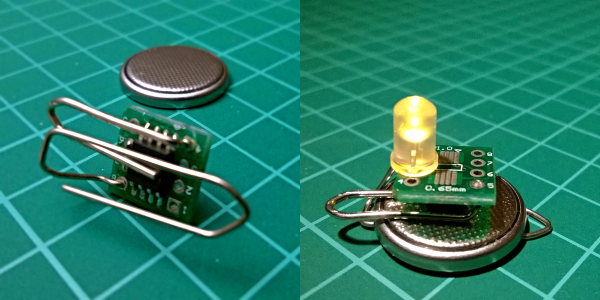
Get ready to rumble! [Thierry] made the exact same Hello-World-esque project with two microcontrollers (that are now technically produced by the same firm!) to see how the experience went.

It’s not just an LED-blinker, though. He added in a light-detection function so that it only switches on at night. It uses the Forest Mims trick of reverse-biasing the LED and waiting for it to discharge its internal capacitance. The point is, however, that it gives the chip something to do instead of simply sleeping.

Although he’s an AVR user by habit, [Thierry] finds in favor of the PIC because it’s got a lower power draw both when idling and when awake and doing some computation. This is largely because the PIC has an onboard low-power oscillator that lets it limp along at 32 kHz, but also because the chip has a lower power consumption in general. In the end, it’s probably a 10% advantage to the PIC on power.

If you’re competent with one of the two chips, but not the other, his two versions of the same code would be a great way to start familiarizing yourself with the other. We really like his isDarkerThan() function which makes extensive use of sleep modes on both chips during the LED’s discharge period. And honestly, at this level the code for the two is more similar than different.

(Oh, and did you notice [Thierry]’s use of a paper clip as a coin-cell holder? It’s a hack!)

Surprisingly, we’ve managed to avoid taking a stray bullet from the crossfire that occasionally breaks out between the PIC and AVR fans. We have covered a “shootout” before, and PIC won that round too, although it was similarly close. Will the Microchip purchase of Atmel calm the flames? Let’s find out in the comment section. We have our popcorn ready!

What Could Go Wrong: Asynchronous Serial Edition

It’s the easiest thing in the world — simple, straightforward serial data. It’s the fallback communication protocol for nearly every embedded system out there, and so it’s one that you really want to work when the chips are down. And yet! When you need it most, you may discover that even asynchronous serial can cost you a few hours of debugging time and add a few gray hairs to your scalp.

In this article, I’m going to cover most (all?) of the things that can go wrong with asynchronous serial protocols, and how to diagnose and debug this most useful of data transfer methods. The goal is to make you aware enough of what can go wrong that when it does, you’ll troubleshoot it systematically in a few minutes instead of wasting a few hours.

Continue reading “What Could Go Wrong: Asynchronous Serial Edition”

Air Quality Sensors In Every Classroom

One of the first electronics projects for the aspiring hobbyist is wiring a sensor of some sort to a microcontroller, and then doing something useful with the new information. [Brock] has taken this type of gateway project and turned it into a way to get his students involved and familiar with electronics. His take on an air quality meter accomplishes both of these goals, and hopefully helps turn all of his students into the next generation of hackers.

The bill of materials is pretty straightforward. Instead of the go-to Arduino, [Brock] has gone with a Particle Photon which has the added benefits of various wireless connectivity options. The air quality sensor is a Shinyei PP42ns which interfaces easily with the Photon. The only thing that might be out of reach of most public high schools (at least in the United States) is the 3D-printed enclosure, although if you have access to one, [Brock] put the files on the project page so anyone can use them.

Of course, we’re big fans of projects that get students involved in anything beyond standardized tests, and this project goes a long way towards teaching students more than how to pass a test. There are many videos and instructions on the project page if you want to try this on your own, but if the cost for the materials is the only thing scaring you off from doing this in your own classroom there are a few other options. You could use ATtiny chips, or try a different style of sensor, or maybe just try out a different project altogether.

Continue reading “Air Quality Sensors In Every Classroom”

Virtualizing Around The FCC’s Firmware Modification Rules

Last year, the FCC introduced new regulations requiring router manufacturers to implement software security to limit the power output in specific 5GHz bands. Government regulations follow the laws of unintended consequences, and the immediate fear surrounding this new directive from the FCC was that WiFi router manufacturers would make the easiest engineering decision. These fears came true early this year when it was revealed a large router manufacturer was not following the FCC regulations to the letter by limiting the output of the radio module itself, but instead locking down the entire router.

The FCC’s rules regarding the power output of 5GHz routers was never a serious concern; the FCC is, after all, directed to keep the spectrum clean, and can force manufacturers to limit the power output of the wireless devices. The problem comes from how manufacturers implement this regulation – the easiest solution to prevent users from modifying the output of the radio module will always be preventing users from modifying the entire router. Developers don’t like it, the smart users are horrified, and even the FCC is a little flustered with the unintended consequences of its regulation.

While the easiest solution to preventing the modification of a radio module is to prevent modification to the entire router, there is another way. The folks at Imagination Technologies have come up with a virtualization scheme that allows router manufacturers to lock down the radio module per the FCC directive while still allowing the use of Open Source router firmware like OpenWrt.

A demonstration of the capabilities of this next-generation router comes from the prpl Security Working Group and uses MIPS Warrior CPUs to create multiple trusted environments. The control of the router can be handled by one secure environment, while the rest of the router firmware – OpenWrt included – can be run in an environment more conducive to Open Source firmware.

The demo of a compartmentalized, virtualized router uses a dev kit consisting of a dual-core MIPS P5600 CPU running at 1GHz, and a Realtek RTL8192 WiFi adapter plugged into the USB port. The driver for the WiFi adapter runs under a secure hypervisor, making it secure enough to pass the FCC’s muster.

This build wouldn’t be possible without hardware virtualization in microprocessors and microcontrollers. Imagination Technologies has been working on this for a while, and only a few years ago demonstrated a PIC32 with baked in virtualization.

In the video below, Imagination Technologies demonstrates a MIPS board running three virtual machines. The first machine is running OpenWrt, the second is running a WiFi driver, and the third is running third-party applications. Crashing one machine doesn’t bring down the others, and the WiFi driver is locked away in a secure environment in accordance with the FCC regulations.

While it’s hard to imagine a router based on a MIPS board that would be cheaper than the already inexpensive router SoCs found in today’s routers, this method of secure virtualization is the best way to give consumers what they deserve: an open source option for all their devices.

Continue reading “Virtualizing Around The FCC’s Firmware Modification Rules”

Hands-On With The BBC Micro:Bit

It’s been a long wait, but our latest single board computer for review is finally here! The BBC micro:bit, given free to every seventh-grade British child, has landed at Hackaday courtesy of a friend in the world of education. It’s been a year of false starts and delays for the project, but schools started receiving shipments just before the Easter holidays, pupils should begin lessons with them any time now, and you might even be able to buy one for yourself by the time this article goes to press.

The micro:bit top view

It’s a rather odd proposition, to give an ARM based single board computer to coder-newbie children in the hope that they might learn something about how computers work, after all if you are used to other similar boards you might expect the learning curve involved to be rather steep. But the aim has been to position it as more of a toy than the kind of development board we might be used to, so it bears some investigation to see how much of a success that has been.

Opening the package, the micro:bit kit is rather minimalist. The board itself, a short USB lead, a battery box and a pair of AAA cells, an instruction leaflet, and the board itself.  Everything is child-sized, the micro:bit is a curved-corner PCB about 50mm by 40mm. The top of the board has a 5 by 5 square LED matrix and a pair of tactile switches, while the bottom has the surface-mount processor and other components, the micro-USB and power connectors, and a reset button. Along the bottom edge of the board is a multi-way card-edge connector for the I/O lines with an ENIG finish. On the card edge connector several contacts are brought out to wide pads for crocodile clips with through-plated holes to take 4mm banana plugs, these are the ground and 3V power lines, and 3 of the I/O lines.

Continue reading “Hands-On With The BBC Micro:Bit”

Cable Butchering For Logic-Level Serial

Early PCs and other computers had serial ports, sometimes as their main interfaces for peripherals. Serial ports still survive, but these days they are more likely to have a USB connection into the main computer. However, when you are working with a microcontroller, you probably don’t want a proper RS232 port with its plus and minus 12 volt signals.

You can get converters that specifically output logic-level signals but you probably can’t pick one up at the local office supply store. They might, though, have a normal USB to serial cable. [Aaron] had the same problem so he hacked into a cable to pull out the logic level signals.

On the one hand, hacks like this are a good inspiration for when you have a similar problem. On the other hand, you probably won’t wind up with the same cable as [Aaron]. He got lucky since the board inside his cable was clearly marked. Just to be sure, he shorted the transmit and receive lines to see that he did get an echo back from a terminal program.

Unsurprisingly, you can also repurpose an ESP8266 to perform this same task. Or, you can use a cable as an I/O device.

TV Stick Out-Raspberries Raspberry Pi

Android-based TV sticks should be in more projects. They are readily available and inexpensive. They have a lot of horsepower for the price, and they can even boot a mainline Linux kernel, unlike some single-board computers we know. They’re smaller than the Pi Zero, so they’ll fit almost anywhere.

The one thing they don’t have, though, is I/O. Sure, it’s got a USB port, but that’s just about it. [Necromant] considered these problems and created a carrier board that fixes all that.

  • On-board 3A DC-DC. You can power the whole thing with anything from 7 to 24 volts DC
  • A 4-Port USB hub
  • An ATtiny 2313, connected to the hub via the V-USB stack
  • 2 USB ports on the back, with power control via GPIO lines
  • One USB port on the front (with power always on)
  • 3 relays
  • Fits a common anodized aluminum enclosure

The ATtiny code is on GitHub and allows for full I/O control, saving the state of the pins in EEPROM, and providing up to eight channels of servo control. The device connects through the USB port (consuming one port on the hub).

Repurposing consumer gear for embedded service is nothing new. We’ve seen it with phones. We’ve even seen remotes used as a mouse. But this is such a nice template for adding cheap and easy computing power to your projects that we’re surprised we don’t see it more often. Why aren’t you hacking a TV stick into your projects?