Raspi AC And Blinds Controller

raspiBlindsACController

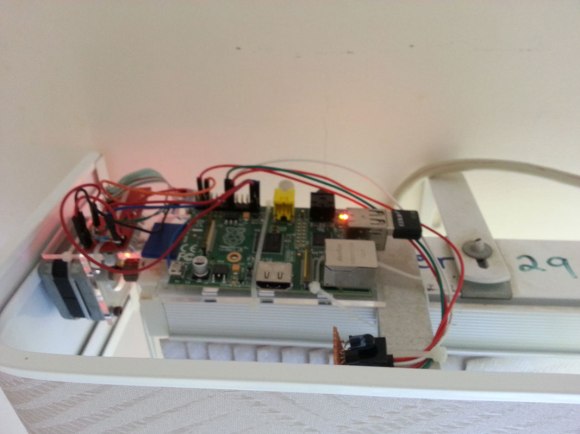
[Chris’s] bedroom has a unique setup with an air conditioning unit perched on the wall next to the top of the blinds that cover his window. Normally, to open the blinds he had to tug on a cord and operating the AC meant fiddling with a remote control. Not anymore. Now [Chris] has an all-in-one Raspberry Pi-based solution to drive both.

The build uses a stepper motor salvaged from a printer to directly drive the blinds, with a familiar-looking Easy Driver connecting it to the Pi. The motor spins the blinds’ mechanism either open or closed, though at a modest pace that’s slow enough to provide the needed torque. [Chris] added an IR diode plugged into the Pi that imitates the air conditioning unit’s remote control, and simply pointed it directly at the unit’s receiver. An inexpensive WiFi dongle gets the Pi onto the network, allowing [Chris] to interact via a custom web interface. The interface itself not only provides a couple of clickable buttons, but a cleverly-designed status image indicating the position of the blinds.

Make sure you see the video below for a demonstration and for more details on the build. This is one of the better examples of home automation devices we’ve seen recently, especially considering it actually fits the “autonomous” implications discussed in our Ask Hackaday post from a few months back—although a relatively simple automation, [Chris’s] interface does allow for operating both the blinds and the AC on a preselected schedule.


Continue reading “Raspi AC And Blinds Controller”

AVR Atmega Based PID Magnetic Levitator

[Davide] saw our recent post on magnetic levitation and quickly sent in his own project, which has a great explanation of how it works — he’s also included the code to try yourself!

His setup uses an Atmega8 micro-controller which controls a small 12V 50N coil using pulse-width-modulation (PWM). A hall effect sensor (Allegro A1302) mounted inside the coil detects the distance to the magnet and that data is used by a PID controller to automatically adjust the PWM of the coil to keep the magnet in place. The Atmega8 runs at 8Mhz and the hall effect sensor is polled every 1ms to provide an updated value for the PWM. He’s also thrown in an RGB LED that lights up when an object is being levitated!

So why is there a kid with a floating balloon? [Davide] actually built the setup for his friend [Paolo] to display at an art fair called InverART 2013!

After the break check out the circuit diagram and a short demonstration video of the device in action!

Oh yeah, those of you not impressed by magnetic levitation will probably appreciate acoustic levitation.

Continue reading “AVR Atmega Based PID Magnetic Levitator”

A Shell For The Stellaris & Tiva

cli

When [antoker] is working on a microcontroller project, he often has to write short bits of test code to make sure everything in his circuit is working properly. This is a time-consuming task, and a while back he started on a small side project. It’s a command line interface for a microcontroller that allows him to send short commands to the uC over a serial connection to play around with the ADC, UART, and GPIO pins.

[antoker]’s tiny Unix-like environment is based on modules  that can keep track of the time, print the current commands and stack to a terminal, and query things like the current speed of the uC and the available Flash and RAM.

This tiny shell also has scripting capabilities and a jump function, making this a true programming language, however minimal it is. Right now [antoker]’s work is available for the TI Stellaris and Tiva series microcontrollers, and a video of a scripted Larson scanner is available below.

Continue reading “A Shell For The Stellaris & Tiva”

8-Bit Video Game Is Best Of Retro Gaming On A Shoestring Budget

[Petri] wrote in to show off the 8-bit gaming system and original platformer which he and [Antti] developed. Don’t get us wrong now, it’s impressive that the duo were able to put together what looks like a very interesting game. But we’ve seen many industry-leading video games developed with just one or two people (we’re thinking all the way back to the days of Atari). Nope, what’s most interesting to us is that the console is also their creation. We should note that the title screen was the work of their friend [Juho].

Take this with a grain of salt, as the bottom right image in the vignette obviously includes an Arduino. But isn’t it a testament to the state of open hardware and the sharing of knowledge through the Internet that this is even possible on the hobby level? And just because we call it “hobby” doesn’t mean you have to lower your expectations. This thing is full featured. Watch the clip after the break to see the ATmega328 driving a 104×80 resolution screen with a 256 color palette, while using four audio channels for the chiptunes. The thing even utilizes an original NES controller port for user input.

And for those of you who are thinking we’ve seen the same thing before, we never get tired of seeing projects where a lot of hard work has obviously paid off!

Continue reading “8-Bit Video Game Is Best Of Retro Gaming On A Shoestring Budget”

An ARM Powered Business Card, Part Two

Card

While most microcontroller powered business cards opt for something small and cheap, [Brian] is going in an entirely different direction. His business card features an ARM processor, some Flash storage, a USB connection, and enough peripherals to do some really cool stuff.

This is the second iteration of [Brian]’s business card. We saw the first version, but this new version makes up for a few mistakes in the previous version. The biggest improvement is the replacement of the Molex USB plug with bare traces on the board. [Brian] couldn’t find a board house that could fab a board with the proper thickness for a USB plug, but a few strips of masking tape did enough to beef up the thickness and make his plug nice and snug. Also, the earlier version had a few pins sticking out of the board for programming purposes. This wasn’t an idea solution for a business card where it would be carried around in a pocket, so these pins were replaced with a connectorless programming adapter. Just a few exposed pads gives [Brian] all the programming abilities of the last version, without all those prickly pins to catch on clothing.

With his new business card, [Brian] has an excellent display of his engineering prowess and a very cool toy; he has a project that will turn this card into a keyboard emulator, randomly activating the Caps Lock button for a few seconds every few minutes. A great prank, and a great board to give to future employers.

Using DMA To Drive WS2812 LED Pixels

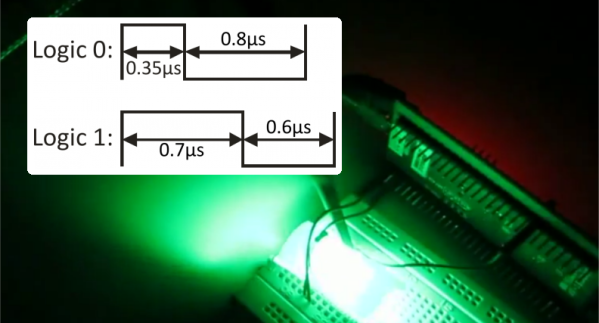
It’s pretty well known by now that the LED pixel hardware which is starting to be commonplace, both WS2811 and WS2812, needs pretty strict timing in order to address them. There are libraries out there which mean almost no work on your part, but that’s no fun. [Elia] started looking into what it takes to drive the hardware, trying out a few 8-bit micros before moving to 32-bit with the help of an STM32VL Discovery Board. The move to a beefier processor brings a lot of speed, but why bit bang everything? He came up with a way to use the PWM and DMA features of the chip to drive the LEDs.

DMA is the Direct Memory Access unit that allows you to change the values being sent to the pixel without interrupting the processor. This is done by pre-loading the data at a memory location. This buffer is automatically read by the DMA unit — its values are used to set the PWM timer compare trigger in order to send out logic values show in the diagram above.

If you do want to delve further into this topic here’s a collection of techniques for driving the WS2811.

Continue reading “Using DMA To Drive WS2812 LED Pixels”

Arduino-Based Power Failure Alert System

arduinoPowerFailBox

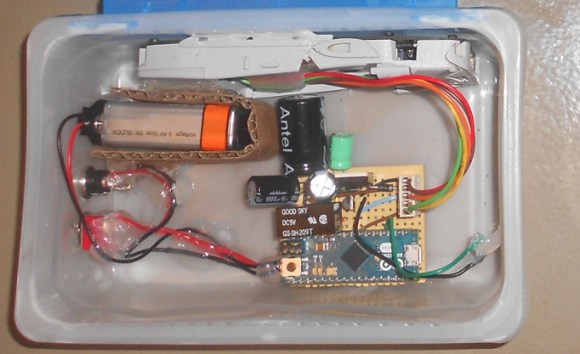
When the power went out at his parents’ shop and ruined the contents of their fridge, [Lauters Mehdi] got to work building a custom power failure alert system to prevent future disasters. Although some commercial products address this problem, [Lauters] decided that he could build his own for the same cost while integrating a specific alert feature: one that fires off an SMS to predefined contacts upon mains power failure.

The first step was to enable communication between an Arduino Micro and a Nokia cell phone. His Nokia 3310 uses FBus protocol, but [Lauters] couldn’t find an Arduino library to make the job easier. Instead, he prototyped basic communication by running an Arduino Uno as a simple serial repeater to issue commands from the computer directly to the phone, and eventually worked out how to send an SMS from the ‘duino. [Lauters] then took the phone apart and tapped into the power button to control on/off states. He also disconnected the phone’s battery and plugged it into an attached PCB. The system operates off mains power but swaps to a 1000mAH 9V backup battery during a power outage, logging the time and sending out the SMS alerts. A second message informs the contacts when power has been restored.

Head over to [Lauters’s] project blog for schematics and photos, then see his GitHub for the source code. If you want to see other SMS hacking projects, check out the similar build that keeps a remote-location cabin warm, or the portable power strip activated by SMS.