Enabling An Unused Touchscreen Overlay On A Consumer LCD

uncovering-an-unused-touchscreen-on-a-consumer-lcd

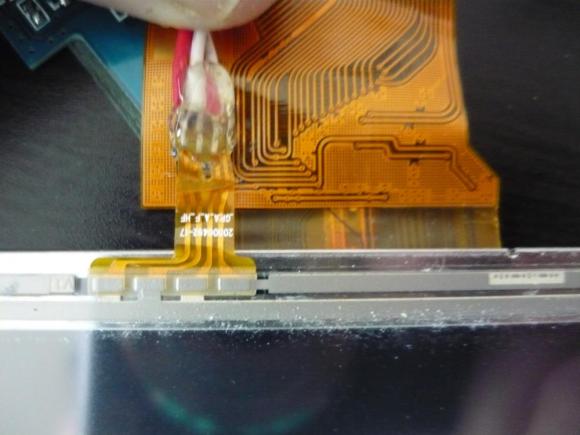
When [Andrei] first got his Raspberry Pi he wanted to make it a standalone computer right away. This means the normal input devices like a mouse and keyboard, but also some type of display. To avoid waiting for shipping he ended up using a cheap vehicle backup camera screen from the local big box store. It worked great, and recently he decided he would try to convert it to run off of 5V power to simplify his setup. While snooping around inside the device he discovered an unused resistive touch overlay and figured out how to get it to work.

What tipped him off is the small four-conductor connector which wasn’t hooked up to anything. He carefully soldered wires onto the flexible circuit traces, then generously covered them in hot glue to help prevent movement from breaking the rigid connection. To get this working you need to measure the resistance between the conductors. Most of the time we figure the RPi GPIO header can be used directly, but for this task an intermediary is necessary. [Andrei] went with a small Arduino clone board. A bit of trial and error was all it took to get the connections right and to iron out the code which translates the values into coordinates.

Two-wire Serial Backpack For GLCD Screens

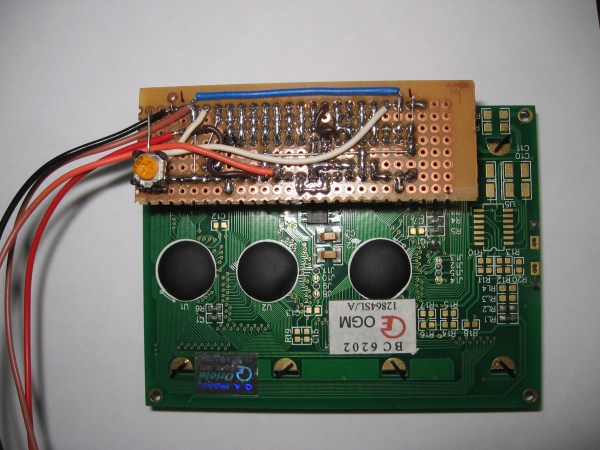
[Debraj] wrote in about his 2-wire serial backpack he developed for a Graphic LCD screen. It’s build on a hunk of protoboard and uses a pair of 595 shift registers to translate incoming serial data to the parallel interface which is used by the LCD screen. It takes more time to push commands this way, but the interface is still quite snappy as you can see in the clip after the jump.

The real trick here is how the hardware has been configured to get away without a third wire for latching the shift registers (if you need a primer on 595 chips check out this feature). The idea of using a latch is that all of the data can be shifted in over the serial pin before it appears on the output pins. Otherwise, the GLCD would see each bit as it shifts into the register, wreaking havoc on its communication protocol. [Debraj] gets around this by using a diode AND gate trick he learned from this other serial LCD project.

One good thing about this method is the 595 chips have a wide range of control voltage that will allow you to drive this with 3.3V or 5V microcontrollers. But you do need to implement the communication protocol and push those commands via serial. For nearly the same cost in chips something like an ATtiny2313 could be substituted to make an even simpler addressing scheme — or even switch to 1-wire protocol. But you’d then lose the wide input voltage tolerance.

Continue reading “Two-wire Serial Backpack For GLCD Screens”

Another Salvo In The PIC Vs. AVR Holy War

Ah, PIC vs. AVR, the never-ending battle of electronic design supremacy. Some people swear by Atmel’s AVR microcontrollers, while others are wrong. [majenko] is firmly planted in Microchip’s PIC camp, so he wrote up a nice comparison of Atmel’s AVR versus Microchip’s PIC family of microcontrollers. The results aren’t that surprising; PIC microcontrollers come out as a better product that no hobbyist uses because no hobbyist uses them.

Atmel and their series of AVR microcontrollers has seen a huge increase in popularity in the hobbyist market in the last few years, no doubt thanks to the Arduino and other AVR-powered dev boards. This isn’t to say Microchip and PIC haven’t seen their time in the lime light; there was a time when you could actually buy electronic components at Radio Shack, including kits containing Microchip’s very popular but somewhat outdated Basic Stamp.

After going over the capabilities of the Atmel AVR ATMega328p, the similarly equipped Microchip’s PIC PIC18F25K80, and TI’s MSP430G2533, [majenko] found the perennial favorite, the AVR, lacked in some very important categories. The AVR has a lower resolution ADC, fewer PWM pins, fewer 16-bit timers, while costing about $0.75 more.

Of course [majenko]’s analysis doesn’t take into account the intangibles of choosing a PIC over an AVR. Thanks to the Arduino’s adoption of the AVR, there are many, many more code and schematic examples floating around on the Internet for just about every project imaginable. The development tools for PIC are a bit more expensive than their AVR equivalents; A PICkit2 runs about $50 while AVR ISP programmers can be found just about everywhere for pocket change.

It’s a lazy Sunday, so all ‘yall can go on and argue in the comments.

Wireless Doorbell Battery Monitor

wireless-doorbell-battery-monitor

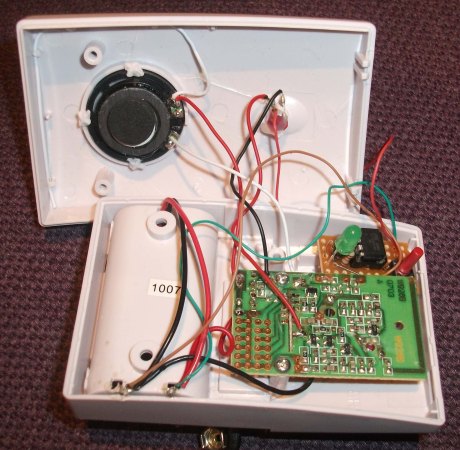
We know exactly what [Dan] is going through. We also bought a cheap wireless doorbell and are plagued by the batteries running down. When that happens, the only way you know is when people start pounding on the door because you’re not answering the bell. Well no more for [Dan]. He built a backup system which monitors the voltage of the batteries on the chime unit.

You can see the small bit of protoboard he used to house the microcontroller and the UI. It’s an ATtiny13 along with a green LED and a single push button. The idea is to use the chip’s ADC to monitor the voltage level of the pair of batteries which power the chime. When it drops below 3V the green LED will come on.

First off, we wish these things would come with better power supply circuits. For instance, we just replaced the CR2032 in an Apple TV remote and measured the voltage at 2.7V. That remote and the chime both run from a 3V source. Can’t they be made to work down to 1.8V? But we digress.

In addition to monitoring voltage [Dan’s] rig also counts the number of times the chime has rung. Every eight seconds it flashes the count in binary, unless he presses the red button to clear the count. This is shown in the video after the break. We guess he wants to know how many times this thing can be used before running the batteries down.

Seriously though, for a rarely used item like this how hard would it be to use ambient light harvesting to help save the batteries? Looking at some indoor solar harvesting numbers shows it might be impossible to only power this from PV, but what if there was a super-cap which would be topped off with a trickle from the panels but would still use the batteries when that runs down?

Continue reading “Wireless Doorbell Battery Monitor”

POV Pong Game Uses All Kinds Of Smart Design

pov-pong-game-uses-smart-design

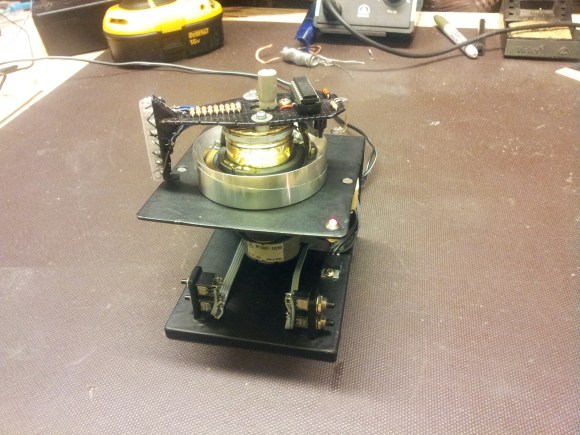
This little device lets you play some head-to-head pong using a spinning LED display. We’re really in love with the design. You get a pretty good idea of the Persistence of Vision aspect of the build by looking at this picture. But hearing [Dennis] explain the entire design in the video after the break has us really loving its features.

He’s using the head from a VCR as the spinning motor. The display itself uses a vertical row of LEDs with a bit of wax paper as a diffuser. These are current limited by a 1k resistor for each of the eight pixels. They’re driven by a PIC 16F690 but you may have already noticed that there’s no battery on the spinning part of the board. It gets voltage and ground from a pair of brushes which he fabricated himself. To avoid having to do the same thing to map the control buttons in the base to the spinning board he came up with something special. There’s a downward facing phototransisor which registers LED signals from the base to move the paddles up or down.

If you love this project check out the POV Death Star.

Continue reading “POV Pong Game Uses All Kinds Of Smart Design”

Digging Deep Into How The 8085 Processor’s Registers Were Designed

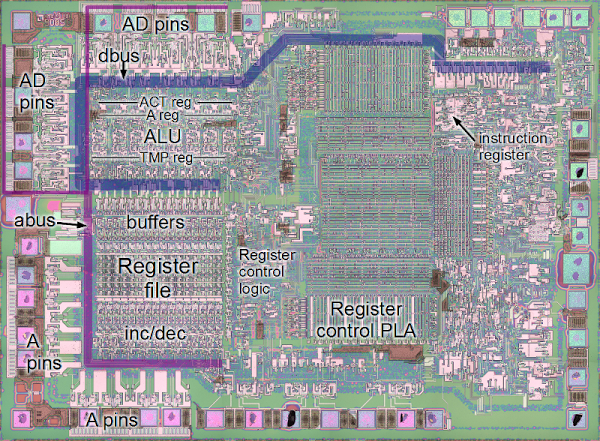
Hardware design enthusiasts should already be salivating just looking at this image. But [Ken Shirriff’s] write-up on how the 8085 processor’s registers were designed will put you in silicon reverse-engineering heaven. He manages to get to the bottom of the tricks the designers used to make register access as efficient as possible, like routing some through the ALU on their path elsewhere.

We’re certainly not experts in studying dies like the one seen above. Luckily [Ken] does a great job of zooming in on important parts, then dissecting how they work by representing the silicone image as a functional flow chart. One of the parts which we found most interesting is the WZ temporary registers. These are a set of internal registers that are not accessible to the programmer. They’re only used internally by the chip. They act as temporary storage for multiple operand functions, and also hold register addresses for a handful of instructions (JMP, CALL, RST, etc.).

If you’re more interested in how images of these chips are attained you should do some searching on Hackaday. Just last week we featured one such project in a links post.

[via Reddit]

Programmable Computer Built From A Humble ATtiny84

attiny84-computer

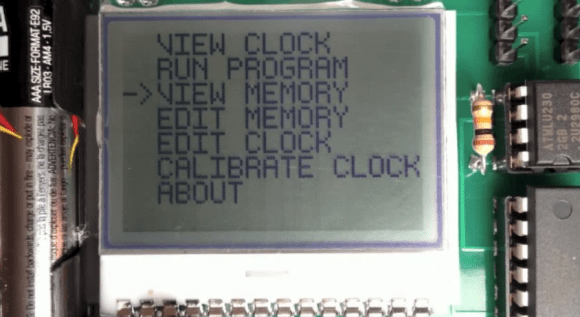
Here’s a way to play around with simple computing concepts without going too crazy with the hardware side of things. [John Eisenmann] calls it the DUO tiny. It’s a programmable computer based around the ATtiny84. He wrote the operating system himself, building in a set of commands that make it quite functional, but allow the user to manipulate or even write the programs using the four button interface. Editing and running programs (which include some games) is demonstrated in the clip after the break.

The three major components used in the system are the ATtiny84, and EEPROM chip with 64 KB capacity to hold the programs, and the 102×64 pixel LCD screen seen above. The project began on a breadboard, but as he brought each part into being it transitioned to a strip-board prototype and finally this fab-house version.

Continue reading “Programmable Computer Built From A Humble ATtiny84”