Toroid Transformers Explained

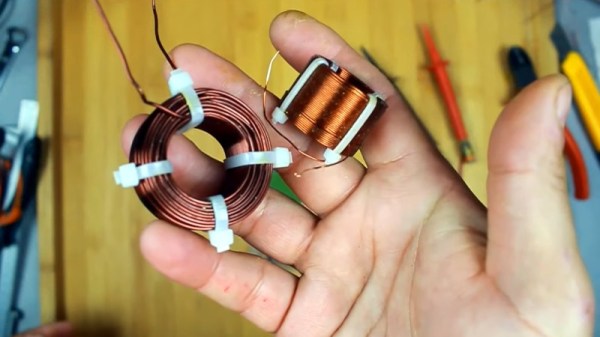
HF radios often use toroidal transformers and winding them is a rite of passage for many RF hackers. [David Casler, KE0OG] received a question about how they work and answered it in a recent video that you can see below.

Understanding how a conventional transformer works is reasonably simple, but toroids often seem mysterious because the thing that makes them beneficial is also what makes them confusing. The magnetic field for such a transformer is almost totally inside the “doughnut,” which means there is little interaction with the rest of the circuit, and the transformer can be very efficient.

The toroid itself is made of special material. They are usually formed from powdered iron oxide mixed with other metals such as cobalt, copper, nickel, manganese, and zinc bound with some sort of non-conducting binder like an epoxy. Ferrite cores have relatively low permeability, low saturation flux density, and low Curie temperature. The powder also reduces the generation of eddy currents, a source of loss in transformers. Their biggest advantage is their high electrical resistivity, which helps reduce the generation of eddy currents.

If you haven’t worked through how these common little transformers work, [David]’s talk should help you get a grip on them. These aren’t just for RF. You sometimes see them in power supplies that need to be efficient, too. If you are too lazy to wind your own, there’s always help.

Continue reading “Toroid Transformers Explained”

OpenStructures Is A Modular Building System For The RepRap Age

Modular construction toys like LEGO and Meccano are great for prototyping, but they aren’t so great for large builds. OpenStructures promises to be a modular building system for projects large and small.

A series of images showing the disassembly of a short, red cabinet and its reassembly as a tall, white cabinet. The shelves are reused between both objects since they both are part of the OS Grid.

Originally conceived in 2007 by [Thomas Lommée], OpenStructures is a modern, more robust reinterpretation of Grid Beam, which was itself a reinterpretation of the earlier Living Structures. By using a common standard (PDF), parts can be reused project after project as they would with LEGO, meaning you can spend more time building and less time cutting or figuring out joints. OpenStructures parts need connection points, part diameters, or part dimensions at multiples of 20 mm to be compatible. To fulfill the spirit of the project, parts should be designed for disassembly, use recyclable materials when possible, and be Open Source.

The system seems like a great starting point for prototyping furniture or other large builds more quickly than building everything on a case-by-case basis. By including diameters for round objects as well as square and rectangular profiles, OpenStructures is a more flexible (and aesthetically pleasing?) option than Grid Beam.

A couple more options for furniture-scale modular construction are these big LEGO bricks or copper pipe.

(via Low Tech Magazine)

Experimenting With 20 Meters Of Outlet Adapters

You may have seen some of the EEVblog dumpster dive videos, where [Dave Jones] occasionally finds perfectly good equipment that’s been tossed out. But this time, rather than a large screen monitor, desktop computer, or a photocopier, he features a stash of 283 electrical outlet double adapters that he found last year. He decided to perform a test in the parking lot, connecting all 283 adapters in series.

Using a pair of power meters and a 2 kW electric heater as a test load, [Dave] and his son [Sagan] measure the loss through this wild setup. It works out to about about 300 W, or roughly 1 W per adapter. He did a follow-up experiment using a FLIR thermal camera, and confirmed that the power loss is reasonably uniform, and that no single rogue adapter consuming all the lost power. After a back of the envelope calculation, we estimate this chain of adapters is about 20 meters long, making this whole thing entirely pointless but interesting nonetheless. Stick around until the end of the video for a teardown — they’re not as cheaply made as you might think.

[Dave]’s crazy experiment aside, we do wonder why someone had so many adapters to throw away in the first place. What would you have done with 283 adapters — left them in the dumpster or rescued them?

Continue reading “Experimenting With 20 Meters Of Outlet Adapters”

Showing two MCP23017 expanders soldered onto a PCB

MCP23017 Went Through Shortage Hell, Lost Two Inputs

The MCP23017, a 16-bit I2C GPIO expander, has always been a tasty chip. With 16 GPIOs addressable over I2C, proper push/pull outputs, software-enabled pull-ups, eight addresses, maskable interrupts for all pins, and reasonably low price, there’s a reason it’s so popular. No doubt due in part to that popularity, it’s been consistently out of stock during the past year and a half, as those of us unlucky enough to rely on it in our projects will testify.

Now, the chip is back in stock, with 23,000 of them to go around on Mouser alone, but there’s a catch. Apparently, the lengthy out-of-stock period has taken a heavy toll on the IC. Whether it’s the recession or perhaps the gas shortages, the gist is — the MCP23017 now a 14/16-bit expander, with two of the pins (GPA7 and GPB7) losing their input capabilities. The chips look the same, are called the same, and act mostly the same — if you don’t download the latest version of the datasheet (Revision D), you’d never know that there’s been a change. This kind of update is bound to cause a special kind of a debugging evening for a hobbyist, and makes the chip way less suitable for quite a few applications.

It’s baffling to think about such a change happening nearly 20 years after the chip was initially released, and we wonder what could have caused it. This applies to the I2C version specifically — the SPI counterpart, MCP23S17, stays unaffected. Perhaps, using a microcontroller or shift registers for your GPIO expansion isn’t as unattractive of an option after all. Microcontroller GPIO errata are at least expected to happen, and shift registers seem to have stayed the same since the dawn of time.

The reasons for MCP23017 silicon getting cut in such a way, we might never know. At least now, hopefully, this change will be less of a bitter surprise to those of us happy to just see the chip back in stock — and for hackers who have already restocked their MCP23017 hoards, may your shelved boards magically turn out to have a compatible pinout.

Brass Hardware Makes For Pretty Potentiometer Knobs

Knobs and switches can make or break the aesthetic and tactile appeal of a project. Fine hi-fi hardware goes hard on these details, while cheap knock-off guitar pedals often go the other way. If you’re looking for a unique, cheap, and compelling solution for potentiometer knobs, you might like to consider using converted brass hardware for the job.

Gorgeous, no?

The idea comes from [Kevin Jordan], who realized that some simple 3D printed parts would enable him to repurpose brass hardware for use with common split-shaft potentiometers. He grabbed a bunch of brass flare caps intended for use with gas piping, and got to work.

The result is the simple 3D printed cap converter. It has a threaded outer portion, which screws neatly inside a brass flare cap. Inside, it features a hole to mate to the potentiometer shaft. While this could be done with a spline, it also works with a simple hole since the plastic is soft enough to simply push the potentiometer shaft into.

The flare caps look great when pressed into service as knobs. [Kevin] uses them on a tennis racket guitar he built, and the brass knobs beautifully set off against the natural wood finishes of the build. If you’re looking for some unique adornments for your own projects, you might like to experiment with this concept yourself! Alternatively, you can try making your own knobs from scratch.

Continue reading “Brass Hardware Makes For Pretty Potentiometer Knobs”

Copy And Paste Lithium Battery Protection

Lithium batteries have, nearly single-handedly, ushered in the era of the electric car, as well as battery energy storage of grid power and plenty of other technological advances not possible with older battery chemistries. There’s just one major downside: these lithium cells can be extremely finicky. If you’re adding one to your own project you’ll have to be extremely careful to treat them exactly how they are designed to be treated using something like this boilerplate battery protection circuit created by [DIY GUY Chris].

The circuit is based around the TP4056 integrated circuit, which handles the charging of a single lithium cell — in this design using supplied power from a USB port. The circuit is able to charge a cell based on the cell’s current charge state, temperature, and a model of the cell. It’s also paired with a DW01A chip which protects the cell from various undesirable conditions such as over-current, overcharge, and over-voltage.

The best thing about this design isn’t the design itself, but that [DIY GUY Chris] built the circuit schematic specifically to be easily copied into PCB designs for other projects, which means that lithium batteries can more easily be integrated directly into his other builds. Be sure to check out our primer on how to deal with lithium batteries before trying one of your own designs, though.

Continue reading “Copy And Paste Lithium Battery Protection”

Retro Computer Enclosure Without The Sacrifice

The unique look of early desktop computer systems remains popular with a certain segment of geekdom, so it’s no great surprise when we occasionally see a modern hacker or maker unceremoniously chuck 40+ year old electronics from a vintage machine just to reuse its plastic carcass. We try not to pass judgement, but it does sting to see literal museum pieces turned into glorified Raspberry Pi enclosures.

But with a little luck, perhaps the Retro Wedge Computer case designed by [AndyMt] will be able to save a few of those veteran computers from an unnecessary lobotomy. As the name implies, this 3D printable model is designed to resemble “wedge” desktop computers such as the Atari ST, TI-994A, and Commodore 128. But don’t be put off by its considerable size — the model has been chopped up so no piece is larger than what can fit on a fairly standard 230 x 230 mm print bed. Continue reading “Retro Computer Enclosure Without The Sacrifice”