IBM Made A MIPS Laptop. Will It Make You WinCE?

We’re used to our laptop computers here in 2022 being ultra-portable, super-powerful, and with impressively long battery lives. It’s easy to forget then that there was a time when from those three features the laptop user could usually expect only one of them in their device. Powerful laptops were the size of paving slabs and had battery lives measured in minutes, while anything small usually had disappointing performance or yet again a minuscule power budget.

In the late 1990s manufacturers saw a way out of this in Microsoft’s Windows CE, which would run on modest hardware without drinking power. Several devices made it to market, among them one from IBM which [OldVCR] has taken a look at. It makes for an interesting trip down one of those dead-end side roads in computing history.
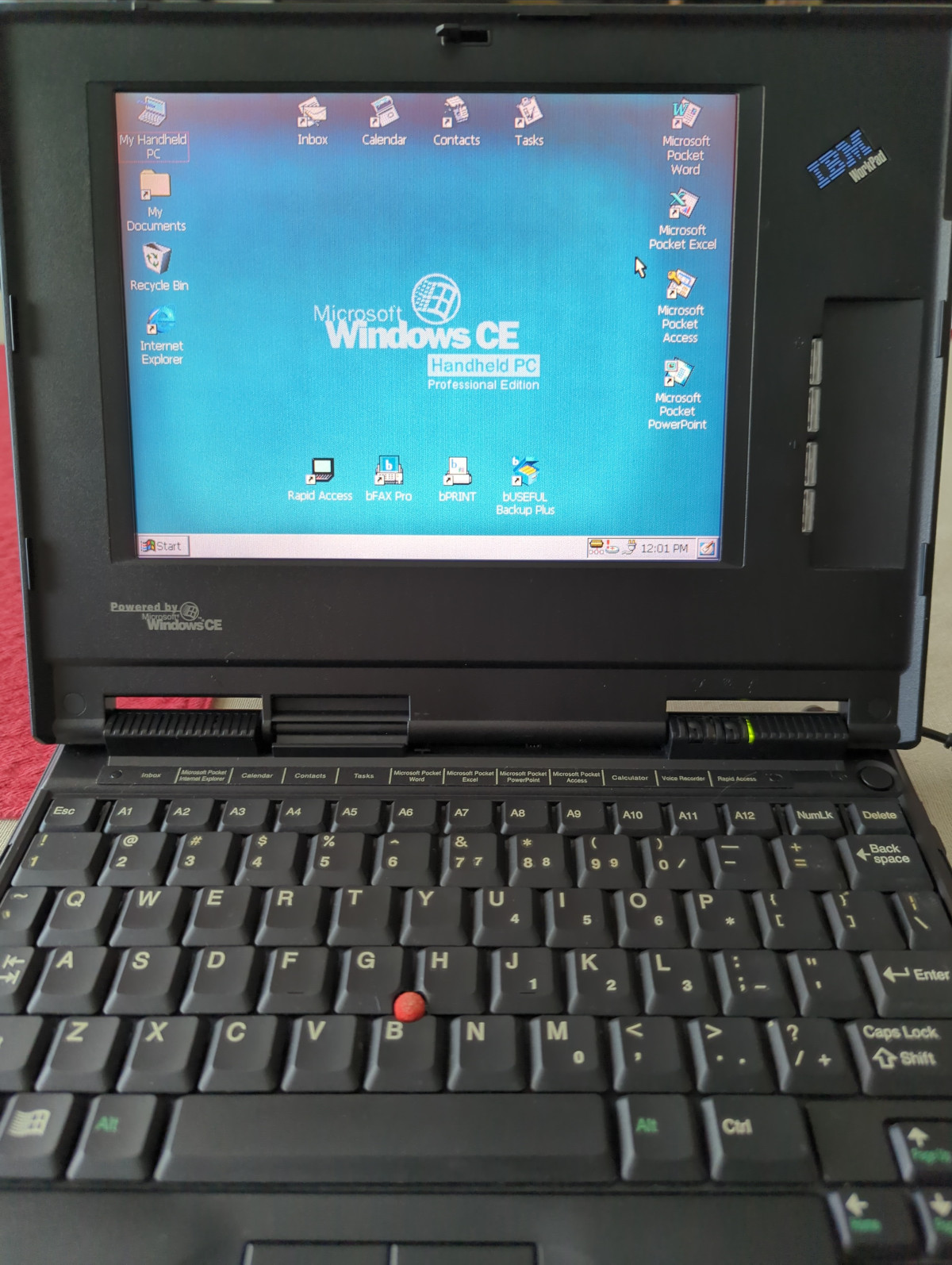
In the box bought through an online auction is a tiny laptop that screams IBM, we’d identify it as a ThinkPad immediately if it wasn’t for that brand being absent. This is an IBM WorkPad, a baby sibling of the ThinkPad line intended as a companion device. This one has a reduced spec screen and an NEC MIPS processor, with Windows CE on a ROM SODIMM accessible through a cover on the underside. For us in 2022 MIPS processors based on the open-sourced MIPS ISA are found in low-end webcams and routers, but back then it was a real contender. The article goes into some detail on the various families of chips from that time, which is worth a read in itself.

We remember these laptops, and while the IBM one was unaffordable there was a COMPAQ competitor which did seem tempting for on-the-road work. They failed to make an impact due to being marketed as a high-end executive’s toy rather than a mass-market computer, and they were seen off as “real” laptops became more affordable. A second-hand HP Omnibook 800 did the ultra-portable job on this bench instead.

The industry had various attempts at cracking this market, most notably with the netbooks which appeared a few years after the WorkPad was produced. It was left to Google to reinvent the ultra-portable non-Intel laptop as an internet appliance with their Chromebooks before they would become a mass-market device, but the WorkPad remains a tantalizing glimpse of what might have been.

Windows CE occasionally makes an appearance here, and yes, it runs DOOM.
The First Microcomputer: The Q1

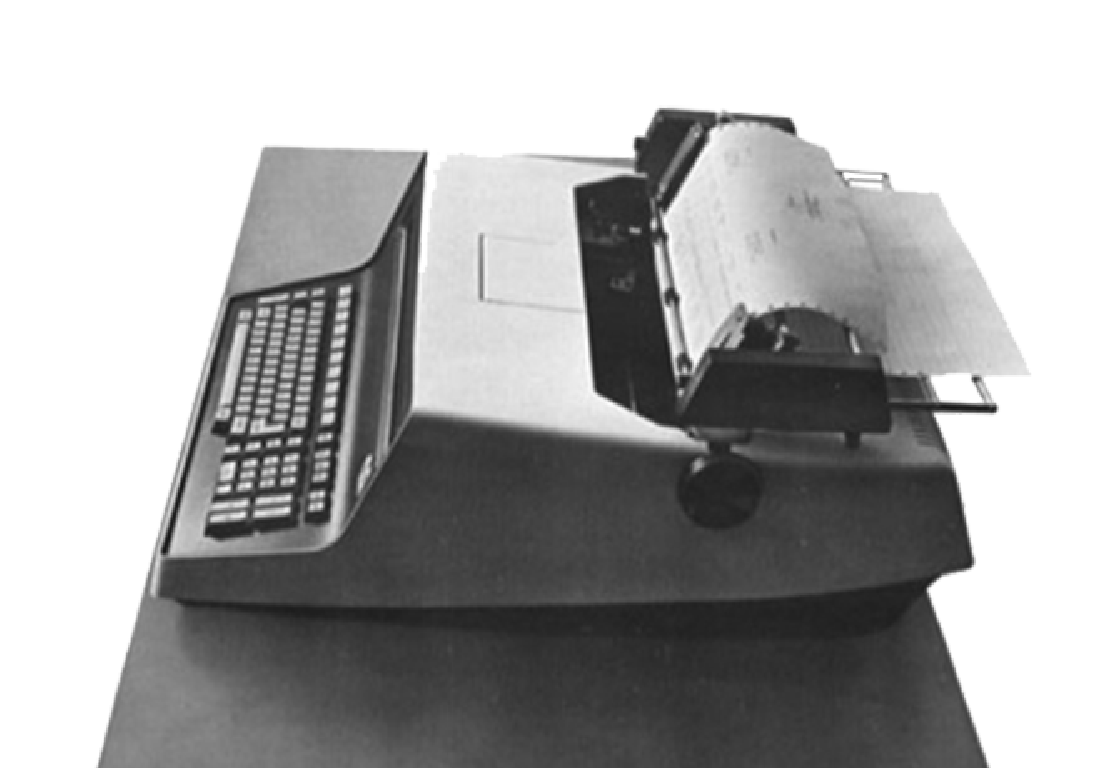
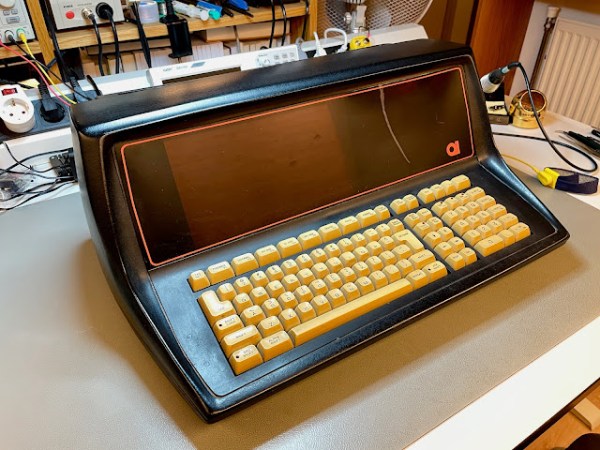
Quiz time, what was the first commercially available microcomputer? The Altair 8800? Something obscure like the SCELBI? The Mark-8 kit? According to [The Byte Attic], it was actually the Q1, based on the Intel 8008 processor. The first Q1 microcomputer was delivered in December of 1972, making it the first, as far as he can tell. Later revisions used the Z80 processor, which is the model pictured above that [The Byte Attic] has in his possession. It’s a beautiful little machine, with a striking orange plasma display.

The irony is that this machine is almost entirely forgotten about. The original unit may have looked more like a typewriter, pictured here. If you have any first hand knowledge, or especially software, documentation, or surviving hardware bits, make sure to check in to add to the knowledge pool about this amazing little machine.

It’s an important milestone, and the development of the Q1 may have been a direct cause of Intel developing the more powerful 8080 microprocessor. It seems that Daniel Alroy’s work on this machine literally kicked off the microcomputer revolution, and it’s been missing from our computer lore for too many years. We’re very hopeful to see more of this story come together, and the history of the Q1 fully recovered.

And if retro hardware is your jam, we’ve got you covered, including among others, the parallel story about the first microprocessor.

Continue reading “The First Microcomputer: The Q1” →

Tiny Dongle Brings The Hard Drive’s Song Back To Updated Retrocomputers

Back in the “beige box” days of computing, it was pretty easy to tell what your machine was doing just by listening to it, because the hard drive was constantly thrashing the heads back and forth. It was sometimes annoying, but never as annoying as hearing the stream of Geiger counter-like clicks stop when you knew it wasn’t done loading a program yet.

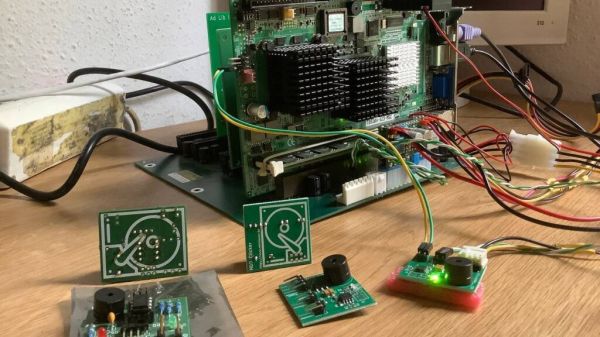
That “happy sound” is getting harder to come by, even on retro machines, which increasingly have had their original thrash-o-matic drives replaced with compact flash and other solid-state drives. This HDD sound simulator aims to fill that diagnostic and nostalgic gap on any machine that isn’t quite clicky enough for you. Sadly, [Matthias Werner] provides no build details for his creation, but between the longish demo video below (by a satisfied customer) and the details of the first version, it’s easy enough to figure out what’s going on here. An ATtiny and a few support components ride on a small PCB along with a piezoelectric speaker. The dongle connects to the hard drive activity light, which triggers a series of clicks from the speaker that sound remarkably like a hard drive heading seeking tracks. A demo starts at 7:09 in the video below; the very brave — or very nostalgic — might want to check out the full defragmentation that starts at 13:11.

Sure, this one is perhaps a bit over-the-top, but in the retrocomputing world, no price is too high to pay in the name of nostalgia. And it’s still far from the most ridiculous hard drive activity indicator we’ve seen.

Continue reading “Tiny Dongle Brings The Hard Drive’s Song Back To Updated Retrocomputers” →

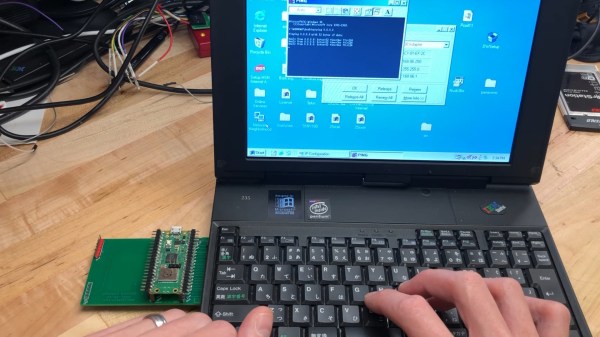
Card's author typing on the IBM PC110's keyboard, with the Pico W-based card plugged into the PCMCIA slot on the left. PC110's screen shows successful ping 8.8.8.8.8.

Pi Pico W Does PCMCIA, Gets This IBM PC110 Online

Bringing modern connectivity to retro computers is an endearing field- with the simplicity of last-century hardware and software being a double-edged sword, often, you bring a powerful and tiny computer of modern age to help its great-grandparent interface with networks of today. [yyzkevin] shows us a PCMCIA WiFi card built using a Pi Pico W, talking PCI ISA. This card brings modern-day WiFi connectivity to his IBM PC110, without requiring a separate router set up for outdated standards that the typical PCMCIA WiFi cards are limited by.

The RP2040 is made to talk PCI ISA using, of course, the PIO engine. A CPLD helps with PCI ISA address decoding, some multiplexing, and level shifting between RP2040’s 3.3V and the PCI 5 V levels. The RP2040 software emulates a NE2000 network card, which means driver support is guaranteed on most OSes of old times, and the software integration seems seamless. The card already works for getting the PC110 online, and [yyzkevin] says he’d like to improve on it – shrink the design so that it resembles a typical PCMCIA WiFi card, tie some useful function into the Pico’s USB port, and perhaps integrate his PCMCIA SoundBlaster project into the whole package while at it.

This is a delightful project in how it achieves its goal, and a pleasant surprise for everyone who’s been observing RP2040’s PIO engine conquer interfaces typically unreachable for run-of-the-mill microcontrollers. We’ve seen Ethernet, CAN and DVI, along many others, and there’s undoubtedly more to come.

We thank [Misel] and [Arti] for sharing this with us!

TRS-80 Gains Multiple Monitor Support, And High-Resolution Graphics

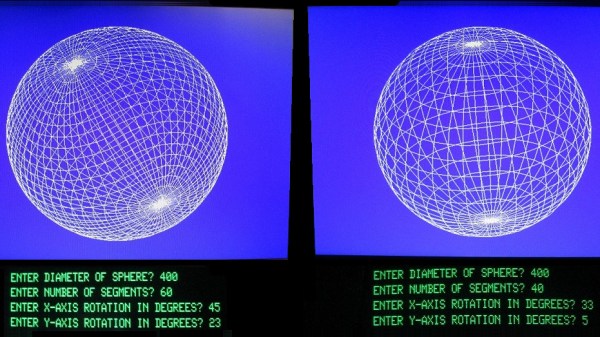
To call [Glen Kleinschmidt] a vintage computing enthusiast would be an understatement. Who else would add the ability to control and address multiple VGA monitors to a rack-mounted TRS-80 Model 1? Multiple 64-color 640×480 monitors might not be considered particularly amazing by today’s standards, but for 70s-era computing, it’s a different story.

Drawing this sin(x)/x ripple surface can be done in only 17 lines of BASIC.

How does a TRS-80 even manage to output anything useful to these monitors? [Glen] wrote his own low-level driver in machine code to handle that. The driver even has useful routines that are callable from within BASIC, meaning that programs written on the TRS-80 are granted powerful drawing abilities. Oh, and did we mention that the VGA graphics cards themselves were designed and made by [Glen]?

Interested in making your own? [Glen] provides all the resources you’ll need to re-create his work, including machine code drivers and demonstration BASIC programs as downloadable audio files, just as they would have been on original cassette tapes.

Watch things in action in the videos embedded below. The first draws a Land Rover, and the second plots a simple Moiré pattern star. Not bad for 70s-era hardware and 74xx logic!

Continue reading “TRS-80 Gains Multiple Monitor Support, And High-Resolution Graphics” →

Exploring Texas Instrument’s Forgotten CPU

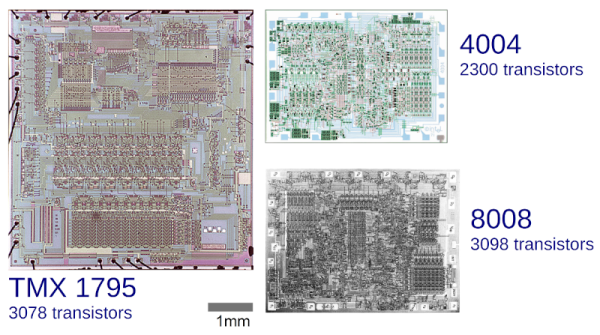
Texas Instruments isn’t the name you usually hear associated with the first microprocessor. But the TI TMX 1795 was an 8008 chip produced months before the 8008. It was never available commercially, though, so it has been largely forgotten by most people. But not [Ken Shirriff]. You can see a demo from 2015 of the device in the video below, too.

The reason the chips have the same architecture is they were built to replace the same large circuit board inside a Datapoint 2200 programmable terminal. These were big beasts that could be programmed in BASIC or PL/B.

Datapoint asked Intel to shrink the board to a chip due to heating problems — but after delays, they instead replaced the power supply and lost interest in the device. TI heard about the affair and wanted in on the deal. However, Datapoint was unimpressed. The chip didn’t tolerate voltage fluctuations very well, since they had replaced the power supply and had a new CPU design that was faster than the chip would be. They were also unimpressed with how much stuff you had to add to get a complete system.

So why did the Intel 8008 work out in the marketplace but the TI chip didn’t? After all, Datapoint decided not to use the 8008, also. But as [Ken] points out, the 8008 was much smaller than the TI chip and, thus, was more cost-effective to produce.

As usual, [Ken]’s posts are always interesting and enlightening. He’s looked at a lot of old computers. He’s even dug into old space hardware. Great stuff!

Continue reading “Exploring Texas Instrument’s Forgotten CPU” →

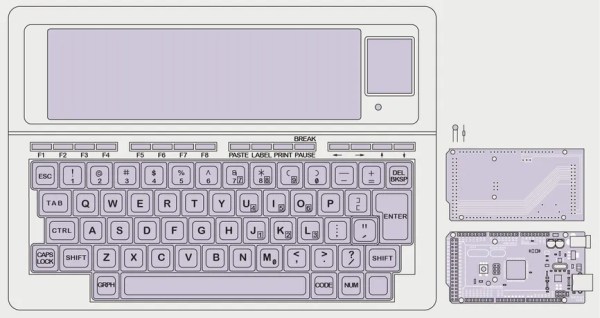
Sketch of a Tandy TRS-80 Model 100 with Arduino Mega 2560

TRS-80 Model 100 Gets Arduino Heart Transplant

When [Stephen Cass] found himself with a broken Tandy TRS-80 Model 100 portable computer, the simplest solution was to buy another broken one and make one working computer from two non-working computers. However, this left him with a dilemma — what to do with the (now even more) broken one left over?

LCD layout is unusual by modern standard, but optimized for fast updates

Naturally, he did what a lot of us would do and used modern hardware to interface with the original parts that still work. In this case it meant replacing the motherboard with an Arduino Mega 2560.

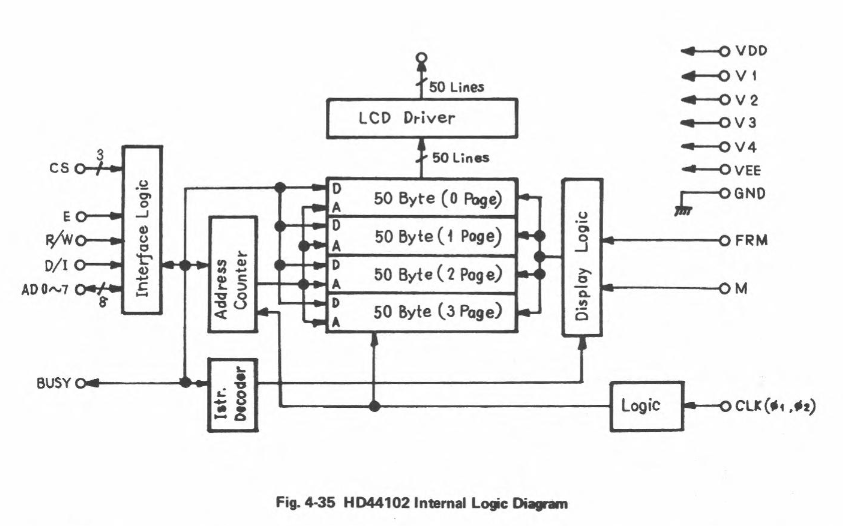
Luckily, the Model 100 has a substantial fanbase and there’s a lot of helpful information available online, including the detailed service manual, that helped [Stephen] to understand how to drive the unusual display.  The LCD has a resolution of 240×64 pixels, which are broken down into eight zones of 50×32 pixels, and two zones of 40×42 pixels.  Each zone is then further divided into four banks, eight pixels tall, so that each column of eight pixels corresponds to a single byte.

Every one of the ten zones is controlled by an individual HD44102 driver IC, connected to a 30-bit wide bus for selecting the correct chip, bank and column.

With the Arduino handling the data, the old LCD still needed a -5 V supply for contrast and an RC filter to smooth out the PWM signal [Stephen] is using to adjust the viewing angle.

With the new interface, [Stephen] is able to access all of the pixels on the original display, and to use modern graphics libraries such as displayio. With the display issue solved, he intends to use a separate Teensy 4.1 to connect with the keyboard matrix and provide a VT100 terminal interface.

Schematic of the HD44102 driver circuit

Upcycling old, broken hardware can be a lot of fun and is always educational.  Understanding why certain design decisions were made at a time when the engineering trade-offs were different can lead to insights that are directly relevant to modern designs when resources get tight. In this case, the quirky LCD drivers were a response to making the display of text as efficient as possible, so as not to overburden the processor.

The TRS-80 computers are ripe for hacking, with their “built-for-service” designs, and we’ve featured a few in the past.  Some have replaced the motherboard with something newer, like [Stephen], whereas others have also replaced the display, or connected them to the cellphone network.

Have you found new ways to get old hardware working? Tell us in the comments below or send us a message on the Hackaday tips line.

Thanks to [nb0x0308] for the tip!