Web Emulator For The Kenbak-1 Computer (If You’ve Heard Of It)

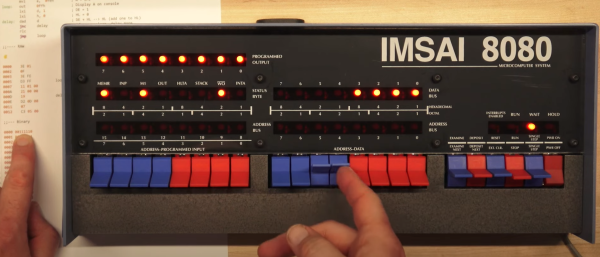
Ever heard of the KENBAK-1? Recognized as the first personal computer, created by John Blankenbaker and sold in 1971 in comparatively small numbers, it’s now a piece of history. But don’t let that stop you if you are curious, because of course there is an emulator on the web.

If the machine looks a bit strange, that’s because early computers of this type did not have the kind of controls (or displays) most people would recognize today. Inputs were buttons and switches, and outputs were lights showing binary values of register contents. The machine could store and run programs, and those programs were entered in pure machine code (no compiler, in other words) by setting individual bit values via the switches. In fact, the KENBAK-1’s invention preceded that of the microprocessor.

The KENBAK was the first electronic, commercially available computer that was not a kit and available to the general population, but the story of how it came to be is interesting. Back in 2016 we covered how that story was shared by John Blankenbaker himself at Vintage Computer Festival East.

APPLE2IDIOT Expansion Card Lets Your Apple II (Sort Of) Access The Internet

[Nathanial Hendler]’s Apple2Idiot expansion card for the Apple II family of computers is a nifty mix of modern and vintage, and provides a clever means of allowing the host computer to (indirectly) access the internet over WiFi while keeping things simple from the host computer’s perspective.

The PCB has plenty of space on which to silkscreen reference data. Click to enlarge.

It does this by embedding an ESP32 module and a dual-port RAM chip onto an expansion card. The Apple2Idiot, when installed into a host machine, presents as a memory location which the host machine can access. The ESP32 then takes care of all the WiFi communications and tasks requiring internet access, and the host computer directs these tasks (and reads their output) via PEEK and POKE commands.

This means that there are two pieces of software for any given task: one running on the ESP32 doing the actual work, and one running on the Apple II that communicates with the ESP32 on the card by reading and writing to memory. It’s a simple system, and one that [Nathanial] thinks works quite well for specific tasks.

Example programs include things like scanning and selecting a WiFi network, fetching weather data, and sending a message to Slack. Making new applications does mean having to write software on two ends, but the simplicity of the system also means flexibility, because anything the ESP32 does can have its complexity abstracted away by the time its data is presented to the host machine. Not that the Apple II is incapable of dealing with the modern internet more directly; we’ve seen a basic Apple II web server written in BASIC.

A (Nearly All) New Commodore 64

The Commodore 64 remains one of the most influential of the 8-bit home computers four decades after its launch, so not surprisingly there is a huge enthusiast community surrounding it. With so many produced over the years it was available one might think that there would be no shortage of surviving specimens, but sadly time and component failure have taken their toll and the classic micro is not always the most reliable kid on the block. Thus a cottage industry has sprung up supplying C64 parts, leading [The Retro Shack] to have a go at making a new one entirely from scratch.

As you can see in the video below the break it’s not quite an entirely new ’64, as parts including some of the custom silicon come from failed boards. The PCB is a modern recreation of the original and the SID sound chip is an ARMsid though, and most of the parts come from a handy bagged-up kit that makes assembling the BoM much easier. Instead of the big silver box of the original RF modulator is a modern composite board, and there are a few issues with minor connector part differences.

Assembly is simply a very long through-hole soldering process, and once he’d completed it there was the expected refusal to work. We’ve all been there, and eventually he traced it to an incorrectly fitted chip. If you think you’ve seen a few brand new C64s here before you’d be correct, one of them even used LEGO for those elusive keycaps.

Continue reading “A (Nearly All) New Commodore 64”

A vacuum tube computer next to a part of its schematic

This Colossal Vacuum Tube Computer Plays A Mean Game Of Pong

It doesn’t happen often that we report on new vacuum tube based computer designs. Today however, we’re pleased to introduce to you the Fast Reliable Electronic Digital Dot Computer, or Fred.Computer for short. It’s the brainchild of [Mike] who also brought us ENA, which we featured earlier.

Fred is a new design that reuses the parts that made up ENA. It has an 8-bit CPU, 16 bytes of RAM, 256 bytes of NVRAM, and runs at a clock speed of 11.3 kHz. With its 560 tubes drawing a total supply current of about 200 A it also provides a fair bit of heating to [Mike]’s study. The main logic is implemented through NOR gates, built from 6N3P dual-triode tubes sourced from Eastern Europe. These NOR gates are combined into more complex structures like latches, registers and even a complete ALU. A total of sixteen machine code instructions can be used to write programs; clever design allows Fred to perform 16, 32 or even 64-bit calculations with its 8-bit ALU.

A PCB with many reed relays
Need some RAM? There’s sixteen bytes right here.

An interesting addition is a new RAM design based on reed relays. [Mike] realised that relays are actually very similar to digital transmission gates and can therefore be used to make a simple static RAM cell. If you thought relays were too slow for RAM cells, think again: these reed relays can toggle at a mind-boggling 700 Hz, making them more than fast enough for Fred.

The main I/O device is a console that contains several pushbuttons as well as a 12 x 8 LED display. All of this makes Fred a fully-functional general-purpose computer that’s even capable of playing Pong (video, embedded below). [Mike]’s website is full of interesting detail on all aspects of vacuum tube computer design, and makes delightful reading for anyone tempted by the idea of building their own.

Can’t get enough of vacuum tube computers? Have a look at this 1-bit MC14500 implementation, marvel at this modern interpretation of an adding machine, or find out how IBM designed its logic in the 1950s.

Continue reading “This Colossal Vacuum Tube Computer Plays A Mean Game Of Pong”

Vintage Computer Festival East Raises The Bar Again

When I arrived at the InfoAge Science and History Museum for this year’s Vintage Computer Festival East, I fully expected it to be a reduced event compared to last year. After all, how could it not? Due to the schedule getting shifted around by COVID, show runner Jeffrey Brace and his team had just six months to put together an event that usually gets planned over the course of an entire year. With such a truncated preparation time, they more than deserved a little slack.

But as anyone who attended VCF East 2022 can attest, they didn’t need it. Not only did the event meet the high expectations set by last year’s Festival, it managed to exceed them. There were more workshops, more talks, more vendors, more consignment rooms, more live streams, more…well, everything. This year’s program even got a splash of glossy color compared to the grayscale handout attendees received in October. It was, by any metric you care to use, better than ever.

It does however leave me in somewhat on an unenviable position. As we’ve learned during the pandemic, a virtual representation of an event as extensive as VCF can give you a taste of what’s offered, but all the nuance is lost. Looking at pictures of somebody’s passion project can’t compare to actually meeting the person and seeing that glint of pride in their eye as they walk you through all the details.

So bear that in mind through this rundown of some of the projects that caught my eye. This isn’t  a “best of” list, and the Festival is certainly not a competition. But each attendee will invariably come away with their own handful of favorite memories, so I’ll document mine here. If you’d like to make your own memories, I’d strongly suggest making the trek out to the Jersey Shore come April 2023 for the next Vintage Computer Festival East.

Continue reading “Vintage Computer Festival East Raises The Bar Again”

The Sinclair ZX Spectrum Turns 40

It’s an auspicious moment for retrocomputing fans, as it’s now four decades since the launch of the Sinclair ZX Spectrum. This budget British microcomputer was never the best of the bunch, but its runaway success and consequent huge software library made it the home computer to own in the UK. Here in 2022 it may live on only in 1980s nostalgia, but its legacy extends far beyond that as it provided an entire generation of tech-inclined youngsters with an affordable tool that would get them started on a lifetime of computing.

What Was 1982 Really Like?

Cover of Sincalir User, Sir Clive Sinclair as a magician
Sinclair User issue 3 captures the excitement surrounding the Spectrum launch.

There’s a popular meme among retro enthusiasts that the 1980s was a riot of colour, pixel artwork, synth music, and kitschy design. The reality was of growing up amid the shabby remnants of the 1970s with occasional glimpses of an exciting ’80s future. This was especially true for a tech-inclined early teen, as at the start of 1982 the home computer market had not yet reached its full mass-market potential. There were plenty of machines on offer but the exciting ones were the sole preserve of adults or kids with rich parents. Budget machines such as Sinclair’s ZX81 could give a taste of what was possible, but their technical limitations would soon become obvious to the experimenter.

1982 was going to change all that, with great excitement surrounding three machines. Here in the UK, the Acorn BBC Micro had been launched in December ’81, the Commodore 64 at the start of ’82, and here was Sinclair coming along with their answer in the form of first the rumour of a ZX82, and then the reality in the form of the Spectrum.

This new breed of machines all had a respectable quantity of memory, high-res (for the time!) colour graphics, and most importantly, sound. The BBC Micro was destined to be the school computer of choice and the 64 was the one everybody wanted, but the Spectrum was the machine you could reasonably expect to get if you managed to persuade your parents how educational it was going to be, because it was the cheapest at £125 (£470 in today’s money, or about $615). Continue reading “The Sinclair ZX Spectrum Turns 40”

IBM PCjr Types Again, Thanks To KeybJr

Most of us think of keyboards — even vintage ones — as being fairly standardized and interchangeable, but that isn’t the case for the IBM PCjr. Its keyboard was quite unlike most others of its time, which means that a PCjr without an original keyboard is pretty much a dust collector. That’s what led [Jozef Bogin] to create the KeybJr, a piece of hardware that allows one to use any AT, XT, or PS/2 keyboard with the IBM PCjr.

The PCjr’s oddball keyboard can be a bit of a hassle for vintage computing enthusiasts.

What was strange about the PCjr’s keyboard? From the outside it looked pretty normal, but it definitely had its own thing going on. For one, the PCjr keyboard operated over a completely different protocol than the other keyboards of the time. In addition, its connection to the host was either by IR, or via its own wired cable adapter.

The KeybJr solves this by using an Arduino-based board to turn inputs from other keyboards of the time into something the PCjr expects. These signals are sent out and received either over infrared, or by the PCjr’s “K” port for a wired keyboard link.

Why bother with the IR functionality? Well, the connector and pins on the PCjr are not very rugged, and sometimes they are damaged. In those cases, it is nice to have the option of using a normal (for the time) keyboard over the IR link. Vintage hardware is not always in perfect shape, after all. That’s why things like ATX power supply adapters for the PCjr exist.

Want to give it a shot? There is a GitHub repository for the KeybJr, and you can see it in action in a brief video, embedded below.

Continue reading “IBM PCjr Types Again, Thanks To KeybJr”