Access An 8-bit Atari Through Twitter

Building a retro computer, or even restoring one, is a great way to understand a lot of the fundamentals of computing. That can take a long time and a lot of energy, though. Luckily, there is a Twitter bot out there that can let you experience an old 8-bit Atari without even needing to spin up an emulator. Just tweet your program to the bot, and it outputs the result.

The bot was built by [Kay Savetz] and accepts programs in five programming languages: Atari BASIC, Turbo-Basic XL, Atari Logo, Atari PILOT, and Atari Assembler/Editor, which was a low-level assembly-type language available on these machines. The bot itself runs on a Raspberry Pi with the Atari 800 emulator, rather than original hardware, presumably because it’s much simpler to get a working network connection on a Pi than on a computer from the 80s. The Pi runs a python script that polls Twitter every two minutes and then hands the code off to the emulator.

[Kay]’s work isn’t limited to just Ataris, though. There’s also an Apple II BASIC bot for all the Apple fans out there that responds to programs written in AppleSoft BASIC. While building your own retro system or emulating one on other hardware is a great exercise, it’s also great that there are tools like these that allow manipulation of retro computers without having to do any of the dirty work ourselves.

Retrotechtacular: The $5,000 40 Pound HP Classroom Computer

See if you can talk your local school district into buying a computer that costs about $5,000 and weighs 40 pounds. That was HP’s proposition to schools back in 1968 so really it is more like $35,000 today. The calculator had a CRT display for the RPN stack that you could mirror on a big screen. You could also get a printer or plotter add-on. Pretty hot stuff for the ’60s.

The 1970 videos promoting the HP 9100, posted by the [Computer History Archive Project], shows something we’d think of as a clunky calculator, although by the standards of the day it was a pretty good one with trig functions and a crude programming capability.

Continue reading “Retrotechtacular: The $5,000 40 Pound HP Classroom Computer”

Adding WiFi To The Acorn Electron

In the continuing quest by countless hobbyists to allow every 1980s 8-bit home computer to experience the joys of an online experience that doesn’t involve a 9600 baud modem, [Roland Leurs] has created a cartridge-based module for the Acorn Electron that adds WiFi, which he showed off at the virtual ABug conference in September 2020.

The Acorn Electron is a Synertek 6502-based computer that was released in the UK in August of 1983. It’s a budget version of the well-known BBC Micro educational/home computer, with 32 kB of RAM and featuring BBC BASIC v2 in its ROM. [Roland]’s ElkWiFi card slots into an available cartridge slot, after which the onboard ESP8266 (ESP-1 module) can be enabled and used as a WiFi modem.

Acorn Electron with Plus 1 expansion, ElkWiFi and additional expansion card inserted.

The board features the Exar ST16C2552CJ dual UART chip, one channel of which connects to the ESP-1 module, with the other channel used as an uncommitted UART header. The control logic is implemented in VHDL and flashed to the onboard Xilinx CPLD, and a 128 kB RAM module is used as WiFi data buffer.

Although a definite niche product, reading through the forum thread makes one really appreciate the technical complexity and joy once things are beginning to work reliably. It also shows one of the few cases where an ESP-1 module is used for its original purpose: as an easy way to add WiFi functionality with full WiFi and TCP stack, without burdening the main CPU.

(Thanks, BaldPower)

Teleconferencing Like It’s 1988: Connecting Vintage Hardware To Zoom

Hang up your car phone and toss that fax machine in the garbage. Even back in the late 80s it was possible to do away with these primitive technologies in favor of video conferencing, even though this technology didn’t catch on en masse until recently. In fact, Mitsubishi released a piece of video conferencing equipment called the VisiTel that can be put to use today, provided you can do a bit of work to get it to play along nicely with modern technology.

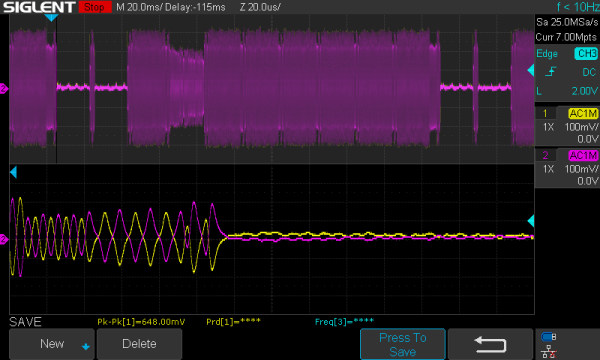
[Alex] was lucky enough to have one of these on hand, as soon as it was powered up he was able to get to work deciphering the messaging protocol of the device. To do this he showed the camera certain pictures with known properties and measured the output waveforms coming from the device, which were AM modulated over an RJ9 connection which he had changed to a 3.5 mm headphone jack.

It communicates in a series of pictures instead of sending an actual video signal, so [Alex] had a lot of work to do to properly encode and decode the stream. He goes into incredible detail on his project page about this process and is worth a read for anyone interested in signal processing. Ultimately, [Alex] was able to patch this classic piece of technology into a Zoom call and the picture quality is excellent when viewed through the lens of $399 80s technology.

We have been seeing a lot of other hacks around video conferencing in the past six months as well, such as physical mute buttons and a mirror that improves eye contact through the webcam.

Casio Computer Rebuild Puts New Wine In An Old Bottle

With a glut of vintage consumer electronics available from eBay it should be easy to relive your glory days, right? Unfortunately the march of time means that finding gear is easy but finding gear that works is not. So was the case when [Amen] acquired not one, but two used calculator/computer units hoping to end up with one working device. Instead, he went down the rabbit hole of redesigning his own electronics to drive the Casio QT-1 seen here.

Especially interesting is the prototyping process for the replacement board. [Amen] used a “BluePill” STM32 microcontroller board at its heart, and used point-to-point soldering for the rest of the circuitry on a rectangle of protoyping board. That circuit is non-trivial, needing a 23 V source to drive the original VFD from the computer, a battery-backed real-time-clock (MCP7940), and a GPIO expander to scan the keys on the keypad.

It worked great, but couldn’t be cut down to fit in the case. The solution was a PCB designed to fit the footprint of the original. The modern guts still need more firmware work and a couple of tweaks like nudging that 23 V rail a bit higher to 26 V for better brightness, but the work already warrants a maniacal cry of “It’s Alive!”.

This isn’t [Amen’s] first rodeo. Back in March we looked in on another vintage Casio refurb that sniffed out the display protocol.

The ZX Microdrive: Budget Data Storage, 1980s Style

An enduring memory for most who used the 8-bit home computers of the early 1980s is the use of cassette tapes for program storage. Only the extremely well-heeled could afford a disk drive, so if you didn’t fancy the idea of waiting an eternity for your code to load then you were out of luck. If you had a Sinclair Spectrum though, by 1983 you had another option in the form of the unique Sinclair ZX Microdrive.

This was a format developed in-house by Sinclair Research that was essentially a miniaturized version of the endless-loop tape carts which had appeared as 8-track Hi-Fi cartridges in the previous decade, and promised lightning fast load times of within a few seconds along with a relatively huge storage capacity of over 80 kB. Sinclair owners could take their place alongside the Big Boys of the home computer world, and they could do so without breaking the bank too much.

Continue reading “The ZX Microdrive: Budget Data Storage, 1980s Style”

Commodore 64 Mini Man Makes Matching Mini Monitor

While putting together a retro computer is a great project and can teach a lot about the inner workings of electronics, hooking that 70s- or 80s-era machine up to a modern 144 Hz 1440p display tends to be a little bit anticlimactic. To really recreate the true 8-bit experience it’s important to get a CRT display of some sort, but those are in short supply now as most are in a landfill somewhere now. [Tony] decided to create a hybrid solution of sorts by 3D printing his own Commodore replica monitor for that true nostalgia feel.

This build is a matching mini scale replica of the Commodore 1702 monitor, a color monitor produced by Commodore specifically for their machines. At the time it was top-of-the-line and even included an early predecessor of the S-Video method of video signalling. This monitor was modeled in Fusion 360 and then sent to the 3D printer for assembly, then populated with a screen with a period-correct 4:3 aspect ratio, required electronics for handling the Commodore’s video signal, and even includes an upgrade over the original monitor: stereo speakers instead of the single-channel speaker that was featured in the 80s.

While this monitor doesn’t use a CRT, it’s an impressive replica nonetheless, right down to the Commodore serial number sticker on the back. If you need a Commodore 64 to go along with it, there are plenty of possibilities available to consider like this emulated C64 on a Raspberry Pi or these refurbished OEM Commodores.

Continue reading “Commodore 64 Mini Man Makes Matching Mini Monitor”