TV Output From Arduino — 1980s Style!

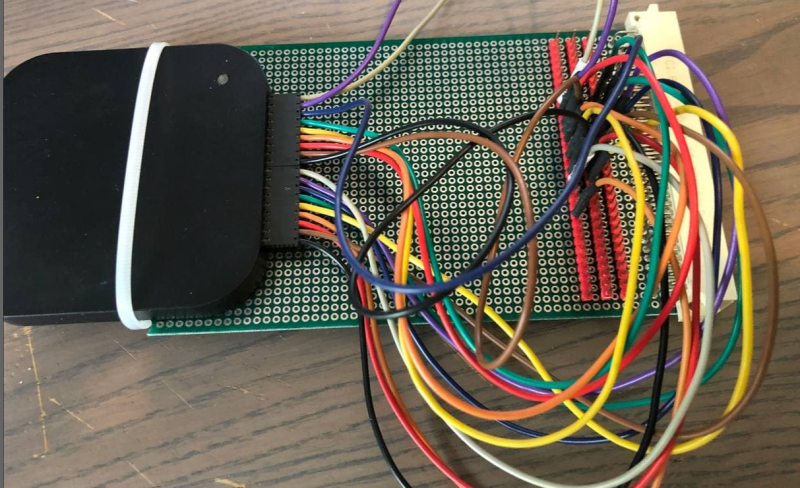
We’ll admit it, we’re all spoiled. A few bucks can now buy a computer that would have been the envy of everyone back in the late 1970s or early 1980s. So it’s no surprise that [krallja] was able to use an old-style video output chip to drive a TV with an Arduino. The TMS9918A is a venerable output device, and if the old computers could drive it then it makes sense that a modern computer could too. You can see a video of the whole experiment, below.

The Internet has also spoiled us, in that it’s dead simple to find datasheets for nearly anything, even these old chips. The only real problem with such aged silicon is that they typically expect a processor with a data and address bus, but most microcontrollers now keep all of that internal. But with enough fast I/O you can simulate a bus just fine. For now, the experiment just cycles through the color output.

Continue reading “TV Output From Arduino — 1980s Style!”

Game Boy Plays Forever

For those of us old enough to experience it first hand, the original Game Boy was pretty incredible, but did have one major downside: battery consumption. In the 90s rechargeable batteries weren’t common, which led to most of us playing our handhelds beside power outlets. Some modern takes on the classic Game Boy address these concerns with modern hardware, but this group from the Delft University of Technology and Northwestern has created a Game Boy clone that doesn’t need any batteries at all, even though it can play games indefinitely.

This build was a proof-of-concept for something called “intermittent computing” which allows a computer to remain in a state of processing limbo until it gets enough energy to perform the next computation. The Game Boy clone, fully compatible with the original Game Boy hardware, is equipped with many tiny solar panels which can harvest energy and is able to halt itself and store its state in nonvolatile memory if it detects that there isn’t enough energy available to continue. This means that Super Mario Land isn’t exactly playable, but other games that aren’t as action-packed can be enjoyed with very little impact in gameplay.

The researchers note that it’ll be a long time before their energy-aware platform becomes commonplace in devices and replaces batteries, but they do think that internet-connected devices that don’t need to be constantly running or powered up would be a good start. There are already some low-powered options available that can keep their displays active when everything else is off, so hopefully we will see even more energy-efficient options in the near future.

Thanks to [Sascho] for the tip!

Continue reading “Game Boy Plays Forever”

Reverse Engineering A Module From A Vacuum Tube Computer

It’s best to admit upfront that vacuum tubes can be baffling to some of the younger generation of engineers. Yes, we get how electron flow from cathode to anode can be controlled with a grid, and how that can be used to amplify and control current. But there are still some things that just don’t always to click when looking at a schematic for a tube circuit. Maybe we just grew up at the wrong time.

Someone who’s clearly not old enough to have ridden the first wave of electronics but still seems to have mastered the concepts of thermionic emission is [Usagi Electric], who has been doing some great work on reverse engineering modules from old vacuum tube computers. The video below focuses on a two-tube pluggable module from an IBM 650, a machine that dates clear back to 1954. The eBay find was nothing more than two tube sockets and a pair of resistors joined to a plug by a hoop of metal. With almost nothing to go on, [Usagi] was still able to figure out what tubes would have gone in the sockets — the nine-pin socket was a big clue — and determine that the module was likely a dual NAND gate. To test his theory, [Usagi] took some liberties with the original voltages used by IBM and built a breakout PCB. It’s an interesting mix of technologies, but he was able to walk through the truth table and confirm that his module is a dual NAND gate.

The video is a bit long but it’s chock full of tidbits that really help clear up how tubes work. Along with some help from this article about how triodes work, this will put you on the path to thermionic enlightenment.

Continue reading “Reverse Engineering A Module From A Vacuum Tube Computer”

Miniature Faux Floppy For 8-Bit Atari Looks The Part

There’s plenty of fun to be had with retrocomputers of yesteryear, but for modern users, it can be something of a culture shock. Going back to floppy disks after all these years is a reminder of just how far storage technology has come in terms of speed, reliability, and of course, capacity. Luckily, there are ways to combine the best of both worlds.

Floppy drive emulators for classic computers are of course nothing new, but we think this one [c0pperdragon] has put together is worthy of a closer look. Not only does the ATmega32U4 based emulator have an exceptionally low part count, but the code has been written in the Arduino IDE. Both features make it easy for new players to duplicate and revise the design should they feel so inclined. In a pinch you could even implement it on a breadboard with a garden variety Arduino.

The emulator is housed in a 3D printed enclosure designed to look like an era-appropriate Atari 1050 Disk Drive, except you’re using SD cards instead of floppies. The firmware can mimic two physical drives and supports up to 100 disk images on each SD card. The user interface is about as simple as it gets, with two push buttons and a pair of seven-segment LEDs to indicate which disk image is currently loaded up.

We’ve seen some very elaborate disk emulators over the years, but there’s something compelling about how straightforward this version is. If it helps a few more people experience the unique joys of retrocomputing, it’s a win in our book.

Restoring An Unusual Piece Of Computing History

Trawling classified ads or sites like Craigslist for interesting hardware is a pastime enjoyed by many a hacker. At a minimum, you can find good deals on used tools and equipment. But if you’re very lucky, you might just stumble upon something really special.

Which is exactly how [John] came into possession of the TRANSBINIAC. Included in a collection of gear that may have once belonged to a silent key, the device is a custom-built solid-state computer that appears to have been assembled in the early 1960s. Featuring a large see-through window not unlike what you might find on a modern gaming computer and a kickstand that tilts it back at a roughly 45° angle, it was obviously built to be shown off. Perhaps it was a teaching aid or even a science fair entry.

After some digging, it looks like the design of the TRANSBINIAC was based on plans published in the January 1960 issue of Electronics Illustrated. Though there are some significant differences. This computer uses eight bistable flip-flip modules instead of the original six, deletes the multiplication circuit, and employs somewhat simplified wiring. Whoever built this machine clearly knew what they were doing, which for the time, is really saying something. This truly unique machine may well have been one of the first privately owned digital computers in the world.

Which is why we’re glad to see [John] trying to restore the device to its former glory. Naturally it’s a little tricky since the computer came with no documentation and its design doesn’t exactly match anything out there. But with the help of other Hackaday.io users, he’s hoping to get everything figured out. It sounds like the first step is to try and diagnose the 2N554 germanium transistor flip-flop modules, as they appear to be behaving erratically. If you have experience with this sort of hardware, feel free to chime in.

We’re supremely proud of the fact that so many of these early computer examples (and the people that are fascinated by them) have recently found their way to Hackaday.io. They’re literally the building blocks on which so much of our modern technology is based on, and the knowledge of how they were designed and operated deserves to live on for future generations to learn from. If it wasn’t for 1960s machines like the TRANSBINIAC or the so-called “Paperclip Computer”, Hackaday might not even exist. It seems like the least we can do is return the favor and make sure they aren’t forgotten.

[Thanks to Yann for the tip.]

Retrocomputing Spray Paints: Amiga Beige, Commodore, And ATARI Grey

[retrohax] has provided vintage computer guidance for years, and part of that guidance is this: sometimes using paint as part of restoration is simply unavoidable. But the days of tediously color-matching to vintage hardware are gone, thanks to [retrohax] offering custom-mixed spray paints in Amiga 500 Beige, C-64 Beige, and ATARI ST/SE Grey. (At the moment only delivery within Poland is available due to shipping restrictions, but [retrohax] is working on a better solution.)

As a companion to making these vintage colors available, there is also a short how-to guide on how to properly prep and spray paint a computer case for best results that talks a little about the challenges in color matching to vintage hardware, and how getting custom paints mixed makes life much easier. Hackers may value making do with whatever is available, but we can also appreciate the value of having exactly the right material or tool for the job.

It’s not every day we see someone mixing custom spray paint colors, but off the shelf options don’t always cut it. Another example of getting specialty materials made from the ground up is custom plywood specifically designed for laser-cutting puzzles, something done because the troubles that came with off-the-shelf options were just not worth the hassle.

Start Me Up: What Has The Windows 95 Desktop Given Us 25 Years Later?

We’ve had something of an anniversary of late, and it’s one that will no doubt elicit a variety of reactions from our community. It’s now 25 years ago that Windows 95 was launched, the operating system that gave the majority of 1990s PC users their first taste of a desktop-based GUI and a 32-bit operating system.

To the strains of the Rolling Stones’ Start me up, Microsoft execs including Bill Gates himself jubilantly danced on stage at the launch of what was probably to become the company’s defining product, perhaps oblivious to the line “You make a grown man cry” which maybe unwittingly strayed close to the user experience when faced with some of the software’s shortcomings.

Its security may seem laughable by the standards of today and the uneasy marriage of 16-bit DOS underpinning a 32-bit Windows operating system was clunky even in its heyday, but perhaps now is the best time to evaluate it unclouded by technical prejudice. What can we see of Windows 95 in the operating systems we use today, and thus from that can we ask the question: What did Windows 95 get right? Continue reading “Start Me Up: What Has The Windows 95 Desktop Given Us 25 Years Later?”