Teardown: BlackBerry Smart Card Reader

Years before Steve Jobs showed off the first iPhone, the BlackBerry was already the must-have accessory for mobile professionals. Back then, nobody was worried about watching movies or playing the latest games on their mobile devices, they just wanted a secure and fast way to send and receive email on the go. For that, the BlackBerry was king.

Fast forward to today, and the company is just a shell of what it once was. They don’t even bother making their own hardware anymore. Over the last several years they’ve opted to partner with a series of increasingly obscure manufacturers to produce a handful of lackluster Android phones so they still have something to sell to their dwindling userbase. Anyone excited about the new 5G BlackBerry being built by Texas start-up OnwardMobility? Did you even know it was in the works before now?

A DoD Common Access Card

But this article isn’t about BlackBerry phones. It’s about something that’s evenĀ more irrelevant to consumers: the BlackBerry Smart Card Reader. Technically, this little device isn’t dependent on the phones of the same name, but it makes sense that Research In Motion (which eventually just renamed itself to BlackBerry Limited) would market the gadget under the brand of their most popular product. Though as you might expect, software was available to allow it to work with the BlackBerry phone that you almost certainly owned if you needed a dedicated smart card reader.

For those who might not be aware, a smart card in this context is a two-factor authentication token contained in an ID card. These are used extensively by organizations such as the Department of Defense, where they’re known as Common Access Cards, that require you to insert your ID card into a reader before you can log into a secure computer system. This sleek device was marketed as a portable reader that could connect to computers over USB or Bluetooth. Worn around your neck with the included lanyard, the battery-powered reader allowed the card itself to remain on the user’s body while still being readable by nearby devices.

Civilians will recognize the basic technology from modern “Chip and PIN” debit and credit cards, but we’ve never had to stick one of those into our laptop just to log in. To be sure, the BlackBerry Smart Card Reader was never intended for the average home computer user, it was sold to companies and organizations that had tight security requirements; which just so happened to be the same places that would likely already be using BlackBerry mobile devices.

Of course, times and technology change. These devices once cost $200 apiece and were purchased in vast quantities for distribution to trusted personnel, but are now all but worthless. Even in new and unopened condition, they can be had for as little as $10 USD on eBay. For that price, it’s certainly worth taking a peek inside. Perhaps the hacker community can even find new applications for these once cutting-edge devices.

Continue reading “Teardown: BlackBerry Smart Card Reader”

This Week In Security: UTorrent Vulnerable, Crowd-Sourcing Your Fail2Ban, And Cryptographers At Casinos

The uTorrent client was recently updated to fix a null pointer dereference (CVE-2020-8437), discovered by [whtaguy]. Triggering the dereference simply crashes the client — so far an actual RCE hasn’t been found. Given the nature of the null pointer dereference, it’s possible this bug is limited to denial of service. That’s extremely good, because the flaw is extremely easy to target.

BitTorrent is a clever protocol. It’s still used to distribute large files, like Linux ISOs. The concept is simple: Split a large file into small chunks. Send the chunks to a client one at a time. As each chunk is received, the client sends a copy of that chunk to the next client. As a result of this peer-to-peer (p2p) arrangement, the bandwidth available to the server is greatly multiplied. As with all other p2p arrangements, the sticking point is how to make those connections between peers, particularly when most of the world’s desktops are behind NAT routers. In practice, for two peers to share data, at least one of them has to have a port opened or forwarded to the client. This is often accomplished through Universal Plug-n-Play (UPnP) or the NAT Port Mapping Protocol (NAT-PMP). The idea of both protocols are the same; a client on an internal device can request a temporary port forward without manual intervention. Whether it’s a good idea to allow automatic port forwards is another issue for another day. Continue reading “This Week In Security: UTorrent Vulnerable, Crowd-Sourcing Your Fail2Ban, And Cryptographers At Casinos”

ESP32 Vulnerability Affects Older Chips

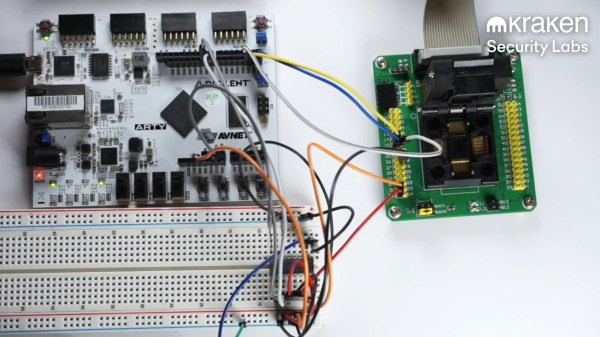
There is a scene from the movie RED (Retired, Extremely Dangerous) where Bruce Willis encounters a highly-secure door with a constantly changing lock code deep inside the CIA. Knowing the lock would be impossible to break, he simply destroyed the wall next to the door, reached through, and opened the door from the other side. We thought about that when we saw [raelize’s] hack to bypass the ESP32’s security measures.

Before you throw out all your ESP32 spy gadgets, though, be aware that the V3 silicon can be made to prevent the attack. V1 and V2, however, have a flaw that — if you know how to exploit it — renders secure boot and flash encryption almost meaningless.

Continue reading “ESP32 Vulnerability Affects Older Chips”

Displaying Incoming Server Attacks By Giving Server Logs A Scoreboard

In the server world, it’s a foregone conclusion that ports shouldn’t be exposed to the greater Internet if they don’t need to be. There are malicious bots everywhere that will try and randomly access anything connected to a network, and it’s best just to shut them off completely. If you have to have a port open, like 22 for SSH, it’ll need to be secured properly and monitored so that the administrator can keep track of it. Usually this is done in a system log and put to the side, but [Nick] wanted a more up-front reminder of just how many attempts were being made to log into his systems.

This build actively monitors attempts to log into his server on port 22 and notifies him via a numerical display and series of LEDs. It’s based on a Raspberry Pi Zero W housed in a 3D-printed case, and works by interfacing with a program called fail2ban running on the server. fail2ban‘s primary job is to block IP addresses that fail a certain number of login attempts on a server, but being FOSS it can be modified for situations like this. With some Python code running on the Pi, it is able to gather data fed to it from fail2ban and display it.

[Nick] was able to see immediate results too. Within 24 hours he saw 1633 login attempts on a server with normal login enabled, which was promptly shown on the display. A video of the counter in action is linked below. You don’t always need a secondary display if you need real-time information on your server, though. This Pi server has its own display built right in to its case.

Continue reading “Displaying Incoming Server Attacks By Giving Server Logs A Scoreboard”

ESP8266 Turned Secretive WiFi Probe Request Sniffer

When a Wi-Fi device is switched on, it starts spewing out probe requests to try and find a familiar access point. These probe requests contain the device’s MAC address and the SSID of the hotspot it’s looking for, which can potentially be used to identify a specific device and where it’s been. After experimenting with these probe requests, [Amine Mehdi Mansouri] has created OpenMAC, a tiny ESP8266 based sniffer that could be hidden anywhere.

The device consists of an ESP-07S module, a regulator circuit for getting power from a USB-C connector, and a button for power cycling. An external antenna is required for the module, which can be selected based on the size or gain requirements for a specific deployment. [Amine] tested the OpenMAC at a local library (with permission), in combination with a number of his own little Wi-Fi repeaters to expand the reach of the network. All the recorded MAC addresses were logged to a server, where the data can be used for traffic analysis in and around the library, or even for tracking and locating specific devices.

This is nothing new, and is relatively common technique used for gathering information in retail locations, and could be also be used for more nefarious purposes. Newer versions of iOS, Android, and Windows 10 feature MAC address randomization which can limit the ability to track devices in this manner, but it isn’t always activated.

We’ve seen a number of projects that exploit probe requests. FIND-LF can be used for locating devices in your home, and Linger fools probe requests sniffers by replaying previously recorded requests.

This Week In Security: AD Has Fallen, Two Factor Flaws, And Hacking Politicians

The big news this week is the huge flaw in Microsoft’s Active Directory, CVE-2020-1472 (whitepaper). Netlogon is a part of the Windows domain scheme, and is used to authenticate users without actually sending passwords over the network. Modern versions of Windows use AES-CFB8 as the cryptographic engine that powers Netlogon authentication. This peculiar mode of AES takes an initialization vector (IV) along with the key and plaintext. The weakness here is that the Microsoft implementation sets the IV to all zeros.

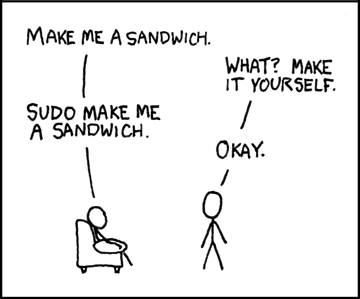
XKCD.com CC BY-NC 2.5

It’s worth taking a moment to cover why IVs exist, and why they are important. The basic AES encryption process has two inputs: a 128 bit (16 byte) plaintext, and a 128, 192, or 256 bit key. The same plaintext and key will result in the same ciphertext output every time. Encrypting more that 128 bits of data with this naive approach will quickly reveal a problem — It’s possible to find patterns in the output. Even worse, a clever examination of the patterns could build a decoding book. Those 16 byte patterns that occur most often would be guessed first. It would be like a giant crossword puzzle, trying to fill in the gaps.

This problem predates AES by many years, and thankfully a good solution has been around for a long time, too. Cipher Block Chaining (CBC) takes the ciphertext output of each block and mixes it (XOR) with the plaintext input of the next block before encrypting. This technique ensures the output blocks don’t correlate even when the plaintext is the same. The downside is that if one block is lost, the entire rest of the data cannot be decrypted Update: [dondarioyucatade] pointed out in the comments that it’s just the next block that is lost, not the entire stream. You may ask, what is mixed with the plaintext for the first block? There is no previous block to pull from, so what data is used to initialize the process? Yes, the name gives it away. This is an initialization vector: data used to build the initial state of a crypto scheme. Generally speaking, an IV is not secret, but it should be randomized. In the case of CBC, a non-random IV value like all zeros doesn’t entirely break the encryption scheme, but could lead to weaknesses. Continue reading “This Week In Security: AD Has Fallen, Two Factor Flaws, And Hacking Politicians”

GitHub’s Move Away From Passwords: A Sign Of Things To Come?

Later this month, people who use GitHub may find themselves suddenly getting an error message while trying to authenticate against the GitHub API or perform actions on a GitHub repository with a username and password. The reason for this is the removal of this authentication option by GitHub, with a few ‘brown-out’ periods involving the rejection of passwords to give people warning of this fact.

This change was originally announced by GitHub in November of 2019, had a deprecation timeline assigned in February of 2020 and another blog update in July repeating the information. As noted there, only GitHub Enterprise Server remains unaffected for now. For everyone else, as of November 13th, 2020, in order to use GitHub services, the use of an OAuth token, personal token or SSH key is required.

While this is likely to affect a fair number of people who are using GitHub’s REST API and repositories, perhaps the more interesting question here is whether this is merely the beginning of a larger transformation away from username and password logins in services.

Continue reading “GitHub’s Move Away From Passwords: A Sign Of Things To Come?”