This Week In Security: VPN Gateways, Attacks In The Wild, VLC, And An IP Address Caper

We’ll start with more Black Hat/DEFCON news. [Meh Chang] and [Orange Tsai] from Devcore took a look at Fortinet and Pulse Secure devices, and found multiple vulnerabilities. (PDF Slides) They are publishing summaries for that research, and the summary of the Fortinet research is now available.

It’s… not great. There are multiple pre-authentication vulnerabilities, as well as what appears to be an intentional backdoor.

CVE-2018-13379 abuses an snprintf call made when requesting a different language for the device login page. Snprintf is an alternative to sprintf, but intended to prevent buffer overflows by including the maximum string length to write to the target buffer, which sounds like a good idea but can lead to malicious truncation.

The code in question looks like snprintf(s, 0x40, "/migadmin/lang/%s.json", lang);.
When loading the login page, a request is made for a language file, and the file is sent to the user. At first look, it seems that this would indeed limit the file returned to a .json file from the specified folder. Unfortunately, there is no further input validation on the request, so a language of ../../arbitrary is considered perfectly legitimate, escaping the intended folder.  This would leak arbitrary json files, but sincesnprintf doesn’t fail if it exceeds the specified length, sending a request for a lang that’s long enough results in the “.json” extension not being appended to the request either.

A metasploit module has been written to test for this vulnerability, and it requests a lang of /../../../..//////////dev/cmdb/sslvpn_websession. That’s just long enough to force the json extension to fall off the end of the string, and it is Unix convention is to ignore the extra slashes in a path. Just like that, the Fortigate is serving up any file on its filesystem just for asking nice.

More worrying than the snprintf bug is the magic value that appears to be an intentional backdoor. A simple 14 character string sent as an http query string bypasses authentication and allows changing any user’s password — without any authentication. This story is still young, it’s possible this was intended to have a benign purpose. If it’s an honest mistake, it’s a sign of incompetence. If it’s an intentional backdoor, it’s time to retire any and all Fortinet equipment you have.

Pulse Secure VPNs have a similar pre-auth arbitrary file read vulnerability. Once the full report is released, we’ll cover that as well.

Exploitation in the Wild

But wait, there’s more. Hide your kids, hide your wife. Webmin, Pulse Secure, and Fortigate are already being exploited actively in the wild, according to ZDNet. Based on reports from Bad Packets, the Webmin backdoor was being targeted in scans within a day of announcement, and exploited within three days of the announcement. There is already a botnet spreading via this backdoor. It’s estimated that there are around 29,000 vulnerable Internet-facing servers.

Both Pulse Secure and Fortinet’s Fortigate VPN appliances are also being actively targeted. Even though the vulnerabilities were reported first to the vendors, and patched well in advance of the public disclosure, thousands of vulnerable devices remain. Apparently routers and other network appliance hardware are fire-and-forget solutions, and often go without important security updates.

VLC is Actually Vulnerable This Time

The VLC media player has released a new update, fixing 11 CVEs. These CVEs are all cases of mishandling malformed media files, and are only exploitable by opening a malicious file with VLC. Be sure to go update VLC if you have it installed. Even though no arbitrary code execution has been demonstrated for any of these issues, it’s likely that it will eventually happen.

Gray Market IP Addresses

With the exhaustion of IPv4 addresses, many have begun using alternative methods to acquire address space, including the criminal element. Krebs on Security details his investigation into one such story: Residential Networking Solutions LLC (Resnet). It all started with an uptick in fraudulent transactions originating from Resnet residential IP addresses. Was this a real company, actually providing internet connectivity, or a criminal enterprise?

Secret Messages Could Be Hiding In Your Server Logs

[Ryan Flowers] writes in with a clever little hack that can allow you to hide data where nobody is going to go looking for it. By exploiting the fact that a web server will generally log all HTTP requests whether or not it’s valid, he shows how you can covertly send a message by asking the server for a carefully crafted fictitious URL.

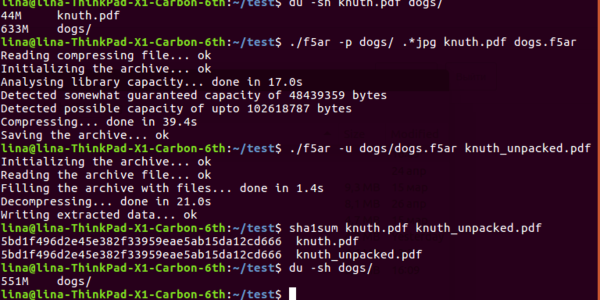
We aren’t talking about requesting “yousuck.txt” from the server that hosts your least favorite website, either. As [Ryan] demonstrates, you can compress a text file, encode it with uuencode, and then send it line by line to the destination server with curl. He shows how the process, which he calls “CurlyTP” can be done manually on the command line, but it would be a simple matter of wrapping it up in a Bash script.

To get the message back, you just do the opposite. Use grep to find the lines in the log file that contain the encoded data, and then put them through uudecode to get the original text back. Finding the appropriate lines in the log file is made easier by prepending a prearranged keyword to the beginning of the URL requests. The keyword can be changed for each message to make things easier to keep track of.

If you’re still wondering why anyone would go through the trouble to do this, [Ryan] provides an excellent example: a covert “dead drop” where people could leave messages they’d rather not send through the usual channels. As long as the sender used a service to mask their true IP address, they could anonymously deliver messages onto the server without having to use any special software or protocol they might not have access to. Even the most restrictive firewalls and security measures aren’t likely to be scanning URLs for compressed text files.

We’ve seen web-based dead drops done with Python in the past, and even purpose built “PirateBoxes” that allow people to covertly exchange files, but we like how this method doesn’t require any special configuration on the server side. You should check your server logs, somebody might be trying to tell you something.

Take Pictures Around A Corner

One of the core lessons any physics student will come to realize is that the more you know about physics, the less intuitive it seems. Take the nature of light, for example. Is it a wave? A particle? Both? Neither? Whatever the answer to the question, scientists are at least able to exploit some of its characteristics, like its ability to bend and bounce off of obstacles. This camera, for example, is able to image a room without a direct light-of-sight as a result.

The process works by pointing a camera through an opening in the room and then strobing a laser at the exposed wall. The laser light bounces off of the wall, into the room, off of the objects on the hidden side of the room, and then back to the camera. This concept isn’t new, but the interesting thing that this group has done is lift the curtain on the image processing underpinnings. Before, the process required a research team and often the backing of the university, but this project shows off the technique using just a few lines of code.

This project’s page documents everything extensively, including all of the algorithms used for reconstructing an image of the room. And by the way, it’s not a simple 2D image, but a 3D model that the camera can capture. So there should be some good information for anyone working in the 3D modeling world as well.

Thanks to [Chris] for the tip!

Build A Fungus Foraging App With Machine Learning

As the 2019 mushroom foraging season approaches it’s timely to combine my thirst for knowledge about low level machine learning (ML) with a popular pastime that we enjoy here where I live. Just for the record, I’m not an expert on ML, and I’m simply inviting readers to follow me back down some rabbit holes that I recently explored.

But mushrooms, I do know a little bit about, so firstly, a bit about health and safety:

  • The app created should be used with extreme caution and results always confirmed by a fungus expert.
  • Always test the fungus by initially only eating a very small piece and waiting for several hours to check there is no ill effect.
  • Always wear gloves  – It’s surprisingly easy to absorb toxins through fingers.

Since this is very much an introduction to ML, there won’t be too much terminology and the emphasis will be on having fun rather than going on a deep dive. The system that I stumbled upon is called XGBoost (XGB). One of the XGB demos is for binary classification, and the data was drawn from The Audubon Society Field Guide to North American Mushrooms. Binary means that the app spits out a probability of ‘yes’ or ‘no’ and in this case it tends to give about 95% probability that a common edible mushroom (Agaricus campestris) is actually edible. 

The app asks the user 22 questions about their specimen and collates the data inputted as a series of letters separated by commas. At the end of the questionnaire, this data line is written to a file called ‘fungusFile.data’ for further processing.

XGB can not accept letters as data so they have to be mapped into ‘classic LibSVM format’ which looks like this: ‘3:218’, for each letter. Next, this XGB friendly data is split into two parts for training a model and then subsequently testing that model.

Installing XGB is relatively easy compared to higher level deep learning systems and runs well on both Linux Ubuntu 16.04 and on a Raspberry Pi. I wrote the deployment app in bash so there should not be any additional software to install. Before getting any deeper into the ML side of things, I highly advise installing XGB, running the app, and having a bit of a play with it.

Training and testing is carried out by running bash runexp.sh in the terminal and it takes less than one second to process the 8124 lines of fungal data. At the end, bash spits out a set of statistics to represent the accuracy of the training and also attempts to ‘draw’ the decision tree that XGB has devised. If we have a quick look in directory ~/xgboost/demo/binary_classification, there should now be a 0002.model file in it ready for deployment with the questionnaire.

I was interested to explore the decision tree a bit further and look at the way XGB weighted different characteristics of the fungi. I eventually got some rough visualisations working on a Python based Jupyter Notebook script:


Obviously this app is not going to win any Kaggle competitions since the various parameters within the software need to be carefully tuned with the help of all the different software tools available. A good place to start is to tweak the maximum depth of the tree and the number or trees used. Depth = 4 and number = 4 seems to work well for this data. Other parameters include the feature importance type, for example: gain, weight, cover, total_gain or total_cover. These can be tuned using tools such as SHAP.

Finally, this app could easily be adapted to other questionnaire based systems such as diagnosing a particular disease, or deciding whether to buy a particular stock or share in the market place.

An even more basic introduction to ML goes into the baseline theory in a bit more detail – well worth a quick look.

Dirty Tricks For 6502 Programming

We know the 6502 isn’t exactly the CPU of choice for today’s high-performance software, but with the little CPU having appeared in so many classic computers — the Apple, the KIM-1, The Commodores, to name a few — we have a real soft spot for it. [Janne] has a post detailing the eight best entries in the Commodore 64 coding competition. The goal was to draw an X on the screen using the smallest program possible. [Janne] got 56 bytes, but two entrants clocked in at 34 bytes.

In addition to the results, [Janne] also exposes the tricks people used to get these tiny programs done. Just looking at the solution in C and then 6502 assembly is instructive. Naturally, one trick is to use the existing ROM code to do tasks such as clearing the screen. But that’s just the starting point.

Continue reading “Dirty Tricks For 6502 Programming”

Designing An Advanced Autonomous Robot: Goose

Robotics is hard, maybe not quite as difficult as astrophysics or understanding human relationships, but designing a competition winning bot from scratch was never going to be easy. Ok, so [Paul Bupe, Jr’s] robot, named ‘Goose’, did not quite win the competition, but we’re very interested to learn what golden eggs it might lay in the aftermath.

The mechanics of the bot is based on a fairly standard dual tracked drive system that makes controlling a turn much easier than if it used wheels. Why make life more difficult than it is already? But what we’re really interested in is the design of the control system and the rationale behind those design choices.

The diagram on the left might look complicated, but essentially the system is based on two ‘brains’, the Teensy microcontroller (MCU) and a Raspberry Pi, though most of the grind is performed by the MCU. Running at 96 MHz, the MCU is fast enough to process data from the encoders and IMU in real time, thus enabling the bot to respond quickly and smoothly to sensors. More complicated and ‘heavier’ tasks such as LIDAR and computer vision (CV) are performed on the Pi, which runs ‘Robot operating system’ (ROS), communicating with the MCU by means of a couple of ‘nodes’.

The competition itself dictated that the bot should travel in large circles within the walls of a large box, whilst avoiding particular objects. Obviously, GPS or any other form of dead reckoning was not going to keep the machine on track so it relied heavily on ‘LiDAR point cloud data’ to effectively pinpoint the location of the robot at all times. Now we really get to the crux of the design, where all the available sensors are combined and fed into a ‘particle filter algorithm’:

What we particularly love about this project is how clearly everything is explained, without too many fancy terms or acronyms. [Paul Bupe, Jr] has obviously taken the time to reduce the overall complexity to more manageable concepts that encourage us to explore further. Maybe [Paul] himself might have the time to produce individual tutorials for each system of the robot?

We could well be reading far too much into the name of the robot, ‘Goose’ being Captain Marvel’s bazaar ‘trans-species’ cat that ends up laying a whole load of eggs. But could this robot help reach a de-facto standard for small robots?

We’ve seen other competition robots on Hackaday, and hope to see a whole lot more!

Video after the break: Continue reading “Designing An Advanced Autonomous Robot: Goose”

A Tiny Train Departure Board, Just Like The Real Thing

If you travel on the British rail system, you’ll be familiar with the ubiquitous orange dot-matrix departure display boards. At a glance they tell you the expected arrival times of the next few trains, where they are headed, and at the bottom the current time.  [Chris Crocker-White] was inspired by a Tweet to recreate one of these displays in miniature and hang it under his monitor.

The hardware is a Raspberry Pi Zero with an OLED screen, in a custom 3D-printed case. A soldered USB cable takes power from the monitor’s USB ports. Software wise it’s a demonstration vehicle for the Balena cloud service that pulls its data from their transport API, but the choice of dot matrix typeface is perfect and absolutely looks the part.

There is some question as to whether a project such as this one should need a cloud service as its backend, and of course it serves as a demonstration piece rather than a definitive way to enact a departure board. It does however bring a ready-packaged API for transport data, which given that many data sources can be opaque, is a useful feature.

Train time displays seem to be a popular choice on the Eastern side of the Atlantic, here’s another British one, and one from Ireland.

Thanks [Pyrofer] for the tip.