Relive The Dot Matrix Glory Days With Your 3D Printer

With the cost of 3D printers dropping rapidly, we’ve started to see a trend of hackers re-purposing them for various tasks. It makes perfect sense; with the hotend and extruder turned off (or removed entirely), you’ve got a machine that can move a tool around in two or three dimensions with exceptional accuracy. Printers modified to carry lasers, markers, and even the occasional rotary tool, are becoming a common sight in our tip line.

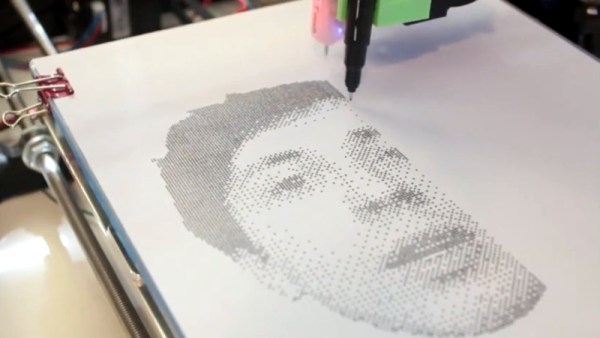
Last year [Matthew Rayfield] attached a marker to his 3D printer and had it sketch out some pictures, but recently he decided to revisit the idea and try to put a unique spin on it. The end result is a throwback to the classic dot matrix printers of yore utilizing decidedly modern hardware and software. There’s something undeniably appealing about the low-fi nature of dot matrix printing, and when fed the appropriate images this setup is capable of producing something which we’ve got to admit is dangerously close to being art.

To create these images, [Matthew] has created “Pixels-to-Gcode”, an online service that anyone can use to turn an arbitrary image into GCode they can feed their 3D printer. There’s a number of options available for you to play with so you can dial in the specific effect you’re looking for. Pointillist images can be created using a tight spacing of dots, but widen them up, and your final image becomes increasingly abstract.

The hardware side of this project is left largely as an exercise for the reader. [Matthew] has attached a fine-point pen to his printer’s head using a rubber band, but admits that it’s far from ideal. A more robust approach would be some kind of 3D printed device that allows you to quickly attach your pen or marker so the printer can be easily switched between 2D and 3D modes. We’d also be interested in seeing what this would look like if you used a laser mounted on the printer to burn the dots.

Back in the ancient days of 2012, we saw somebody put together a very similar project using parts from floppy and optical drives. The differences between these two projects, not only in relative difficulty level but end result, is an excellent example of how the hacker community is benefiting from the widespread availability of cheap 3D motion platforms.

Continue reading “Relive The Dot Matrix Glory Days With Your 3D Printer” →
Talking Telegram With The ESP8266

At this point it’s something of a given that a member of the ESP8266 family is likely your best bet if you want to cobble together a small Internet-connected gadget. Costing as little as $3 USD, this well documented all-in-one solution really can’t be beat. But of course, the hardware is only one half of the equation. Deciding how to handle the software side of your homebrew Internet of Things device is another story entirely.

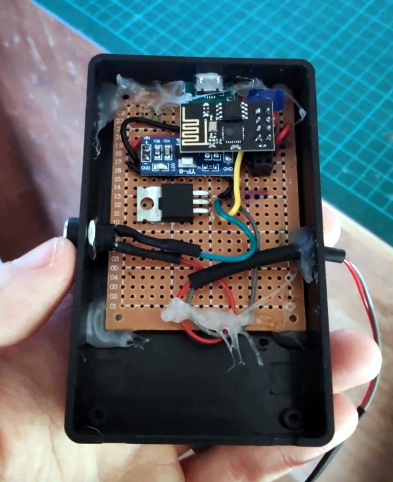
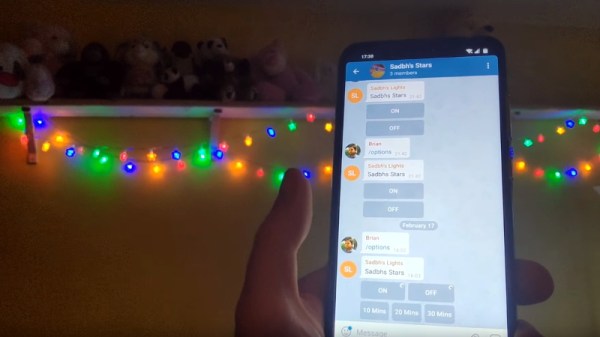
A simple Telegram ESP8266 switch

It would be fair to say that there’s no clear-cut “right” way to approach the software, and it really depends on the needs or limitations of your particular project. For example [Brian Lough] finds that building Telegram support into his ESP8266 allows him to accomplish his goals with the minimum amount of fuss while at the same time using an environment he’s already comfortable with. He recently wrote in to share one of his Telegram projects with us, and in the video after the break, takes the time to explain some of the things he likes best about controlling his hardware through the encrypted chat platform.

But you don’t have to take his word for it, you can try it yourself. Thanks to the software library that [Brian] has developed to connect his projects to Telegram, the aptly named “Universal Telegram Bot Library”, anyone can easily follow in his footsteps. Adding his Telegram library to your next ESP8266 project is as easy as selecting it in the Arduino IDE. From there the video explains the process for getting a bot ID from Telegram, and ultimately how you use it to receive messages from the service. What you do with those messages is entirely up to you.

According to [Brian], the main downside is that you are beholden to a web service to control your local devices; not ideal if the Internet goes down or you would rather your little hacker projects not talk to the big scary Internet in the first place. If you’d rather keep all your smart things talking within the confines of your own network, perhaps your next project could be setting up a private MQTT server.

Continue reading “Talking Telegram With The ESP8266” →

Calling World Cup Goals Before They Happen, By Polling A Betting Site

[Ben] made an interesting discovery during the FIFA World Cup in 2018, and used it to grant himself the power to call goals before they happened. Well, before they happened on live TV or live streaming, anyway. It was possible because of the broadcast delay on “live” broadcasts, combined with the sports betting industry’s need for timely and detailed game state tracking.

He discovered that a company named Running Ball provides fairly detailed game statistics in digital form, which are generated from inside the stadium as events occur. An obvious consumer of this data are sports betting services, and [Ben] found a UK betting site that exposed that information in full inside their web app. By polling this data, he measured a minimum of 4 seconds between an event (such as a goal) being reported in the data and the event occurring on live TV. The delay was much higher — up to minutes — for live streaming. [Ben] found it quite interesting to measure how the broadcast delay on otherwise “live” events could sometimes be quite significant.

Knowing broadcast delays exist is one thing, but it’s a neat trick to use it to predict goals before they occur on “live” television. This isn’t the first time we’ve seen evidence of [Ben]’s special interest in data and using it in unusual ways; he once set up a program to play Battleship over the Border Gateway Protocol (BGP), making it very probably the first board game played over BGP.

Build Retro Games With Script-8

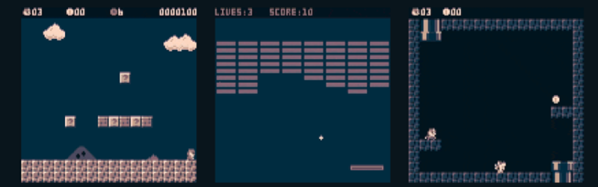
A whole generation of programmers learned to program by writing — or at least typing in — game programs for relatively simple computers like a TRS-80, a Commodore 64, or any of a handful of similar machines. These days, games are way more complicated and so are computers. Sure, it is more fun to play Skyrim than Snake, but for learning, you are probably going to get more out of starting with a simple game. If you want to learn programming today — or maybe start someone else on that same journey, you should check out Script-8, a project by [Gabriel Florit]. You can get a taste of how it looks in the video below, or just surf over to the site and play or modify a game (hint: press “a” to launch the ball).

Instead of paraphrasing, here’s the excellent elevator speech from the web site:

SCRIPT-8 is a fantasy computer for making, sharing, and playing tiny retro-looking games (called cassettes). It’s free, browser-based, and open-source. Cassettes are written in JavaScript.

Continue reading “Build Retro Games With Script-8” →

Hack Your Gmail: A Quick Start For Google App Scripting

For many people, Gmail is synonymous with e-mail. Some people like having cloud access to everything and some people hate having any personal data in the cloud. However you feel about it, one thing that was nice about having desktop software is that you could hack it relatively easily. If you didn’t like how your desktop mail client worked, you had a lot of options: use a different program, write your own, hack the executable of your current program, or in the case of open source just fork it and make any changes you are smart enough to make.

Google provides a lot of features with all of its products, but however you slice it, all the code runs on their servers out of your reach. Sort of. If you know JavaScript, you can use Google Apps Script to add features to many Google products including Gmail. If you’ve used Office scripting, the idea is the same, although obviously the implementation is very different.

With scripting you can make sophisticated filters that would be very hard to do otherwise. For example,  monitor for suspicious messages like those with more than 4 attachments, or that appear to come from a contact between the hours of 2AM and 5AM.

For our example today, I’m going to show you something that is easy but also highly useful.

Continue reading “Hack Your Gmail: A Quick Start For Google App Scripting” →

35C3: Safe And Secure Drivers In High-Level Languages

Writing device drivers is always a good start for a journey into the Linux kernel code. Of course, the kernel is a highly complex piece of software, and if you mess up your code properly, you might take down the entire system with you. User-space drivers on the other hand might not look as good on your CV, but they can help to work around some of the dangers and complexity of the kernel space. Plus, you don’t necessarily have to limit yourself to C to write them, especially if you are concerned about the usual C pitfalls and the security issues they can lead to.

With that in mind, [Paul Emmerich] is researching the concept of Linux user-space drivers for Intel’s 10Gbit network cards using other high-level languages, and recruits his students to write their final theses about the implementation details of as many languages as possible.

At last year’s 34c3, [Paul] already demonstrated the basics of writing such a user-space network driver for Linux, which serves now as reference implementation for his students. We won’t see Bash or JavaScript here, but we will see a brief summary of what it generally means to develop user-space drivers in C#, Swift, OCaml, or Haskell, along a more detailed insight from [Sebastian Voit] and [Simon Ellmann] about Go and Rust. A collection of each language’s implementation can be found on GitHub.

Since some of these languages bring their own memory handling and perform unpredictable garbage collection, performance and latency are two big topics to cover here. But then, the general concept is language-independent, so even if nothing in the world could ever make you give up on C, you might at least take away some new ideas for driver development.
Continue reading “35C3: Safe And Secure Drivers In High-Level Languages” →

When Unfolding An STL In Software, Math Isn’t The Tricky Part

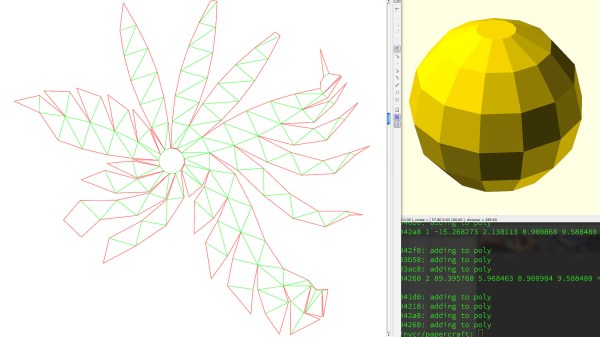
Some time ago, [Trammell Hudson] took a shot at creating a tool that unfolds 3D models in STL format and outputs a color-coded 2D pattern that can be cut out using a laser cutter. With a little bending and gluing, the 3D model can be re-created out of paper or cardboard.

There are of course other and more full-featured tools for unfolding 3D models: Pepakura is used by many, but is not free and is Windows only. There is also a Blender extension called Paper Model that exists to export 3D shapes as paper models.

What’s interesting about [Trammell]’s project are the things he discovered while making it. The process of unfolding an STL may be conceptually simple, but the actual implementation is a bit tricky in ways that have little to do with number crunching.

For example, in a logical sense it doesn’t matter much where the software chooses to start the unfolding process, but in practice some start points yield much tighter groups of shapes that are easier to work with. Also, his software doesn’t optimize folding patterns, so sometimes the software will split a shape along a perfectly logical (but non-intuitive to a human) line and it can be difficult to figure out which pieces are supposed to attach where. The software remains in beta, but those who are interested can find it hosted on GitHub. It turns out that it’s actually quite challenging to turn a 3D model into an unfolded shape that still carries visual cues or resemblances to the original. Adding things like glue tabs in sensible places isn’t trivial, either.

Tools to unfold 3D models feature prominently in the prop-making world, and it’s only one of the several reasons an economical desktop cutter might be a useful addition to one’s workshop.