Building A Dependency-Free GPT On A Custom OS

The construction of a large language model (LLM) depends on many things: banks of GPUs, vast reams of training data, massive amounts of power, and matrix manipulation libraries like Numpy. For models with lower requirements though, it’s possible to do away with all of that, including the software dependencies. As someone who’d already built a full operating system as a C learning project, [Ethan Zhang] was no stranger to intimidating projects, and as an exercise in minimalism, he decided to build a generative pre-trained transformer (GPT) model in the kernel space of his operating system.

As with a number of other small demonstration LLMs, this was inspired by [Andrej Karpathy]’s MicroGPT, specifically by its lack of external dependencies. The first step was to strip away every unnecessary element from MooseOS, the operating system [Ethan] had previously written, including the GUI, most drivers, and the filesystem. All that’s left is the kernel, and KernelGPT runs on this. To get around the lack of a filesystem, the training data was converted into a header to keep it in memory — at only 32,000 words, this was no problem. Like the original MicroGPT, this is trained on a list of names, and predicts new names. Due to some hardware issues, [Ethan] hasn’t yet been able to test this on a physical computer, but it does work in QEMU.

It’s quite impressive to see such a complex piece of software written solely in C, running directly on hardware; for a project which takes the same starting point and goes in the opposite direction, check out this browser-based implementation of MicroGPT. For more on the math behind GPTs, check out this visualization.

Continue reading “Building A Dependency-Free GPT On A Custom OS”

C64 Gets A Modern Interactive Disassembler

If you want to pull apart a program to see how it ticks, you’re going to need a disassembler. [Ricardo Quesada] has built Regenerator 2000 for just that purpose. It’s a new interactive disassembler for the Commodore 64 platform.

Naturally, Regenerator 2000 is built with full support for the 6502 instruction set, including undocumented op-codes as well. It’s able to automatically create labels and comments and can be paired with the VICE C64 emulator for live debugging. You can do all the usual debug stuff like inspecting registers, stepping through code, and setting breakpoints and watchpoints when you’re trying to figure out how something works. It can even show you sprites, bitmaps, and character sets right in the main window.

Files are on Github if you’re ready to dive in. You might find this tool to be a useful companion to C64 assembly tools we’ve featured previously, as well. If you’re pulling off your own retro development hacks, be sure to notify the tipsline.

[Thanks to Stephen Waters for the tip!]

CSS, Now It’s Got Your 8086

The modern web browser is now far more than a thing for rendering web pages, it’s a multi-faceted environment that can provide a home for almost any application you could imagine. But why should JavaScript or Wasm have all the fun? CSS is Turing complete now, right? Why not, as [Lyra Rebane] has done, write an 8086 emulator in pure CSS?

The web page at the link above may contain an 8086, but missing MMU aside, don’t expect it to run Linux just yet. Instead it has limited resources, just enough to run a demo program. It needs a Chrome-adjacent browser because it uses some CSS functions not available in for example Firefox, but we’ll forgive it that oddity. Its clock is provided by a small piece of JavaScript not because CSS can’t provide one, but because the JS version is more stable.

On one hand this is of little practical use, but to dismiss it as such is to entirely miss the point. It’s in the fine spirit of experimentation, and we love it. Perhaps a better way to look at it is to see what could be done more efficiently with the same idea. A 1970s CISC microprocessor might not be the best choice, but would for example a minimalist and optimized RISC design be more capable? We’re looking forward to where others take this thread.

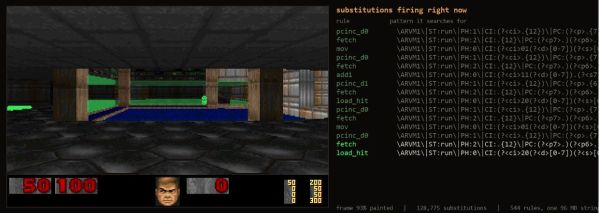
It’s not the first unexpected computing environment we’ve found, who could forget the DOOM calculator!


Header: Thomas Nguyen, CC BY-SA 4.0.

Real-time Shader, Running On A Game Boy Color

[Danny Spencer] has a brilliant graphical demo that, like all great demos, flexes a deep understanding of the underlying system: a real-time 3D shader on the Game Boy Color.

If you’re not familiar with shaders, they were originally mathematical lighting models (hence the name) and are an integral part of the modern 3D graphics pipeline. One no longer draws pixels directly to a screen to represent objects. Instead, 3D object data is sent to the Graphics Processing Unit (GPU) which handles the drawing. Shaders are what control things like an object’s lighting, textures, and more.

Implementing even a basic real-time shader in software on a Game Boy Color is pretty wild. Not only is it a pixels-and-sprites (and not 3D graphics) kind of system, but the Game Boy’s SM83 CPU doesn’t even have a multiply instruction, nor does it support floats. As [Danny] puts it: given that the entire mathematical foundation of his shader rests on multiplying non-integer numbers, he had to get creative. That makes his demo a very round peg in an extremely square hole.

In the case of [Danny]’s demo, the user can manipulate the position of, and lighting around, a classic Utah teapot in real time. He explains the workflow and shows how the process can be applied to other objects. The ROM is available on GitHub and there’s a video, embedded below.

[Danny] is no stranger to performing feats of technical prowess that are as creative as they are playful, like implementing a working adding machine in a DOOM level.

Continue reading “Real-time Shader, Running On A Game Boy Color”

Running In Printf

You may or may not know, but printf is a Turing-complete language, once you exploit all the strange and wonderful format characters in it (especially %n). But who has time to write code as printf modifiers? Now, thanks to [sebsite], you can at least write in a slightly higher level assembly language and compile to printf. Practical? No. Cool? Undeniably.

As an example, the page shows fizzbuzz written in the assembler:

alias i, fizz, buzz

->fizz ([i] + 1) % 3 == 0
->buzz ([i] + 1) % 5 == 0
->i [i] + 1
->exit [i] == 100

[i] if !![i] & ![fizz] & ![buzz]
"Fizz" if [fizz]
"Buzz" if [buzz]
"\n" if [i]

The alias keyword defines constants and, owing to default values, sets i to zero, fizz to one, and buzz to 2. The “arrow” statements store a result into a variable (so the first assignment sets the resulting value into fizz).

Continue reading “Running In Printf”

Ask Hackaday: Do You Have A Dead Man’s Switch?

During the Cold War, the specter of a nuclear “dead man’s switch” was central to the concept of Mutually Assured Destruction (MAD). In the event that one side was annihilated by the other, an automated system would be triggered to deliver a revenge strike that would ultimately destroy the attacker. It was the ultimate defense, as your enemy will never attack if they know doing so will inevitably lead to their own destruction.

The same idea has occasionally been employed by whistleblowers and journalists as well. Should the individual fail to check in regularly, a series of predetermined events will be set into motion. Again, the idea is defensive in nature. If somebody is in possession of information so damning that they could be abducted or even killed to keep it quiet, making arrangements to have that information be released to the public in the event anything should happen to them is a great way to stay safe.

A nuclear dead man’s switch is a key plot point in Dr. Strangelove.

But what about for the average person? In the past, there was no need for most people to think about something as elaborate as a dead man’s switch. But we live in interesting times, to say the least. In an information society such as ours, whistleblowers have never been more common, and the Internet has significantly blurred the definition of what it means to be a journalist.

For those living under a repressive regime or in a war zone, simply posting to social media can provide the outside world with an unfiltered look at what’s actually happening on the ground. A teenager with a cell phone has the potential to reach a wider audience than the legacy media — a powerful, but dangerous, proposition.

Even if you’re not in the middle of political upheaval, there are still reasons you might want to have previously secret information made available in the event of your death or incapacitation. Perhaps you’d like to send your loved ones a final personal message, or make sure the passwords for all your accounts get in the hands of whoever will be handling your estate.

Of course, one could argue that could be accomplished with little more than a notebook hidden in your sock drawer. But this is Hackaday, and over-engineering is the name of the game. So do you have a dead man’s switch? How is it implemented? Or is the whole idea just a bit too out there for you?

Continue reading “Ask Hackaday: Do You Have A Dead Man’s Switch?”

Sliderule Simulator Teaches You How To Do Calculations The Old Fashioned Way

Ever wanted to know how engineers made their calculations before digital calculators were on every workbench? [Richard Carpenter] and [Robert Wolf] have just the thing—a sliderule simulator that can teach you how to do a whole bunch of complex calculations the old fashioned way!

The simulator is a digital recreation of the Hemmi/Post 1460 Versalog slide rule. This was a particularly capable tool that was sold from 1951 to 1975 and is widely regarded as one of the best slide rules ever made. It can do all kinds of useful calculations for you just by sliding the scales and the cursor appropriately, from square roots to trigonometry to exponents and even multi-stage multiplication and divisions.

You can try the simulator yourself in a full-screen window here. It’s written in JavaScript and runs entirely in the browser. If you’ve never used a slide rule before, you might be lost as you drag the center slide and cursor around. Fear not, though. The simulator actually shows you how to use it. You can tap in an equation, and the simulator will both spit out a list of instructions to perform the calculation and animate it on the slide rule itself. There are even a list of “lessons” and “tests” that will teach you how to use the device and see if you’ve got the techniques down pat. It’s the sort of educational tool that would have been a great boon to budding engineers in the mid-20th century. With that said, most of them managed to figure it out with the paper manuals on their own, anyway.

We’ve featured other guides on how to use this beautiful, if archaic calculation technology, too. We love to see this sort of thing, so don’t hesitate to notify the tipsline if you’ve found a way to bring the slide rule back to relevance in the modern era!

Thanks to [Stephen Walters] for the tip!