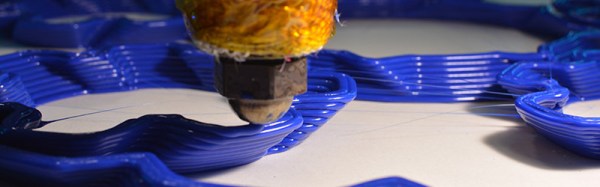
Hands On With Variable Layer Height

3D printers are an exercise in compromise. Generally, you don’t want a lot of mass on your tool head, as that can lead to ringing and other mechanical artifacts on your print. However, direct drive extruders are better for many filaments, and the decision on what printer to build ultimately comes down to a choice between speed, build area, and the ability to print in exotic filaments.

Even in slicing a 3D model, a 3D printing enthusiast must balance the quality of a print versus how long the print will take to squirt out of a nozzle. Now, just about any printer can produce fantastic models at a very high layer height, but no one wants to wait several days for the print to finish.

This balance between print time and print quality has, for the last few years, been completely ignored. One of the best solutions to this we’ve seen is variable layer height slicing. Basically, if you’re printing something without much detail, you don’t need small layers in your 3D print. Think of it as printing the neck of a bust at 0.3mm layer height, and the face at 0.1mm.

Yes, there were a few papers from a decade ago laying the conceptual foundations of variable layer height slicing. 3D printers weren’t exactly common back then, though. Recently, Autodesk’s Integrated Additive Manufacturing Team released Varislice for automatic generation of variable layer heights on a 3D printed object. So far, though, there’s no good automated solution for variable layer height slicing, and the tools for manual configuration of variable layer height slicing are terrible.

For the past few months, Prusa Research has been working on their own edition of Slic3r that includes an easy to use interface for variable layer height slicing. This version of Slic3r was just released, and now it’s time for the hands-on. Does variable layer height slicing work?

Continue reading “Hands On With Variable Layer Height”

Building A Replica Of An Ultraluxury Watch

In the world of late-stage capitalism, unchecked redistribution of wealth to the upper classes has led to the development of so-called ultraluxury watches. Free from any reasonable constraints on material or R&D cost, manufacturers are free to explore the outer limits of the horological art. [Karel] is an aspiring engineer and watch enthusiast, and has a taste for the creations of Urwerk. They decided to see if they could create a replica of the UR202 watch with nothing more than the marketing materials as a guide.

[Karel]’s first job was to create a model of the watch in CAD. For a regular watch this might be simple enough, but the UR202 is no run-of-the-mill timepiece. It features a highly irregular mechanism, full of things like a turbine regulated winding mechanism, telescoping rods instead of minute hands, and tumbling rotors to indicate the hours. The official product sheet bears some of these features out. Through careful analysis of photos and watching videos frame-by-frame, they managed to recreate what they believe to be a functioning mechanical model within their CAD software.

It was then time to try and build the timepiece for real. It was then that [Karel] started hitting some serious stumbling blocks. As a humble engineering student, it’s not often possible to purchase an entire machine shop capable of turning out the tiny, precision parts necessary to make even a basic watch mechanism. Your basic 3D printer squirting hot plastic isn’t going to cut it here. Farming out machining wasn’t an option as the cost would be astronomical. [Karel] instead decided on combining a Miyota movement with a machined aluminum base plate and parts 3D printed using a process known as “Multijet Modelling” which essentially is an inkjet printhead spitting out UV curable polymer.

In the end, [Karel] was able to get just the tumbling hour indicator working. The telescoping minute hand, compressed air turbine winding system, and other features didn’t make it into the build. However, the process of simulating these features within a CAD package, as well as manufacturing a semi-functional replica of the watch, was clearly a powerful learning experience. [Karel] used their passion to pursue a project that ended up giving them a strong grasp of some valuable skills, and that is something that is incredibly rewarding.

We’ve seen others trying to fabricate parts of a wristwatch at home. Keep your horological tips coming in!

[Thanks to Str Alorman for the tip!]

CheetahBeam: More Proof That Cats Are Your Overlord

We don’t know what cats see when they see a red laser beam, but we know it isn’t what we see. The reaction, at least for many cats — is instant and extreme. Of course, your cat expects you to quit your job and play with it on demand. While [fluxaxiom] wanted to comply, he also knew that no job would lead to no cat food. To resolve the dilemma, he built an automated cat laser. In addition to the laser module, the device uses a few servos and a microcontroller in a 3D printed case. You can see a video, below. Dogs apparently like it too, but of course they aren’t the reason it was built.

If you don’t have a 3D printer, you can still cobble something together. The microcontroller is an Adafruit Pro Trinket, which is essentially an Arduino Pro Mini with some extra pins and a USB port.

Continue reading “CheetahBeam: More Proof That Cats Are Your Overlord”

Annoy Your Neighbors With MIDI Musical Siren

[Yannick], aka [Gigawipf] brings us this (mostly) musical delicacy: a 3D-printed siren that’s driven by a brushless quadcopter motor, and capable of playing (mostly) any music that you’ve got the MIDI score for. This is a fantastic quickie project for any of you out there with a busted quad, or even some spare parts, and a 3D printer. Despite the apparent level of difficulty, this would actually be a great quickie weekend build.

Continue reading “Annoy Your Neighbors With MIDI Musical Siren”

3D Printing Makes Electronics A Snap

For just about as long as there have been electronics, there’s been a search for a way to let students and hobbyists build projects without a lot of effort. A board with Fahnestock clips was probably the first attempt. Today, it is more often the ubiquitous solderless breadboard. In between, we’ve seen copper pipe pieces and rubber bands, components mounted on magnets that hold them and make connections, and other even less probable schemes. A few years back, a new method appeared: Snap Circuits. The name almost says it all. A baseboard has mounting holes for different components. All the components make their electrical connections and mechanical connections through a common snap like you might find on clothing. Even the wires are little segments with snaps at both ends.

One problem with any system like this is how to integrate custom components. Of course, with the snaps, that’s not very hard, but [Chuck Hellebuyck] got creative with TinkerCad and worked out how to 3D print custom modules for the system. You can see his video, below.

Continue reading “3D Printing Makes Electronics A Snap”

Electronic Prototyping With A 3D Printer

It would be nice if your 3D printer could spit out PC boards. There’s been lots of work done to make that happen, mostly centered on depositing conductive material, although we’ve been surprised no one has worked out how to just 3D print a plastic resist mask.

We recently found a GitHub group for [PCBPrints] which has small modules that would be useful in prototyping and breadboarding. They are really just carriers that create plug in modules for switches, LEDs, and the like. It looks like this is a aggregated list of other GitHub projects that realize these designs. The group is in Spanish, but Google Translate is your friend, as usual. You can see a video of one of the button modules in action, below.

Continue reading “Electronic Prototyping With A 3D Printer”

Multiextrusion 3D Printing And OpenSCAD

In a recent posting called Liar’s 3D Printing, I showed you how you can print with multiple filament colors even if your printer only has one extruder and hot end. It isn’t easy, though, and a lot of models you’ll find on sites like Thingiverse are way too complicated to give good results. An object with 800 layers, each with two colors is going to take a lot of filament changes and only the most patient among us will tolerate that.

What that means is you are likely to want to make your own models. The question is, how? The answer is, of course, lots of different ways. I’m going to cover how I did the two models I showed last time using OpenSCAD (seen below). The software is actually really well suited for this hack, making it easy for me to create a framework of several models to represent the different colors.

About OpenSCAD

I’m not going to say much about OpenSCAD. It is less a CAD package and more a programming language that lets you create shapes. We’ve covered it before although it changes from time to time so you might be better off reading the official manual.

The general idea, though, is you use modules to create primitives. You can rotate them and translate them (that is, move them). You can also join them (union) and take the difference of them (difference). That last is especially important. For example, look at the callsign plate above. Forget the text for now. See the two holes? Here’s the OpenSCAD that creates that shape:

 difference() {
 cube([basew,basel,basez]);
 // cut holes
 translate([4,basel/2,0]) cylinder(r=2,h=basez+2);
 translate([basew-4,basel/2,0]) cylinder(r=2,h= basez+2);
 }

The cube “call” creates the base. The cylinders are the holes and the difference “call” is what makes them holes instead of solid cylinders (the first thing is the solid and everything after is taken away). One key point: instead of numbers, the whole thing uses (mostly) variables. That means if you change the size of something, everything will adjust accordingly if you wrote the script well. Let’s look at applying these techniques for multiple colors.

Continue reading “Multiextrusion 3D Printing And OpenSCAD”