A small circuit board glowing purple inset with computer code

Power Cycling Museum Computers On The Cheap

Flicking a circuit breaker to power cycle hundreds of desktop computers inside interactive museum exhibits is hardly ideal. Computers tend to get cranky when improperly shutdown, and there’s an non-zero risk of data loss. However, financial concerns ruled out commercial computer management solutions, and manually shutting down each exhibit at the end of the day is not practical. Tasked with finding a solution, [Jeff Glass] mixed off-the-shelf UPS (uninterruptible power supply) hardware, a Featherwing and some Python to give the museum’s computer-run exhibits a fighting chance.

Without drastically changing the one-touch end-of-day procedure, the only way to properly shutdown the hundreds of computers embedded in the museum exhibits involved using several UPS units, keeping the PCs briefly powered on after the mains power was cut. This in itself solves nothing – while the UPS can trigger a safe shutdown via USB, this signal could only be received by a single PC. These are off-the-shelf consumer grade units, and were never intended to safely shut down more than one computer at a time. However, each 300 watt UPS unit is very capable of powering multiple computers, the only limitation is the shutdown signal and the single USB connection.

To get around this, the Windows task scheduling service was setup to be triggered by the UPS shutdown signal, which itself then triggered a custom Python script. This script then relays the shutdown signal from the UPS to every other computer in the museum, before shutting itself down for the evening.

While many computers can be enabled to boot on power loss, the UPS and safe shutdown scripts meant that this wasn’t an option. To get around this, an ESP32 Featherwing and a little bit if CircuitPython code sends out WOL (wake-on-LAN) signals over Ethernet automatically on power up. This unit is powered by a non-UPS backed power outlet, meaning that it only sends the WOL signal in the morning when mains power is restored via the circuit breaker.

There are undoubtedly a variety of alternative solutions that appear ‘better’ on paper, but these may gloss over the potential costs and disruption to a multi-acre museum. Working within the constraints of reality means that the less obvious fix often ends up being the right one. How would you have tackled this problem? Sound off in the comments below. And while you’re here, make sure to check out our coverage of other UPS solutions, like this supercap UPS.
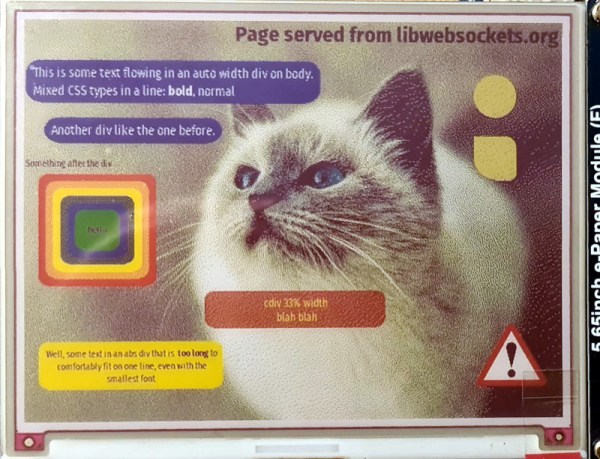

Render HTML And CSS On An ESP32

As the available computing power from affordable microcontrollers continues to increase, there is an inevitable blurring of the line between them and the lower tier of application processors capable of running Linux-based operating systems. For the most part a microcontroller busies itself with behind-the-scenes tasks, but as so many projects here have demonstrated, they can be pretty capable when it comes to user-facing applications too. Now [Andy Green] has extended the possibilities with affordable silicon, by producing a proof-of-concept HTML + CSS renderer over h2 on ESP32 for libwebsockets. Surf the web on a microcontroller without settling for a text-only experience? Why not!

He freely admits that this is far from being a complete HTML rendering engine, in that while it parses and renders HTML and CSS with JPEG and PNG image support, it does so only with a subset of HTML and is not tolerant of any malformations. There is also no JS support, which is hardly surprising given the available resources.

Even with those limitations it remains an impressive piece of work, which we hope will one day be able to make some effort at displaying Hackaday on ESP32 devices such as the badge.team European conference badges. Definitely a project to watch!

ESP32 Virtual Machine Lets You Change Programs On The Fly

Often, reprogramming a microcontroller involves placing it in reset, flashing the code, and letting it fire back up. It usually involves shutting the chip down entirely. However, [bor0] has built a virtual machine that runs on the ESP32, allowing for dynamic program updates to happen.

The code is inspired by the CHIP-8, a relatively ancient interpreter that had some gaming applications. [bor0] had already created a VM simulating the CHIP-8, and repurposed it here, taking out the gaming-related drawing instructions and replacing them with those that control IO pins. Registers have also been changed to 16 bits for added flexibility and headroom.

It’s probably not something with immediate ground-breaking applications for most people, but it’s a different way of working with and programming the ESP32, and that’s pretty neat.

The ESP32 is a powerful chip, too, as we all know – and it makes a great 8-bit emulator to boot. Sound off in the comments with your thoughts on what would make a killer application for the ESP32 VM!

[Thanks to satancete for the tip!]

No Privacy: Cloning The AirTag

You’ve probably heard of the infamous rule 34, but we’d like to propose a new rule — call it rule 35: Anything that can be used for nefarious purposes will be, even if you can’t think of how at the moment. Case in point: apparently there has been an uptick in people using AirTags to do bad things. People have used them to stalk people or to tag cars so they can be found later and stolen. According to [Fabian Bräunlein], Apple’s responses to this don’t consider cases where clones or modified AirTags are in play. To prove the point, he built a clone that bypasses the current protection features and used it to track a willing experimental subject for 5 days with no notifications.

According to the post, Apple says that AirTags have serial numbers and beep when they have not been around their host Apple device for a certain period. [Fabian] points out that clone tags don’t have serial numbers and may also not have speakers. There is apparently a thriving market, too, for genuine tags that have been modified to remove their speakers. [Fabian’s] clone uses an ESP32 with no speaker and no serial number.

The other protection, according to Apple, is that if they note an AirTag moving with you over some period of time without the owner, you get a notification. In other words, if your iPhone sees your own tag repeatedly, that’s fine. It also doesn’t mind seeing someone else’s tags if they are near you. But if your phone sees a tag many times and the owner isn’t around, you get a notification. That way, you can help identify random tags, but you’ll know if someone is trying to track you. [Fabian] gets around that by cycling between 2,000 pre-loaded public keys so that the tracked person’s device doesn’t realize that it is seeing the same tag over and over. Even Apple’s Android app that scans for trackers is vulnerable to this strategy.

Even for folks who aren’t particularly privacy minded, it’s pretty clear a worldwide network of mass-market devices that allow almost anyone to be tracked is a problem. But what’s the solution? Even the better strategies employed by AirGuard won’t catch everything, as [Fabian] explains.

This isn’t the first time we’ve had a look at privacy concerns around AirTags. Of course, it is always possible to build a tracker. But it is hard to get the worldwide network of Bluetooth listeners that Apple has.

Dummy The Robot Arm Is Not So Dumb

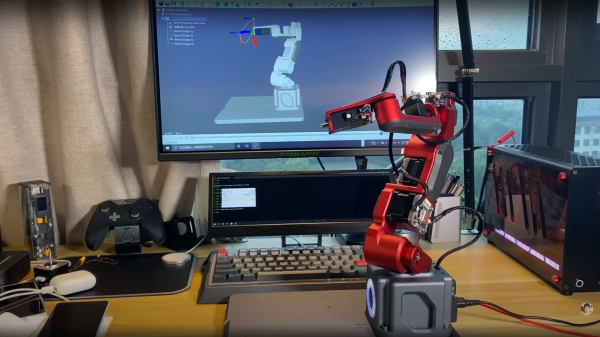
[Zhihui Jun] is a name you’re going to want to remember because this Chinese maker has created quite probably one of the most complete open-source robot arms (video in Chinese with subtitles, embedded below) we’ve ever seen. This project has to be seen to be believed. Every aspect of the design from concept, mechanical CAD, electronics design and software covering embedded, 3D GUI, and so on, is the work of one maker, in just their spare time! Sound like we’re talking it up too much? Just watch the video and try to keep up!

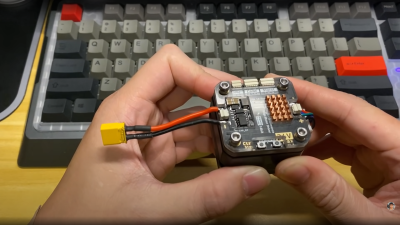
After an initial review of toy robots versus more industrial units, it was quickly decided that servos weren’t going to cut it – too little torque and lacking in precision. BLDC motors offer great precision and torque when paired with a good controller, but they are tricky to make small enough, so an off-the-shelf compact harmonic drive was selected and paired with a stepper motor to get the required performance. This was multiplied by six and dropped into some slick CNC machined aluminum parts to complete the mechanics. A custom closed-loop stepper controller mounts directly to the rear of each motor. That’s really nice too.

Stepper controller mounts on the motor rear – smart!

Control electronics are based around the STM32 using an ESP32 for Wi-Fi connectivity, but the pace of the video is so fast it’s hard to keep up with how much of the design operates. There is a brief mention that the controller runs the LiteOS kernel for Harmony OS, but no details we can find. The project GitHub has many of the gory details to pore over perhaps a bit light in places but the promise is made to expand that. For remote control, there’s a BLE-connected teaching device (called ‘Peak’) with a touch screen, again details pending. Oh, did we mention there’s a force-feedback (a PS5 Adaptive Trigger had to die for the cause) remote control unit that uses binocular cameras to track motion, with an AHRS setup giving orientation and that all this is powered by a Huawei Atlas edge AI processing system? This was greatly glossed over in the video like it was just some side-note not worth talking about. We hope details of that get made public soon!

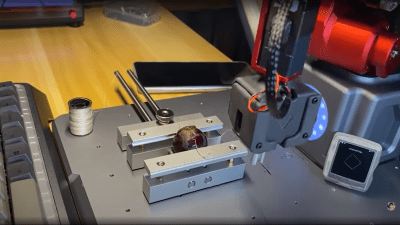
Threading a needle through a grape by remote control

The dedicated GUI, written in what looks like Unity, allows robot programming and motion planning, but since those harmonic drives are back-drivable, the robot can be moved by hand and record movements for replaying later. Some work with AR has been started, but that looks like early in the process, the features just keep on coming!

Quite frankly there is so much happening that it’s hard to summarise here and do the project any sort of justice, so to that end we suggest popping over to YT and taking a look for yourselves.

We love robots ’round these parts, especially robot arms, here’s a big one by [Jeremy Fielding],  and if you think stepper motors aren’t necessary, because servo motors can be made to work just fine, you may be right.

Continue reading “Dummy The Robot Arm Is Not So Dumb”

Sound And Light Play Off Acrylic And Wire In This Engaging Circuit Sculpture

It’s no secret that we really like circuit sculptures around here, and we never tire of seeing what creative ways people come up with to celebrate the components used to make a project, rather than locking them away in an enclosure. And a circuit sculpture that incorporates sound and light in its design is always a real treat to discover.

Called “cwymriad” by its designer, [Eirik Brandal], this sound sculpture incorporates all kinds of beautiful elements. The framework is made from thick pieces of acrylic, set at interesting angles to each other and in contrasting colors. The sound-generating circuit, which uses square wave outputs from an ESP32 to provide carrier and modulation signals for a dual ring modulator, is built on a framework of tinned wires. The sounds the sculpture makes have a lovely resonance to them, like random bells and chimes that fade and mix together. There’s also a matrix of white LEDs that form a sort of digital oscilloscope that displays shifting waveforms in time with the music.

While we like the way this looks and sounds, the real bonus here is the details of construction in the video below. [Eirik]’s careful craftsmanship working with multiple materials is evident throughout; we were especially impressed by the work needed to drill holes for the LED matrix, any one of which slightly out of place would have been painfully obvious in the finished product.

This is far from [Eirik]’s first appearance on these pages. His vacuum tube and silicon “ioalieia” was featured just a few weeks back, and “ddrysfeöd” used the acrylic parts as light pipes in a lovely way.

Continue reading “Sound And Light Play Off Acrylic And Wire In This Engaging Circuit Sculpture”

Filament Dry Box Design Goes Way Over The Top

There’s a fine line between simple feature creep and going over the top when it comes to project design. It’s hard to say exactly where that line is, but we’re pretty sure that this filament dry box has at least stepped over it, and might even have erased it entirely.

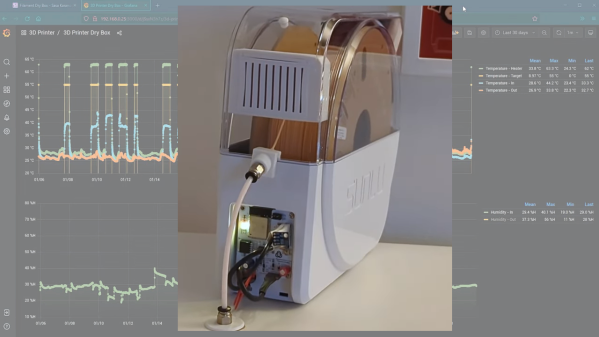
Sure, we all know the value of storing 3D printer filament under controlled conditions, to prevent the hygroscopic plastics from picking up atmospheric moisture. But [Sasa Karanovic] must really, REALLY hate the printing artifacts that result. Starting with a commercially available dry box that already had a built-in heating element, [Sasa] took it to the next level by replacing the controller and display with an ESP32. He added a fan to improve air circulation inside the enclosure and prevent stratification, as well as temperature and humidity sensors. Not satisfied with simply switching the heating element on and off at specific setpoints, he also implemented a PID loop to maintain a constant temperature. And of course, there’s a web UI and an API available for third-party control and monitoring.

The video below details [Sasa]’s design thoughts and goes into some detail on construction and performance. And while we may kid that this design is over-the-top, what really comes through is that this is a showcase for design ideas not only for one application, but for hardware projects in general. There are certainly simpler heated dry box designs, and zero-cost solutions as well, but sometimes going overboard has its own value too.

Continue reading “Filament Dry Box Design Goes Way Over The Top”