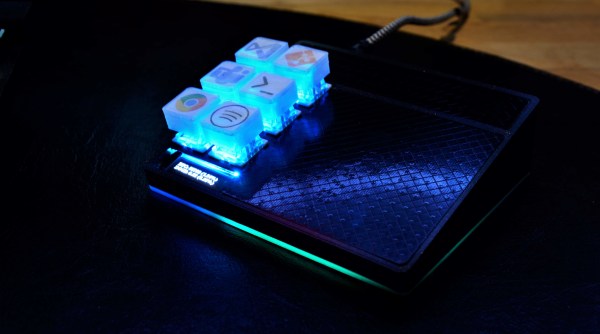
The idea of a reconfigurable macro keyboard is a concept that has been iterated on by many all the way from custom DIY keypads to the polarizing TouchBar on MacBooks. The continual rise of cheap powerful microcontrollers with Wi-Fi and 3D printers makes rolling your own macro keyboard easier every year. [Dustin Watts] has joined the proverbial club and built a beautiful macro pad called FreeTouchDeck.
We’ve seen macro keyboards that use rotary encoders to cycle through different mappings for the keys. FreeTouchDeck has taken the display approach and incorporates a touch screen to offer different buttons. [Dustin] was inspired by a similar project called FreeDeck, which offers six buttons each with a small screen. FreeTouchDeck is powered by an ESP32 and drives an ILI9488 touch screen with an XPT2046 touch controller. This means that FreeTouchDeck can offer six buttons with submenus and all sorts of bells and whistles. A connection to the computer is done by emulating a Bluetooth keyboard. By adding a configuration mode that starts a web server, FreeTouchDeck allows easy customization on the fly.
To date, e-paper technology has been great for two things, displaying static black and white text and luring hackers with the promise of a display that is easy on the eyes and runs forever. But poor availability of bare panels has made the second (we would say more important) goal slow to materialize. One of the first projects that comes to mind is using such a display to show ambient information like a daily summary weather, train schedules, and calendar appointments. Usually this means rolling your own software stack, but [Christopher Mullins] has put together a shockingly complete toolset for designing and updating such parameterized displays called epaper_templates.
To get it out of the way first, there is no hardware component to epaper_templates. It presupposes you have an ESP32 and a display chosen from a certain list of supported models. A quick search on our favorite import site turned up a wide variety of options for bare panels and prebuilt devices (ESP32 and display, plus other goodies) starting at around $40 USD, so this should be a low threshold to cross.
Once you have the device, epaper_templates provides the magic. [Christopher]’s key insight is that an ambient display is typically composed of groups of semi-static data displayed in a layout that never changes. The only variation is updates to the data which is fully parameterized: temperature is always integer Fahrenheit, train schedules are lists of minutes and hours, etc. Layouts like this aren’t difficult to make, but require the developer to reimplement lots of boilerplate. To make them easy to generate, epaper_templates provides a fully featured web UI to let the user freely customize a layout, then exports it as JSON which the device consumes.
The sample layout configured in the video below
The web UI is shockingly capable, especially for by the standards of the embedded web. (Remember it’s hosted on the ESP32 itself!) The user can place text and configure fonts and styles. Once placed, the text can be set to static strings or tied to variables, and if the string is a timestamp it can be formatted with a standard strftime format string.
To round out the feature set, the user can place images and lines to divide the display. Once the display is described, everything becomes simple to programmatically update. The ESP can be configured to subscribe to certain MQTT topics from which it will receive updates, or if that is too much infrastructure there is a handy REST API which accepts JSON objects containing variables or bitmaps to update on device.
We’re totally blown away by the level of functionality in epaper_templates! Check out the repo for more detail about its capabilities. For a full demo which walks through configuration of a UI with train arrival times, weather, both instant temperature and forecast with icons, and date/time check out the video after the break. Source for the example is here, but be sure to check out examples/ in the repo for more examples.
These days, there’s plenty of options if you want to get a GPS tracker for your vehicle. Unfortunately, they come with the sort of baggage that’s becoming increasingly common with consumer tech: subscription fees, third-party snooping, and a sneaking suspicion that you’re more commodity than customer. So [Viktor Takacs] decided to take things into his own hands and create an open GPS tracker designed for privacy minded hackers.
As [Viktor] didn’t want to reinvent the wheel, his design leverages several off-the-shelf modules. The core of the tracker is the ESP32, which gives him plenty of computational power while still keeping energy consumption within reasonable levels. There’s also a NEO-6M GPS receiver which works at the same 3.3 V level as the ESP32, allowing the microcontroller to read the NMEA sentences without a level shifter. He decided to go with the low-cost SIM800L GSM modem, but as it only works on 2G networks, provisions have been made in the board design to swap it out for a more modern module should you desire.
For the code to glue it all together, [Viktor] pulled in nearly a dozen open source libraries to create a feature-complete firmware that uses MQTT to create a database of location data on his personal server. From there the data is plugged into Home Assistant and visualized with Grafana. This is enough to deliver core functionality, but he says that more custom software components as well as a deep-dive into the security implications of the system is coming in the near future.
[Martin Fasani] has set out to build a beautiful low power E-Ink Calendar he can hang on his wall. But perhaps more importantly, the work he has done makes it easier for everyone in the future to have a e-ink display. Many battery-powered e-ink projects connect to some server, download a bitmap image, display the new image, and then go into a deep sleep power mode. [Martin’s] project is no different, but it uses a handy microservice that does the conversion and rendering for you.
The firmware for this ESP32/ESP32S2 based calendar is open sourced on GitHub, with a version based on the Arduino framework as well as the native ESP-IDF framework. One particularly fantastic part of the firmware is a C++ component called CalEPD that drives e-paper displays. CalEPD extends the Adafruit_GFX class and is broken out in a separate repo, making it easy to consume on other projects. Since this supports dozens of different e-paper displays, this simplifies the process of building a calendar with different screens. The firmware includes a Bluetooth setup flow from a smartphone or tablet. This means you can quickly configure how often it wakes up, what it queries, and other important features.
The hardware shown in the demo video has a 7.5″ Waveshare screen with 800 x 400 resolution nestled inside a 3D-printed shell. There is also a 5,000 mAh battery with an ESP32 TinyPICO powering the whole system. The TinyPICO was picked for its incredible deep sleep power consumption. All this fits into a frame just 11 mm thick, for which STL files are available. [Martin] continues to work on this calendar display and has recently added support for FocalTech touch panel controllers. We’re excited to see where he takes it next!
This isn’t the first e-ink display project we’ve seen but this is a great reference to build your own. If you need another good starting point, this weather display might give you that little bit of inspiration you need.
There are plenty of small microcontrollers available for all kinds of tasks, each one with its unique set of features and capabilities. However, not all of us want to spend time mucking about in C or assembly to learn the intricacies of each different chip. If you prefer the higher planes of Python instead, it’s not impossible to import Python on even the smallest of microcontrollers thanks to MicroPython, which [Rob] shows us in this project based on the ESP32.
[Rob] has been working on a small robot called Marty which uses an ESP32 as its brain, so the small microcontroller is already tasked with WiFi/Bluetooth communications and driving the motors in the robot. Part of the problem of getting Python to run on a platform like this is that MicroPython is designed to be essentially the only thing running on the device at any one point, but since the ESP32 is more powerful than the minimum requirements for MicroPython he wanted to see if he could run more than just Python code. He eventually settled on a “bottum-up” approach to build a library for the platform, rather than implementing MicroPython directly as a firmware image for the ESP32.
The blog post is an interesting take on running Python code on a small platform, and goes into some details with the shortcomings of MicroPython itself which [Rob] ended up working around for this project. He’s also released the source code for his work on his GitHub page. Of course, for a different approach to running Python and C on the same small processor, there are some libraries that accomplish that as well.
Given how fast technology is progressing, some consumer gadgets lend themselves to being replaced every few years. Mobile phones are a particularly good example of a device that you probably won’t want to hold onto for more than 4 years or so, with TVs not far behind them. On the other hand, something like a home alarm system can stay in the fight for decades. As long as it still goes off when somebody tries to pop a window, what more do you need?
Well if you’re like [Brett Laniosh], you might want the ability to arm the system and check its current status from your phone. But instead of getting a whole new system, he decided to upgrade his circa 1993 Gardiner Gardtec 800 alarm with an ESP32. As it so happens, the original panel has an expansion connector which he was able to tap into without making any modifications to the alarm itself. If you’ve got a similar panel, you might even be able to use his source code and circuit schematics to perform your own modification.
Optocouplers link the ESP and alarm panel.
Now we know what you’re thinking. Surely there’s a risk involved when trusting an ESP32 connected to the Internet with the ability to disarm your home alarm system. [Brett] has considered this, and made sure that the web server running on the microcontroller can only be accessed from the local network. If he does want to connect from beyond WiFi range, he does so through a VPN. In other words, his code is never directly exposed to the wilds of the Internet and is always hiding behind some kind of encryption.
The WiFi connection allows [Brett] to arm and disarm the alarm system remotely, check if it’s been triggered, and reset it if necessary, all from his smartphone. But he’s also added in a 433 MHz receiver so he can use simple handheld fobs to arm the system if he doesn’t want to go through the phone. Even if you dropped out the Internet connectivity, this alone is a pretty nice upgrade.
While more and more consumer products are rushing to include WiFi and Bluetooth connectivity, the simplicity and reliability of infrared has kept it in the game in the game far longer than many might have thought. Despite being thinner and sleeker, the IR remote control that comes with your brand new smart TV isn’t fundamentally different than what we were using in the 1980s.
But that doesn’t mean IR devices can’t enjoy some modern conveniences. Sick of misplacing his remote, [Sasa Karanovic] decided to come up with a way he could emulate it to control his TV over the network. Now with nothing more exotic than a web browser on his phone or computer, he can tap away at a visual representation of a remote to control the TV from anywhere in the house. As you might expect, this project could readily be adapted to control whatever IR gadget you might have in mind.
Assembling a simple IR transmitter dongle.
Admittedly, this isn’t exactly breaking any new ground. We’ve seen plenty of people come up with similar IR gateways in the past with varying levels of complexity. But what we really like about this project is that not only has [Sasa] shared the source code that turns an ESP32 into a network-controlled IR transmitter, but he’s put together a concise video that demonstrates how easy it is so spin up your own version. The 3D printed enclosure that looks like a traditional IR remote was a nice touch too.
The hardware for this project is little more than an ESP32 development board and an LED, but if you’re looking for something a bit more built for purpose, we recently saw a very slick open hardware IR gateway that might fit your needs.