Going Cellular With Your Arduino Projects

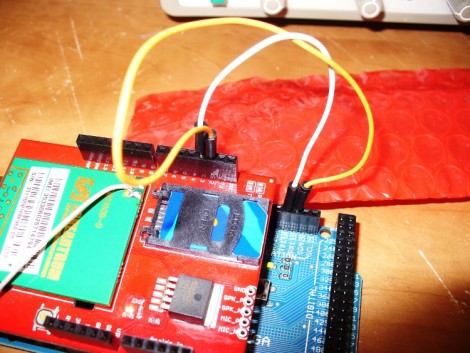
You can add a huge measure of extensibiltiy to a project by using a cellular connection. Anywhere the device can get service you can interact with it. In the past this has been a pretty deep slog through datasheets to get everything working, but this tutorial will show the basics of interacting with phone calls and text messages. It’s the 26th installment of what is becoming and mammoth Arduino series, and the first one in a set that works with the SM5100B cellular shield.

We love the words of warning at the top of the article which mention that a bit of bad code in your sketch could end up sending out a barrage of text messages, potentially costing you a bundle. But there’s plenty of details and if you follow along each step of the way we think you’ll come out fairly confident that you know what you’re doing. Just promise us that you won’t go out and steal SIM cards to use with your next project. Find part two of the tutorial here and keep your eyes open for future installments.

Charging Timer For R/C Batteries

arduino_controlled_socket

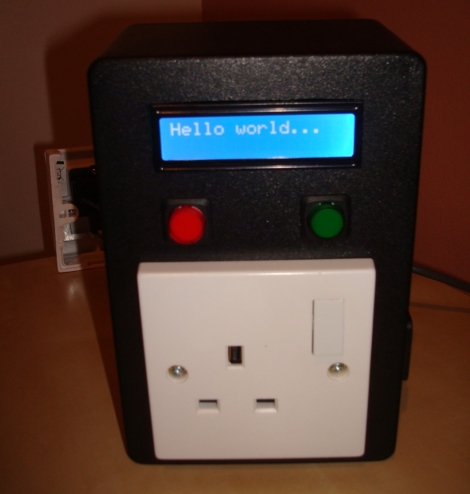
Santa brought [Quinten’s] son a shiny R/C truck for Christmas, but this new toy had one drawback – its batteries could only be connected to the charger for a maximum of 6 hours, lest he turn his house into a pile of smoldering ash.  With grave warnings from the manufacturer dancing in his head, he searched around for a timer that would allow him to cut power to the battery after charging for its allotted time.  Coming up empty, he decided to create his own timed electric socket regulated by an Arduino he had sitting around.  He grabbed a project box and wired up a nice looking socket timer, complete with an LCD status display.  To make things easy for his son, he added two buttons to the front of the controller – one for selecting the amount of charging time, and one to set the timer in motion.  As with his previous hacks, [Quinten] has provided plenty of documentation in the form of pictures, code, and even a video of the timer in action.

See-through LED Display

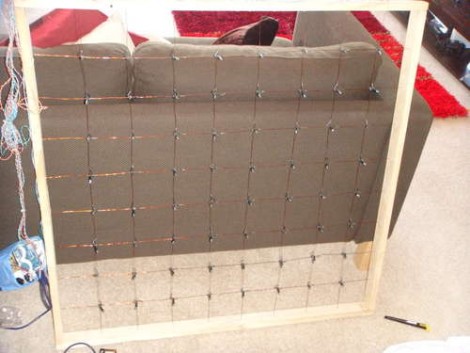
[Ndsit] is having a party and wanted to liven up the place with some blinky lights. He’s a bit new when it comes to hobby electronics, and although we’d highly recommend inviting some resistors to participate, the LED matrix that he built is very nice. It’s 8×8, it’s big, and (as shown in the clip after the break) the lights seem to hover in midair. That’s because he didn’t use a substrate to make the display. A grid of enameled wire is strung between the four sides of the wooden frame. LEDs were gathered from a string of Christmas lights which means they’re in a holder and have insulated wires already connected. Each one was tied on at a junction point of the grid, then connected to a portion of the wire where enamel had been scraped off.

It works but there’s already one light that is out. We hope some current protection is added so that this can be used again and again.

Continue reading “See-through LED Display”

Rotary Dial Authenticates Sudo Commands

[W1ndman] won’t win any security awards for this build, but it’s an interesting idea. On many Linux-based systems commands can be run with administrator privileges by prefacing them with the keyword ‘sudo’. Normally you’d be asked for a password but [W1ndman] used the Pluggable Authentication Modules (PAM) to authenticate via his own shell script. That script checks a code from this rotary dial for authentication. An Arduino takes care of listening for each digit that is entered and then sends the code via USB for comparison with a stored file. We’re not sure if that stored code is in a plain file or is otherwise protected, but at the very least this prevents you from using ‘sudo’ willy-nilly.

Fermentation Temperature Control

[Eric Friedrich] needed to keep the wort warm enough for yeast to ferment it into beer. To solve the problem he built his own fermentation temperature controler using a microprocessor to turn some heating tape on and off. You can see the heating element embracing that diminutive fermentation bucket in the picture above. This was originally meant for keeping reptile cages warm. It costs less than similar products meant just for brewing and works well for [Eric]. A DS1820 temperature sensor gives feedback to an ATmega168 which then uses a relay to switch the heat on and off. The target temperature can be changed using a potentiometer on the board, with the setting displayed on a character LCD screen on the project enclosure.

Xbee Controlled, Granite-wrapped Clock Travels Into Future

From the looks of it this clock is a couple of months ahead of its time. [Oscar] built the clock (translated) taking time to add a lot of goodies into the mix. First up, the parts you see include six large 7-segment displays for hours, minutes, and seconds as well as an LED marquee which can scroll messages. Inside there’s a temperature and humidity sensor for environmental feedback, and an Xbee module which allows for wireless computer control. Time is kept by a DS1307 real-time clock, which is read by an Arduino Uno, then pushed to the display by the pair of I2C addressable SAA1064 drivers. The whole thing was enclosed in four sheets of granite for the box, and a pane of glass for the front. We sure hope it’s well anchored to that wall. You can see it ticking away after the break.

Continue reading “Xbee Controlled, Granite-wrapped Clock Travels Into Future”

Jeep-uter Adds Push Button Control To Your Vehicle

[Ed Zarick] built a module to control his vehicle which he calls the Jeeputer. The name’s a mash-up of Jeep and Computer; the device itself is a combination of Arduino, character LCD, and a collection of shift registers and relays for interfacing. Watch the video after the break to see what this can do. We were surprised in the beginning when he says that all he has left to do is remove the steering wheel lock and he’ll be able to drive using the interface, but we think he means type in a code to unlock the ignition, not remote control for his car. He then goes on to demonstrate garage door control, power cycling for CB radio, GPS, 110V power inverter, vehicle light control, and much more. This must be the most feature packed car computer we’ve seen so far.

Continue reading “Jeep-uter Adds Push Button Control To Your Vehicle”