Amarino Makes Android Controlled Robots A Snap

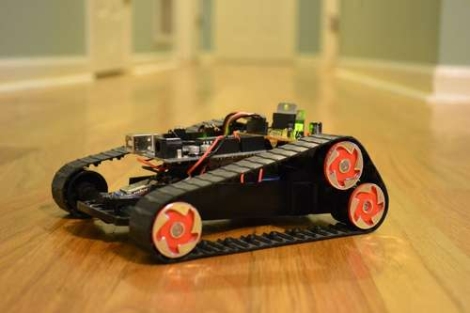
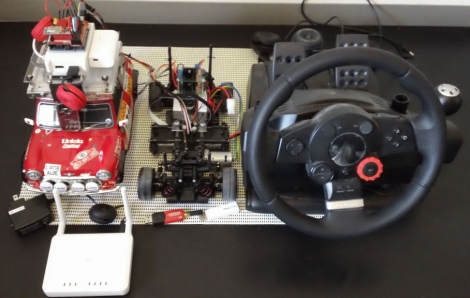
[Lucas Fragomeni] is controlling this robot using the accelerometer on his Android phone (translated). He could have gone through our Android tutorials and developed a custom application but he took the shorter route and used Amarino, an ‘Android meets Arduino’ toolkit, to do it for him. [Lucas] combined an Arduino, a BlueSMiRF Bluetooth modem, and two servo motors to build his robot. Amarino lets him connect to that Bluetooth modem and send sensor data over the connection. In this case it’s only the accelerometer that he chose to use, but he could have gone with the touchscreen, or any other sensor the handheld has to offer. Using this code package got him up and running quickly, only requiring that he writes his own code to turn the received signals into servo motor control routines. See it in action after the break.

Continue reading “Amarino Makes Android Controlled Robots A Snap”

Bluetooth Temperature Module

Wanting to know the outside temperature, [Jamie Maloway] built his own temperature sensor that can be read with a Bluetooth device. Let’s take a tour of the hardware above from right to left. There’s a linear voltage regulator with two filtering caps and a terminal block to attach a 9V battery or other power source. Next there’s an 8 MHz crystal and it’s capacitors, followed by a programming header on top and a 1-wire temperature IC, the DS18B20 we’re all familiar with hanging off the bottom. These both connect to the 8-pin PIC 12F675 that drives the system, and transmits using a Bluetooth module from Sure Electronics. Since this is using a serial protocol and transmitting ASCII data, it can be read using an automated script, or simply by using a terminal program.

Now, who’s going to be the first to get rid of the battery and leech off of the mains through inductance?

Ubertooth Board For Bluetooth Experimentation

Ubertooth Zero is the first offering in [Michael Ossman’s] quest for a Bluetooth sniffing and hacking hardware platform. We’ve seen some of his hacks in the past, like the build-in guitar tuner and some pink pager fiddling. The Ubertooth dongle is his original design based around an LPC1758 ARM Cortex-M3 processor paired with a Texas Instruments 595-CC2400-RTB1 to handle the 2.4 GHz RF communications. Looking at the bill of materials shows a very low cost for the components at just under $30 (if you can get your hands on a PCB to mount them on). He’s written firmware as well as host code to help you up start pulling Bluetooth packets out of the air as quickly as possible.

What can you do with this? That’s up to you, but whatever it is you accomplish, we’d like to hear about it.

Excuse Me, My Pinky Is Ringing

We get a lot of email challenging us to hack things. Sometimes we ignore them, other times we send some words of encouragement. But this time around we thought [Tait] had really come up with a great hack; to build a Bluetooth handset into his prosthetic finger. He hasn’t done much hacking in the past and was wondering if we could put out a challenge to our readers to make this happen. After a bit of back-and-forth brainstorming he decided to take on the challenge himself and was met with great success.

Like other Bluetooth handset hacks [Tait] started with a simple ear-mounted module. He extended the volume button with a piece of plastic and placed it under the battery. A couple of wooden matchsticks space the battery just enough so that it can be squeezed to adjust the volume level. He then extended the speaker with some wire. Next, he used the Oogoo recipe from our previous post to mold a false-finger and a thumb-ring. The PCB and battery fit in the finger, which places the microphone near a hole in the pad of the plastic pinky. The thumb ring houses the speaker to finish the look. Don’t miss the photos [Tait] sent in after the break.

Continue reading “Excuse Me, My Pinky Is Ringing”

Android Oscilloscope

Here’s a 2-channel Oscilloscope for your Android phone. It uses a base module driven by a dsPIC for signal processing. From there, an LMX9838 Bluetooth module broadcasts the data to the phone so that the waveform can be displayed. [Yus] ported some Python code he had been using over to a set of Java and XML files in order to get it working on Android. This was actually the first time he worked with the SDK… we’d say he’s a quick learner. See it in action after the break.

Continue reading “Android Oscilloscope”

Wireless Electrocardiography… With IPhone

This module is a sensor package for monitoring the electrical activity of the heart. It is the product of an effort to create a Wireless Body Sensor Network node that is dependable while consuming very little electricity, which means a longer battery life. To accomplish this, the microcontroller in charge of the node compresses the data (not usually done with wireless ECG hardware) so that the radio transmissions are as short and infrequent as possible.

[Igor] sent us this tip and had a short question and answer session with one of the developers. It seems they are working with the MSP430 chips right now because of their low power consumption. Unfortunately those chips still draw a high load when transmitting so future revisions will utilize an alternative.

Oh, and why the iPhone? The device that displays the data makes little difference. In this case they’re transmitting via Bluetooth for a real-time display (seen in the video after the break). This could be used for a wide variety of devices, or monitored remotely via the Internet.

Continue reading “Wireless Electrocardiography… With IPhone”

Using An NES Controller On An Android Phone

[Sk3tch] rigged up a way to use an original NES controller with Android. He bought the controller and a breakout board for it at DEFCON. By combining the controller, an Arduino, and a blueSMIRF BlueTooth module the controller can be used as a keyboard on his Android device. In the video after the break he demonstrates pairing the devices and playing Super Mario Bros. 3 in an emulator.

He calls this Alpha quality but it certainly looks like it works well. In the beta version we’d love to see all of the extra electronics inside the controller case like those USB mods.

Continue reading “Using An NES Controller On An Android Phone”