In Which I Vibe-Code A Personal Library System

When I was a kid, I was interested in a number of professions that are now either outdated, or have changed completely. One of those dreams involved checking out books and things to patrons, and it was focused primarily on pulling out the little card and adding a date-due stamp.

Of course, if you’ve been to a library in the last 20 years, you know that most of them don’t work that way anymore. Either the librarian scans special barcodes, or you check materials out yourself simply by placing them just so, one at a time. Either way, you end up with a printed receipt with all the materials listed, or an email. I ask you, what’s the fun in that? At least with the old way, you’d usually get a bookmark for each book by way of the due date card.

As I got older and spent the better part of two decades in a job that I didn’t exactly vibe with, I seriously considered becoming a programmer. I took Java, Android, and UNIX classes at the local junior college, met my now-husband, and eventually decided I didn’t have the guts to actually solve problems with computers. And, unlike my husband, I have very little imagination when it comes to making them do things.

Fast forward to last weekend, the one before Thanksgiving here in the US. I had tossed around the idea of making a personal library system just for funsies a day or so before, and I brought it up again. My husband was like, do you want to make it tonight using ChatGPT? And I was like, sure — not knowing what I was getting into except for the driver’s seat, excited for the destination.

Continue reading “In Which I Vibe-Code A Personal Library System”
Game Boy Camera In Wedding Photo Booth

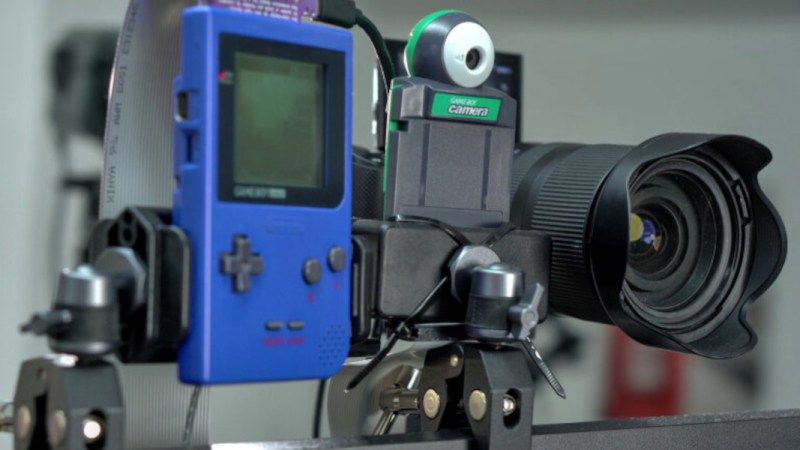
For those of a certain age the first digital camera many of us experienced was the Game Boy Camera, an add-on for the original Game Boy console. Although it only took pictures with the limited 4-tone monochrome graphics of this system, its capability of being able to take a picture, edit it, create drawings, and then print them out on the Game Boy Printer was revolutionary for the time. Of course the people who grew up with this hardware are about the age to be getting married now (or well beyond), so [Sebastian] capitalized on the nostalgia for it with this wedding photo booth that takes pictures with the Game Boy Camera.

The photo booth features the eponymous Game Boy Camera front-and-center, with a pair of large buttons to allow the wedding guests to start the photography process. The system takes video and then isolates a few still images from it to be printed with the Game Boy Printer. The original Game Boy hardware, as well as a Flask-based web app with a GUI, is all controlled with a Raspberry Pi 4. There’s also a piece of Game Boy hardware called the GB Interceptor that sits between the Game Boy console and the camera cartridge itself which allows the Pi to capture the video feed directly.

The booth doesn’t stop with Game Boy hardware, though. There’s also a modern mirrorless digital camera set up in the booth alongside the Game Boy Camera which allows for higher resolution, full color images to be taken as well. This is also controlled with the same hardware and provides a more modern photo booth experience next to the nostalgic one provided by the Game Boy. There have been many projects which attempt to modernize this hardware, though, like this build which adds color to the original monochrome photos or this one which adds Wi-Fi capability.

Continue reading “Game Boy Camera In Wedding Photo Booth”

Streaming Deck Removes Need For Dedicated Hardware

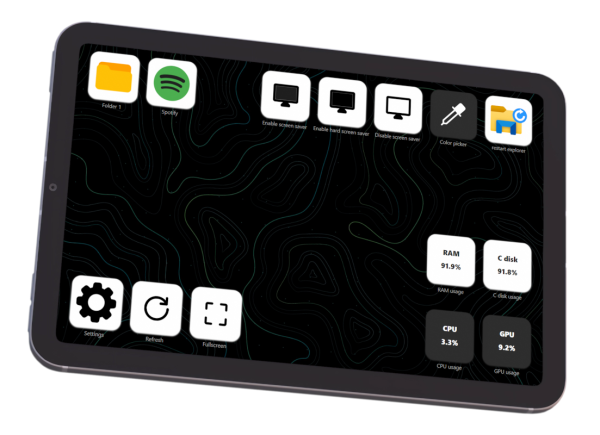
Streaming content online has never been more popular than it is now, from YouTube to Twitch there are all kinds of creators around with interesting streams across a wide spectrum of interests. With that gold rush comes plenty of people selling figurative shovels as well, with audio mixing gear, high-quality web cams, and dedicated devices for controlling all of this technology. Often these devices take the form of a tablet-like device, but [Lenochxd] thinks that any tablet ought to be able to perform this task without needing dedicated, often proprietary, hardware.

The solution offered here is called WebDeck, an application written in Flask that turns essentially any device with a broswer into a stream control device. Of course it helps to have a touch screen as well, but an abundance of tablets and smartphones in the world makes this a non-issue. With the software running on the host computer, the streamer can control various aspects of that computer remotely by scanning a QR code which opens a browser window with all of the controls accessible from within. It has support for VLC, OBS Studio, and Spotify as well which covers the bases for plenty of streaming needs.

Currently the host software only runs on Windows, but [Lenochxd] hopes to have MacOS and Linux versions available soon. We’re always in favor of any device that uses existing technology and also avoids proprietary hardware and software. Hopefully that’s a recipe to avoid planned obsolescence and unnecessary production. If you prefer a version with a little bit of tactile feedback, though, we’ve seen other decks which add physical buttons for quick control of the stream.

A Simple Web-Based Wiring Harness Tool

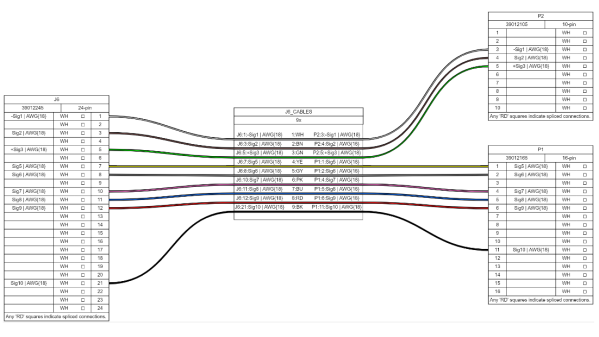
When building electronic assemblies there is quite often the need to construct custom cables to hook things up. It’s all very well if you’re prototyping by hand, or just building one or two of a thing, but if you’re cranking them out using outside help, then you’re going to want to ensure that cable is described very accurately. [Christian Nimako-Boateng Jr.] presents for us the first version of wirely, a wiring harness tool. This is a web-based tool that allows one to describe the cable ends and connectivity between them, producing a handy graphic and exports to excel in a format that should be easy to follow.

Based around the wireviz Python library running on a flask-based backend, image data are sent to the web assembly front-end and rendered with OpenGL. Configuration files can be imported and exported as JSON, making it easily linkable to other tools if required. Helpfully, the tool also seems to support some kind of revision control, although we didn’t try that yet. The process is straightforward enough, one simply defines a few groups (these relate to individual PCBs or other floating items in the assembly) which each contain one or more connectors. First, the connectors are described with part numbers, and wire gauge data, before defining the list of connections (wires) showing which signal and physical pins are connected together. Nothing more complex than that yet. We think there is still some more functionality that the tool could manage, such as shielding and guarding details, twisted pair definitions and a few others, but for a first pass, wirely looks pretty handy.

If you want a more heavyweight option using IEC 60617 symbols for describing wiring harnesses, then look no farther than QElectroTech, and yes, we have covered wireviz before, just for those that want to cut out the middleman and describe their cables in Python directly.

Python Web Proxy Convinces Sonos To Stream YouTube

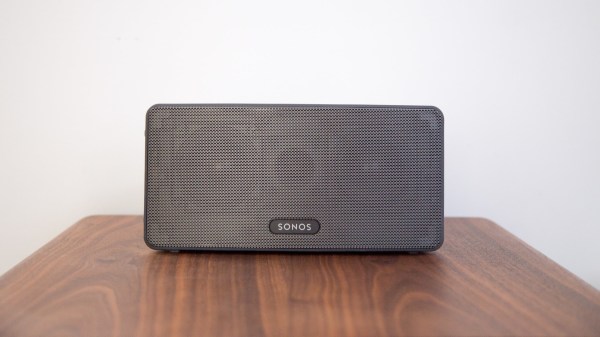
[Maurice-Michel Didelot] owns a Sonos smart speaker, and was lamenting the devices inability (or plain unwillingness) to stream music from online sources without using a subscription service. YouTube Music will work, but being a subscription product there is a monthly fee, which sucks since you can listen to plenty of content on YouTube for free. [Maurice] decided that the way forward was to dig into how the Sonos firmware accesses ‘web radio’ sources, and see if that could be leveraged to stream audio from YouTube via some kind of on-the-fly stream conversion process.

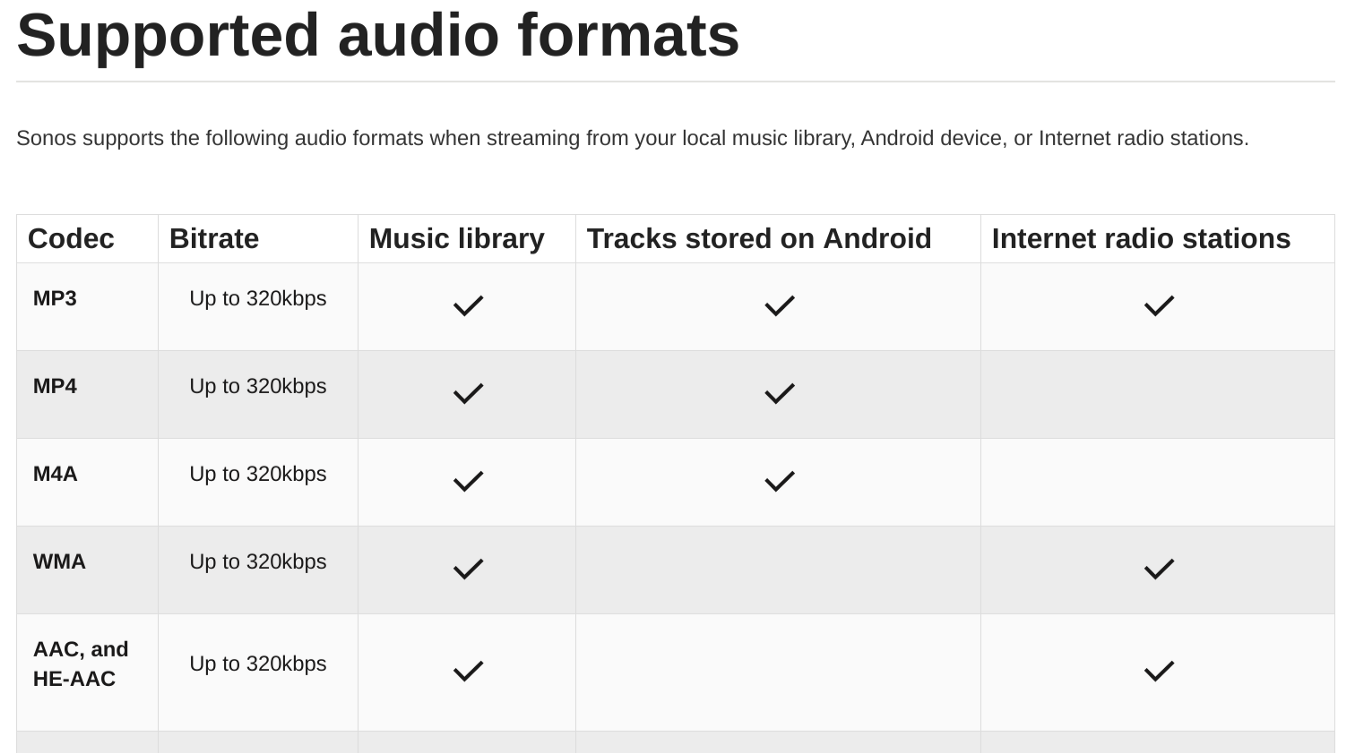
What? No MP4 support for web radio? Curses!

So let’s dig in to how [Maurice] chose to approach this. The smart speaker can be configured to add various streaming audio sources, and allows you add custom sources for those. The Sonos firmware supports a variety of audio codecs, besides MP3, but YouTube uses the MP4 format. Sonos won’t handle that from a web radio source, so what was there to do, but make a custom converter?

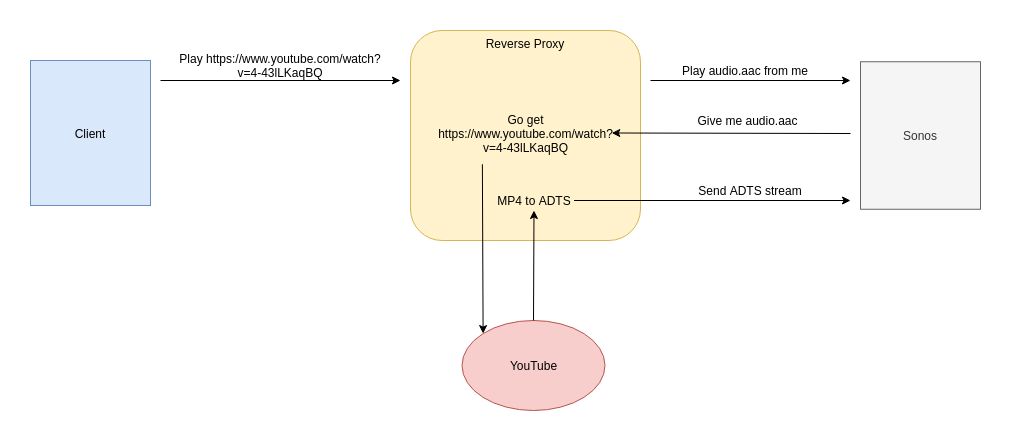
After a little digging, it was determined that Sonos supports AAC encoding (which is how MP4 encodes audio) but needs it wrapped in an ADTS (Audio Data Transport Stream) container. By building a reverse web-proxy application, in python using Flask, it was straightforward enough to grab the YouTube video ID from the web radio request, forward a request to YouTube using a modified version of pytube tweaked to not download the video, but stream it. Pytube enabled [Maurice] to extract the AAC audio ‘atoms’ from the MP4 container, and then wrap them up with ADTS and forward them onto the Sonos device, which happily thinks it’s just a plain old MP3 radio stream, even if it isn’t.

Sonos doesn’t have the best reputation, let’s say, but you can’t deny that there’s some pretty slick tech going on inside. Here’s a neat hack we covered last year, adding Sonos support to an old school speaker, and a nice teardown of a IKEA Sonos-compatible unit, which uses some neat design hacks.

Thanks [mip] for the tip!

Featured image by Charles Deluvio on Unsplash.

Espresso maker with added nixie flair

AI Powered Coffee Maker Knows A Bit Too Much About You

People keep warning that Skynet and the great robot uprising is not that far away, what with all this recent AI and machine-learning malarky getting all the attention lately. But we think going straight for a terminator robot army is not a very smart approach, not least due to a lack of subtlety. We think that it’s a much better bet to take over the world one home appliance at a time, and this AI Powered coffee maker might just well be part of that master plan.

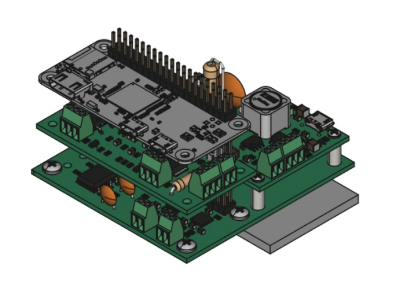
Raspberry Pi Zero sitting atop the custom nixie tube driver PCB
PCB stackup with Pi Zero sat atop the driver / PSU PCBs

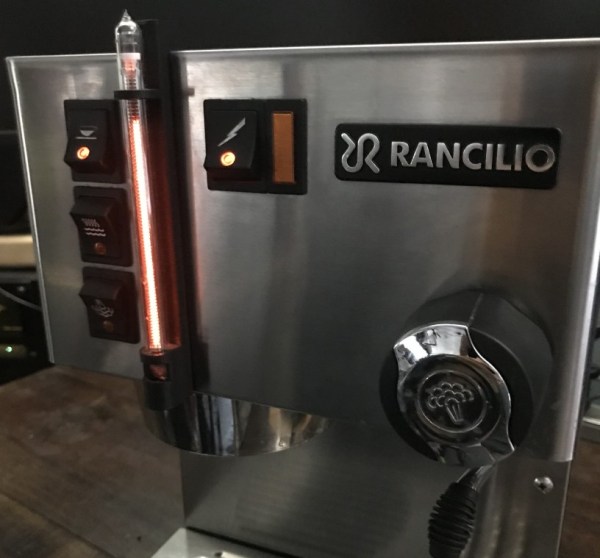
[Mark Smith] has taken a standard semi-auto espresso maker and jazzed it up a bit, with a sweet bar graph nixie tube the only obvious addition, at least from the front of the unit. Inside, a Raspberry Pi Zero sits atop his own nixie tube hat and associated power supply. The whole assembly is dropped into a 3D printed case and lives snuggled up to the water pump.

The Pi is running a web application written with the excellent Flask framework, and also an additional control application written in python. This allows the user to connect to the machine via Ethernet and see its status. The smarts are in the form of a simple self-grading machine learning algorithm, that takes a time series as an input (in this case when you take your shots of espresso) and after a few weeks of data, is able to make a reasonable prediction as to when you might want it in the future. It then automatically heats up in time for you to use the machine, when you usually do, then cools back down to save energy. No more pointless wandering around to see if the machine is hot enough yet – as you can just check the web page and see from the comfort of your desk.

But that’s not all [Mark] has done. He also improved the temperature control of the water boiler, and added an interlock that prevents the machine from producing a shot until the water temperature is just so. Water level is indicated by the glorious bar graph nixie tube, which also serves a few other user indication duties when appropriate. All in all a pretty sweet build, but we do add a word of caution: If your toaster starts making an unreasonable number of offers of toasted teacakes, give it a wide berth.

Continuous Integration: What It Is And Why You Need It

If you write software, chances are you’ve come across Continuous Integration, or CI. You might never have heard of it – but you wonder what all the ticks, badges and mysterious status icons are on open-source repositories you find online. You might hear friends waxing lyrical about the merits of CI, or grumbling about how their pipeline has broken again.

Want to know what all the fuss is about? This article will explain the basic concepts of CI, but will focus on an example, since that’s the best way to understand it. Let’s dive in. Continue reading “Continuous Integration: What It Is And Why You Need It”