DIY Monochrome LCD Hack Doesn’t Go As Planned

Manufacturers of low-cost 3D printers that use the masked stereolithography (MSLA) process are able to build their machines so cheaply because they’re using repurposed smartphone or tablet LCD panels to mask off the UV backlight. Considering the quality you get out of even the entry-level MSLA resin printers, we certainly aren’t complaining about this bit of thrift. But as [Jan Mrázek] explains in a recent blog post, there’s certainly room for improvement.

The problem is that those repurposed LCD panels are, as you’d expect, color displays. After all, even the bottom of the barrel mobile devices moved away from monochrome displays decades ago. But in this case, that’s not what you really want. Since the printer operates on a single wavelength of light, the color filters inside the LCD are actually absorbing light that could otherwise be curing the resin. So an MSLA printer with a monochrome screen would use less energy and print faster. There’s only one problem: it’s not very easy to find high-resolution monochrome displays in the year 2020.

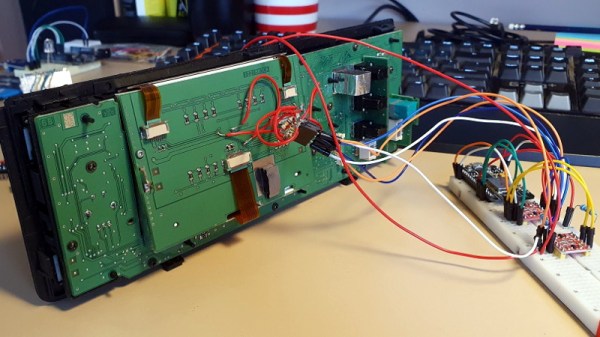
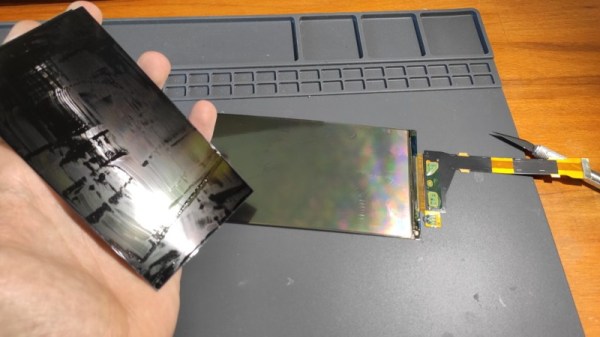
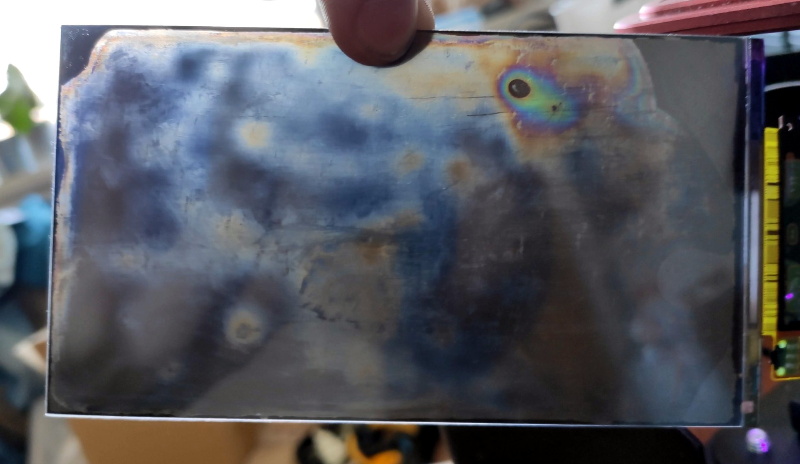
So [Jan] decided to see if he could take a replacement screen intended for his Elegoo Mars MSLA printer and convert it from color to monochrome by disassembling it and manually removing the color filters. If this sounds a bit crazy, that’s because it is. Turns out taking apart an LCD, modifying its internal layout, and putting it all back together in working order is just as difficult as you’d think.

But it was still worth a try. [Jan] pulls the display apart, removes the liquid crystals, scrapes off the color filters, and then puts it all back together again. His first attempt got him a monochrome display that actually worked, but with debris trapped inside the screen, the image was too poor to be useful. He tried again, this time trying harder to keep foreign material out of the crystals. But when he got it back together a second time, he found it no longer functioned. He thinks it’s possible that his attempt to clean up the inside of the display was too aggressive, but really there are so many things that could go wrong here it’s hard to pin down just one.

Long story short, manually creating monochrome displays for low-cost MSLA printers might not be a viable option. Until a better solution comes along, you might be interested in seeing some slightly less invasive ways of improving your resin print quality.

Transparent LCD Makes Everything Look Futuristic

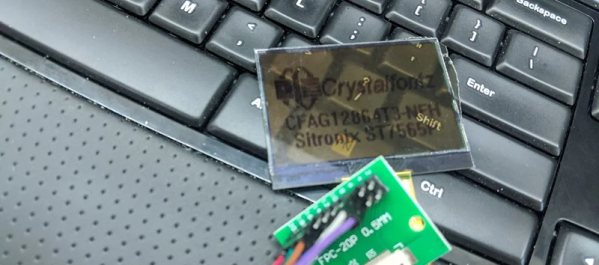
According to [Kelsey], transparent displays are guaranteed to make “everything feel like the future.” Unfortunately they’re hard to find, and the ones typically available are OLED and can’t make solid black colors. But as luck would have it, it’s possible to repurpose a common LCD to be sort of transparent.

A LCD uses nematic crystals that can polarize light, with the amount of polarization changing based on the electric field applied to the crystal. Light enters the front of the panel through a polarizing film, passes through the display, and then bounces off a reflective back coating. The display itself usually polarizes light in a way that matches the front polarizer. That means if you do nothing you get reflected light. However, if a part of the LCD gets an electric field, it will repolarize in such a way as to block the reflected light making the display look black in that area.

[Kelsey’s] trick is to peel off the reflector and replace it with polarizing film taken from another display. The new polarizer needs to be bigger than the display for one reason: you need to match the polarizing angle of the front film with the new back film. That means if the new film is exactly the right size, it won’t be able to rotate without leaving gaps. By starting with a larger piece, you’ll be able to rotate for maximum transparency before you stick it on.

We’ve seen some homemade transparent numeric displays. The transparent wood, though, has usually left something to be desired.

Improving Exposure On A Masked SLA Printer

It’s taken longer than some might have thought, but we’re finally at the point where you can pick up an SLA 3D printer for a few hundred bucks. These machines, which use light to cure a resin, are capable of far higher resolution than their more common FDM counterparts, though they do bring along their own unique issues and annoyances. Especially on the lower end of the price spectrum.

[FlorianH] recently picked up the $380 SparkMaker FHD, and while he’s happy with the printer overall, he’s identified a rather annoying design flaw. It seems that the upgraded UV backlight in the FHD version of the SparkMaker produces somewhat irregular light, which in turn manifests itself as artifacts on the final print. Due to hot spots on the panel, large objects printed on the SparkMaker show fairly obvious scarring.

Now you might expect the fix for this problem to be in the hardware, but he’s taken it in a different direction. These printers use an LCD panel to block off areas of the UV backlight, thereby controlling how much of the resin is exposed. This is technique is officially known as “masked SLA”, and is the technology used in most of these new entry level resin printers.

As luck would have it, the SparkMaker FHD allows showing various levels of grayscale on the LCD rather than a simple binary value for each pixel. At least in theory, this allows [FlorianH] to compensate for the irregular backlight by adjusting how much the UV is attenuated by the LCD panel. He’s focusing on the printer he personally owns, but the idea should work on any masked SLA printer that accepts grayscale values.

The first step was to map the backlight, which [FlorianH] did by soaking thin pieces of paper in a UV reactant chemical, and draping them over the backlight. He then photographed the illumination pattern, and came up with some OpenCV code that takes this images and uses the light intensity data to compensate for the local UV brightness underneath the sliced model.

So far, this method has allowed [FlorianH] to noticeably reduce the scarring, but he thinks it’s still possible to do better. He’s released the code for this backlight compensation script, and welcomes anyone who might wish to take a look at see how it could be improved.

An uneven backlight is just one of the potential new headaches these low-cost “masked” SLA printers give you. While they’re certainly very compelling, you should understand what you’re getting into before you pull the trigger on one.

LCD Panel Lamp Shade Makes For Eye-Catching Lighting

At first sight, [Kyle]’s Elroy lamp is simply an attractive piece of modern-styled interior furnishing; its clean lines, wood grain, and contemporary patterning being an asset to the room. But when he pulls out his phone, things change. Because this lamp hides a secret: at its heart may be a standard LED bulb, but the shade conceals four LCD screens driven by an Nvidia Jetson. These can be controlled through a web app to display a variety of textures, completing the effect.

This is not however simply a set of laptop screens bolted to a lampshade. The screens started life in laptops sure enough, but have since had their reflective backing removed to create a transparent LCD panel. Then an appropriate diffuser had to be found, which after much experimentation became a composite including more than one textured paper. Finally the whole was enclosed in an attractive wooden lamp frame and became part of the furniture. We like it, both as an aesthetically pleasing lamp and as a genuine departure from the norm.

This isn’t the first eye-catching lampshade we’ve brought you, but it’s certainly raised the bar. You can see it in action in the video below the break.

Continue reading “LCD Panel Lamp Shade Makes For Eye-Catching Lighting”

Amstrad Portable Gets A Modern LCD Transplant

Playing classic games on the real hardware is an experience many of us enjoy, but sometimes the hardware is just a bit too retro for modern sensibilities. A case in point is the miserable monochrome LCD that was originally installed in the Amstrad PPC640 portable 8086 PC that [Drygol] recently picked up. He decided that his portable Amstrad sessions would be far more enjoyable if he swapped it out for a display that didn’t have 30+ years on the clock.

To quell the complaints of any of the vintage hardware aficionados out there, it’s worth mentioning that the original LCD was actually damaged and needed to be replaced anyway. Granted [Drygol] could have tried to find a contemporary panel to replace it with, but looking at the incredible before and after shots of the modded PPC640, it’s hard to argue he didn’t make the right decision by throwing a modern display into the otherwise largely original computer.

Getting the new LCD’s PCB ready for installation.

[Drygol] says he picked up a cheap 4:3 LCD TV on eBay, and as luck would have it, found that the new panel dropped perfectly into the original frame. Getting it buttoned back up required the removal of the RF can and all the female connections on the TV’s PCB, plus he had to cut some holes in the back of the display enclosure to mount the LCD’s controls, but overall it looks very stock.

Of course, getting the new LCD display in the original frame was only half the battle, it still needs to be connected up to the computer somehow. To get everyone playing nicely with each other, [Drygol] is using a commercially available MDA/CGA/EGA to VGA converter that is installed where the batteries would have gone originally. Wired to the PPC640’s external monitor connector, it allows him to drive the new display without having to use the original LCD interface.

[Drygol] has made something of a name for himself by performing some of the most impressive restorations and modifications of retro hardware in recent memory. From the unbelievable work that went into repairing a smashed Atari 800XL case to his gorgeous custom Amiga A500, his projects are sure to please the retro hardware lovers in the audience.

Continue reading “Amstrad Portable Gets A Modern LCD Transplant”

Multimeter Display Perked Up With Nixies, LEDs, And Neon Tubes

Just because something is newer than something else doesn’t automatically make it better. Of course the opposite is also true, but when it comes to displays on bench multimeters, a fancy LCD display is no guarantee of legibility. Take the Hewlett Packard HP 3478A multimeter; the stock transflective display with its 14-segment characters is so hard to read that people usually have to add a backlight to use it.

That wasn’t good enough for [cyclotronboy], though, who chose to completely replace the stock 3478A display with Nixie tubes. He noticed that with a little modification, six IN-17 tubes just fit in the window vacated by the LCD. He sniffed out the serial data stream going to the display with a collection of XOR gates and flip-flops, which let him write the code for a PIC18F4550. The finished display adds a trio of rectangular LEDs for the + and – indicators, and an HDLO-1414 four-character alphanumeric display to indicate units and the like. And the decimal points? Tiny neon bulbs. It already looks miles better than the stock display, and with the addition of a red filter, it should look even better.

If you’re stuck with a lame LCD multimeter but Nixies don’t quite do it for you, worry not – an LED conversion is possible too.

The Future’s So Bright, I Gotta Wear LCDs

Whether it was rays from the Sun that made a 150 million kilometer trip just to ruin your day or somebody’s unreasonably bright aftermarket headlights, at some point or another we’ve all experienced the discomfort of bright spots in our eyes. But short of wearing welder’s goggles all the time, what can we do? Luckily for us, [Nick Bild] has come up with a solution. Sort of.

Modifying the LCD so it can be seen through.

By adding LCDs to a pair of standard sunglasses, [Nick] has created something he’s calling “Light Brakes”. The idea is that the LCDs, having their backings removed, can essentially be used as programmable shutters to block out a specific part of the image that’s passing through them. With the addition of a Raspberry Pi and a camera, the Light Brakes can identify an unusually bright source of light and block it from the wearer’s vision by drawing a sufficiently large blob on the LCDs.

At least, that’s the idea. As you can see in the video after the break, the LCDs ability to block out a moving source of light is somewhat debatable. It’s also unclear what, if any, effect the “blocking” would have on UV, so you definitely shouldn’t try looking at the sun with a pair of these.

That said, a refined version of the concept could have some very interesting applications. For instance, imagine a pair of glasses that could actively block out advertisements or other unpleasant images from your field of vision. If this all sounds a bit like something out of an episode of Black Mirror, that’s because it is.

Attentive readers may have noticed that this isn’t the first time these fashionable frames have graced the pages of Hackaday. Over the summer they were used in a very interesting field of view home automation project that [Nick] was working on. This also isn’t the first time he’s stuck a pair of small LCDs in front of his eyes in the name of progress. We’re starting to identify something of a trend here, though we certainly aren’t complaining.

Continue reading “The Future’s So Bright, I Gotta Wear LCDs”