MSP430 Based Single LED Clock

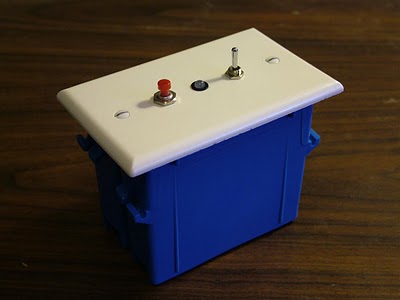
[Kenneth Finnegan’s] latest clock makes use of the TI Launchpad for programming and debugging MSP430 microprocessors. We took a look at the Launchpad when it was released and we’re glad to see some hacks resulting from availability of that tool. The clock reads out the time using a bi-color LED. Press the button and a series of flashes will tell you the time. A three-position toggle switch is used along with the push button for setting the time. The protocol he developed is outlined in his demo video after the break.

We like [Kenneth’s] use of a plastic electrical box as a project box. They’re cheap and you can find them everywhere in many different sizes. He mentions the difficulty in drilling through the faceplate. We’ve had our share of shattered plastic trying to drill holes in the darn things. If you’ve got some tips on faceplate-modification we’d love to hear them.

This clock is sure the polar opposite from the TTL clock that [Kenneth] showed us back in March, trading jumper wires for lines of code. We’re going to give this one a try, hopefully fixing the button debounce along the way.
Continue reading “MSP430 Based Single LED Clock”

RGB Lamp Bulb Replacement

[youtube=http://www.youtube.com/watch?v=TwZBMJS1teg]

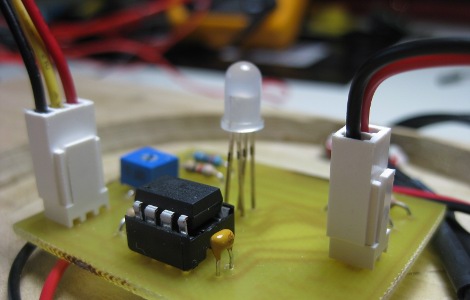
Wanting to make some unique and interesting gifts for his nieces as well as improve his PCB skills and expand beyond Arduino, [Jay] has made these color changing Ikea lamps. He’s using an ATTiny2313 for the brains, a handful of RGB LEDs plus 3 warm white LEDs to keep the wife happy. you can download the schematic and PCB files if you want to reproduce this one yourself. You can see his PCB making skills have improved since the nursery room temperature monitor. We think his nieces will be pleased with their gifts.

[via HackedGadgets]

Spin Peggy, Get 3D POV

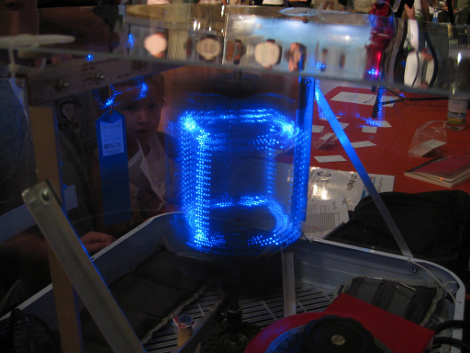
We put a temporary ban on posting POV projects after receiving several LED spheres back in May. But we had to lift the injunction after seeing this superb Volumetric 3D POV display by [Wes Faler] and [Don Smith].

Their creative use of several readily available components adds to the alluring setup; the central elements being just a box fan and Peggy kit from EMSL. The video after the jump doesn’t really do the project justice, but if you missed it at Maker Fair Detroit and can’t make your own it’s the best you’re going to get.

Continue reading “Spin Peggy, Get 3D POV”

Save A Baby, Nursery Temperature Monitor

Yes, you could argue this Nursery Room Temperature Monitor is simply an LED and an Arduino with a temperature sensor, but [Jay] really did put more thought into the process. For instance he stuck with AVR, built a wooden base and sanded globe, and even included schematics and source code. Plus, SIDS is no laughing matter and the more you know, the more it can be prevented. Back on point, one thing we would add is PWM for a more gradual change in color. What would you add?

Continue reading “Save A Baby, Nursery Temperature Monitor”

Chess Table: Physical Interface For Internet Games

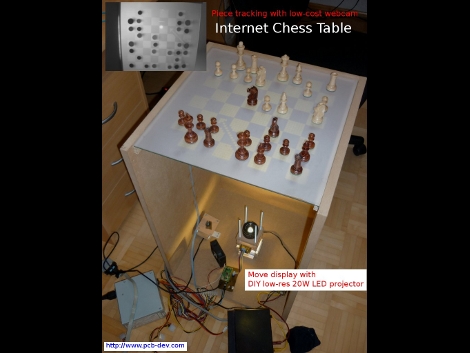
Wanting to get back to playing with actual pieces, [Thomas Pototschnig] built a chess table that interfaces with the Internet. The table uses an custom setup to project the board on the frosted surface of the table. Chess moves from your internet opponent are displayed as arrows on the board so you can move the pieces. Your moves are detected by a webcam below the surface as this table actually functions as a multitouch display. From the description, it sounds like the projector was made from a 128×64 graphic LCD display. A 64×64 pixel area is used, with an LED below and a lens above. This works remarkably well. See for yourself after the break.

Want some other options for your chess setup? You can play against a robot arm, or if you’ve got 144 square feet of extra space you can build a really big board for the occasional game.

Continue reading “Chess Table: Physical Interface For Internet Games”

Decatron Stand-in

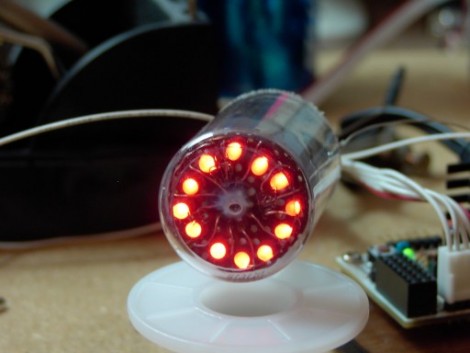
Think the swirling glow of a Decatron is cool but don’t want to deal with the voltage issues? [Osgeld] sidestepped the problem by developing a fake Decatron. Admiral Nelson (Captain Morgan’s cheaper cousin) provided the enclosure in the form of an airplane sized liquor bottle. The LEDs are common-something (not sure if it’s anode or cathode) so they end up being individually addressable through the mess of wires coming out the end. This will greatly simplify that kitchen timer we’ve been meaning to build. See the blinking lights go around and around after the break.

Continue reading “Decatron Stand-in”

Physical Tone Matrix

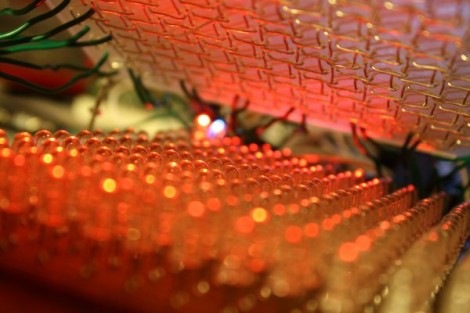
[Andrew Jenner] pulled off something amazing with this Physical Tone Matrix. He wanted to build a physical version of a flash applet he had seen. Two layers make up the main user interface. The top layer is a sheet of acrylic that acts as a touch interface and below there’s an LED matrix. [Andrew’s] touch interface uses wires running throughout the acrylic as contacts which are polled via transistor pairs. As you can see in the video after the break it works well and we like the fact that there’s a tactile component (due to the bumpy wires) you don’t get when working with a touchscreen.

The 16×16 grid of LEDs on the bottom layer correspond to each ‘button’ on the touch matrix hand have some extra functions such as playing Conway’s Game of Life. This fantastic build still has a couple of kinks to work out, most notably the interference in the audio circuit, but we’re quite impressed at what he’s achieved quickly. Plus, this is more economical than a monome and larger than some of the monome clones we’ve seen.

Continue reading “Physical Tone Matrix”