A Thousand LED Lights For Your Room

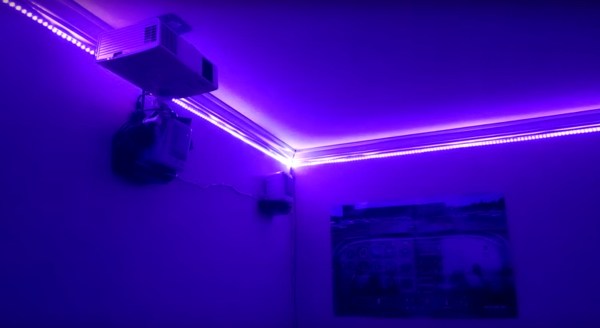
Sure, you could get a regular light fixture like a normal person… Or you could use close to a thousand RGB LEDs to light your room!

That’s what [Dmitry] decided to do after trying to figure out the best way to light his pad. You see, his room is 4 by 4 meters, and WS2812 RGB LED strips happen to come in 4 meter lengths… Coincidence? We think not.

The problem with using 16 meters of LED strips is powering them… You see, at 16 meters, you’re looking at about 5V @ 57.6A — and we’re guessing you probably don’t have a 5V 60A power supply handy. Not to mention if you run them in series, the resistance of the system is going to kill your efficiency and the last LEDs probably won’t even work… So [Dmitry] had to break the system up. He has two power supplies feeding the strips from the middle of each pair — that way, he doesn’t have to worry about any voltage drops due to the length of the strips.

Continue reading “A Thousand LED Lights For Your Room”

Because Burning Man Needed More LEDs

There are a lot of blinky glowy things at Burning Man every year, and [Mark] decided he would literally throw his hat into the ring. He built a high visibility top hat studded with more RGB LEDs than common sense would dictate. It’s a flashy hat, and a very good example of the fashion statement a few hundred LEDs can make.

[Mark]’s top hat has 481 WS2812b addressable LEDs studded around the perimeter, a common LED choice for bright and blinky wearables. These LEDs are driven by a Teensy 3.1, with a Bluetooth transceiver, a GPS module, a compass, and gyro/accelerometer attached to the microcontroller. That’s a lot of hardware, but it gives [Mark] the capability of having the hat react to its own orientation, point itself North, and allow for control via a modified Nintendo NES controller.

The WS2812 LEDs draw a lot of power, and for any wearable project having portable power is a chief concern. [Mark]’s original plan was to use an 8x battery holder for the electronics enclosure, and use five AA batteries to power the hat. The total idle draw of the LEDs was 4.5 Watts, and with even a few LEDs blinking colors there was a significant voltage drop. The idea of powering the hat with AA batteries was discarded and the power source was changed to a 195 Watt-hour lithium ion battery bank that was topped off each day with a solar panel.

The hat is awesome, exceedingly bright, and something that gets a lot of attention everywhere  it goes. For indoor use, it might be too bright, but this could be fixed with the addition of a bit of black stretchy fabric, like what our own [Mike Szczys] did for his DEF CON hat. [Mark]’s hat is just version 1, and he plans on making a second LED hat for next year.

Sending The Internet From An LED Lightbulb

The number of things that can carry Internet traffic is always increasing. Now, you can add LED light bulbs to this list, as engineers in Disney Research have just demonstrated a system that transmits Internet traffic using an LED light bulb. This method of communication isn’t new: Visible Light Communication (VLC) has been demonstrated before by Disney and others, but this project puts it into a standard LED light bulb. This bulb has been modified to include an Atheros AR9331 SoC running OpenWRT and an Atmel ATmega328p that controls the LED elements and sensors that send and receive the data. So, the device is acting as a gateway between a WiFi network and a VLC one.

Disney’s new test system (PDF link) isn’t especially fast: it can only carry about 380 to 400 bits per second, so it won’t be streaming video anytime soon. That is definitely fast enough, though to send control data to a toy, or to send a continual stream of updated data to a device in the room, such as an ebook reader with a continually updated encyclopaedia. This being Disney, the authors coin a new phrase to end their paper: The Internet of Toys.

Debug An IKEA Lamp Hack, Win A Lamp Controller

[Limpkin], aka Hackaday alum [Mathieu Stephan], is at it again, converting an IKEA lamp into a visual wake-up light. He wants to build an alarm that can be remotely triggered, He’s basing this project around a combination of an ESP8266 that handles the communication and timing, and a pile of 10-watt RGB LEDs. However, he is having a problem: every time he initializes the PWM (pulse width modulation) signalling that will control the level of the LEDs, his ESP8266 dev board reboots. So, he’s offering an interesting bounty for the person who finds the issue: figure it out and he will send you the lamp. Well, the PCB and components, anyway: you’ll have to add your own IKEA lamp. It’s an interesting approach to debugging a hardware problem, so feel free to take a look. The full hardware and software details are on his GitHub repository.

LED Ring Around The ESP8266

The world needs more blinky lights, and [Bertus Kruger] has created a neat way to make lights blink wirelessly. He has a footprint in the middle of the board for soldering the castellated ESP8266 module, and an LED ring around it to create the WiFi Pixel. It’s an LED ring that can be controlled over a WiFi connection. His design is based on a combination of the ubiquitous ESP8266 WiFi chip and a NeoPixel ring from AdaFruit, so there are already great examples of how to code and control the hardware. The project is still in progress, but he has released all of the details, including the Gerber files for the board and the Arduino code that the ESP8266 is running.

It’s a great start: add in battery support and you could have an awesome way to have portable LED blinky light rings. For those who want to try it out without building your own circuit boards, [Bertus] says that it could be built with an ESP8266 dev board and an Adafruit NeoPixel ring. Currently, he is running the device from USB, but there is no reason why it couldn’t be powered from a battery for some portable USB blinkiness.

Continue reading “LED Ring Around The ESP8266”

LED Matrix Failure And Vindication

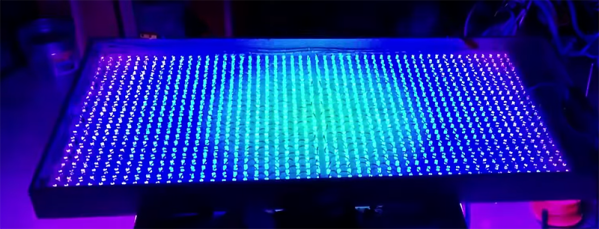
If necessity is the mother of invention, what’s failure the mother of? Improvement? Anyway, [prpplague]’s second version of his roll-up 70×30 RGB LED display looks a lot better and more reliable than the first, and that’s precisely due to “failing”.

Sometimes you design the hardware around the software, and sometimes vice-versa. It’s all about the balance of pain. [prpplague] initially wired the strips together in a consistently left-to-right raster arrangement to make the coding easier, but this means long wires on the backside of the fabric returning from the right side back to the start again at the left. These long wires snagged on stuff, and pulled the solder connections apart.

600px-Dotstar-adapter-solder3The fix? Alternate rows of left-to-right with right-to-left to minimize wiring and make nice, robust connectors for the ends, and a much more elegant implementation at the expense of more complicated software to drive the device. (Alternating rows have to be flipped horizontally, so this means custom driver routines.)

The second gremlin was that the interfacing board that [prpplague] was using didn’t have enough current sourcing capability on the SPI lines, and he discovered that he couldn’t communicate reliably with the strings if the first pixel was more than 24″ of wire away from the board. Once the signal got to the first pixel, though, everything was fine. [prpplague] figured out that the RGB LEDs themselves had more drive capability than the SPI source.

The solution? Add a single pixel at the front of the chain to buffer the SPI lines and serve as a bonus status indicator. Cute.

We’d hardly call these “fails”, but rather “learning experiences”. Anyway, here’s two design “mistakes” that we won’t make when making a roll-up flexible pixel display. Thanks [prpplague].

You Can’t Call It A Battlestation Without This Overhead Control Panel

Modern computers are rubbish. Why, they barely have a switch or a blinky light on them. What’s the point in having a computer if you don’t have the thrill of throwing a switch or eight and watching lights blink in response? [Smashcuts] obviously agrees because he built a control panel filled with heavy-duty switches and blinking wonderfulness to augment his battlestation. This piece of mechanical wonderment has buttons for useful features such as typing several levels of derisive laughter in chat windows, playing odd sound effects and a large red panic button that… well, I won’t spoil the surprise. The whole thing is hand-wired and fronted with laser-cut panels that make it look really authentic. [smashcuts] built it “because it didn’t exist and I felt like it needed to”, which is a perfect justification for this piece of industrial scale awesomeness.

It does have some more practical uses, though: he has set several of the switches to trigger actions in Photoshop and other programs, so this could be easily adapted for those who have the odd belief that things need a practical use to exist. He used USB controllers from Desktop Aviator, and a Mac program called Controller Mate to set up the sequencing for the blinkies. Unfortunately, [smashcuts] didn’t produce a how-to guide for this panel, claiming that “I don’t really have blueprints or schematics. I REALLY didn’t know what I was doing, so all the notes I do have wouldn’t make sense to anyone. It’d be like reading an owners manual to a car written by a caveman”. Either way, it is an impressive build, and you can find more details from the creator on this reddit thread.