Retro-Inspired Computer Case Hosts Mechanical Keyboard

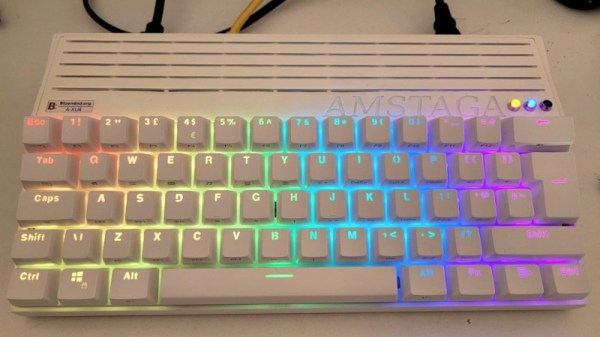
During the time in the 1980s when the personal computer was gaining steam as a household fixture, plenty of models shipped with the keyboard built in to the machine itself. This helped reduce costs, lower the physical footprint of the device, and arguably improved aesthetics. But as technology progressed, this type of design fell by the wayside as computers became more modular and configurable. That’s not to say there aren’t any benefits to building a computer like this, though. [jit] is here to show off this Amiga-inspired computer with its own modern built-in mechanical keyboard.

Like the Raspberry Pi 400 which is built into its own case, modern computers like this are extremely portable, relatively simple, and space-efficient. But [jit] did not like the uninspired design of the Pi so he was looking to make some improvements. Starting with the keyboard, it boasts a 60% size board with mechanical keys which are backlit by LEDs. Inside the machine is a Odroid XU4 which has a little bit more power (and is often easier to find) than a comparable Raspberry Pi. The case is 3D printed and includes ventilation and support for the addition of various cooling fans, I/O ports, status LEDs, and switches for the computer inside.

Additionally, some modification of the Odroid itself was needed in order to move the various switches to the case, and the build also includes a somewhat customized power supply internally as well. It’s a well-rounded build that captures the spirit of the old computer cases, but takes advantage of a lot of modern technology at the same time. If you want to go all-out with a build like this, though, take a look at this retro-inspired case (with keyboard included) that manages to get most of a Framework laptop inside.

Continue reading “Retro-Inspired Computer Case Hosts Mechanical Keyboard”
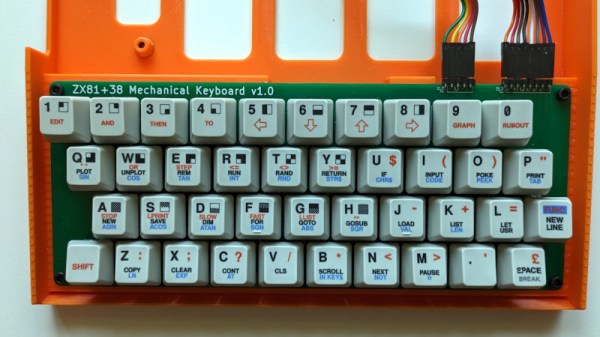
It’s Never Too Late To Upgrade Your ZX81 Keyboard

Sir Clive Sinclair’s ZX81 was a phenomenal sales success as one of the cheapest machines available in the early 1980s, but even its most fervent admirers will admit that it suffered heavily from the Sinclair economy drive. In particular that membrane keyboard was notorious for its lack of feedback, and a popular upgrade back in the day was a replacement keyboard. Now we can bring you what might be the ultimate in ZX replacement keyboards, in the form of [Brian Swetland]’s mechanical ZX81 keyboard.

The familiar 40-key layout is all there, using Cherry MX key switches and a beautiful set of custom-printed keycaps. There’s little more to a ZX keyboard than the matrix wiring, and in this case it’s all incorporated on a PCB. None of these techniques were readily available to individuals back in the ’80s, so a large piece of perfboard, key switches from an old terminal keyboard, and Letraset would have had to suffice.

We have to admit liking this project a lot, in fact we’re even tempted by a set of these keycaps for a regular keyboard just for old time’s sake. If you’re interested in the ZX81 then take a look at how we used one to help us through the pandemic.

A Miniature MNT For Every Pocket

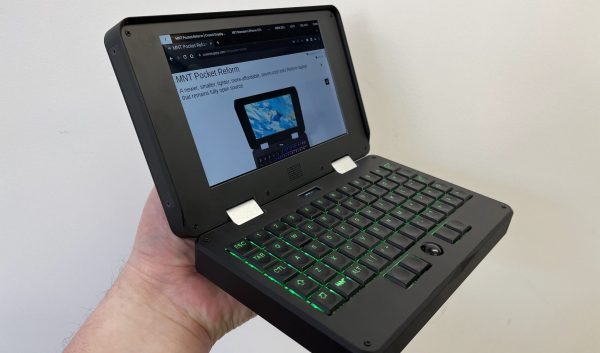
Last time Hackaday went hands on with a product from German company MNT, it was the Reform laptop; a full size computer with a full feature set and fully open source design. Now they’re back with the same value proposition and feature set crammed into a much more adorable (and colorful!) package with the MNT Pocket Reform. If you want the big Reform’s open source philosophy in a body fit for a coat pocket, this might be the computing device for you.

To refresh your memory, MNT is a company that specializes in open source hardware and the software to support it. They are probably best known for the Reform, their first laptop. Its marquis feature is a fully open design, from the mechanical components (designed with OSS tools) to the PCBAs (designed with KiCad) to the software (designed with, uh, software). When originally shipped that product packed a DIMM-style System On Module (SOM) with a default configuration containing a quad core NXP i.MX8M Quad and 4GB of RAM, as well as mini PCIe Card and M key m.2 2280 slots on the motherboard for storage and connectivity. That computer was designed to be easily serviceable and included a plethora of full sized ports along with easy to source cylindrical battery cells. The Pocket Reform takes the same intent and channels it into a much smaller package.

Continue reading “A Miniature MNT For Every Pocket”

Solar Powered Split Wireless Mechanical Keyboard

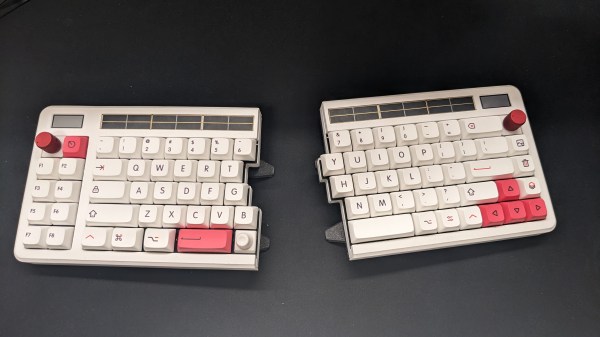
When thinking about a perfect keyboard, some of us have a veritable laundry list: split, hot-swapping, wireless, 3d printed, encoders, and a custom layout. The Aloidia keyboard by [Nguyen Vincent] has all that and more.

One of the first things to notice is a row of solar panels on the top, which trickle charge the keyboard. The keyboard uses 65uA in idle and 30uA when in a deep sleep. With the solar panels providing anywhere between 600-1200uAh a day, the battery should last a year and a half under even harsh conditions. The encoders were specially chosen to reduce pull-up power consumption. Given the focus on power and the lack of wires between the halves, you might wonder how the connection to the computer is handled. Does one-half handle the connection and use more power? The answer is that both talk to a dongle based around an nRF52840. This lets the keyboard halves idle most of the time and enables the dongle to handle the expensive communications to the host PC.

Instead of an e-paper screen in the top left, [Nguyen] placed a Sharp memory display. The 3D-printed case is stunning, with no visible screws on the top and tenting feet on the bottom. The two halves snap together very satisfactorily with the power of magnets (the printed palm rests also magnetically attach). Overall it is an incredibly well-thought-out keyboard with all sorts of bells and whistles.

There are project logs with detail to dig into and more videos and photos. We love a good keyboard journey like this one that went for a more ergonomic shape that meant more custom wiring.

Schematics are up on hackaday.io in the files section—video after the break.

Thanks [Shantanu] for the tip!

Continue reading “Solar Powered Split Wireless Mechanical Keyboard”

Mechanical Keyboard As Travel Saxophone

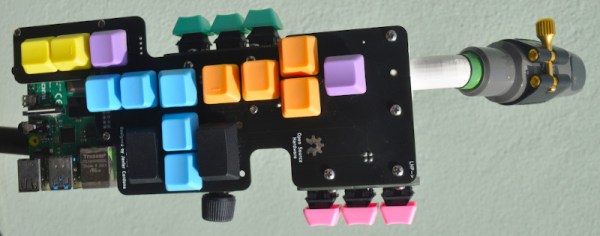
Those who play larger musical instruments, things like drums, piano, harp, tuba, upright bass, or Zeusaphone, know well the challenges of simply transporting their chosen instrument to band practice, a symphony hall, or local watering hole. Even those playing more manageably-sized instruments may have similar troubles at some point especially when traveling where luggage space is at a premium like on an airplane. That’s why [jcard0na] built this electronic saxophone, designed to be as small as possible.

Known as the “haxophone”, the musical instrument eschews the vibrating column of air typical of woodwind instruments in favor of an electronic substitute. Based around the Raspberry Pi, the device consists of a custom HAT with a number of mechanical keyboard switches arrayed in a way close enough to the layout of a standard saxophone that saxophonists will be able to intuitively and easily play. Two pieces of software run on the Pi to replicate the musical instrument, one that detects the player’s breaths and key presses, and another that synthesizes this information into sound.

While [jcard0na] notes that this will never replicate the depth and feel of a real instrument, it does accomplish its design goal of being much more easily transportable than all but the most soprano of true saxophones. As a musical project it’s an excellent example of good design as well, much like this set of electronic drums with a similar design goal of portability.

Fulcrum Foils Finger Fatigue

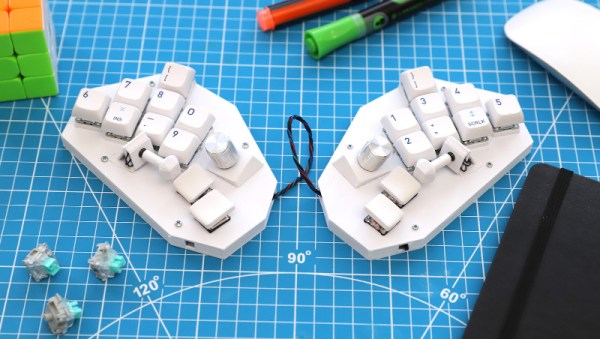
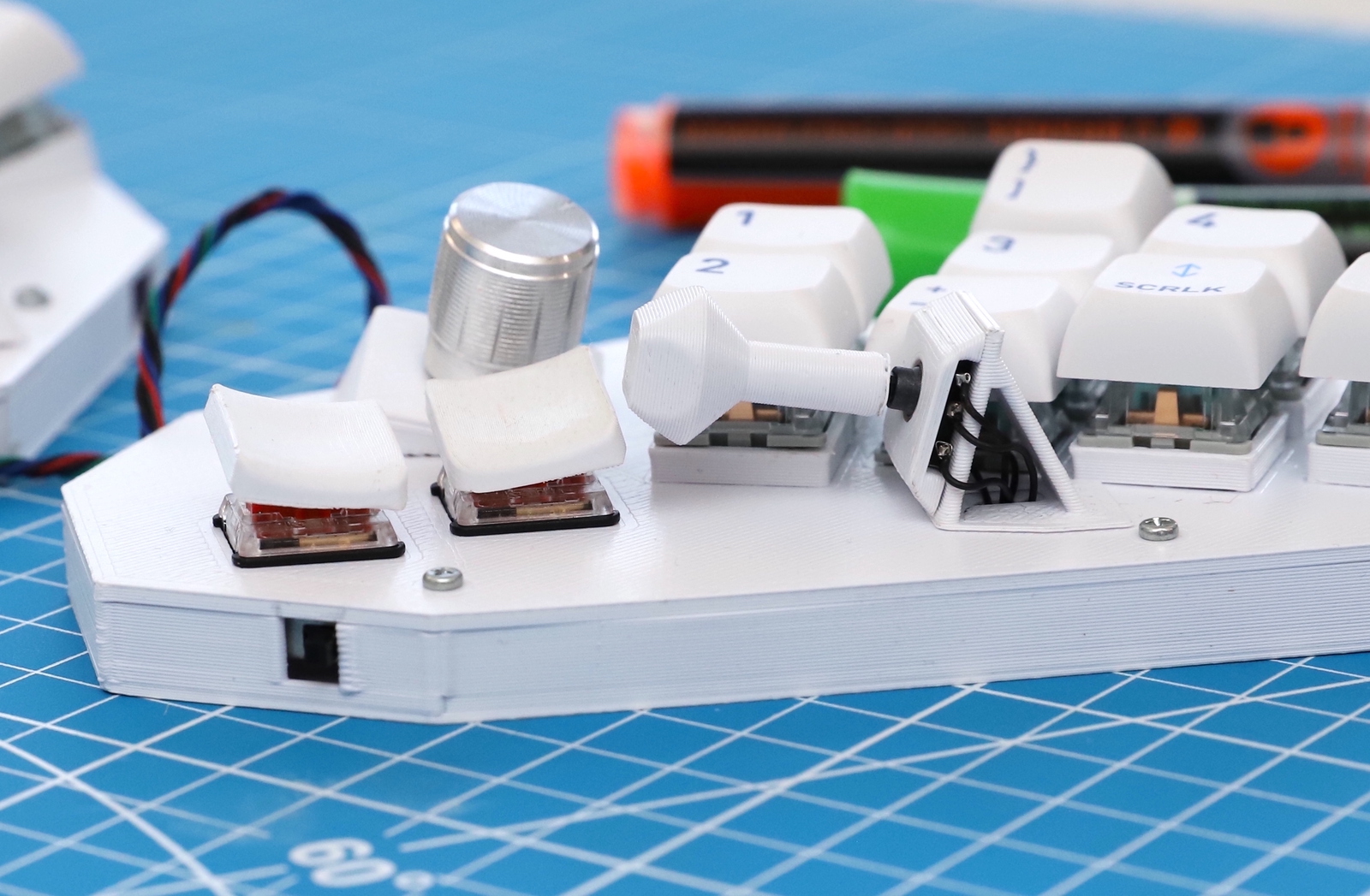
It turns out that typing all day just might be bad for your hands and fingers. Repetitive Strain Injury, RSI, was a real problem for [David Schiller], particularly when coding. So, naturally, he started designing his own keyboard. And bless him, he’s shared the whole project on GitHub.

The solution is Fulcrum, a chording keyboard with keys that can be pressed with minimal movement. And one more clever trick is a thumb joystick, mounted in the thumb’s opposable orientation. It’s a 5-way switch, making for a bunch of combinations. The base model is a 20-key arrangement, and he’s also designed a larger, 40-key option.

The build is pretty simple, if you have access to a 3D printer. Print the STLs, add key switches, and wire it all up to a microcontroller. Use the supplied code, and all that’s left is to learn all the chord combos. And why stop with combos for single characters, when there are plenty of common words and plenty of key combinations. If you decide to build your own take on the Fulcrum, be sure to let us know about it!

A 3D-printed case for the ZX Spectrum with a mechanical keyboard

The ZX Spectrum Finally Gets A Proper Keyboard

The Sinclair ZX Spectrum is fondly remembered by many for being their first introduction into the wonderful world of computing. Its advanced capabilities coupled with a spectacularly low price made it one of the great home computers of the 1980s, at least in the UK and nearby countries. What was less spectacular about the Spectrum was its awful keyboard: although a step up from the flat membrane keyboards of earlier Sinclair computers, the Spectrum’s tiny rubbery keys made typing anything more than a few characters a bit of a chore.

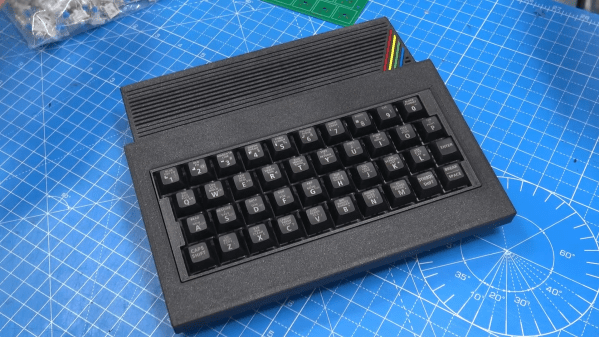
If you’re planning to do any serious programming on your Spectrum, you might therefore want to check out [Lee Smith]’s latest project in which he redesigns the Spectrum’s case to include a proper mechanical keyboard. [Lee] got this idea when he was looking for ways to fix a few Spectrums with broken or missing cases, and stumbled upon several projects that aim to recreate classic Sinclair machines using modern components. He took a keyboard PCB meant for the ZX Max 128 project, populated it with some high-quality switches, and added a modified set of keycaps from the ManuFerHi N-Go.

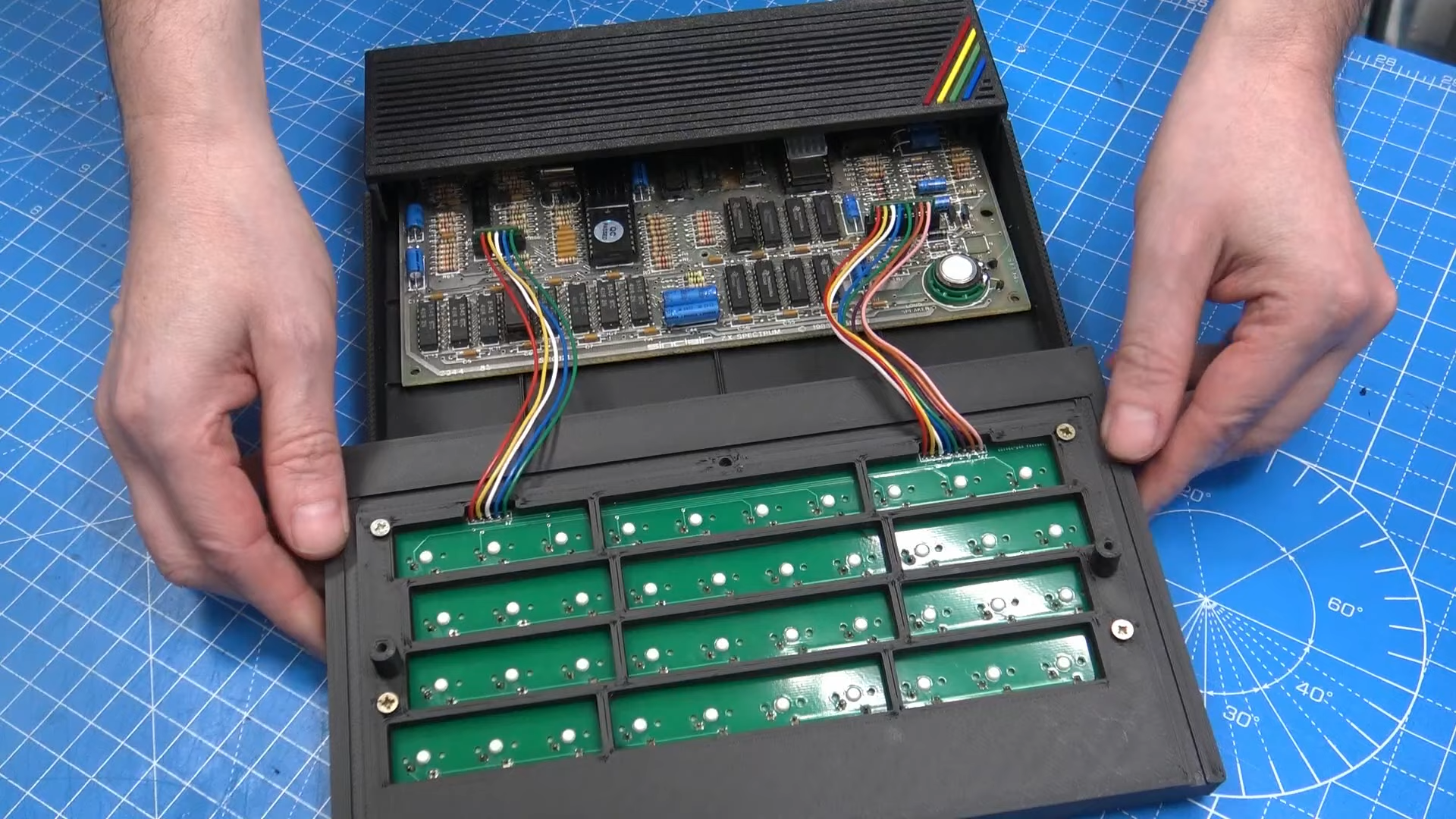
A new ZX Spectrum case, opened to show the keyboard connecting to the mainboard
The new keyboard plugs into the original connectors and doesn’t require any board-level modifications.

Together, those parts formed a modern, comfortable keyboard that still had the proper labelling on all keys. This is rather essential on the Spectrum, since each key is also used to generate symbols and BASIC keywords: for instance, the “K” key also functions as LIST, +, LEN and SCREEN$.

With the keyboard design settled, [Lee] set to work on the rest of the case: he designed and 3D-printed a sleek enclosure that takes the new keyboard as well as an original Spectrum mainboard. The resulting system is called the ZX Mechtrum, and looks fabulous with its matte black exterior and the obligatory four-coloured rainbow. A replaceable rear panel also allows several board-level modifications, like composite video or VGA output, to be neatly incorporated into the design.

We wrote an extensive retrospect on the Spectrum on its 40th anniversary earlier this year. If, somehow, you actually like the Spectrum’s original rubbery keyboard, then you can also modify the whole thing to work with modern computers.

Continue reading “The ZX Spectrum Finally Gets A Proper Keyboard”