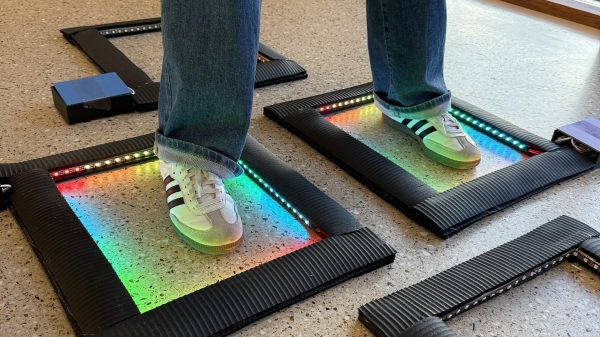
The build uses yoga mats as the raw material to create each individual square of the hopscotch board. The squares all feature simple break-beam light sensors that detect when a foot lands in the given space. These sensors are monitored by a Raspberry Pi Pico in each square. In turn, the Pico lights up addressable NeoPixel LED strips in response to the current position of the player.
It’s a simple little project which makes a classic game just a little more fun. It’s also a great learning project if you’re trying to get to grips with things like microcontrollers and addressable LEDs in an educational context. We’d love to see the project taken a step further, perhaps with wirelessly-networked squares that can communicate and track the overall game state, or enable more advanced forms of play.
Meanwhile, if you’re working on updating traditional playground games with new technology, don’t hesitate to let us know!
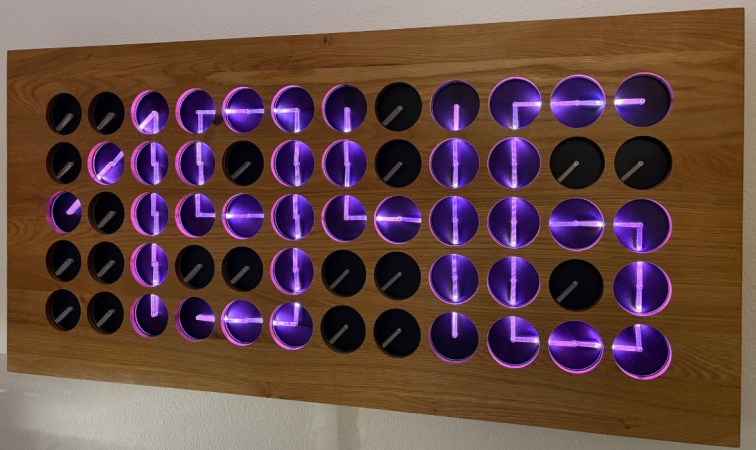
Some people just want to have their cake and eat it too, but very few of us ever get to pull it off. [Erich Styger] has, though with V5 of his “MetaMetaClock”— a clock made of clocks, that uses the orientation of the hands to create digits.
We’ve seen previous versions of this clock. As before, the build is exquisitely detailed and all relevant files are on GitHub. This version keeps the acrylic light-pipe hands of version 4, but adds more of them: 60 clocks vs 24. Larger PCBs are used, grouping the dual-shaft steppers into groups of four, instead of the individual PCBs used before. Each PCB has an NXP LPC845 (a Cortex M0 microcontroller) that communicates on an RS-485 bus. Placing four steppers per microcontroller reduces parts count somewhat compared to previous versions (which had each ‘clock’ on its own modular PCB) albeit at the cost of some flexibility.
While the last version used veneers on its face, this version is cut by CNC by from a large slab of oak. It’s certainly the most attractive version yet, and while bigger isn’t always better, more clock faces means more potential effects. Date? Time? Block letters? Arbitrary text? Kaleidoscopic colours from the RGB LEDs? It’s all there, and since it’s open source, anyone who builds one can add more options. A BLE interface makes it quick and easy to wirelessly switch between them or set the time.
It’s nice sometimes to watch projects like this improve incrementally over time. [Erich] mentions that he plans to add Wifi and a web-based user interface for the next version. We look forward to it, and are grateful to [jicasi] for the tip. Just as it is always clock time at Hackaday, so you can always toss a tip of your own into the box.
It’s always clock time at Hackaday, and this time we have an interesting hack of a clock by [danjovic]– the CIS4, a Cistercian digital clock.
The Cistertians, in case you weren’t paying close attention to European holy orders during the 13th to 15th centuries were the group of monks you’d most likely have found us in. They were the hackers of the middle ages, establishing monestaries across western Europe that were chock full of hacks– including their own numeral system. Cistercian numerals were much more efficient (in spaces and penstrokes) than the Roman numerals they replaced, and even the “Arabic” numerals that replaced them. A single glyph could record anything from 1 to 9,999. (The Europeans hadn’t yet cottoned on to zero.)
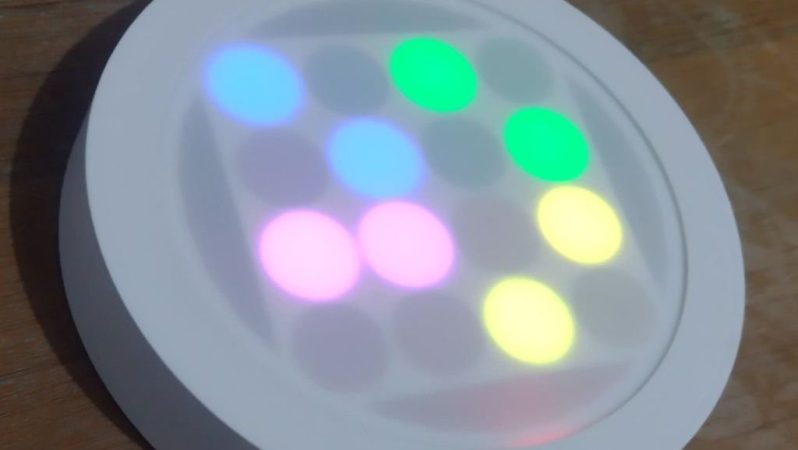
The Cistertian glyphs reduced to a 4×4 display.
Depending how you wanted to count time, a single glyph could be used; it looks like [danjovic] is using the thousands and hundreds portions of the glyph for hours and the tens and ones for minutes. This is all accomplished with a 4×4 neopixel matrix, run by an Attiny85 Digispark with a DS3231 RTC module keeping time. A slight simplification is required to reduce the glyphs to 4×4, but we don’t think the monks would mind. For those of us who don’t wear tonsures, an easy read mode scrolls the time in Arabic numerals. (Which still aren’t super easy,with only 4×4 LEDs to display them. See the demo video embedded below and try and guess the time.)
One nice quality of life feature is an LDR for ambient light detection, to automatically adjust the neopixels’ brightness. The hackiest part, which we thought was really clever, is the enclosure: it’s a cheap LED ceiling light. This provides a diffuser, housing and mounting hardware with decent design for no effort. A 3D-printed mask sits between the diffuser and the LEDs and doubles as a PCB holder. All very elegant.
[danjovic] did include a buzzer in the design, but does say if its been programed to sound off for matins, nones and vespers. In any case, at least it’s easier to read than his binary-coded-octal clock that we featured a few years back. This isn’t our first look at this number system,so evidently people can read them with practice.
The concept was to build a staff or cane with a big glowing orb on top. The aim was to 3D print the top as a very thin part so that LEDs inside could glow through it. Eventually, after much trial and error, the right combination of design and printer settings made this idea work. A Pi Pico W was then employed as the brains of the operation, driving a number of through-hole Neopixel LEDs sourced from Adafruit.
Power was courtesy of a long cable running out of the cane and to a USB power bank in the wielder’s pocket. Eventually, it was revealed this wasn’t ideal for dancing with the staff. Thus, an upgrade came in the form of an Adafruit Feather microcontroller and a 2,000 mAh lithium-polymer battery tucked inside the orb. The Feather’s onboard hardware made managing the lithium cell a cinch, and there were no more long cables to worry about.
The result? A neat costume prop that looks fantastic. A bit of 3D printing and basic electronics is all you need these days to build fun glowing projects, and we always love to see them. Halloween is right around the corner — if you’re building something awesome for your costume, don’t hesitate to let us know!
[Scotty Allen] of Strange Parts is no stranger to Chinese factory tours, but this one is now our favorite. He visits the font of all WS2812s, World Semi, and takes a good look at the machines that make two million LEDs per day.
The big deal with the WS2812s, and all of the similar addressable LEDs that have followed them, is that they have a logic chip inside the LED that enables all the magic. And that means die-bonding bare-die ICs into each blinky. Watching all of the machines pick, place, glue, and melt bond wire is pretty awesome. Don’t miss the demo of the tape-and-frame. And would you believe that they test each smart LED before they kick it out the door? There’s a machine that clocks some data in and reads it back out the other side.
Do we take the addressable LED for granted today? Probably. But if you watch this video, maybe you’ll at least know what goes into making one, and the next time you’re blinking all over the place, you’ll spill a little for the epoxy-squirting machine. After all, the WS2812 is the LED that prompted us to ask, three years ago, if we could live without one. Continue reading “How The WS2812 Is Made”→
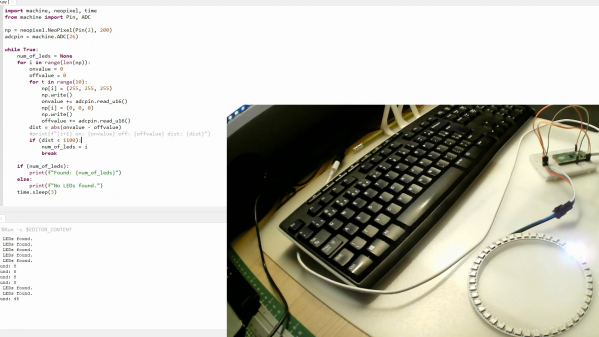
The tool is based on a Raspberry Pi Pico, so it’s easy to replicate at home. The LED strip is simply connected to the microcontroller via a set of jumper wires going to the 5V and GND pins, while one of the Pico’s ADC pins is then connected to the strip’s GND pin after the jumper. A further GPIO pin is used to send data to the strip.
Essentially, this uses the jumper wire as a rudimentary current shunt. The code steps through the string of LEDs, turning each one on and then off in turn, comparing the value read by the ADC pin at each state. When the Pico detects no difference in current draw between the on and off states, that suggests it’s trying to turn on an LED beyond the end of the string, and thus the count is concluded.
You don’t need to understand any of that to put this device to good use, however. You can easily whip it up on a breadboard with a Pi Pico and parts you have lying around in the shop. Video after the break.
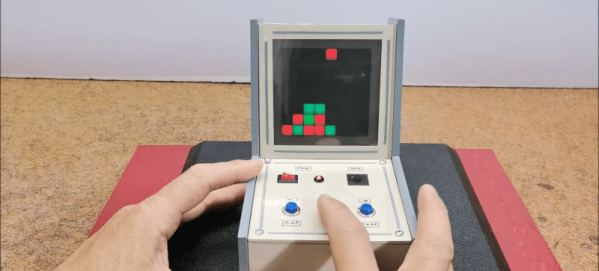
You might think that making your own electronic games would require some kind of LCD, but lately, [Mirko Pavleski] has been making his using inexpensive 8X8 WS2812B LED panels. This lets even a modest microcontroller easily control a 64-pixel “screen.” In this case, [Mirko] uses an Arduino Nano, 3 switches, and a buzzer along with some 3D printed components to make a good-looking game. You can see it in action in the video below.
The WS2812B panels are easy to use since the devices have a simple protocol where you only talk to the first LED. You send pulses to determine each LED’s color. The first LED changes color and then starts repeating what you send to the next LED, which, of course, does the same thing. When you pause a bit, the array decides you are done, and the next train of pulses will start back at the first LED.
It looks like the project is based on a German project from [Bernd Albrecht], but our German isn’t up to snuff, and machine translation always leaves something to be desired. Another developer added a play against the computer mode. This is a simple program and would be easy to port to the microcontroller of your choice. [Mirko]’s execution of it looks like it could be a commercial product. If you made one as a gift, we bet no one would guess you built it yourself.