M5Paper Gets Open Source Weather Display Firmware

We know you like soldering irons, we’re quite fond of them ourselves. But the reality is, modular components and highly capable development boards allow the modern hardware hacker to get things done with far less solder smoke then ever before. In fact, sometimes all you need to finish your project is the right code.

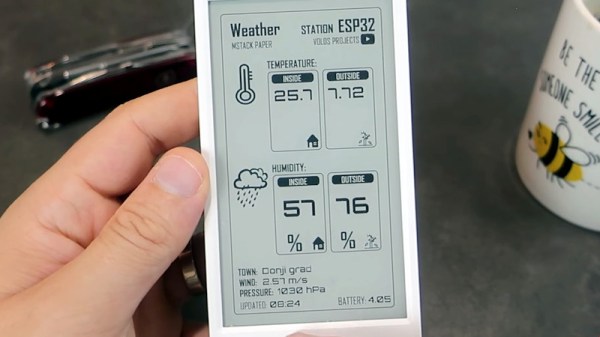
Case in point, check out the slick electronic paper weather display that [Danko Bertović] shows off in the latest Volos Projects video. While it certainly fits the description of a DIY project, he didn’t have to put any of the hardware together himself. The M5Paper is an ESP32 development kit designed around a crisp 4.7″, 960 x 540 e-paper panel that includes everything from environmental sensors to an internal 1150 mAh battery. To make your handheld e-paper dreams come true, the only thing you need to provide is the software.

The weather display code provided by [Danko] should certainly get you going in the right direction. Now don’t get us wrong, there’s certainly no shame in just flashing his code to the device and plunking it on your desk. It’s a gorgeous looking interface, and we all know that a sprinkling of open source code is often all it takes to make a standard consumer device extraordinary. But by using the code he’s provided as a launching point, you can take this turn-key device and really make it your own.

Continue reading “M5Paper Gets Open Source Weather Display Firmware”

Tracking Maximum Power Point For Solar Efficiency

In days of yore when solar panels weren’t dirt cheap, many people (and even large energy companies) used solar trackers to ensure their panels were always physically pointed at the sun to make sure they harvested every watt of energy possible. Since the price of panels has plummeted, though, it’s not economical to install complex machines to track the sun anymore. But all solar farms still track something else, called the Maximum Power Point (MPP), which ensures that even stationary panels are optimized for power production.

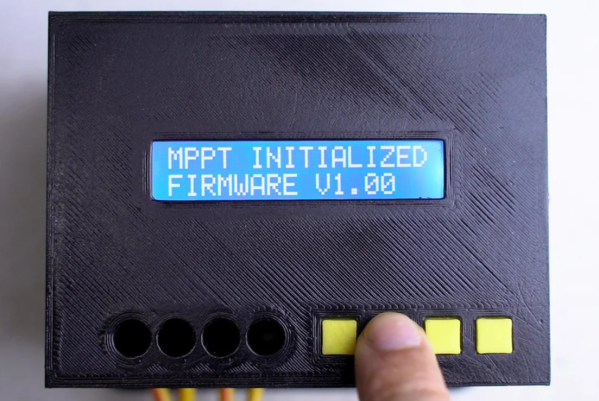
While small MPP trackers (MPPT) are available in solar charge controllers in the $200 range that are quite capable for small off-grid setups, [ASCAS] aka [TechBuilder] decided to roll out an open source version with a much lower price tag since most of the costs of these units are in R&D rather than in the actual components themselves. To that end, the methods that he uses for his MPPT are essentially the same as any commercial unit, known as synchronous buck conversion. This uses a specially configured switch-mode power supply (SMPS) in order to match the power output of the panels to the best power point for any given set of conditions extremely rapidly. It even works on many different battery configurations and chemistries, all configurable in software.

This build is incredibly extensive and goes deep into electrical theory and design choices. One design choice of note is the use of an ESP32 over an Arduino due to the higher resolution available when doing analog to digital conversion. There’s even a lengthy lecture on inductor core designs, and of course everything on this project is open source. We have also seen the ESP32 put to work with MPPT before, although in a slightly less refined but still intriguing way.

Thanks to [Sofia] for the tip!

Continue reading “Tracking Maximum Power Point For Solar Efficiency”

Pick Up The Ball And Run With It

Once in a while we get to glimpse how people build on each other’s work in unexpected and interesting ways. So it is with the GateBoy project, a gate-level emulator built from die shots of the original Game Boy processor. The thing is, [Austin Appleby] didn’t have to start by decapping and taking photos of the chip. He didn’t even have to make his own schematics by reverse engineering those structures. Someone else had already done that and made it available for others to use. A couple of years back, [Furrtek] started manually tracing out the DMG chip and posted schematics to the DMG-CPU-Inside repo, kindly licensing it as CC-BY-SA 4.0 to let people know how they can use the info.

But playing Game Boy games isn’t actually the end game of [Austin’s] meticulous gate-level recreation. He’s using it to build “a set of programming tools that can bridge between the C/C++ universe used by software and the Verilog/VHDL universe used by hardware.” A new tool has been born, not for gaming, but for converting a meta language that assigns four-letter codes to gate structures (somewhat reminiscent of DNA sequences) and will eventually convert them to your choice of C++ or a Hardware Description Language for use with FPGAs.

The open source community is playing four-dimensional football. Each project moves the ball downfield, but some of them add an additional goal in an alternate hardware universe — advancing the aims of both (like finding and fixing some errors in [Furrtek’s] original schematics).

Of course the real challenge is getting the word out that these projects exist and can be useful for something you’re working on. For instance, [Neumi’s] depth sounding rowboat allows an individual to make detailed depth maps of lakes, rivers, and the like. It was in the comments that the OpenSeaMap project was brought up — a site working to create crowd sourced waterway charts. It’s the perfect place for [Neumi] to get inspiration, and help move that ball toward a set of goals.

How do we get the word out so more of these connections happen? We’ll do our part here at Hackaday. But it’s the well-document and thoughtfully-licensed projects that set the up playing field in the first place.

Pulling the Google logo off of a smartphone

Pining For A De-Googled Smartphone

Last summer in the first swings of the global pandemic, sitting at home finally able to tackle some of my electronics projects now that I wasn’t wasting three hours a day commuting to a cubicle farm, I found myself ordering a new smartphone. Not the latest Samsung or Apple offering with their boring, predictable UIs, though. This was the Linux-only PinePhone, which lacks the standard Android interface plastered over an otherwise deeply hidden Linux kernel.

As a bit of a digital privacy nut, the lack of Google software on this phone seemed intriguing as well, and although there were plenty of warnings that this was a phone still in its development stages it seemed like I might be able to overcome any obstacles and actually use the device for daily use. What followed, though, was a challenging year of poking, prodding, and tinkering before it got to the point where it can finally replace an average Android smartphone and its Google-based spyware with something that suits my privacy-centered requirements, even if I do admittedly have to sacrifice some functionality.

Continue reading “Pining For A De-Googled Smartphone”

ReactOS Is Going Places, With More Stable AMD64, SMP, And Multi-Monitor Support

In the crowd of GNU/Linux and BSD users that throng our community, it’s easy to forget that those two families are not the only games in the open-source operating system town. One we’ve casually kept an eye on for years is ReactOS, the long-running open-source Windows-compatible operating system that is doing its best to reach a stable Windows XP-like experience. Their most recent update has a few significant advances mentioned in it that hold the promise of it moving from curiosity to contender, so is definitely worth a second look.

ReactOS has had 64-bit builds for a long time now, but it appears they’ve made some strides in both making them a lot more stable, and moving away from the MSVC compiler to GCC. Sadly this doesn’t seem to mean that this now does the job of a 64-bit Windows API, but it should at least take advantage internally of the 64-bit processors. In addition they have updated their support for the Intel APIC that is paving the way for ongoing work on multiprocessor support where their previous APIC driver couldn’t escape the single processor constraint of an original Intel 8259.

Aside from these its new-found support for multiple monitors should delight more productive users, and its improved support for ISA plug-and-play cards will be of interest to retro enthusiasts.

We took a close look at the current ReactOS release when it came out last year, and concluded that its niche lay in becoming a supported and secure replacement for the many legacy Windows XP machines that are still hanging on years after that OS faded away. We look forward to these and other enhancements in their next release, which can’t be far away.

Custom RISC-V Processor Built In VHDL

While ARM continues to make inroads into the personal computing market against traditional chip makers like Intel and AMD, it’s not a perfect architecture and does have some disadvantages. While it’s a great step on the road to software and hardware freedom, it’s not completely free as it requires a license to build. There is one completely open-source and free architecture though, known as RISC-V, and its design and philosophy allow anyone to build and experiment with it, like this build which implements a RISC-V processor in VHDL.

Since the processor is built in VHDL, a language which allows the design and simulation of integrated circuits, it is possible to download the code for the processor and then program it into virtually any FPGA. The processor itself, called NEORV32, is designed as a system-on-chip complete with GPIO capabilities and of course the full RISC-V processor implementation. The project’s creator, [Stephan], also struggled when first learning about RISC-V so he went to great lengths to make sure that this project is fully documented, easy to set up, and that it would work out-of-the-box.

Of course, since it’s completely open-source and requires no pesky licensing agreements like an ARM platform might, it is capable of being easily modified or augmented in any way that one might need. All of the code and documentation is available on the project’s GitHub page. This is the real benefit of fully open-source hardware (or software) which we can all get behind, even if there are still limited options available for RISC-V personal computers for the time being.

How does this compare to VexRISC or PicoSOC? We don’t know yet, but we’re always psyched to have choices.

Hands-On Review: TCam-Mini WiFi Thermal Imager

A thermal camera is a tool I have been wanting to add to my workbench for quite a while, so when I learned about the tCam-Mini, a wireless thermal camera by Dan Julio, I placed an order. A thermal imager is a camera whose images represent temperatures, making it easy to see things like hot and cold spots, or read the temperature of any point within the camera’s view. The main (and most expensive) component of the tCam-Mini is the Lepton 3.5 sensor, which sits in a socket in the middle of the board. The sensor is sold separately, but the campaign made it available as an add-on.

Want to see how evenly a 3D printer’s heat bed is warming up, or check whether a hot plate is actually reflowing PCBs at the optimal temperature? How about just seeing how weird your pets would look if you had heat vision instead of normal eyes? A thermal imager like the tCam-mini is the tool for that, but it’s important to understand exactly how the tCam-mini works. While it may look like a webcam, it does not work like one.

Continue reading “Hands-On Review: TCam-Mini WiFi Thermal Imager”