Sudo Find Me A Parking Space; Machine Learning Ends Circling The Block

If you live in a bustling city and have anyone over who drives, it can be difficult for them to find parking. Maybe you have an assigned space, but they’re resigned to circling the block with an eagle eye. With those friends in  mind, [Adam Geitgey] wrote a Python script that takes the video feed from a web cam and analyzes it frame by frame to figure out when a street parking space opens up. When the glorious moment arrives, he gets a text message via Twilio with a picture of the void.

It sounds complicated, but much of the work has already been done. Cars are a popular target for machine learning, so large data sets with cars already exist. [Adam] didn’t have to train a neural network, either–he found a pre-trained Mask R-CNN model with data for 80 common objects like people, animals, and cars.

The model gives a lot of useful info, including a bounding box for each car with pixel coordinates. Since the boxes overlap, there needs be a way to determine whether there’s really a car in the space, or just the bumpers of other cars. [Adam] used intersection over union to do this, which is conveniently available as a function of the Mask R-CNN model’s library. The function returns a score, so it was just a matter of ignoring low-scoring bounding boxes.

[Adam] purposely made the script adaptable. A few changes here and there, and you could be picking up tennis balls with a robotic collector or analyzing human migration patterns on your block in no time. Or change it up and detect all the cars that run the stop sign by your house.

Thanks for the tip, [foamyguy].

Never Mind The Sheet Music, Here’s Spreadsheet Music

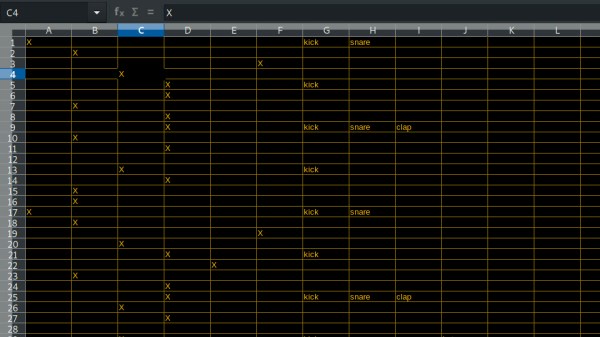
Nothing says Rockstar Musician Lifestyle like spreadsheet software. Okay, we might have mixed up the word order a bit in that sentence, but there’s always Python to add some truth to it. After all, if we look at the basic concept of MIDI sequencers, we essentially have a row of time-interval steps, and depending on the user interface, either virtual or actual columns of pitches or individual instruments. From a purely technical point of view, spreadsheets and the like would do just fine here.

Amused by that idea, [Maxime] wrote a Python sequencer that processes CSV files that works with both hardware and software MIDI synthesizers. Being Python, most of the details are implemented in external modules, which makes the code rather compact and easy to follow, considering it supports both drums and melody tracks in the most common scales. If you want to give it a try, all you need is the python-rtmidi and mido module, and you should be good to go.

However, if spreadsheets aren’t your thing, [Maxime] has also a browser-based sequencer project with integrated synthesizer ongoing, with a previous version of it also available on GitHub. And in case software simply doesn’t work out for you here, and you prefer a more hands-on experience, don’t worry, MIDI sequencers seem like an unfailing resource for inspiration — whether they’re built into an ancient cash register, are made entirely out of wood, or are built from just everything.

Continue reading “Never Mind The Sheet Music, Here’s Spreadsheet Music”

DIY Clapper Is 1980s Style With Raspberry Pi Twist

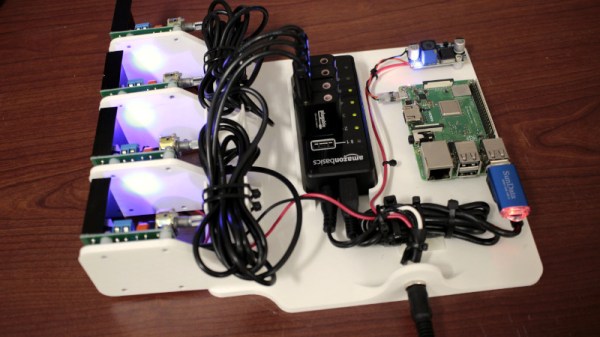
Home automation isn’t all that new. It is just more evolved. Many years ago, a TV product appeared called the Clapper. If you haven’t heard of it, it was basically a sound-operated AC switch. You plug, say, a lamp into the device and the clapper into the wall and you can then turn the lamp on or off by clapping. If you somehow missed these — and you can still get them, apparently — have a look at the 1984 commercial in the video below. [Ash] decided to forego ordering one on Amazon and instead built her own using a Raspberry Pi.

[Ash’s] prototype uses an LED and could — in theory — drive anything. If you wanted to make a real Clapper replacement you’d need a relay or some other kind of AC switch suitable for the load. The actual clap detection software is from [nikhiljohn10] and simply waits for two loud noises. No fancy machine learning to differentiate between a clap and a cat knocking over a vase. Just a threshold and some timing.

Continue reading “DIY Clapper Is 1980s Style With Raspberry Pi Twist”

Portmanteau Spewing PunBot

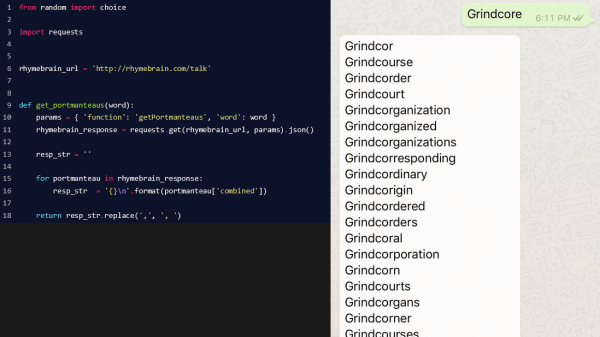
When Python was created, [Guido van Rossum] knew that one day it would be fully realized and take its final form. Clearly, that day has arrived since there now exists a way to send a word query and receive a lengthy list of potential portmanteaus. Some may regard this as merely quaint, but it will be the most important thing to happen in binary until the singularity.

Perhaps we are overpromising a smidge, but it may be fun to spend an afternoon getting your own whimsicalibrated pun resource churning out some eye-roll-worthy word combos. The steps are broken up neatly and explained at a high level with links for more in-depth explanations so a novice can slog through it, but a whiz can wrap it up while the boss is looking the other way.

We truly live in the future, but we may continue writing our own brand of artisanal puns which are number one in someone’s book.

LEDs And Pi Let You Virtually Decorate This Online Christmas Tree

Anyone who has decorated a Christmas tree knows that the lights are what really make the look. But no matter how many strings you wrap around it, there never seems to be enough. Plus the standard sets either sit there and do nothing, or just blink on and off at regular intervals. Yawn.

But hackers aim higher, and [leo.currie]’s interactive “paintable” Christmas tree takes the lighting game a step beyond. The standard light strings are replaced with strings of WS2811 RGB LEDs which are wired to an ESP8266. A camera connected to a Raspberry Pi is setup up to stream images of the tree to all and sundry on the Interwebz, but with a special twist: it also creates a map of every light on the tree. That allows the lights to be controlled individually in response to user inputs on a web page hosted on the Pi. The upshot is that you can paint the tree with any color you like in real time, or upload various animated GIFs to display on the tree. You can play with the tree directly, or watch a replay on the video below when that Pi inevitably gets hugged to death.

Imagine the possibilities with this. Why not hang a lot of LED strings vertically from the eaves of your house and make a huge, low-resolution display? We’ve featured plenty of large, interactive LED Christmas displays before, and we’d love to see what you come up with.

Continue reading “LEDs And Pi Let You Virtually Decorate This Online Christmas Tree”

Microcontroller And IMU Team Up For Simple Flight Sim Controls

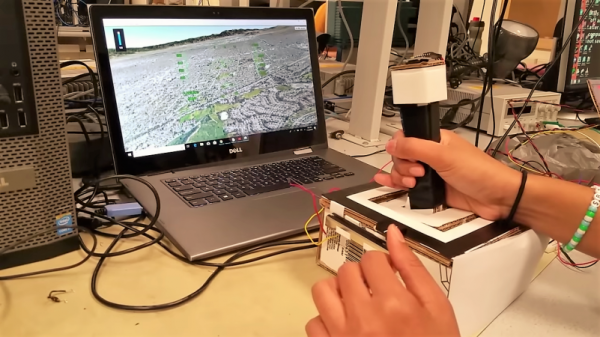
Classes are over at Cornell, and that means one thing: the students in [Bruce Land]’s microcontroller design course have submitted their final projects, many of which, like this flight control system for Google Earth’s flight simulator, find their way to the Hackaday tips line.

We actually got this tip several days ago, but since it revealed to us the previously unknown fact that Google Earth has a flight simulator mode, we’ve been somewhat distracted. Normally controlled by mouse and keyboard, [Sheila Balu] decided to give the sim a full set of flight controls to make it more realistic. The controls consist of a joystick with throttle, rudder pedals, and a small control panel with random switches. The whole thing is built of cardboard to keep costs down and to make the system easy to replicate. Interestingly, the joystick does not have the usual gimbals-mounted potentiometers to detect pitch and roll; rather, an IMU mounted on the top of the stick provides data on the stick position. All the controls talk to a PIC32, which sends the inputs over a serial cable to a Python script on the PC running Google Earth; the script simulates the mouse and keyboard commands needed to fly the sim. The video below shows [Sheila] taking an F-16 out for a spin, but despite being a pilot herself since age 16, she was curiously unable to land the fighter jet safely in a suburban neighborhood.

[Bruce]’s course looks like a blast, and [Sheila] clearly enjoyed it. We’re looking forward to the project dump, which last year included this billy-goat balancing Stewart platform, and a robotic ice cream topping applicator.

Continue reading “Microcontroller And IMU Team Up For Simple Flight Sim Controls”

Using FTDI Chips With Python

FTDI are a company known for producing chips for USB applications. Most of us have a few USB-to serial adapters kicking about, and the vast majority of them run on FTDI hardware (or, if we’re honest, counterfeit copies). However, FTDI’s hardware has a whole lot more to offer, and [jayben] is here to show us all how to take advantage of it using Python.

FTDI chips are an effective way to debug ARM projects, using the SWD protocol.

FTDI’s chips have varying capabilities, but most can do more than just acting as a USB-connected COM port. It’s possible to use the chips for SPI, I2C, or even bitbanging operation. [jayben] has done the hard work of identifying the best drivers to use depending on your operating system, and then gone a step further to demonstrate example code for sending data over these various interfaces. The article not only covers code, but also shows oscilloscope traces of output, giving readers a strong understanding of what should be happening if everything’s operating as it should. The series rounds out with a primer on how to use FTDI hardware to speak the SWD protocol to ARM devices for advanced debugging use.

It’s a great primer on how to work effectively with these useful chips, and we imagine there will be plenty of hackers out there that will find great use to this information. Of course, it’s important to always be careful when sourcing your hardware as FTDI drivers don’t take kindly to fake chips.