Oinker Is Twitter For HAMs

oinker

Have you ever wanted to send a quick message to your HAM radio buddies over the air but then realized you forgot your radio at home? [Troy] created Oinker to remedy this problem. Oinker is a Perl script that turns emails into audio.

The script monitors an email account for new messages and then uses the Festival text-to-speech engine to transform the text into audio. [Troy] runs Oinker on a Raspberry Pi, with the Pi’s audio output plugged directly into an inexpensive ham radio. The radio is then manually tuned to the desired transmit frequency. Whenever Oinker see’s a new email, that message is converted into speech and then output to the transmitter.

The script automatically appends your HAM radio call sign to the end of every message to ensure you stay within FCC regulations. Now whenever [Troy] runs into some bad traffic on the road, he can send a quick SMS to his email address and warn his HAM radio buddies to stay clear of the area.

BrickPi Bookreader 1 And 2 Read Tablets Or Books Aloud, You Choose

BrickPi Bookreader 2

Have you ever wanted to relax with a good book but couldn’t due to the hassle of having to actually read and turn pages? Well, now BrickPi offers 2 solutions to that problem. They have you covered regardless if your document is on a tablet or resides in a physical book.

The original Bookreader will read out loud the displayed text on a tablet. brickpi bookreaderThis is not an application that runs on the tablet, it is a completely separate device that ‘reads’ the tablet screen. As you could guess from the BrickPi name, the brains behind the operation is a Raspberry Pi. A camera takes a photograph of the displayed text and the Raspberry Pi converts that image file to text using Optical Character Recognition. A Text-to-Speech engine then speaks the text in a robotic sounding voice. In order to change the page the Raspberry Pi controls a Lego Mindstorms arm that swipes across the tablet screen and the entire process is repeated.


Continue reading “BrickPi Bookreader 1 And 2 Read Tablets Or Books Aloud, You Choose”

The PebblyPi: A Smart Doorbell

PebblyPi

A Pebble smart watch, and a Raspberry Pi. They are a perfect match. This is probably what [Daniel] thought when he embarked upon his latest project, a smart doorbell called the PebblyPi (tip submitted by [Ben]).

The actual project is quite easy to implement. All you need really need is a Raspberry Pi, a switch, a resistor, and a Pebble Smart Watch (plus a smart phone). Using a simple Python script on the Raspberry Pi, button press notifications are sent to Pushover, which allows the notification to arrive on your smart phone (and thus your Pebble Smart Watch). Pushover is a very cool notification service for Android devices, iPhones, iPads, and your Desktop. The concept behind this project is great, and the fact that it is so simple to implement opens up many other possibilities for interfacing your home electronics with the Pebble Smart Watch (or even just your smart phone). The ability to create custom notifications on any of your devices using any internet connected system is amazing!

You could receive notifications from your absurdly accurate weather station, or even your soil moisture monitor. Have you used Pushover in any of your projects? The possibilities are endless!

Continue reading “The PebblyPi: A Smart Doorbell”

Input And Output On A Single Pin

IO

[Emilio] has a Raspberry Pi with a few sensors running totally headless. It’s a great way to gather data and post it on the Internet, but for the rare occasions when the Pi needs to be turned off for maintenance, [Emilio] needs to connect a monitor, a keyboard, and a mouse. Not a perfect solution when a simple pushbutton and indicator LED would suffice. There’s one problem with adding a simple button and LED combo: there’s only one GPIO pin available in the setup. That’s nothing a few resistors won’t fix.

After wiring up a very simple circuit on a piece of perfboard, [Emilio] met his design goal of being able to tell if the Pi was running and giving it a software reset button using only a single GPIO pin. The circuit requires only two resistors, and the software to make everything run – a simple Python script – toggles the pin between input and output, checking if the button is held down for five seconds. If it is, the Raspi powers off for [Emilio]’s routine maintenance.

Recycled Foam Box Is Now A Weather Station

Raspberry pi in foam box

When [Ioannis] received some high resolution LCD’s in a tattered foam box, he posed to himself a most interesting question – Should he throw the foam box away, or use it as a container for a project? Fortunately for us, he decided on the latter and threw together a very capable weather station!

Having only an hour to spare, [Ioannis] grabbed a Raspberry Pi, WiFi USB stick and a camera module and went to work. He mounted the camera module to the foam lid using a highly advanced technique, and soldered a cable that would power the device directly to D17 – a Zener diode that sits on the bottom of the board.

For the weather data, he’s using another design of his – the Sensor Stick. This nifty device — which we featured over the weekend — is about the size of a stick of chewing gum, and sports an array of sensors including the popular BMP085, which can measure pressure and temperature .

He wraps up everything using open source software to get the data from the weather station. Pretty impressive for an old foam box and an hours time! This would be an interesting start to a home automation system. Connect it to motorized windows and/or a sprinkler system and he’s on his way to claiming The Hackaday Prize.

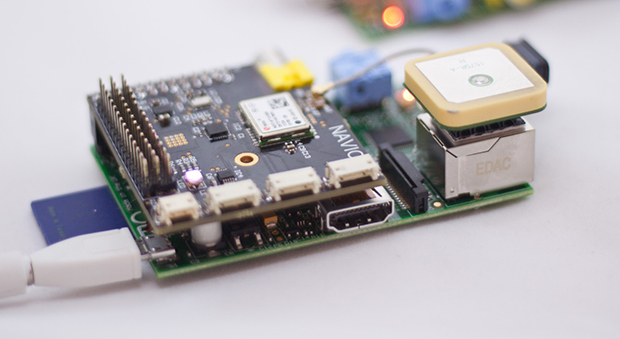
Raspi, GPS, USB hub and battery hooked together

NSA Technology Goes Open Hardware

When [Edward Snowden] smeared the internet with classified NSA documents, it brought to light the many spying capabilities our government has at its disposal. One the most interesting of these documents is known as the ANT catalog. This 50 page catalog, now available to the public, reads like a mail order form where agents can simply select the technology they want and order it. One of these technologies is called the Sparrow II, and a group of hackers at Hyperion Bristol has attempted to create their own version.

The Sparrow II is an aerial surveillance platform designed to map and catalog WiFi access points. Think wardriving from a UAV. Now, if you were an NSA agent, you could just order yourself one of these nifty devices from the ANT catalog for a measly 6 grand.  However, if you’re like most of us, you can use the guidance from Hyperion Bristol to make your own.

They start off with a Raspi, a run-of-the-mill USB WiFi adapter, a Ublox GY-NEO6MV2 GPS Module, and a 1200 mAh battery to power it all. Be sure to check out the link for full details.

Thanks to [Joe] for the tip!

Using The Raspberry Pi To See Like A Bee

Bee

The Raspberry Pi board camera has a twin brother known as the NoIR camera, a camera without an infrared blocking filter that allows anyone to take some shots of scenes illuminated with ‘invisible’ IR light, investigate the health of plants, and some other cool stuff. The sensor in this camera isn’t just sensitive to IR light – it goes the other way as well, allowing some investigations into the UV spectrum, and showing us what bees and other insects see.

The only problem with examining the UV spectrum with a small camera is that relatively, the camera is much more sensitive to visible and IR than it is to UV. To peer into this strange world, [Oliver] needed a UV pass filter, a filter that only allows UV light through.

By placing the filter between the still life and the camera, [Oliver] was able to shine a deep UV light source and capture the image of a flower in UV. The image above and to the right isn’t what the camera picked up, though – bees cannot see red, so the green channel was shifted to the red, the blue channel to the green, and the UV image was placed where the blue channel once was.

Continue reading “Using The Raspberry Pi To See Like A Bee”