Nebulophone Microcontroller Synthesizer Project Sounds Great

Judging from the video (found after the break) the Nebulophone is one of the best sounding DIY synthesizers we’ve seen. Especially when you consider the simplicity of the hardware design. It uses an AVR chip and an OpAmp. The rest of the parts are just a few handfuls of inexpensive components.

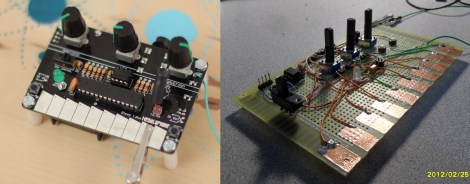
The device was developed by Bleep Labs, and they sell the synthesizer kit seen on the left. But since it’s an open source project you can follow their design to fabricate your own, which is what [BlinkyBlinky] did with his offering seen to the right.

An ATmega328 drives the device, which is the chip often used in the Arduino Duemilanove. The keyboard is a set of traces hooked to the microcontroller. These are tinned pads on the kit PCB, but the DIY version simply uses some adhesive copper foil with a jumper wire soldered to it. The keys are played with a probe that makes the electrical connection, a common practice on these stylophone type designs. Chances are you have everything on hand to make this happen so keep it in mind for that next cold winter weekend that’s making everyone a bit stir crazy.

Continue reading “Nebulophone Microcontroller Synthesizer Project Sounds Great”

Artemis Synthesizer Kit

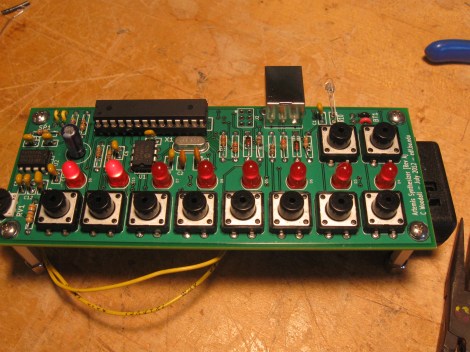
The Artemis Synthesizer was created as a kit for Boston University’s Artemis Project. This project aims to teach female rising high school freshmen about computer science with hands-on activities. [Chris] based the kit on a ATMEGA328P microcontroller and a MCP4921 digital to analog converter. It can be used in a keyboard mode, where the buttons toggle various notes of the scale, or in a sequencer mode, where the buttons are used to toggle pre-programmed sequences.

[Chris] wanted the kit to be usable by the students after the workshop, so he used an optical link dubbed the “Optoloader” to program new sequences and waveforms into the device. A web based application allows for waveforms and sequences to be built in the browser, then programmed by holding a phototransistor up to a blinking square. The square flashes black and white corresponding to a Biphase Mark Code encoded message. This is decoded by the microcontroller on the synthesizer and stored in memory. As a result, no special hardware is needed to play new waveforms and sequences.

[Chris] has a thorough write up for the project, including feedback surveys from the students. He plans to add more specific information about the Optoloader in the future.

Check out a video of the kit in action after the break.

Continue reading “Artemis Synthesizer Kit”

LED Illuminated Isomorphic Keyboard Looks As Good As It Sounds

Unlike the traditional ebony and ivory found on pianos, isomorphic keyboards arrange buttons on a grid. This makes every chord the same shape, and to transpose a piece it’s simply a matter of moving your fingers a few places to the left or right. [Brett Park] sent in an isomorphic keyboard he built loaded up with LEDs, and we’re thinking it the perfect instrument for musicians looking to move up from playing their MacBook.

The body of [Brett]’s keyboard is made out of a sheet of acrylic. After drilling 64 holes for each of the clear arcade buttons, [Brett] bent the sides of his hexagonal keyboard into a very sturdy-looking enclosure.

On the hardware side, [Brett] used a 64 button Arduino shield and a Sparkfun MIDI shield. The RGB LEDs behind each button are controlled via MIDI sysex messages generated outside the instrument, making it perfect for a little bit of visual feedback from whatever soft synth you desire.

In the videos after the break, you can check out the light patterns in action along with one of [Brett]’s improvs. Notice how all the chords are the same shape, and changing the key only requires [Brett] to move his hands slightly to the side.

Continue reading “LED Illuminated Isomorphic Keyboard Looks As Good As It Sounds”

MIDI Man-in-the-middle Hack Lets You Add Pedal To The Mix

[Sebastian] has a friend who would like to use a pedal with his MIDI setup, but his keyboard doesn’t support one. Some might interpret that as a sign you need to buy a new keyboard. But [Sebastian] has already done a lot of work with the MIDI protocol. He knew it should be possible to create a MIDI pass-through which adds support for a pedal.

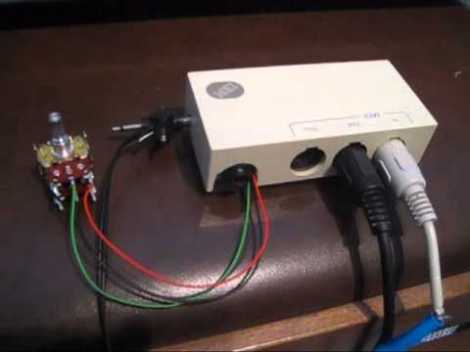
You can see the two MIDI cables connected to the box above. One is the input from the keyboard, the other is the output to the synthesizer. There is also a jack for a pedal input to the left. The chip inside intercepts each packet, rolling in values based from the pedal input and passing on the altered packets to the synthesizer. As you can hear in the video after the break, this works like a charm.

Catch more of [Sebastian’s] midi work by following his keyboard sensor replacement projects.

Continue reading “MIDI Man-in-the-middle Hack Lets You Add Pedal To The Mix”

VISUALIST – A Hardware Visual Effects Synthesizer

[Berto] wrote in to tell us about the visual effects synthesizer he built. It works as a pass-through for a video signal, rendering crisp clean images into a more psychedelic flavor like the one seen above. On the one hand this does a dishonor to the high-quality video devices we carry around in our pockets these days. On the other hand it will make some really interesting background video at a party or at your local dance club.

This is not a filter for a PC, or an FPGA-based processing system. A set of analog parts alter the incoming composite video (NTSC or PAL formats) and pipes the result to a television or projector. [Berto] included controls to alter the effects. They’re mounted on a panel and everything is given a home inside of a handy carrying case. Check out the video clip after the break to get a better idea of the video manipulations this things can pull off.

Continue reading “VISUALIST – A Hardware Visual Effects Synthesizer”

Adding A Sound Synthesizer To A ‘don’t-touch-the-sides’ Maze Game

Part of the fun of the classic game of Operation is the jump you get from the loud buzzer which sounds if you touch the sides. This exhibit piece uses the same principle of lining the edges of a track with metal, but instead of an annoying buzz, each touch will issue a bit of music. That’s because the maze has been paired with a synthesizer. Instead of one sound wherever the stylus touches the sides, different parts of the maze act as one of 94 keys for the synthesizer.

There’s a lot more built into the base of the device than just a maze game. The knobs are used to alter the audio effects and the buttons work in conjunction with they stylus to sequence audio samples. There’s even a graphic LCD screen which shows the currently playing wave form. You can get a better look at the project in the video after the break.

Continue reading “Adding A Sound Synthesizer To A ‘don’t-touch-the-sides’ Maze Game”

ProtoSynth, The Prototyping Synthesizer

This project isn’t really a prototype, but a tool for prototyping. [Tymkrs] came up with a unique way to build this synthesizer prototyping tool. They actually patched into the underside of the breadboards in order to keep all of the permanent bits nice and tidy.

In the clip after the break you’ll see all of the build photos that lead up to this point. After cutting out and assembling the wooden pieces for the case they grab a soldering iron and get to work. Two octaves worth of keys were pulled out of an electric keyboard. Ribbon cable is soldered onto each key’s electrical connection, with an SIL pin header as a connector. This mates with another ribbon cable with a SIL socket on one end, and an IDC connector on the other. The real trick is getting that IDC connected to the breadboard. They cut back the adhesive tape on the underside of the board and soldered a surface mount pin header onto it. This way the inputs from the keys, as well as a few 1/4″ jacks from the back of the case are always available in a tidy way on the breadboards. The video goes on to show preliminary synthesizer work on the device.

Continue reading “ProtoSynth, The Prototyping Synthesizer”