Automatically Remove AI Features From Windows 11

It seems like a fair assessment to state that the many ‘AI’ features that Microsoft added to Windows 11 are at least somewhat controversial. Unsurprisingly, this has led many to wonder about disabling or outright removing these features, with [zoicware]’s ‘Remove Windows AI’ project on GitHub trying to automate this process as much as reasonably possible.

All you need to use it is your Windows 11-afflicted system running at least 25H2 and the PowerShell script. The script is naturally run with Administrator privileges as it has to do some manipulating of the Windows Registry and prevent Windows Update from undoing many of the changes. There is also a GUI for those who prefer to just flick a few switches in a UI instead of running console commands.

Among the things that can be disabled automatically are the disabling of Copilot, Recall, AI Actions, and other integrations in applications like Edge, Paint, etc. The reinstallation of removed packages is inhibited by a custom package. For the ‘features’ that cannot be disabled automatically, there is a list of where to toggle those to ‘off’.

Naturally, since Windows 11 is a moving target, it can be rough to keep a script like this up to date, but it seems to be a good start at least for anyone who finds themselves stuck on Windows 11 with no love for Microsoft’s ‘AI’ adventures. For the other features, there are also Winaero Tweaker and Open-Shell, with the latter in particular bringing back the much more usable Windows 2000-style start menu, free of ads and other nonsense.

Think You Need A New PC For Windows 11? Think Again

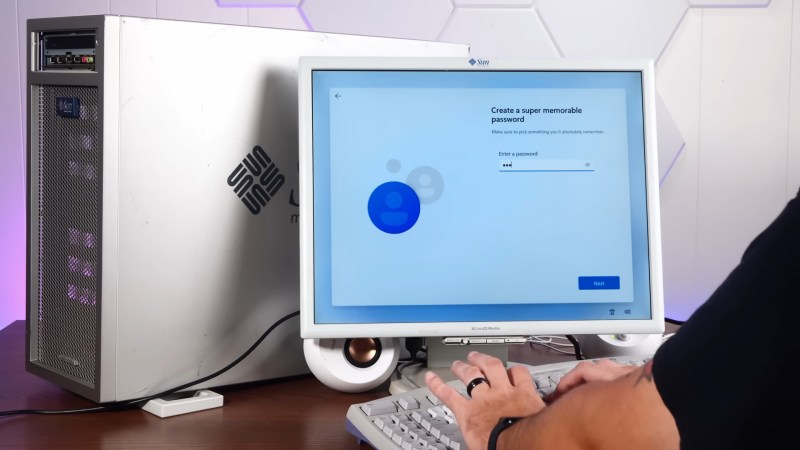
As the sun sets on Windows 10 support, many venues online decry the tsunami of e-waste Windows 11’s nonsensical hardware requirements are expected to create. Still more will offer advice: which Linux distribution is best for your aging PC? [Sean] from Action Retro has an alternate solution: get a 20 year old Sun Workstation, and run Windows 11 on that. 

The Workstation in question from 2005 is apparently among the first Sun made using AMD’s shiny new 64-bit Opteron processor. Since Windows has no legacy 32-bit support– something it shares with certain Linux distributions– this is amongst the oldest hardware that could conceivably install and run Redmond’s latest.

And it can! Not in unaltered form, of course– the real hack here is courtesy of [ntdevlabs], whose “Tiny11” project strips all the cruft from Windows 11, including its hardware compatibility checker. [ntdevlabs] has produced a Tiny11Builder script that is available on GitHub, but the specific version [Sean] used is available on Archive.org.

[Sean] needed the archived version of Tiny11 because Windows 11 builds newer than 22H2 use the POPCNT operation, which was not present in AMD’s first revision of the x86_64 instruction set. POPCNT is part of Intel’s SSE4 extension from 2007, a couple years after this workstation shipped.

If you’re sick of being told to switch to Linux, but can’t stomach staying with Windows either, maybe check out Haiku, which we reported as ready for daily driving early last year.

Continue reading “Think You Need A New PC For Windows 11? Think Again”

Forced E-Waste PCs And The Case Of Windows 11’s Trusted Platform

Until the release of Windows 11, the upgrade proposition for Windows operating systems was rather straightforward: you considered whether the current version of Windows on your system still fulfilled your needs and if the answer was ‘no’, you’d buy an upgrade disc. Although system requirements slowly crept up over time, it was likely that your PC could still run the newest-and-greatest Windows version. Even Windows 7 had a graphical fallback mode, just in case your PC’s video card was a potato incapable of handling the GPU-accelerated Aero Glass UI.

This makes a lot of sense, as the most demanding software on a PC are the applications, not the OS. Yet with Windows 11 a new ‘hard’ requirement was added that would flip this on its head: the Trusted Platform Module (TPM) is a security feature that has been around for many years, but never saw much use outside of certain business and government applications. In addition to this, Windows 11 only officially supports a limited number of CPUs, which risks turning many still very capable PCs into expensive paperweights.

Although the TPM and CPU requirements can be circumvented with some effort, this is not supported by Microsoft and raises the specter of a wave of capable PCs being trashed when Windows 10 reaches EOL starting this year.

Continue reading “Forced E-Waste PCs And The Case Of Windows 11’s Trusted Platform”

The Latest Windows 11 Release Might Not Work On Your Oldest Machines

Everybody knows you can’t install Windows XP on a 386, or Windows 95 on an original IBM PC. But for Windows 11, the goalposts seem to be changing with newer releases of the existing OS. As covered by The Register, it appears the latest Windows 11 24H2 update might be incompatible with older machines.

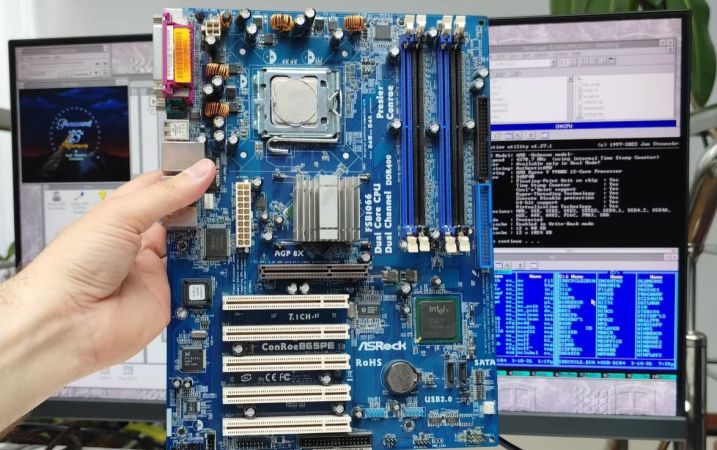
It’s all down to the POPCNT CPU instruction. As shared on Twitter by [TheBobPony], the instruction appears in a number of Windows 11 system files, including kernel and USB XHCI drivers. Thus, it appears that any CPU not able to run this instruction will not be able to boot Windows 11. POPCNT was first included in AMD’s Barcelona architecture in 2007, and Intel’s Core processors in 2008. It’s an instruction for counting set bits in a word.

Ultimately, the effect is that computers with older CPUs will no longer be able to run the latest version of Windows 11. It could be as simple as Microsoft engineers enabling more modern CPU instructions at compilation time. However, given affected hardware is more than 15 years old, it’s perhaps likely that Microsoft is perfectly willing to cut these machines off from using the latest versions of its main operating system. We’ve talked about this phenomenon before, too.

In any case, keep a close eye on Windows update if you’re running super-old hardware. Let us know if you’ll be affected in the comments.

Thanks to [Stephen Walters] for the tip!

Building A Mouse That’s Also A Computer

Once upon a time, a computer was a big metal brick of a thing that sat on or next to your desk. Now, it’s possible to fit decent computing power into a board the size of a stick of gum. [Electo] took advantage of this to build an entire computer into a mouse form factor.

[Electo] had tried this before years ago, and built something pretty sloppy. This time, he wanted to build a version that had an actually-legible screen and fit better in the hand. He whipped up a giant 3D-printed mouse housing, and fitted the sensor board from an optical mouse inside. That was hooked up to an Intel NUC PC that fits inside the housing. A small LCD screen was then installed on a rack system that lets it pop out the front of the mouse. Data entry is via a laser keyboard mounted in the side of the mouse.

Of course, being based on an Intel NUC means the thing was the size of a couple of phonebooks. That’s not really a mouse. Starting again, he reworked the build around a tiny palm-sized computer running Windows 11. It was stripped out of its case and wedged into a compact 3D-printed housing only slightly larger than a typical mouse. It has a keyboard of a sort – really it’s just an array of buttons covering W, A, S, D, and a couple others for playing simple games. Amazingly, it’ll even run Minecraft or Fortnight if you really want to try and squint at that tiny screen.

Having a computer with a screen that moves every time you move the mouse isn’t ideal. At the same time, it’s fun to see someone explore a fun (and silly) form factor. It’s interesting to see how the project works compared to the original version from a few years ago. Video after the break.

Continue reading “Building A Mouse That’s Also A Computer”

Computer Speed Gains Erased By Modern Software

[Julio] has an older computer sitting on a desk, and recorded a quick video with it showing how fast this computer can do seemingly simple things, like open default Windows applications including the command prompt and Notepad. Compared to his modern laptop, which seems to struggle with even these basic tasks despite its impressive modern hardware, the antique machine seems like a speed demon. His videos set off a huge debate about why it seems that modern personal computers often appear slower than machines of the past.

After going through plenty of plausible scenarios for what is causing the slowdown, [Julio] seems to settle on a nuanced point regarding abstraction. Plenty of application developers are attempting to minimize the amount of development time for their programs while maximizing the number of platforms they run on, which often involves using a compatibility layer, which abstracts the software away from the hardware and increases the overhead needed to run programs. Things like this are possible thanks to the amount of computing power of modern machines, but not without a slight cost of higher latency. For applications developed natively, the response times would be expected to be quite good, but fewer applications are developed natively now including things that might seem like they otherwise would be.  Notepad, for example, is now based on UWP.

While there are plenty of plausible reasons for these slowdowns in apparent speed, it’s likely a combination of many things; death by a thousand cuts. Desktop applications built with a browser compatibility layer, software companies who are reducing their own costs by perhaps not abiding by best programming practices or simply taking advantage of modern computing power to reduce their costs, and of course the fact that modern software often needs more hardware resources to run safely and securely than equivalents from the past.

Tiny11 Makes Windows 11 Small

If you often spin up a virtual machine just to run Windows, you might be sad that you have to allocate so much space for it. The Tiny11 project provides a Windows 11 installer that strips and compresses a bare minimum system do under 8GB of space. We aren’t sure what the licensing aspects of it all mean, but there are a few things you need to know. You can see a video about the project below.

The installer requires you to activate Windows, so that’s probably a good thing from a legal standpoint. Besides being compressed, the installer, based on Window 11 Pro 22H2, removes sponsored applications and Teams. It does, however, have the component installer and the Microsoft store, so you can add back things you want that aren’t in the default install.

Continue reading “Tiny11 Makes Windows 11 Small”