Bring The Crane Game Home

Everyone’s familiar with the quarter gobbling crane games. More often than not there’s a child nearby begging a parent for more quarters so they can try their hand at the toy-snatching claw. [Marc.Cryan] put his quarters to a better use by building a home version of the crane game.

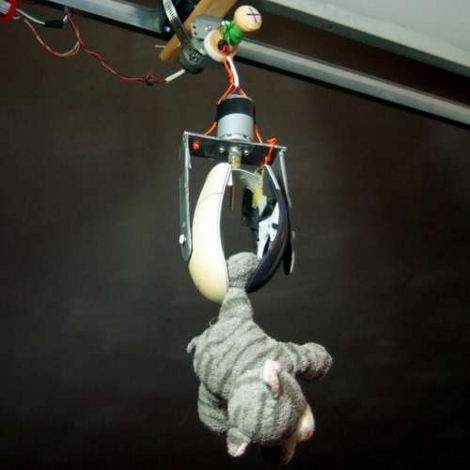
[Marc] installed a gantry in an archway of his house.  The crane trolley rides on this gantry and uses a spool to raise or lower the tether for the claw. Winning copious style-points, he used the case of an old mouse to form the claw. An Arduino controls the different motors in the system and a toy was repurposed to act as the controller. As you can see after the break, it’s more fun than the cinema-lobby version of the game and your kids can play with it for free.
Continue reading “Bring The Crane Game Home”

Oscilloscope Doubles As A Serial Terminal

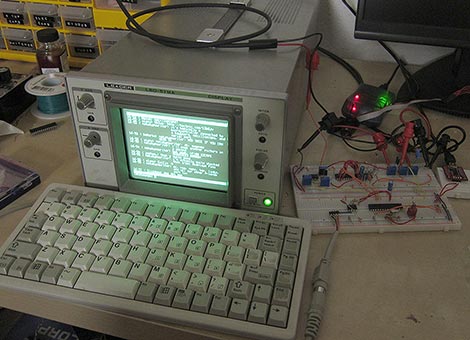
PC-based USB oscilloscopes are fast becoming all the rage. [Matt Sarnoff’s] Terminalscope takes the reverse approach, adapting an oscilloscope into a full serial terminal. You may have seen something similar before in the Dutchtronix/SparkFun O-Clock, but [Matt’s] project goes one further by adding a PS/2 keyboard port for full bidirectional serial communication, and with much sharper display resolution to boot.

The mostly VT-100 compatible Terminalscope is built around two AVR microcontrollers: an ATmega328P runs full-tilt to generate the video signal and handle serial I/O, while an ATtiny45 handles keyboard input to avoid interrupting the ’328’s duties. Rather than vector trace each character, a raster-scanning approach is used: the beam follows a fixed X/Y path (like a television), while modulating the Z input (beam intensity) to form an image. The device can be connected to a PC via serial port or USB-to-TTY adapter, or directly to another microcontroller to debug serial output.

We recently showed an oscilloscope being used as a multichannel digital logic display. The Terminalscope provides yet another use for this essential bench tool and could nicely round out a “poor man’s” testing setup. The schematic and full source code are available for download.

More Cellphone Controlled Door Locks

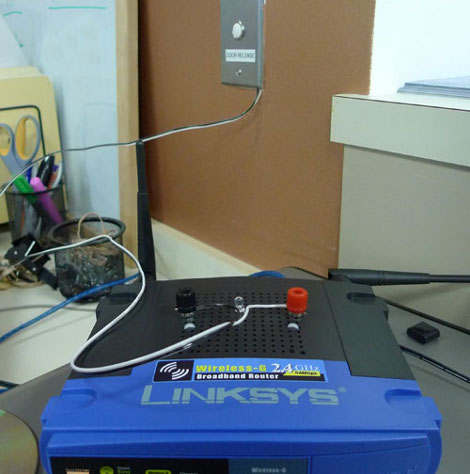
[Tom Lee] and his colleagues just moved to a new office. The doors are setup like a security checkpoint with electronic strikes and buttons on the inside to allow entry. The button simply completes a low-voltage circuit, activating the strike which made it quite easy to patch into. They build an interface board with a small relay to complete that circuit. As we’ve seen before, Linksys routers have plenty of extra room in the case so there was no problem housing the new circuit in this tiny network device. Now [Nicko] and his friends can use a custom app to input an access code or to verify a device ID from a cell phone and gain entry. The door still has keyed locks in case of a power outage. In fact, the only change made to the system was the addition of two wires to the “door release” button as seen above. See the one-touch device ID authentication in the video after the break.

This hack is similar to the GSM door entry from last year. In this case, the phones are communicating with the door via web interface and not the GSM network.

Continue reading “More Cellphone Controlled Door Locks”

Add Pause Button To The Atari 2600

We’re sure that if there had been a pause button on the Atari 2600 people would never have moved on to next-generation systems. Now you can dig the gaming relic out of the closet and pause your Atari games for some good old om nom nom.This hack is from the same person who pulled off the Atari 2600 jukebox. By reverse engineering the signals used on the Onyx Jr., which has a pause button, the halt method became clear.

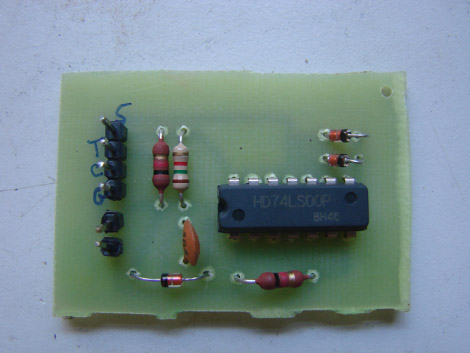
The problem is that the Onyx Jr. uses a different processor than the 2600. A different processor means a different pin-out, and now the clock signal needed to synchronize the pause cycle was missing. But eureka, an abstract source was found. The ready signal from another chip can be used to judge the state of the processor. The small PCB above now interfaces with the Atari 2600 in order to patch in the pause circuit.

[Thanks again Yuppicide, keep ’em coming!]

Precision Grinder Is A Thing Of Beauty

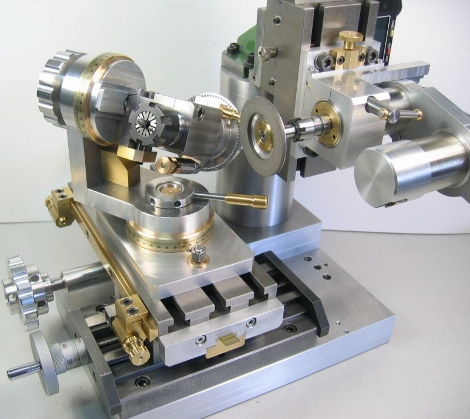
This beautifully crafted grinder would make any machining enthusiast salivate.It features a fixture for holding your work at any angle or orientation to the grinding wheel but the slotted bed also allows for other attachments to be used. Two of the examples shown in this highly detailed (machine porn) writeup include sharpening bits and light surface grinding. There’s not much more to say because the pictures speak for themselves.

[Thanks Bud]

Looping Foot Pedal

This guitar pedal can record, playback, and modify samples. [Colin Merkel], also know for his work on electronic door locks, built this to replicate some guitar effects he heard in recordings. By tapping the button at the bottom with your foot the device begins recording. Another tap stops the recording and starts the loop. That’s where the rest of the controls take over, with settings to adjust the speed of playback, volume, and the type of playback looping. The video after the break gives a great demonstration of these features.

[Colin] built this around a PIC 18F877A with a 256k RAM chip to store the sample. There’s a bunch of other components that go into this and we’re dumbfounded that he built it on protoboard. This would be a multi-breadboard prototype for us and we wouldn’t think twice about laying out and etching our own PCB. He admits that the point-to-point soldering stretched his skills to the limit but he doesn’t say how many hours it took to get the circuit up and running. This is a great addition to the cool guitar pedals we’ve seen here.

Continue reading “Looping Foot Pedal”

Serial Communication With Cell Phones

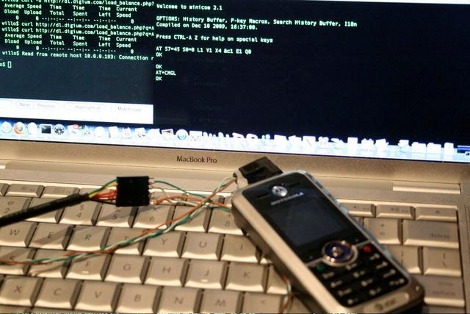
Hackaday alum [Will O’Brien] has been doing some cellphone integration work. He recently picked up some Motorola c168i cellphones from eBay. It turns out there is a serial port that uses TTL communication with a standard head-phone jack as an interface. [Will] soldered up a connector and used a USB to FTDI cable to interface with the phone. To his surprise he was able to read off the stored text messages even though they were PIN protected in the phone’s operating system. The messages on these units were trivial but this is another example of the importance of clearing your data before discarding your devices.