Etching Panel Faces On The Cheap

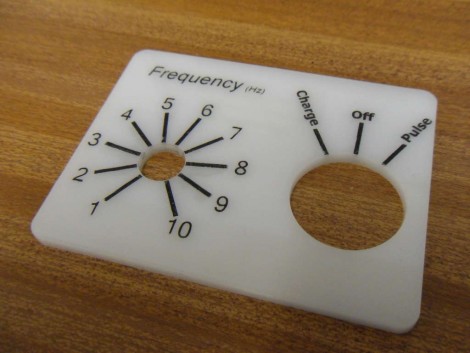
[James] came up with a way to make small numbers of high-contrast instrument panels cheaply, and without too much labor. We’ll make with the bad news right away; you’re going to need a laser cutter to use this method. Traditionally, panels that look like the one above are etched onto special composite that has one color at the surface and a contrasting color beneath. [James] started with plain old acrylic, etched his labels, then filled the voids with black wax crayon. Just scribble all over the etched face to rub wax into the grooves, go through a couple of cleaning steps using white spirit, then bake the panel to even out and harden the wax layer. He’s got several examples of his work, including medallions that are used to label LED indicators.
Propeller Platform Logic Analzyer

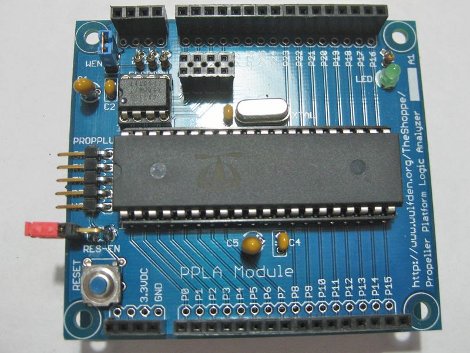
[Wulfden’s] new gadget is a 28 channel 3.3 volt digital logic analyzer. Powered by a Parallax Propeller running at 100MHz (permitting a 10 nanosecond sampling rate), using all though hole parts, and open design so it is possible to whip up your own.

Data is collected and sent to a host computer running Propalyzer which looks to be a very nice logic analyzer front end, and sports all the needed features and a HP inspired design. The design of the board allows you to plug it on to any Propeller Platform board, and this is very handy for those who have other Propeller boards, though others will have to source a regulated 3.3 volt power supply, and serial converter.

Overall this looks to be a very handy tool to have around, whether you opt for the kit to use on your Propeller Platform boards or roll your own, the features and cost are very attractive if you need a logic analyzer.

Join us after the break for a quick introduction video by [Nick] (of Gadget Gangster)

Continue reading “Propeller Platform Logic Analzyer”

DIY Fizzy Fruit

co2inator

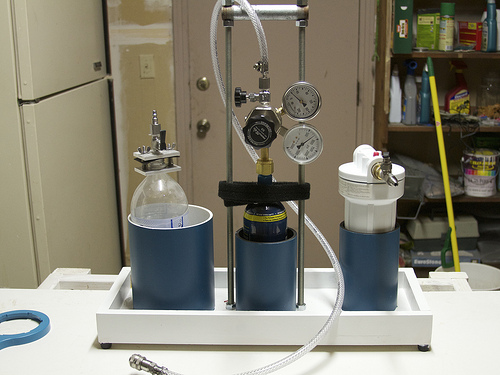
[Rich] over at Evil Mad Scientist Labs took it upon himself to make eating fruit a little more enjoyable for his kids by infusing it with CO2 using his CO2inator. Observing the same principles used in making soft drinks and force-carbed beer, he decided to build a CO2 pressure chamber for use in his kitchen. He gathered a handful of easy to find components to construct his rig, including a household water filter housing and a CO2 cylinder from a paintball gun. He has some helpful hints for those who are not familiar with the process, noting that refrigerated fruit absorbs the gas more quickly than warm, and that considering the water content of the fruit is important when selecting what to carbonate.

Once [Rich] had everything safely connected and checked for leaks, in went the fruit. After about half an hour to an hour, the fruit was carbonated, much to the delight of his children. This looks like a quick and fun project for adults and kids alike, that can easily fit into a busy weekend schedule.

[via Neatorama]

Classical’s Greatest Hits On Hardware’s Greatest Flops

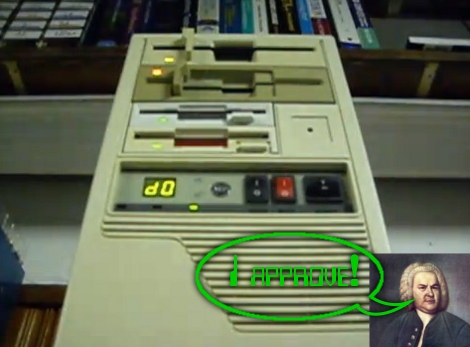
We get a lot of tips about old hardware playing recognizable tunes. But once in a while one of these projects goes above and beyond the others and this is a shining example of great hardware music. [FunToTheHead] put together a music video (embedded after the break) that shows his custom MIDI device playing Bach’s Toccata in d minor. He left some comments that clue us into the way he did it. Most obviously, he’s using the stepper motors from four floppy drives to create precisely pitched sounds. Internally, a PIC 18F14K50 acts as a MIDI-over-USB device, taking commands for all 128 MIDI notes as well as the pitch bends associated with them. The first four channels are played directly on each drive and the other twelve are triaged among the hardware by the microprocessor. But for the results heard in the video you’ll need to code your MIDI files by hand.

Bonus points to the video editor for the Phantom’s floppy-laden appearance in the video… it’s good to laugh!

Continue reading “Classical’s Greatest Hits On Hardware’s Greatest Flops”

Punch Tape Musical Synth

synthanola

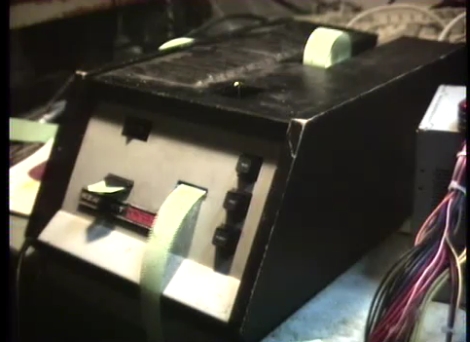
[Jeri Ellsworth] sent over a 555 design contest entry that struck her as particularly interesting. The Synthanola is a three-channel music synthesizer that accepts input from an old Heathkit paper tape reader. While this hack might seem overly retro, it’s actually an extremely appropriate use of technology, as the Heathkit H-10 and the 555 timer were both popular tech in the 70’s. This retro-focused synth uses fourteen 555 timers, twelve of which are dedicated to synthesizing audio. If this entry does not win the contest, it certainly must be a strong contender for most 555 timers used.

[Thrashbarg] gives a detailed explanation of the logic used to drive the music playback from the punch tape, as well as full circuit diagrams for his entry. So far he has encoded MP3s of Bach’s Invention and Fugue in D Minor to tape, with hopefully more to come. In order to truly appreciate his efforts, the Synthanola should be seen as well as heard. Stick around for a pair of videos of the synth in action.

If you’re interested in seeing more 555 contest entries, be sure to check out some of our previously featured projects.

Continue reading “Punch Tape Musical Synth”

38 KHz IR Communications Tutorial

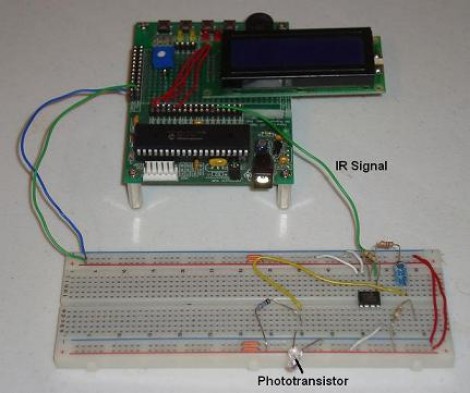
Learning about how infrared remote controls work is a great way to expand your electronics knowledge. That’s because this technology is invisible to our eye, and happening faster than we can comprehend without help from test equipment. This tutorial over at Pyroelectro talks about the theory behind how the data is transferred and shows you how to build a couple of circuits to experiment with and communicate through infrared light transmissions.

Instead of going with an IR receiver module you’ll build your own using a photo-transistor and an operational amplifier. The Opamp is used to amplify and invert the signal picked up from the IR transmission of a common home entertainment remote control. From there the digital signal is read by a PIC 18F452 microcontroller for processing. But if you want to use a different microcontroller there’s still more than enough usable information to get you across the finish line.

Voice-controlled Rolling Robot

rolling_voice_controlled_robot

[societyofrobots] recently posted an Instructable on how to build a voice controlled robot in just a few hours time. This robot isn’t particularly cheap, weighing in at about $230, but it is a fun project if you have the means. The bot is driven around by a pair of servos, taking their directions from an Axon II MCU. A VRbot voice recognition module is used to listen for commands, enabling the user to record up to 32 custom triggers for directing the robot.

All of the source code for the robot is included, as well as instructions on how to get started programing the microcontroller. The code provides some basic functionality, but there’s likely plenty more that can be done with the powerful on-board ATmega460. While this robot would make for a great beginner/intermediate project as-is, it should be noted that [societyofrobots] manufactures and sells the Axon II, so this Instructable is half guide/half self-promotion. Have any of you had experience with the Axon II? Let us know what you think.

Keep reading to see a video of the build process as well as the robot doing its thing.

Thanks, [Bill Porter].

Continue reading “Voice-controlled Rolling Robot”