Arduino Rover Evolves To A Trike Design

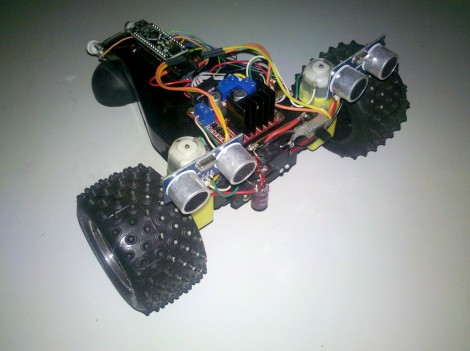
[Eduard Ros] wrote in to show off the latest version of his Arduino powered autonomous rover (translated). You may remember seeing the first version of the build back in June. It started with a remote control truck body, adding an Arduino and some ultrasonic sensors for obstacle avoidance.

The two big wheels and the pair of sensors look familiar, but most of the other components are a different from that version. The biggest change is the transition from four wheels to just three. This let him drop the servo motor which controlled steering. At first glance we though this thing was going to pop some mad wheelies, but the direction of travel actually drags the third wheel being the larger two. The motors themselves are different, this time depending on gear-reduced DC motors. The motor H-bridge is the same, but [Eduard] used a simple transistor-based inverter to reduce the number of pins needed to activate it from two down to just one. He also moved from an Arduino Uno to a Nano to reduce the footprint of the controller.
Interfacing SNES Controllers With Your Raspberry Pi

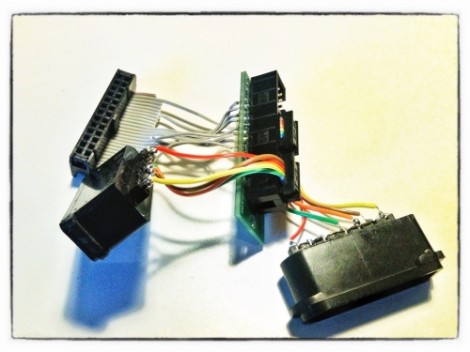
This lovely set of wires lets [Florian] connect stock Super Nintendo controllers to his Raspberry Pi. The IDC connector in the upper left plugs into the GPIO header on the RPi rather than going the route of using an intermediary USB converter.

The setup lets you connect two controllers at once, so you’ll have no trouble going head-to-head on Mario Kart as seen in the clip after the break. The ports themselves were pulled from a pair of SNES extension cables. Since button signals are pushed to the console via a shift register there’s just five wires needed for each (voltage, ground, data, clock, and latch). As far was we know the Raspberry Pi pins are not 5V tolerant so you probably want to add some level conversion to this circuit if you build it yourself.

[Florian] wrote a C program which shifts in data from the controllers and converts it to HID keyboard inputs. This should make it extremely flexible when it comes to emulator setup, and using the technique for different styles of controllers should also be pretty easy.

Continue reading “Interfacing SNES Controllers With Your Raspberry Pi”

Library For Driving SSD1289 LCD Displays With Small Microcontrollers

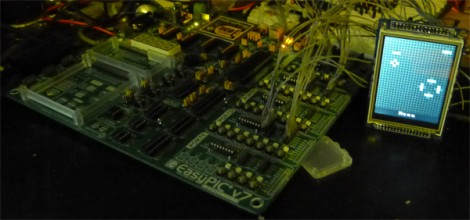
[H. Smeitink] got his hands on a 320×240 color TFT LCD screen. He set out to drive it with a small PIC microcontroller but didn’t find a lot of help out there to get up and running quickly. This is surprising since it’s a really nice display for quite a low price (under $16 delivered on eBay at the time of writing). He decided to write his own library and support tools to help others.

The display includes an SPI touch screen, but since that works separately from the LCD controller, touch input is not supported in this package. The driver that he wrote is coming from a mikroC toolchain point of view, but it shouldn’t be too hard to port to your platform of choice. We took a quick look at the code and it seems all you need to do is tweak the defines to match your hardware registers, and implement your own delay_ms() function.

But he didn’t stop with the driver. You’ll also find a C# program which converts images to an array for easy use on the display. Incidentally, this is the same display which [Sprite_TM] got working with the Raspberry Pi.

TI Chronos Watch Monitor Your Sleeping Infant

[Bill] wants a little piece of mind when his infant is sleeping in the other room. For him, the audio-only baby monitor could use some improvement. His proof-of-concept is that blue patch Velcroed on the swaddled infant. It monitors movement, orientation, and temperature and alerts you when something’s amiss.

Inside the pouch you’ll find a TI Chronos eZ430 wristwatch with the band removed. It’s a nice hardware choice because it includes an accelerometer, temperature sensor, and RF link to a USB dongle. [Bill’s] code sends a data packet to the PC about once a second. The PC watches to make sure there’s slight motion, indicating the baby is breathing. This part doesn’t work all that well as the accelerometer doesn’t pick up tiny movements all too well, but it does have potential. In the video after the break you can see the functions which make sure the baby doesn’t roll onto its belly, and that she’s not too cold do work extremely well.

We wonder if the accelerometer would pick up more motion if the watch was hung from a string inside of a small enclosure. This way it would swing back and forth with small movements. But perhaps that would make the whole thing too bulky?

Continue reading “TI Chronos Watch Monitor Your Sleeping Infant”

A Resistor’s Fiery Death Used To Launch Fireworks

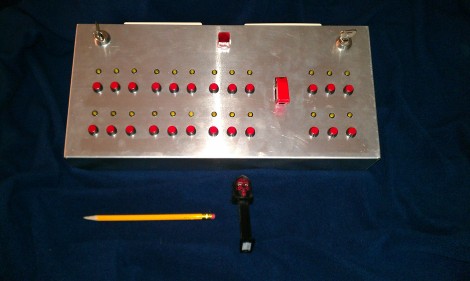
Check out this control center which [Awesome0749] built for launching fireworks. From the looks of his stash he’s going to be doing quite a bit of celebrating. The control console is clean and offers some safety features, and he just upgraded to an interesting ignition technique.

He’s using CAT5 cable to connect to the fireworks. At the top of the enclosure you can just make out the edge of the almond-colored wall plates which offer three jacks each. The two keys on the controller must be turned on to power the device. There is also a safety toggle switch in the middle.

The ignition is cause by running 70 VDC through a 1/4 Watt 24 Ohm resistor. As you can see in the demo after the break this results in flames quite quickly. One other thing we saw in the demonstration is that only the LED for the button which is hooked up comes on when the system is armed. We didn’t see a schematic, but he must have wired this so the system checks for continuity to ensure there’s something wired to the business end of the button.

Continue reading “A Resistor’s Fiery Death Used To Launch Fireworks”

Roller Coaster Simulator For The Redbull Creation Contest

[Dave] and [Martin], otherwise known as Ballistic Locomotive, sent in their entry for the Redbull creation contest. It’s a roller coaster simulator that can emulate the twists, turns, and drops of a roller coaster in your living room.

The simulator is built around a plywood roller coaster car mounted on a 2 DOF table. With a few first-person roller coaster videos and the speed, roll, and tilt data provided. Ballistic Locomotive had a functioning roller coaster simulator.

Of course, watching a 1st-person shot of a roller coaster just isn’t the same experience without the wind blowing through your hair. To simulate this aspect of a roller coaster ride, so the Ballistic Locomotive team connected a relay to the bullduino and connected a carpet drying fan.

Not only did Ballistic Locomotive build something awesome with their bullduino, they also manage to make a great ride for one of the builder’s son’s birthday party this weekend. You can check out the demo and a few videos after the break.

Continue reading “Roller Coaster Simulator For The Redbull Creation Contest”

Fifa Looks At Electronic Augmentation

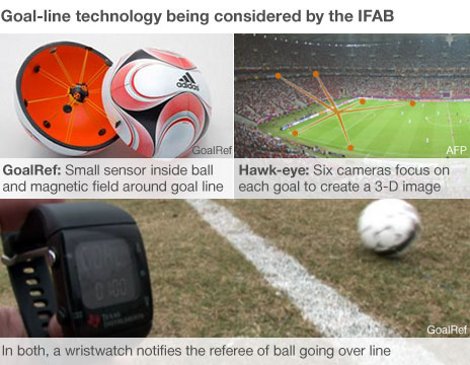
The [Fédération Internationale de Football Association] is joining the growing list of professional sports that is adopting technological means in an attempt to help the human referees. After a botched call in 2010 the organization called for a system that would work day or night, with 100% accuracy and the ability to report to the Refs in less than 1 second. The applicants have been weeded out and it comes down to two systems, both of which use a piece of personal hardware we’re quite familiar with. [Fe80], who sent in the tip, recognized the TI Chronos eZ430 watch in the image above.

The two systems both use the watch as an interface, but work very differently. The first, called GoalRef, uses a sensor suspended inside the ball. This detects a magnetic field made up by the goal posts. We’d guess it’s an inductance sensor that is triggered when it passes a coil in the goal posts (we didn’t find much in the way of technical info so please do your own speculation in the comments). The second system is very familiar. It’s the Hawkeye camera system used by the APT (Tennis) in all the major tournaments.