PropVario, A Talking Variometer/Altimeter For RC Sailplanes

propvario

Lift. For a sailplane pilot it means the difference between a nice relaxing flight, or searching for an open area to land. Finding lift isn’t always easy though. This is especially true when the sailplane is hundreds of meters above a pilot whose feet are planted firmly on the ground. That’s why [Tharkun] created PropVario. PropVario is a combination variometer and altimeter for Radio Controlled sailplanes. We’ve seen a few variometers in the past, most often for full-scale sailplane or hang glider pilots. Almost every full-scale plane has a variometer as part of its suite of gauges – usually called a rate of climb or vertical speed indicator.

R/C pilots don’t have the luxury of looking at a gauge while flying though. At altitude even large 2 meter gliders can appear to the naked eye as no more than a dot. It would be somewhat embarrassing to lose sight of your glider because you were checking gauges. The solution is actually simple. A varying audio tone indicates the rate of climb of the plane. Higher pitched tones mean the plane is going up. Lower pitched tones mean the plane is descending. This system, coupled with a simple radio transmitter, has been in use by R/C sailplane pilots for years.

Continue reading “PropVario, A Talking Variometer/Altimeter For RC Sailplanes”

InfinitEye HMD Brings 210 Degree FOV To The Party

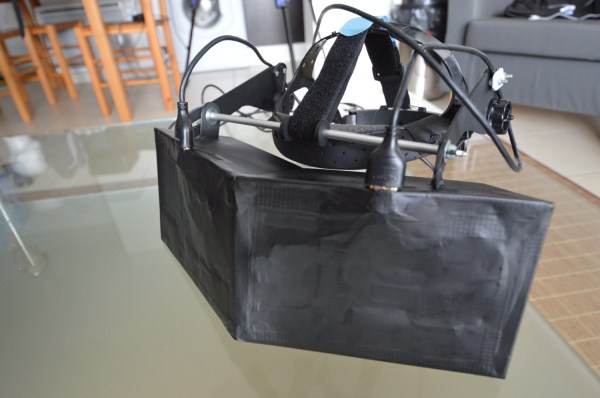
Head mounted displays are coming in hot and heavy this year. InfinitEye doesn’t have an official web page yet, so we’re linking to a review done by TheRoadToVR. Note that this is the second version of the display. InfinitEye released plans for their V1 HMD back in February. The InfinitEye prototype looks strikingly like the early Oculus Rift prototypes. Gaffers tape and what appears to be the frame from a face shield hold together the optical system. It’s this optical system which is interesting. InfinitEye has decided to go with head mounted LCD screens, similar to the rift, and unlike castAR’s projection system.

The InfinitEye team decided to go with two screens, giving them a whopping 1280×800 resolution per eye. The optics are also simple – fresnel lenses. This is all similar to the first version of the goggles, however the InfinitEye team claims that this new edition provides a 210 degree field of view. What we don’t know is exactly what they changed. We’re curious if the wider field of view will reduce the Sim Sickness some of us have felt with the rift – though to be fair, almost any head mounted display requires some time to adjust. What we are sure of is that the future is bright for virtual (and augmented) reality.

Continue reading “InfinitEye HMD Brings 210 Degree FOV To The Party”

1Sheeld Uses Your SmartPhone As An Arduino Accessory

1sheeld

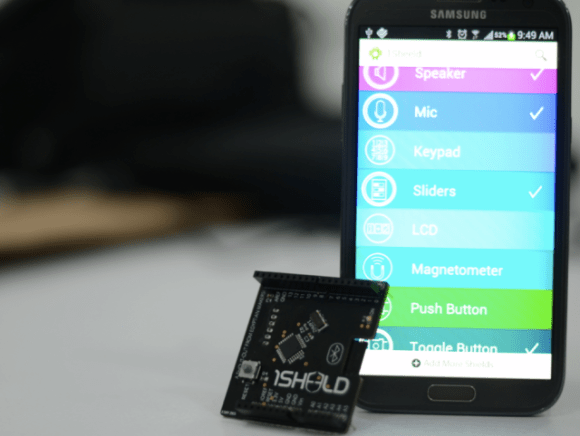
The Arduino can be a bit of a gateway board. You start with an Uno, then a shield, then another. Before you know it, you have an entire collection of shields. This is the problem 1Sheeld wants to solve. 1Sheeld allows a you to use your cell phone as a sensor and I/O suite for your Arduino, replacing many existing shields. We think this will be a great idea, especially with all the older phones coming off contract these days. The sensor capabilities of the average smartphone, as well as the LCD and touchscreen I/O capabilities could make for an interesting pairing.

Currently the 1Sheeld page is just a sign up for an upcoming kickstarter, which leaves many details to the imagination. It appears that the 1Sheeld will be a bluetooth based board. A few questions do remain to be answered though – will the 1Sheeld use the Android ADK? The software is what we’re waiting to see. The software running in the 1Sheeld module bluetooth chip will be important, but the software running phone side will be the real make or break of this module. We would love to see more smartphones being used for hardware hacking rather than collecting dust once they’ve been replaced.

[Via TechCrunch]

DIY Mini Quadcopter Frame Is Light And Strong

quadcopter-frame

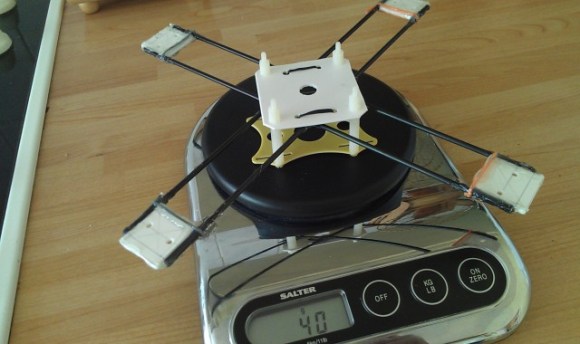
[Oscar] has been busy lately building DIY mini quadcopters. We saw his controller design earlier in the month. Back then he was using it with his walking robot designs. Now [Oscar] has posted up some information on his quadcopter work. Even though [Oscar] is new to mini quads, he began by designing his own frame. He started his frame design by using a cut down version of the well-known 949 frame. [Oscar] chose polystyrene for his motor mounts, which turned out to be the downfall of the frame. Polystyrene proved to be much too flimsy to handle the vibrations of the motors and props. The vibrations were transmitted to the accelerometers, which resulted in a model that was very hard to control. You can see this in the first video after the break.

For his second attempt, [Oscar] started with a proven design from HobbyKing. HobbyKing’s fiberglass mini quadcopter frame is sturdy, but heavy, and expensive to replace (If the parts are even in stock). The frame did work though, so he used it as a starting point for his second DIY frame. The new frame is based upon fiberglass shafts. [Oscar] used hot glue to join the shafts to the motor mounts. Each joint was wrapped in string, which was then coated with hot glue. We’d suggest thin cyanoacrylate glue in the future for these types of joints. Only a few drops of CA soaks up into the string, creating an extremely light and strong joint. [Oscar’s] frame ended up at about half the weight of the HobbyKing frame, but was stiff enough for a successful flight test, as can be seen in the second video after the break.

Continue reading “DIY Mini Quadcopter Frame Is Light And Strong”

DIY Pellet Fed Boiler Is Hot Stuff

pelletburner

[Firewalker] has designed a great pellet burning boiler (translated). Wood and biomass pellets have gained popularity over the last few years. While freestanding stoves are the most popular method of burning the pellets, [Firewalker] went a different route. He’s converted a boiler from what we assume was oil to pellet power. An Arduino controls the show, but don’t hold it against him. [Firewalker] is just using the Arduino as an AVR carrier board.The software is all written in C using AVR studio. The controller’s user interface is pretty simple. A two-line character based LCD provides status information, while input is via buttons. Once the system is all set up, thermostats are the final human/machine interface.

Burning pellets requires a bit of prep. A cleanup of the burn chamber must be performed before each burn. The AVR is programmed to handle this. Once the chamber is clean, new pellets are fed in via an auger system. The burner is monitored with a standard flame sensor. When the fire is up the pellets feed in until the boiler gets up to temp. Then the system enters a standby mode where it feeds in just enough pellets to maintain the flame. When the thermostats stop calling for heat, the whole system shuts down, ready for the next burn.

Continue reading “DIY Pellet Fed Boiler Is Hot Stuff”

Learn Wireless Sensor Networks With Nanode

wicked

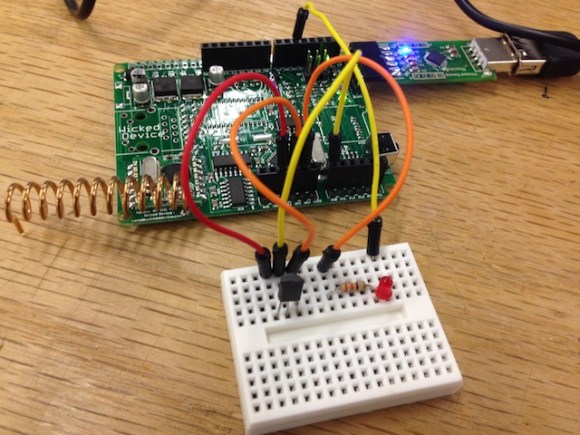
Getting a device on the internet is great – but what if you want to monitor multiple wireless sensors? The [WickedDevice] crew have been publishing a tutorial series focusing on just that. Their weapon of choice is the Nanode, an Arduino based wireless sensor system we’ve seen a few times in the past. So far the first and second parts have been posted up. Part one starts with an explanation of the Arduino and Nanode platform, and takes us through connecting the Nanode to a wireless temperature sensor. Part two walks through the hardware and code changes to add multiple wireless sensors to the system. Part three will focus on getting the entire network up on the internet, and piping data onto the Xively data hosting site.

This tutorial does begin a bit on the basic side, covering the installation of the Arduino software environment. This may seem a bit simplistic for some of our readers, but we think this type of tutorial is necessary. It helps ‘newbies’ get started down what could otherwise be a difficult path. For more advanced readers, it’s easier to skip past steps you already know than it is to try to hunt down information that isn’t there.

Old Fax Machine Shows Signs Of Life

fax1

[Dmitry] is a Moscow based artist. He’s also a an avid circuit bender and hardware hacker. His latest project is entitled “signes de vie” or signs of life. [Dmitry] started with an Arduino and an old thermal fax machine. He removed the thermal print head and replaced it with a row of 10 LEDs. These old fax machines would use rolls of paper, cutting each sheet of as it was printed. [Dmitry] kept the roll system, but treated his paper with fluorescent dye. As the paper passes under the LEDs, it pauses for a moment and the LEDs are flashed. This causes a ghostly glow to remain on the paper for several minutes as the next rows are printed.

While [Dmitry] could have made this the world’s biggest tweet printer, he chose to go a more mathematical route. Each printed row of dots represents a generation of one-dimensional cellular automata. Cellular automation is a mathematical model of generations of cells. All cells exist on a grid, and can be alive or dead. The number of neighboring live cells determines if any given cell will live on to the next generation. One common implementation of cellular automation is Conway’s Game of Life. In [Dmitry’s] implementation, a bank of switches select which of the 256 common cellular automata rules controls the colony. A second bank selects how long each generation lasts – from 1 to 18 seconds.

We really like how the paper becomes a printed, yet temporary history of the colony. [Dmitry] doesn’t say if he’s using a single long strip of paper, or if he created a loop. We’re hoping for the latter. Finally a useful implementation of the old black fax loop prank.

Continue reading “Old Fax Machine Shows Signs Of Life”